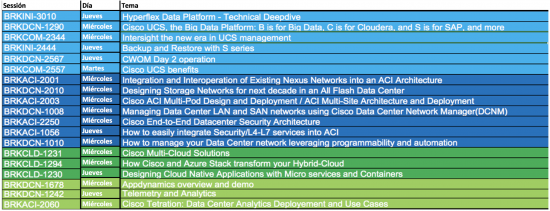
Éste blog te ayudará a organizar tu visita a Cisco Live Cancún 2017. Revisa la lista de presentaciones y demos del data center, luego márcalas en tu calendario o guarda las imágenes para que no te pierdas ninguna sesión que te interese.
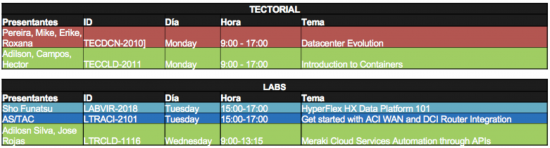
Sesiones
¿Cómo poder aprender toda la información de este show en tiempo limitado? Te recomiendo las siguientes sesiones para conocer todos los beneficios, el impacto en tu organización, seguido de un breve demo.
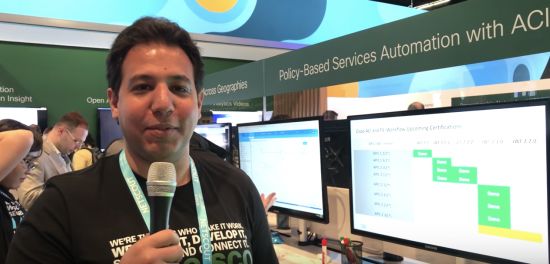
Demos
Después de que hayas aprendido de los beneficios a través de las sesiones generales, es importante aprender cómo funcionan estas tecnologías en detalle. Este año, le estaremos demostrando temas en:
Creating an integration between two software platforms sounds complex, right? Well, it can be much easier than it looks. In this blog, you can have Salesforce Cloud CRM tightly integrated with Cisco Webex to digitize customer and sales workflows, bringing together experts, customers, data and workflows into a seamless, powerful real-time collaboration experience.
Note that Cisco Spark and Cisco WebEx are now Cisco Webex Teams and Cisco Webex Meetings, both part of Cisco Webex for Salesforce. The new Cisco Webex experience in Salesforce will be rolled out to customers in late 2018. Until then, set up screens, help articles and the user interface will have references to Cisco Spark and Cisco Webex.
What is Webex Teams?
Webex Teams and Webex Meetings are now part of the Cisco Webex for Salesforce experience.
Webex Teams is a collaboration tool to manage people, spaces, messages, teams, roles, admin, and more. You can chat with people, video call with an individual or your entire team, or connect via voice/VoIP. Developers can easily integrate solutions with Webex Teams via the Webex Teams REST API – for example to add Webex Teams messaging features to an app user interface, or to automate sending Webex Teams messages to rooms based on business system or real-world events.
Webex Meetings is Cisco’s industry-leading meetings solution that brings the power of conferencing to Salesforce. Now, you can invite people related to a Salesforce Event to meet at a time that works for everyone. Webex meetings run on Cisco’s global Webex network, providing a simple, easy to use, video-first, and mobile-centric experience, without the need for downloads or plugins. Cisco Webex rich API allows developers to insert Webex Meetings into their application environments such as the integration we are showing here with Salesforce.
So what exactly is Cisco Webex for Salesforce? Cisco Webex for Salesforce (formerly known as Cisco Spark for Salesforce) is a joint development effort that is now available. Watch the video here, or check out the blog by Jason Goecke. This solution puts essential collaboration tools in the hands of users directly within Salesforce. It’s turnkey and intuitive, allowing you to gain user value from day one. If you’re in Salesforce, then you now have a free and ready-to-use solution that provides
High-quality video calling
Group messaging with advanced features including file sharing, read receipts, and message deletion
Visibility of user status
Reliable, high quality Webex meetings at your Webex Personal Room or standard Webex meeting address
Other tools designed to improve your effectiveness
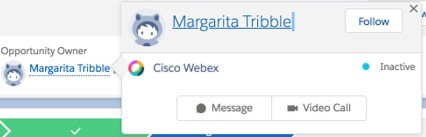
These capabilities integrate smartly into the Salesforce interface. Simply hover over another user’s name to send a message or start a video call. Link group messages right inside relevant Salesforce records to keep things streamlined. Have multiple ongoing discussions to multitask as you move between different records.
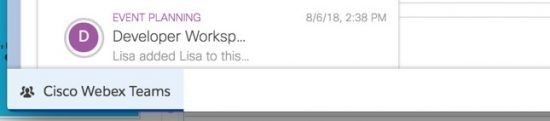
Let’s say a sales person is talking to customer support and needs to document it. You can save records of your conversation. The Webex Teams Widget is easily accessed on the utility bar.
Need to meet later? Just add a Webex meeting to your Salesforce Event and choose where to meet. All the available ways to join the meeting (your Webex Personal Room or Webex standard meeting invitation, phone numbers) will be automatically added and available to the people related to the Salesforce Event.
The integration is designed to be very easy for a Salesforce admin to set up. No APIs or development work is needed. Just follow these steps to get started quickly.
Enabling Webex Teams
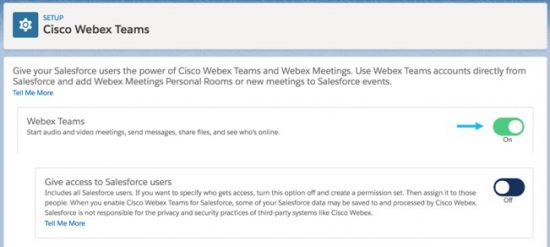
Step 1: Enable Cisco Webex Widget
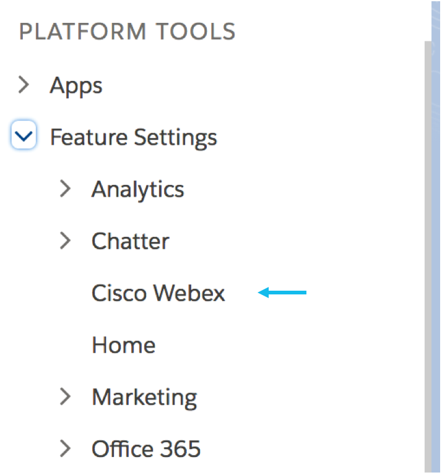
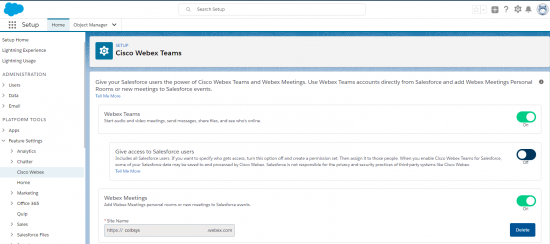
Go to Setup -> Platform Tools -> Feature Settings -> Cisco Webex
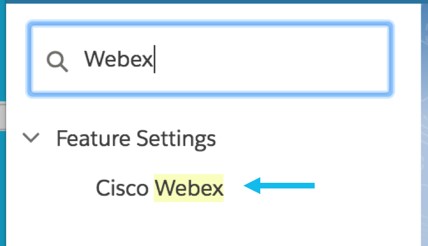
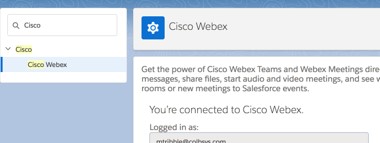
You can also use the Search function to find Cisco Webex.
Click on the button and Enable Cisco Webex Teams Messages and Meetings.
You can find more helpful tips on the help page for Salesforce.
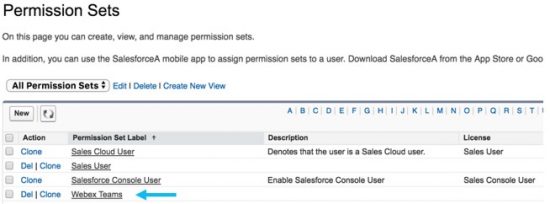
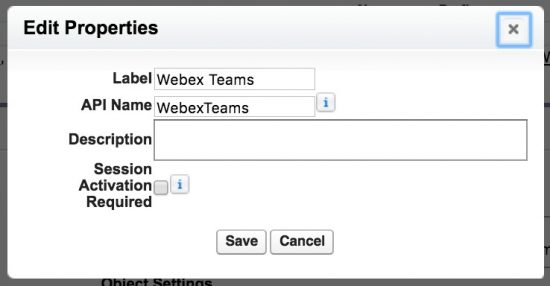
Step 2: Create a new permission or edit an existing one, and add the Webex Teams Conversation permission
Create a new permission or edit an existing one and add the Cisco Webex Teams Conversation permission. You can find this on Setup -> Administration -> Users -> Permission Sets.
Step 3: Add System Permissions
In the Permission set, navigate to System Permissions towards the bottom of the page. After enabling Cisco Webex on Step 1, you’ll now see “Cisco Webex Teams Conversation” on the list of system permissions.
Edit the page, checkmark and enable Cisco Webex Teams Conversation, and save the permissions.
Step 4: Add User Permission
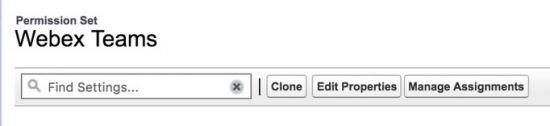
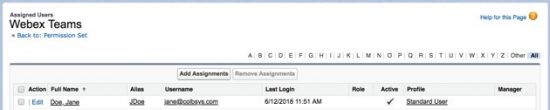
Now, we will enable the permission set for one or multiple users. Still in the Permission Set, click on Manage Assignments.
Go to Manage Assignments under the specific permission and select the users for which you want to enable the permission for Cisco Webex Teams. Check the Active checkbox to enable specific users.
At this point in time, the hover to message or video call with a colleague feature is enabled automatically; no additional set up required.
Step 5: Add Webex Teams to Your Utility Bar
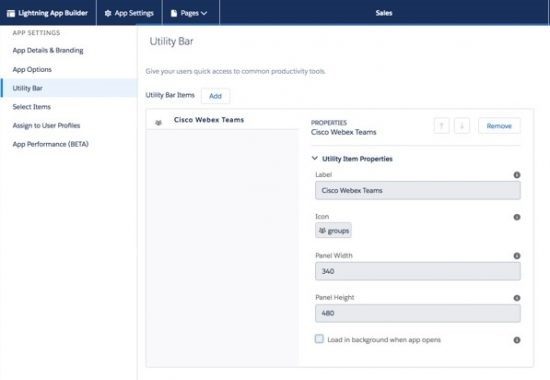
Go to Set Up -> Apps -> App Manager -> Sales (Lightning Sales type) -> Edit -> Utility Bar (3rd tab).
Click on Add and search for Cisco Webex Teams. When you click on Save, you will be able to view the Cisco Webex Teams button in your utility bar.
Not only can you have Webex Teams integrated with your Salesforce instance, you can use the SDK to integrate it in any web app you are using. Check out our learning lab about how to integrate Webex Teams video into your web app.
Step 6: Adding Webex Teams Components to the User Interface
To add Webex Teams components to your UI, follow these steps:
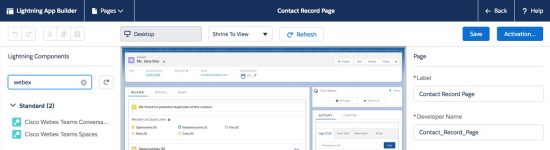
Go to the Sales view -> Contacts -> Open a Contact -> Click on Setup Icon -> Edit Page
Adding the Conversation component:
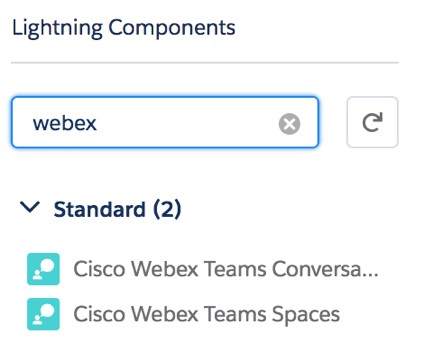
Enable 1:1 video call and messaging feature for Salesforce record pages. Go to Lightning App Builder and drag/drop the Cisco Webex Teams Conversation component anywhere you want in the UI.
Tip: The component is best used for leads, contacts, or anywhere that 1:1 communication is desired.
Enabling Webex Teams spaces in Salesforce record pages.
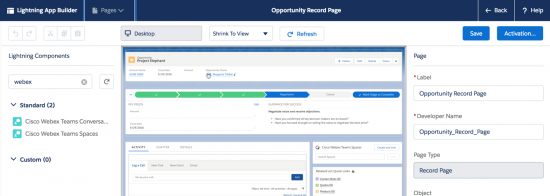
Enable Cisco Webex Teams spaces in Salesforce record pages. Go to Lightning App Builder and drag/drop the Cisco Webex Teams Group Conversation component anywhere you want in the UI.
Tip: Best utilized in places where group spaces are needed such as Opportunities or Accounts.
Step 7: Connect Webex Teams
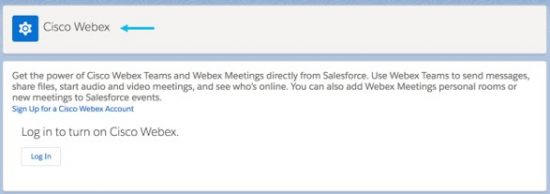
For all Salesforce users, by clicking on “Connect Your Cisco Webex Account” at the top of the page you will be prompted to login to your Webex Teams account.
If you do not have an account, you’ll be able to create an account on that page.
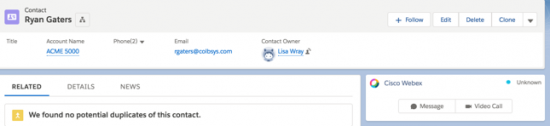
Go to your “Contact” page and open up a contact. You can now open up a Webex Teams Chat Message or Initiate a Video Call with the user. If they do not have a Webex Teams account, it will send them an invite to create an account. The contact will be able to use the Webex Teams desktop, mobile, or web application.
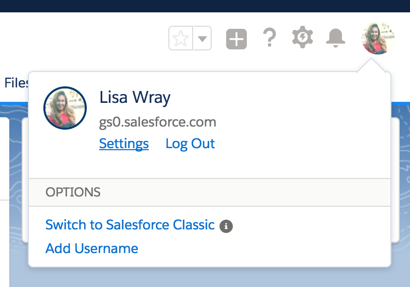
Note: You can also enable Webex Teams via User settings and searching for Cisco Webex.
Enabling Webex Meetings
Step 1: Enable Webex Meetings
You enable Webex Meetings in the same settings area you used to enable Webex Teams. Either browse to Home > Settings > Feature Settings, or type “Webex” in the ‘Search Setup’ bar on the home screen.
Enter your Webex sitename URL <sitename.webex.com>, and slide the toggle to ‘On’ for Webex Meetings.
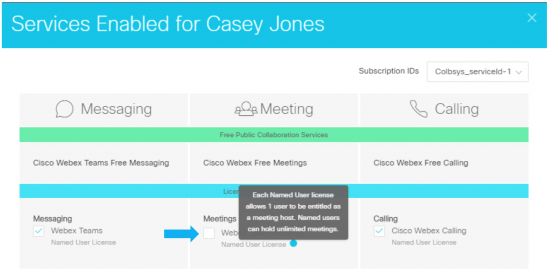
At this point your Salesforce users will be able to add Webex meetings to their events, and Salesforce’s association capabilities will propagate these events into the various Salesforce workflows making these meetings easy to find for your colleagues and followers. Hosts of Webex meetings require Webex Host licenses. Continue reading below for more information about license requirements.
Step 2: Onboard Webex Users
Behind every Webex meeting is a Webex Host, and depending on your Webex license agreement you may be assigning everyone or a subset of users in your organization as Webex Hosts. Everyone in your organization regardless of whether or not they have a Webex Host license will at least be a user with a user level account. These are the different ways to assign a Webex license:
Manually Assign Licenses
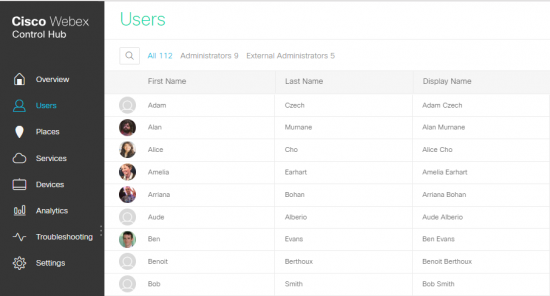
Login to admin.webex.com as a Webex administrator and go to the Users screen.
Select the user(s) in question to assign a host license by clicking on the Edit tab, in the Services area.
2. Bulk Assign Licenses
Can be done for hundreds or thousands of users at a time via CSV import, by flagging the Webex Host field for that user. Flag that variable to true for all the users you want to do this for and upload the new file. For more detailed instructions see: https://collaborationhelp.cisco.com/article/en-us/nh17y2u
3. Automatic License Assignment for New Users
Ease the admin’s overhead by automatically providing new users with Webex Host licenses when those are created in Webex Control Hub. Read more about this option here:
What do you get when you combine Cisco Spark with outer space? The Starship Team Challenge, an exciting adventure game where attendees race to complete a deep space mission!
Attendees at Cisco LIVE LatAm 2017 will be able to participate in the Cisco Spark Starship Team Challenge and compete for bragging rights and fun prizes. To complete the mission, teams must locate important resources that have been hidden around the Cisco LIVE venue. It sounds simple, right? There’s just one little problem… The resources have been spread around so many places and sessions that no single attendee could possibly find them all! That’s where Cisco Spark comes in. Attendees must collaborate and share information on Cisco Spark to complete the mission, so the best TEAM really does win!
There are 12 resources teams must locate to complete the mission. The first, and obviously most important, is a Starship! Of course, finding a Starship that is fully operational would be too easy. As it turns out, teams will also need to locate a new hyper-drive engine, ion fuel, a sensor array and other essentials for skipping halfway across the galaxy. And come to think of it, they’ll need a crew, or at least a good space pilot! They will also need to know where they are going, and what they are supposed to pick up, so discovering the destination planet and cargo is essential.
The resources they need are located on slides that have been hidden in virtually every part of the Cisco LIVE Cancun event. Many of the slides will be hidden in Cisco and partner presentations during sessions. One minute you’re sitting through slides that describe the Cisco IoT Kinetic platform, and the next thing you know, BAM! Up pops a slide that tells you a source for ION FUEL has been discovered! What do you do? Share that information with your team on Cisco Spark, of course! You can either take a picture of the slide that identifies the location of the fuel, or simply type in a message with the name of the location.
Other locations for finding the resources your team needs include product demonstrations in the World of Solutions in the Cisco Campus, partner booths, and most importantly, the DevNet Zone! Once teams have gathered all 12 resources needed to complete the mission, they must post their list to the Cisco SpaceFleet HQ space on Spark. The first team to correctly locate all 12 resources is the winner, and the top 10 teams finishing win prizes.
To play the game, attendees can download Spark from the Cisco Event app on their phone. All of the instructions for playing are in the Starship Team Challenge space. To be assigned to a team, attendees can ask any Cisco Spark Expert wearing the blue Spark shirts, located in the Collaboration booth and around the venue. Teams all have fun names like the Space Invaders, Star Trippers and the Cosmic Collaborators!
The first place team wins a cool patch that identifies them as Cisco Spark Starship Team Challenge winners at Cisco LIVE Cancun 2017! They also get their team name added to the Starship Team Challenge trophy! The first 10 teams to complete the mission and post their results will all win Wireless Chargers!
If Cisco Spark can help your team reach the stars, just imagine what it can do for your company! So best of luck on your space adventure, work as a team, have fun, and may the force be with you! Or rather, may Cisco Spark be with you!
We’d love to hear what you think. Ask a question or leave a comment below.
And stay connected with Cisco DevNet on social!
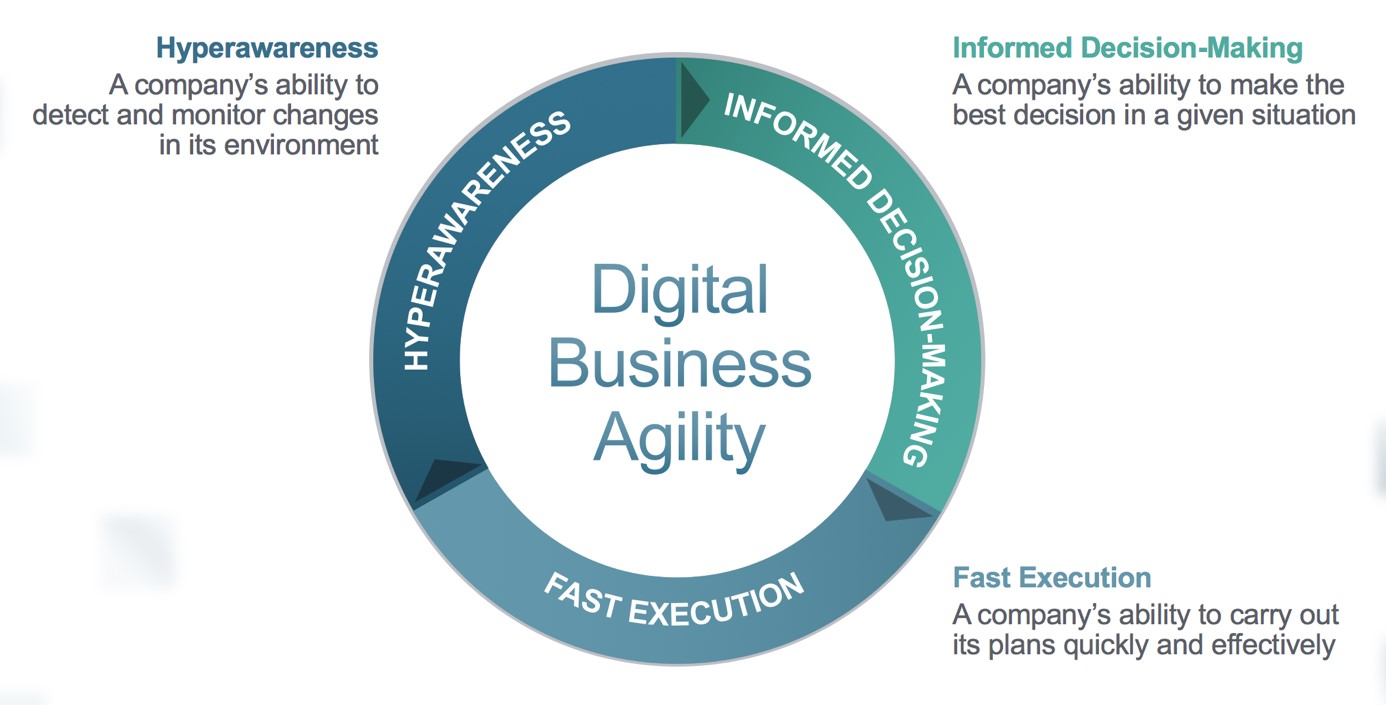
Thriving in a digital world requires agility. To bring this concept to life, members of my team created the Digital Business Agility (DBA) framework below. As you can see, becoming digitally agile requires hyperawareness, informed decision making, and fast execution. In parallel, you must reimagine work (how your business operates) and reimagine value (how your company makes money) as I have covered in several of my previous blogs.
Digital business agility (DBA) is the critical capability for digital business transformation.
Given the magnitude of change in becoming agile, while literally reinventing everything about your business, where do you begin and how do you accomplish these Herculean goals?
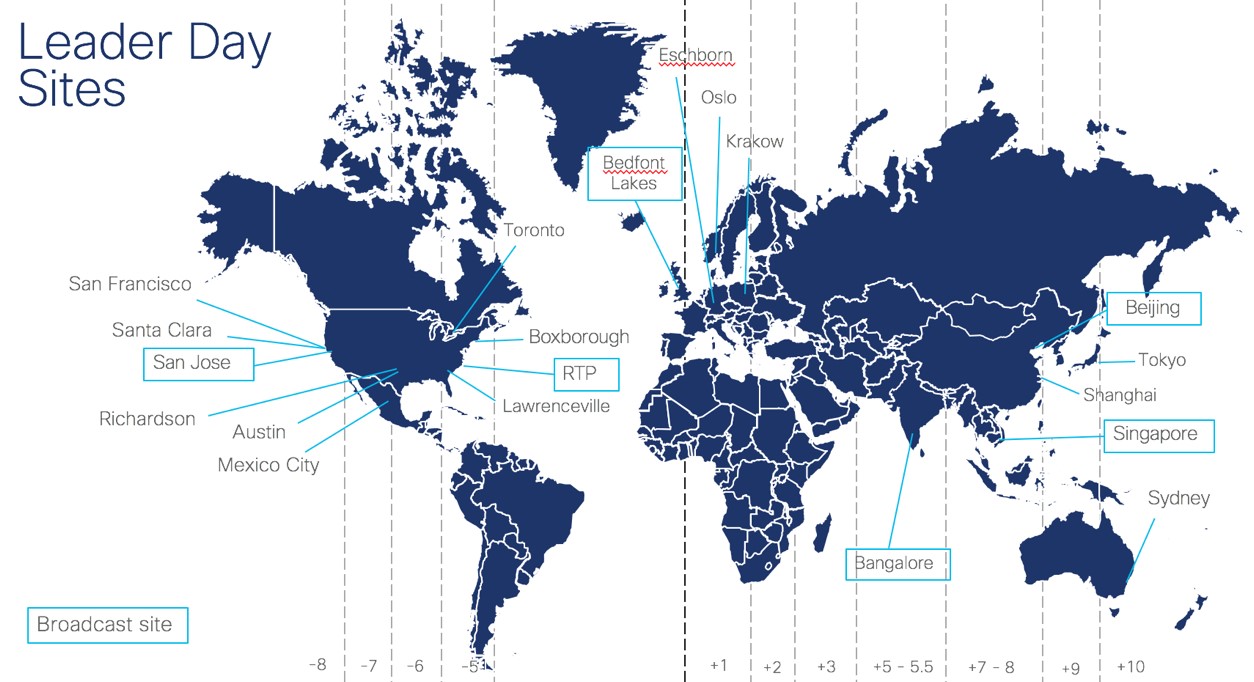
The answer is simple: it begins with your employees. Cisco’s inaugural Leader Day was a huge step in creating the agility we need to succeed. This 24-hour global event fully leveraged Cisco’s digital collaboration capabilities to educate, engage, and empower more than 8,000 people leaders to understand our own transformation and embrace what it means to be a digital leader.
Cisco TV, TelePresence, WebEx, Spark, live chat, Q&A, social media, and audience polling were all seamlessly integrated so that every attendee, no matter where they were located or what device they were using, became an integral and connected part of the Leader Day experience. In total, the event involved six live broadcasts to 37 locations and included more than 900 WebEx working sessions with pre-assigned cross-functional groups to enable real-time collaboration among attendees.
Leader Day wasn’t just another company-wide event, it was what modern digital communications looks like when transforming a company of more than 70,000 people.
Here are some of the key areas addressed during Cisco’s first Leader Day:
How we led yesterday is not how we should lead today or tomorrow. At Cisco, this means leadership is about ownership and being agile enough to change when it’s required. It’s about measurement. It’s about accountability. “I didn’t know” is no longer an excuse. This means broadening the scope of leadership.
Digital leaders must be true business leaders, connecting their team’s work to the company’s strategy in order to improve overall performance.
Effective leadership requires setting clear expectations with measurable outcomes. However, leaders also have to balance risk with the return. To do this, maintain focus on investments that deliver value to the company, and know when to stop investing in things that don’t. This approach requires agility, ownership, and accountability at all levels of management.
Strong leaders own the team experience and building great teams that people want to be part of. At Cisco, leaders are responsible for achieving success with individuals, teams, and teams of teams. For individuals, success means creating an experience of growth, support, and contribution. For teams, success is building and developing world-class groups and harnessing the best of each person to deliver results. For teams of teams, success means driving innovation, alignment, and cooperation across Cisco to win.
Leadership isn’t without obstacles. It requires effort, commitment, focus, and resources to become agile. Cisco demonstrated this by taking a full day to bring leaders together and reset what it means to be a leader in a digital world. Even so, Leader Day was just the start. The energy around the globe had our leaders asking to continue the training and dialogue on an ongoing basis.
I hope the example of Cisco Leader Day and these insights about being an agile leader in a world of accelerating change are helpful to your company’s transformation. Please let me know your thoughts and your own experiences when it comes to educating, engaging with, and empowering your leaders.
Tax season is a few months away. It is time to start preparing.
Business leaders should consider acquiring new or remanufactured equipment before the end of 2017 to take advantage of legislation that both expands deductions and extends depreciation benefits for qualifying equipment purchases. In fact, tax benefits and favorable pricing make the fourth quarter of the year a particularly lucrative time for businesses to finance equipment.
Through financing programs, businesses can conserve cash and lines of credit while providing maximum flexibility. Entering into flexible payment programs at the end of the year is a smart way for companies to use any remaining budget while preparing for end of the calendar year. Consider the following factors when determining whether investing in capital equipment during the fourth quarter of the year aligns with your company’s strategic goals.
“Instead of spending a large amount of budget on equipment that will quickly depreciate in value, why not invest in other strategic and growth areas? When you do, you have immediate access to the technology you need without upfront costs.”
Beneficial for small businesses
Section 179 of the IRS tax code is an incentive created by the U.S. government to encourage businesses to invest in IT equipment. This covers accelerated write-offs for purchases and is particularly beneficial to smaller businesses with limited budgets. Effective January 1, 2017, businesses purchasing $2 million or less in capital equipment can deduct up to $500,000 of that expense immediately on their 2017 tax return. Financing can further enhance the bottom line by eliminating the upfront cash outlay typical of an equipment purchase while still preserving the Section 179 deduction. However, equipment must be financed and in place by midnight of December 31, 2017, to qualify for the 2017 tax year.
Companies requiring more than $2 million in capital equipment investment in 2017 will need to manage the tax ownership of those additional assets to maintain a Section 179 write-off. By using a tax lease for assets exceeding the $2 million threshold, the leasing company becomes the tax owner of the equipment, which allows businesses to maintain the maximum Section 179 deduction on the assets for which they retain tax ownership.
Extended bonus depreciation
Under the same tax legislation adopted by Congress for 2017, businesses of all sizes can depreciate 50 percent of the cost to acquire eligible equipment on their 2017 tax returns. This tax break has been extended through 2019, although it will phase down to 40 percent in 2018 and 30 percent in 2019.
For many businesses, asset depreciation plays an important role in fiscal management. Most equipment acquisitions offer depreciation benefits, but determining whether a company can effectively use all of that depreciation requires some consideration. This is especially true for equipment-intensive businesses. Full taxpayers in need of the sheltering effect of equipment depreciation will typically benefit from tax ownership of equipment. This can be accomplished with a loan, installment payment agreement, and some leases. All of these options allow the user to deduct depreciation and interest charges from taxable income.
Companies near to or already paying alternative minimum taxes should be aware of the implications of purchasing assets. These organizations may not be able to effectively use all of the tax benefits associated with accelerated equipment depreciation. Therefore, they can experience an increase in the after-tax cost of acquiring an asset. In contrast, a tax lease can minimize the creation of additional tax depreciation. The lessor records the equipment ownership and resulting depreciation, and because equipment leasing companies are able to more efficiently utilize the tax benefits associated with depreciation, the lessee can enjoy the savings in the form of lower monthly payments.
A tax lease may also be advantageous for corporations with expiring net operating loss, carryforwards or other similar tax credits. Depreciation deductions on purchased equipment reduce taxable income, sometimes preventing a business from fully using its available tax credits. Leasing allows companies to maximize the use of the credits to lower the tax liability. Tax benefits can be passed on to the customer in the form of lower payments.
Boost your bottom line
Leasing allows a company the freedom to obtain the equipment it needs, when necessary. With tax leases, companies avoid fourth quarter asset acquisition restrictions because the leasing company is the tax owner of the equipment. However, the business can still receive the tax benefits in the form of lower payments. Leasing can be a helpful option when project delays or unexpected equipment replacement needs arise in the fourth quarter.
There are many reasons to finance equipment at any time of the year, but companies interested in taking advantage of expanded tax benefits for 2017 and getting a head start on next year should consider financing new or updated equipment before December 31. It may be the best decision you make all year.
“Companies with a more complex tax situation may want to consider a tax lease. Tax leases effectively trade tax depreciation for lower payments. Additionally, tax leases allow the entire lease payment to be deducted as an operating expense on the business’ tax return.”
*Cisco and Cisco Capital do not provide tax or accounting advice to customers. Tax and accounting treatment is the sole responsibility of the customer.
Craig Tranter is a former educator, and now serves as a technology presenter for Cisco. This blog is the fifth in his series on advancements and opportunities in education. All views are his own.
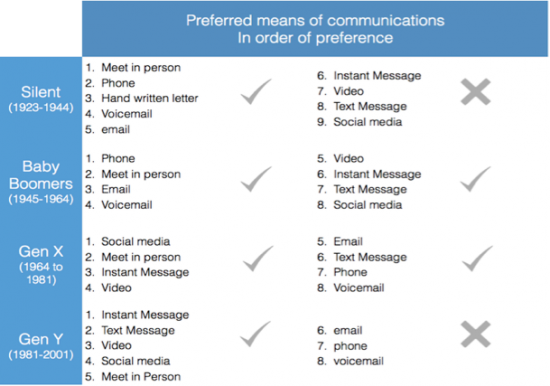
There are many different ways that we like to communicate and there are trends in communication preferences. For example, the “Silent Generation” tend to prefer meeting in person, letters, email, phone and voicemail, which may not be surprising as IM, social media and handheld devices were not a part of everyday life growing up. However, as more technological developments occur, we can see how these preferences have changed below.
The way we study, work, and communicate has evolved a great deal and it’s important that we develop tools that are fit for purpose. If not, those tools quickly becomes obsolete. The biggest development in this area is with the use of apps. If an app is fit for purpose, then more and more people are going to adopt it. If the app no longer does what you want it to do, you simply download a new app that does. You are no longer tied in to expensive investments into the newest hardware that you can’t afford to upgrade for years. If it doesn’t work, simply download something that does.
The main advantage of apps is that they can be updated with new software on a regular basis, meaning that they can stay current and up to date, without the user needing to worry. For example, do you know what version of WhatsApp you’re using? No? Me neither, but it doesn’t matter, because I know I have the most up to date version with all the best features as I’ve enabled automatic updates on my device. So, no worries.
Now, perhaps there may be some bias here as I use this every day at work, but a fantastic app for work and education is Cisco Spark. This app offers an easy to use, persistent IM chat with file sharing, white boarding, and video calling functionality. It can also be linked up to any Cisco video-endpoint that’s registered to the Spark Cloud so that you can easily swap your call between devices and share content wirelessly with ease. The other great aspect is that various integrations and bots can be developed to suit your needs. These integrations and bots can also communicate with Learning Management Systems (LMS) such as Blackboard and Moodle to integrate with universities’ existing systems. For more on the future of bots, you’ll have to wait until next time.
The evolution of cable networks came into focus at the recent SCTE Cable-Tec Expo in Denver, Colorado. Cable industry professionals from all over the world came together to learn and share the next generation of network technologies that will be shaping the cable industry for years to come. Distributed Access Architectures, virtualization and automation were key themes throughout the expo, highlighting the customer need for scale, performance and flexibility.
I’m proud to say that Cisco is leading the industry in next gen cable access with fiber deep and Remote PHY:
First to market with an end-to-end Remote PHY solution, Infinite Broadband
First to market with Automation for Remote PHY, Cisco Smart PHY Automation
Leading the industry with innovations such as Full Duplex DOCSIS 3.1 and Cloud Native virtualization
Let me explain:
The Network is Evolving
A new generation of DAA (distributed access architecture) is being deployed by cable operators worldwide. Remote PHY (RPHY) offers operators unprecedented capacity improvements and total cost of ownership savings. To prove how real this evolution is, we demonstrated our new GS7000i RPHY Smart Node, along with our RPHY compact shelf working with the cBR-8 CCAP Core. We showed the industry RPHY interoperability is a reality by running multiple RPDs from the OpenRPD Ecosystem on our CCAP Core. Taking this one step further, we had added the Arris RPD to that, which made a strong statement of industry backing for DAA. Automation was something a lot of people were talking about at SCTE. We actually demonstrated some real magic with Cisco’s Smart PHY mobile app, showing how our Remote PHY devices can be remotely provisioned and managed from a simple user interface.
Another topic often brought up in discussions at the Expo was virtualization, and central to this idea for cable operators is our advancements in a Cloud Native CMTS (aka Virtual CMTS). Our approach to implementing a Cloud Native CMTS is to distribute much of the traditional processing out to the edge while centralizing the control of management functions. With a Cloud Native CMTS, cable operators gain the ability to quickly scale up new services and reduce the overhead associated with housing and powering traditional CMTS hardware. A Cloud Native CMTS also provides a huge amount of flexibility for operators wanting to build out their Distributed Access Architectures (DAA).
DOCSIS 3.1 is here and Full Duplex is coming:
Cable operators are more capable than ever of bringing the promise of gigabit internet speeds into their customers’ homes. While the downstream speeds are already impressive, at SCTE we demonstrated a working version of Full Duplex DOCSIS (FDX), enabling symmetric multi-gigabit services over existing HFC networks. This came just one week after CableLabs completed the specification for Full Duplex DOCSIS 3.1. Full Duplex DOCSIS technology offers operators a cost-effective alternative to running fiber to the home (FTTH) by matching fiber’s capacity and performance over a cable’s existing HFC network. There is, of course, a lot that goes into making Full Duplex DOCSIS work and to better understand how, I recommend checking out our recently published white paper.
Mobile is the next frontier:
Cable network operators have a robust, high-capacity fixed-network just waiting to tap into the next generation of 5G mobile offerings. Using a combination of existing technologies, we demonstrated a proof of concept together with CableLabs, showing how small-cell radios can be plugged right into an already dense cable infrastructure. Given the range limitations of 5G signals, cable networks are well positioned to make mobile network densification and 5G a reality. By combining a cable network’s current physical infrastructure with Full Duplex DOCSIS, and then adding mobile backhaul to the mix, you get a recipe for big opportunity.
One last thing I’d like to mention is how honored I was to witness my esteemed colleague John Chapman inducted into the 2017 class of Cable Pioneers at the event. You can read all about that in my previous blog.
As you can see, there is a lot going on in cable access throughout the industry, and Cisco is leading the way. Keep in touch with our next generation solutions by visiting our cable solutions site often.
Should I automate this task? What about the end-to-end process?
How many times do I need to use the automation to justify the work needed to set it up and maintain it?
As an engineer myself, I have asked these question many times. Can I write a script to do repetitive work? What if I only plan to run the script 10 times this year? Or should I just perform the task manually? Again?
Both individuals and organizations need to understand how to answer these questions. Typically, it is the individual (administrators, operators, architects, developers, etc.) who understands the technical tasks required; and it is the organization (multi-function teams, IT operations, datacenter engineer, systems reliability engineer) that understands the business processes impact, and funds strategic initiatives such as increased automation.
Generally, it makes sense to automate an IT task or process if:
a) You can run the automation enough times to spread out the cost of creating the automation capability (hours of development, testing, and ongoing maintenance).
Pattern – “I’m going to do this task X times in the next year and it will take me a couple hours of writing, testing, and updating a script to add to my bag of tools.”
b) Each automated execution has a lower cost than performing the work manually.
Anti-Pattern – every time I run the automation I end up spending more time tweaking things because the environment or process keeps changing.
The Maths
I built a simple model to help methodically evaluate your decision, based on work originally developed by Brown and Hellersten at the IBM Thomas Watson Research. With a mathematic model, you “tweak the knobs” and consider the impact of different variables on your decision. A main consideration is your investment of time and effort as a quantifiable cost. Time is money, right?
The model compares the fixed and variable costs of manual task or process versus the automated version of the same. The cost calculation is based on the variable N, which represents the number of times the automated process will be executed.
Consider 4 key variables
1 – Manual fixed costs – cost of developing the manual process. How much does it cost to produce a box of ball bearings? 1st you need a factory (manual fixed cost) then you need some steel rod and 5 minutes of labor (manual variable cost). Do not spend too much time on defining the “factory cost” because it is a foundational requirement for both the manual and automated processes, and thus it drops out of your final decision calculation. (If you are thinking “Yeah, but I can do things with automation I can’t do manually” you are on the right track – see footnote)
2 – Manual variable costs – the amount of time and effort involved each time you do the work manually. Think of this is the pain you are trying to eliminate. Every time X lands on your task queue– you are about to experience manual variable cost.
3 – Automated fixed costs – this is the cost of the tools used for multiple processes, and time and effort to build and maintain automation artifacts per workload, task, or process you automate. Python or Perl = fun little programming effort. Orchestration tool or cloud management platform = need to get PO approved. Key – if you are automating deployments to 3x environments and have 3x automation artifacts to build and maintain – that automated fixed cost multiplier works against you.
4 – Automated variable costs – the amount of time and effort involved in automated execution. Ideally it is close to zero if task or process is fully automated. But automation does not always work so you may have to consider what percent of automated deploy fail, and include the cost of manually debugging and reworking exceptions or failures.
Calculate all of the things
We can then solve for NT which we call the Automation Tipping Point. This represents the cross over point at which it becomes cost effective to automate the process. Keep reading. This will get interesting.
As seen below, automation is justified when NT is greater than the ratio of automation fixed costs divided by manual variable costs minus automated variable costs.
Tweaking the knobs
If you could wave a magic wand and create an “easy button” for everything you do, then NT would be 1. However, consider the impact of your reality on this ratio. IF the numerator goes down (automation fixed costs) THEN the tipping point goes down and it is easier to justify automation. IF the denominator goes down (manual is easy, or automation has lots of errors) – THEN the tipping point goes up e.g. harder to justify. Things you can tweak include:
Automation fixed costs – if the cost of automation platform goes down, then you can more easily spread that cost out and justify automating a specific task. If you automate many different workloads, the cost is also spread across all those deployment processes.
Manual variable costs – if performing tasks manually is becoming increasingly more difficult, i.e. a need for specific and deep skills in a particular cloud provider (AWS, GCP, Azure), then you can more easily justify the cost of automating that task.
Automated variable costs – if your automation artifact is effective across multiple environments, then you achieve consistency, predictability, and repeatability that also reduces expensive errors. That is good.
Applied to Multicloud Workload Deployment
When applying this to decision to the automated deployment of applications in a multicloud cloud management scenario, you should assume:
The person who creates the automation is not necessarily the user of the automation. If you want to scale, one person does the automation work to build an easy button, and many persons use the easy button. So, the automation requires guardrails to control the automation which raises automation fixed costs, and thus can raise the tipping point (Someone has to determine policy, implement governance rules that guide user decisions).
Different environments may require unique automation tools. This reality drives up automated fixed costs even further, and likewise raises the tipping point.
Different environments may require multiple environment specific automation artifacts. If you have multiple automation artifacts that are environment specific (e.g. a script for workload 1 in vSphere and another script for workload 1 in AWS), fixed costs go up. More is worse. Configuration tools help here.
Automation should drive consistency, predictability, and repeatability that also reduces expensive errors. The variability of different datacenter and cloud environments may result in variation and exceptions that increase the number of exceptions that need to be handled manually, which also raises the tipping point significantly.
Footnote: Thoughts from Automation Guru Jeremy Guthrie
Jeremy Guthrie, Technical Architect for Orchestration at CDW has some has three tips for success for automation projects in this 3 min video.
He approaches automation with his customers from a different angle, and offers these additional considerations:
Error checking – automation allows error checking to be built in. Manual processes never have that option. I might be building a process that runs 10-12 times per year but it really needs to work and/or recover. Unit testing scripts can be built early on or later, but their value is immense in assuring that after upgrades, systems are working as planned. e.g. Amazon upgrades and promotes new code every 11 minutes because that unit testing is central to their velocity.
Don’t over think it – don’t get too hung up on calculating all of the things [above]. If you try to model all the costs and benefits, you will get overwhelmed and not know where to start. Instead, just start by automating something, get familiar, and as you gain some successes, then you can start to strategize on what’s next and what’s worth it.
Don’t focus on the dollars – as a datacenter engineer working on automation, you need operations and developer buy-in. It has to look attractive on multiple fronts (easy to use, reliable, makes work faster) or else my experience is that Ops or Dev are both capable of burying the project.
Wise words of advice!
Bottom line
A multicloud management platform like Cisco CloudCenter can demonstrate real value when you are automating application deployment and management across different datacenter, private and public cloud environments.
Public cloud infrastructure requires a new approach to security. We’ve all heard that line, but what does it actually mean? There is little stopping you from, say, deploying agents in the cloud to monitor traffic and detect threats and bringing other on-premises techniques to bear. But as anyone who’s ever attempted this before will tell you, the resulting impacts from, for example, using legacy staffing paradigms, can undercut the business incentives that led to cloud adoption in the first place.
Most organizations adopt the public cloud because it allows them to be responsive to the business, boost the availability of their services, and – most of all – lower their operational costs by providing exactly the computational resources they need when they need them. In the cloud, organizations can scale their operation up quickly, without the need for additional manpower to manage and provision equipment.
These benefits allow organizations to move quickly as their business needs change, but the benefits can be reduced or eliminated because of the wrong security strategy based on tools that don’t fit the new approach or that require manual processes. With that approach, every time an organization changes their cloud environment (which is designed to do so frequently), the security process imposes overhead to adjust to the changes including paying for services potentially no longer needed, contract adjustments and manual deployments to new assets, and manual change control steps. This approach undermines the business value of moving workloads to the cloud in the first place.
Security built for the cloud
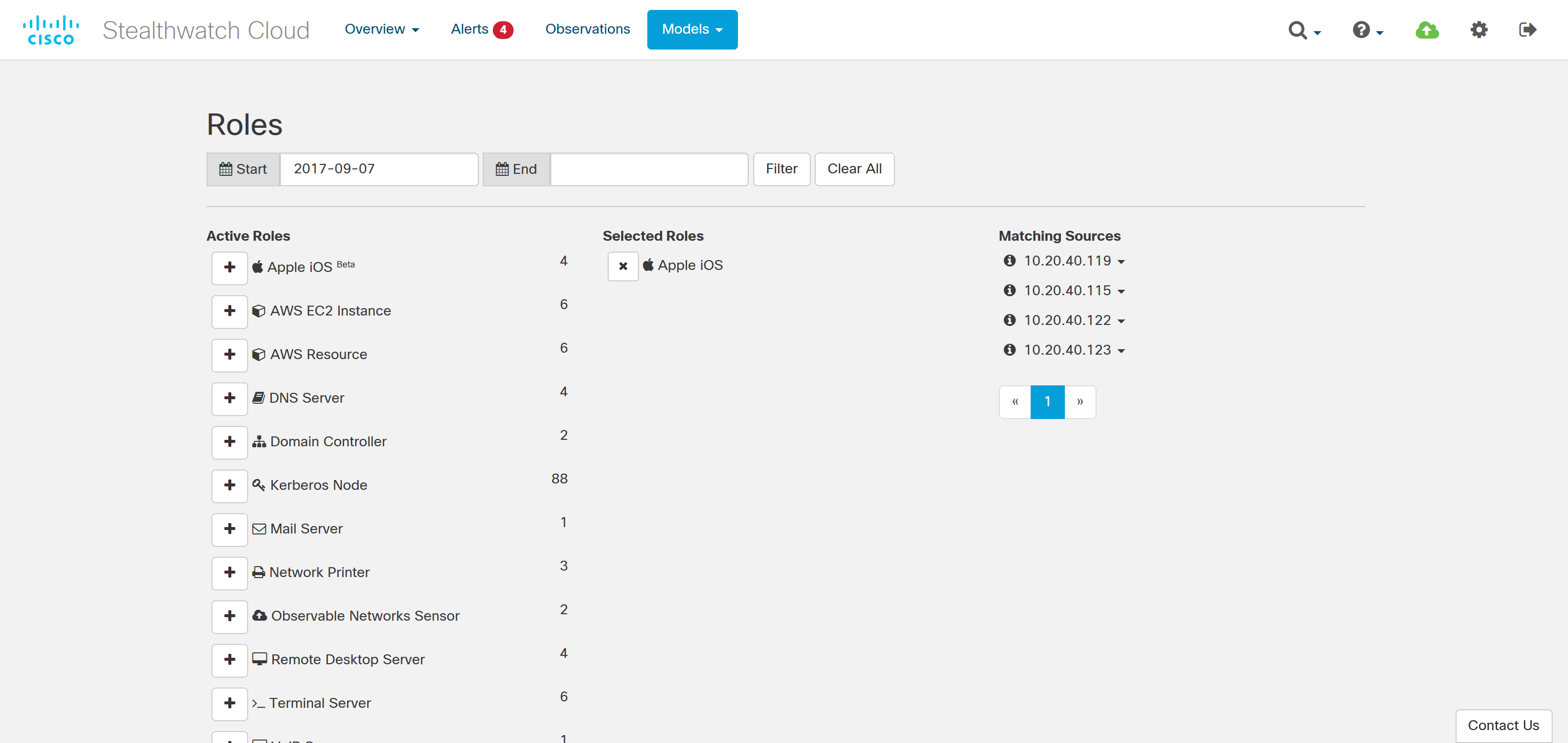
To adequately protect workloads in the public cloud, you need security purpose-built for the dynamic environment of the public cloud. Cisco Stealthwatch Cloud was created to help secure public cloud workloads while remaining easy to use and efficient. It is a cloud-native method to detect early-stage indicators of compromise and gain visibility in your public cloud.
Here are a few of the key benefits of Stealthwatch Cloud:
An agentless approach
Software agents are a management nightmare. Requiring a person to manually deploy agents anytime a new virtual machine is spun up is the antithesis of an automated, easily scalable environment. Even in environments where agents are configured into an automatically deployed build, ensuring correct operation, maintaining upgrades, and testing for non-interference, consumes valuable people time and inserts delays and costs. In environments that support it, such as Amazon Web Services (AWS), Stealthwatch Cloud uses VPC Flow Logs and other native sources of telemetry. This means it is able to monitor the entire IaaS environment, including VPC-to-VPC traffic and external IP addresses, without the need for software agents.
Low-configuration needs
Similarly, security tools that require heavy management and configuration can consume numerous man-hours and act as a roadblock. Instead you need something that is simple to deploy and can automatically adapt to an ever-changing environment.
Because Stealthwatch Cloud relies on native data sources such as VPC Flow Logs, deployment can be accomplished in minutes by simply giving Stealthwatch Cloud read-only access to these logs. In addition, all of Stealthwatch Cloud’s analytics require no configuration. The role of each entity in the public cloud environment is automatically determined based on its behavior, which means security analysts do not have to spend time manually classifying devices and cloud resources.
Stealthwatch Cloud is a software as a service (SaaS) solution. There is no need to maintain hardware or apply patches, and new features are added automatically on a monthly basis. Ultimately, this approach massively reduces the time spent implementing and managing the solution.
Low-noise, effective alarms
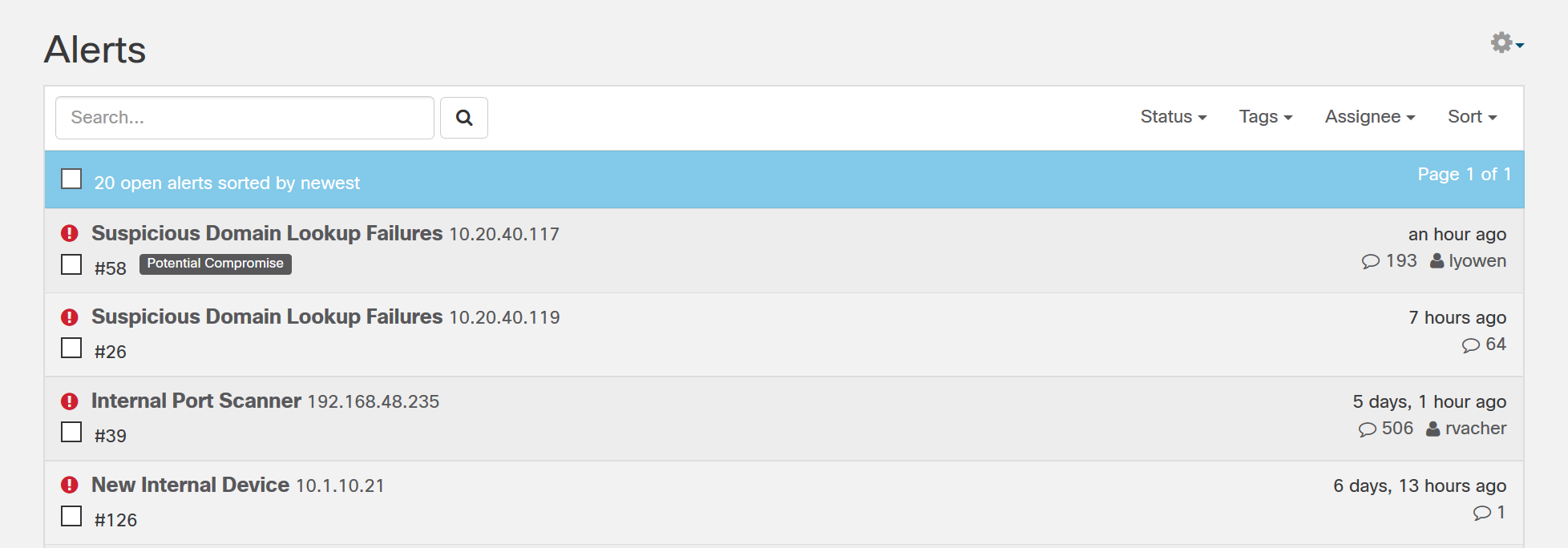
By far the most resource-draining issues encountered by organizations deploying advanced security are false alarm notifications. Most organizations are already struggling with too many security alerts. According to the Cisco 2017 Annual Cybersecurity Report, only 56 percent of security alerts are investigated, and out of those only 28 percent are deemed legitimate alerts. A noisy security solution in the cloud can consume time from security analysts or worse yet, lead to legitimate security events going uninvestigated and unremediated.
Stealthwatch Cloud was created with a laser-focus on being both low noise and accurate. For example, a typical 10,000 endpoints environment produces an average of 2-3 alerts a day. To validate that customers are finding value in the alerts, whenever an alert is triggered, Stealthwatch Cloud requests feedback on the alert’s relevance. Customers currently rate 96 percent of alerts as ‘helpful.’ In other words, when Stealthwatch Cloud asks for your attention on something that it has found, the chances are excellent that you’ll be glad you responded. More significantly, this kind of accuracy gives you a security solution that meets the performance and change-rate demands of your public cloud business case.
Modeling makes the difference
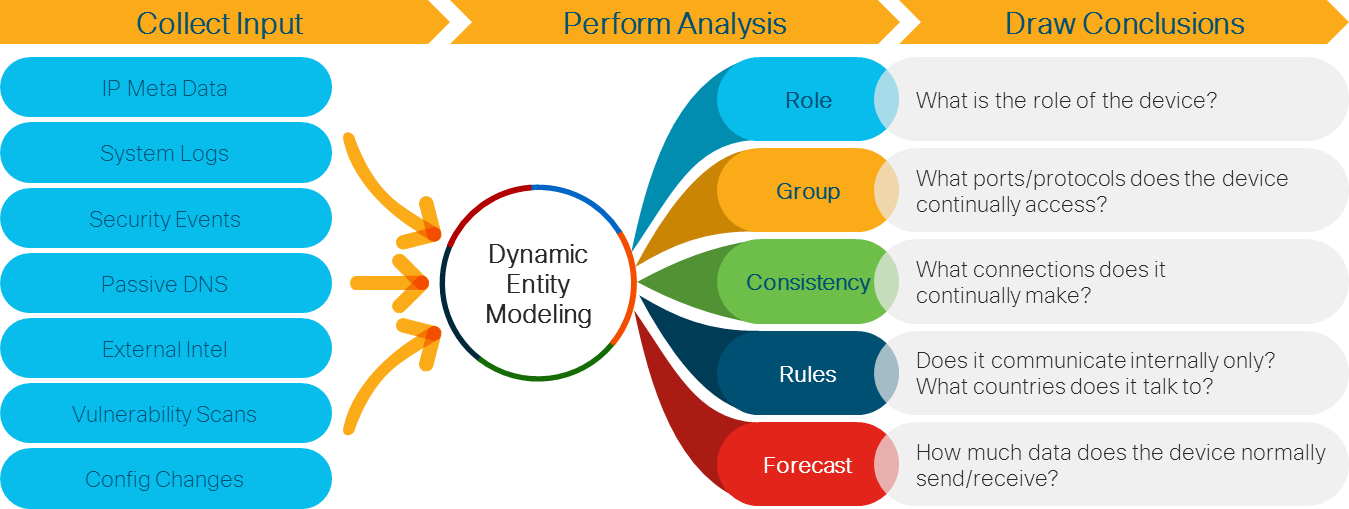
How does Stealthwatch Cloud accomplish all of these benefits when so many other security analytics solutions fall short? Stealthwatch Cloud uses a technology called Dynamic Entity Modeling, which utilizes machine learning and advanced analysis to constantly adapt to the environment and produce actionable security intelligence.
As Stealthwatch Cloud consumes data, it creates a model – a kind of simulation – of every device and network entity. This model determines the entity’s role, what its normal behavior looks like, what other entities it interacts with and when, and how it will likely behave in the future. Based on this model, Stealthwatch Cloud detects when an entity behaves in a way indicative of threat. For instance, if an AWS resources only communicates with internal hosts but suddenly begins connecting to an external server, it could be a sign of compromise.
Dynamic Entity Modeling allows Stealthwatch Cloud to keep up with the ever-changing environment of the public cloud, while accurately identifying security-relevant events. It is built with the high scale, rapidly changing environment of public cloud infrastructure in mind and it flexibly adjusts to your cloud-based business as you would expect.










 The resources they need are located on slides that have been hidden in virtually every part of the Cisco LIVE Cancun event. Many of the slides will be hidden in Cisco and partner presentations during sessions. One minute you’re sitting through slides that describe the Cisco IoT Kinetic platform, and the next thing you know, BAM! Up pops a slide that tells you a source for ION FUEL has been discovered! What do you do? Share that information with your team on Cisco Spark, of course! You can either take a picture of the slide that identifies the location of the fuel, or simply type in a message with the name of the location.
 To play the game, attendees can download Spark from the Cisco Event app on their phone. All of the instructions for playing are in the Starship Team Challenge space. To be assigned to a team, attendees can ask any Cisco Spark Expert wearing the blue Spark shirts, located in the Collaboration booth and around the venue. Teams all have fun names like the Space Invaders, Star Trippers and the Cosmic Collaborators!