Submitted by Kelsey Kusterer Ziser, the Editor of Upskill U at Light Reading
Just as service providers are moving away from traditional networks to all-IP virtualized networks, their software development processes are also undergoing a major overhaul. Yesterday’s work silos can’t keep pace with tomorrow’s network needs, and many operators are increasingly using more dynamic, collaborative approaches like Agile and DevOps.
Service providers can’t afford to wait months for code, but Agile and DevOps can speed cycle times to just a few weeks, improve collaboration between historically isolated departments and increase productivity through the emergence of meritocracies. Yet many operators are finding the transition to Agile and DevOps challenging as barriers like company culture and confusion over how to correctly implement these methodologies threatens to degrade the potential benefits of implementing Agile and DevOps.
Starting September 14, Light Reading, in association with Cisco, aims to unravel the misconceptions and challenges of Agile and DevOps in a four-course series at Upskill U. During this free, online series, lecturers from the Agile Alliance, Cisco, Tech Mahindra and more will explain the core principles of Agile and DevOps, what pitfalls operators should avoid and how service providers can successfully implement these methodologies.
Join Upskill U for these exciting lectures in the Agile and DevOps series:
What Is Agile? (Wednesday, Sept. 14, 1:00 p.m. ET): Kent J. McDonald, Product Owner, Agile Alliance, explains how Agile methods emerged, the Agile Manifesto and 12 Principles, how companies are successfully implementing Agile, and more. This course prepares students for subsequent courses on Agile and DevOps.
How to Implement Agile (Friday, Sept. 16, 1:00 p.m. ET): Alan Bateman, Director, Agile Transformation, examines common mistakes and covers the process of implementing Agile, from identifying company culture barriers, to making the business case, to the process behind building effective teams.
What Is DevOps? (Wednesday, Sept. 21, 1:00 p.m. ET): Colin Kincaid, CTO, Service Provider, Cisco, defines DevOps, addresses the benefits and challenges to implementing DevOps, talks about why and how organizations interpret DevOps differently and explores case studies of successful DevOps teams.
How to Implement DevOps (Friday, Sept. 23, 1:00 p.m. ET): Burt Klein, DevOps Strategist, Tech Mahindra, explains how to secure support for DevOps implementation, avoid common pitfalls that arise in DevOps architecture, streamline processes and more.
Whether you’re experienced with Agile and DevOps or new to these methodologies, this series will help professionals at any stage of the game develop a better understanding of the key principles of these methodologies and how to correctly and successfully implement them. Each 45-minute live session includes Q&A with the speaker plus a live chat board, so audience members can ask expert lecturers and peers their most pressing questions.
Stay ahead of the learning curve and register today for Upskill U’s Agile and DevOps series at http://www.lightreading.com/upskillu. I’ll see you on the chat boards!
Many of us remember growing up watching the TV show Tom and Jerry. Tom always plots to capture Jerry resulting in mayhem and destruction, but Tom rarely, if ever, is able to catch Jerry because of Jerry’s cunningness.
Source: Google Play
Jerry’s ability to beat Tom is more than just luck. It’s his understanding of the situation, planning, and execution that helps him constantly beat Tom at his own game.
Whenever I think of cybersecurity, the tale of Tom and Jerry fills my mind. Tom can be likened to black hat hackers – the bad guys who are always out there plotting ways to go after the good guys like Jerry.
Being Jerry and as stakeholders, we need to think about all the ways Tom can attack and come up with plans to avoid these risks.
To lay out the foundation for foolproof grid security it takes a team of trusted experts with deep knowledge of power systems engineering, the latest communication technologies, and evolving industry regulations (NERC/CIP).
Any security solution that is devised must be flexible enough to accommodate existing IT/OT infrastructure and at the same time meet mandatory NERC/CIP compliance requirements, such as traffic segregation and prioritization among others.
One of the most prevalent sources of grid attacks is through operating system vulnerabilities in Windows or Linux platform. With the frequency of cyberattacks increasing exponentially, OS vendors such as Microsoft or Redhat are forced to release frequent updates. However, it might not practical for IT and OT departments to implement these patches across thousands of computers repeatedly as many times it requires computer reboots and disruptions.
The solution to this lies in implementing proactive measures using the latest security technologies such as firewalls and Intrusion Prevention Systems (IPS) which have built-in rules to close gaps caused by the most common vulnerabilities.
Another key challenge Utilities face is legacy SCADA protocols such as DNP3, Modbus, etc. which have no built-in security mechanisms like authentication and encryption. If not properly secured, this is an open invitation for a cyber-attack. All communication thus must be properly secured via end-to-end encryption and authentication.
At Cisco we bring together complex skills in IT, OT, communication, and power systems to create the comprehensive end-to-end security solutions for Utility companies.
https://www.youtube.com/watch?v=eSM9vtiLLCY
Learn more about our approach to grid security by visiting our website:
“Meet George Jetson.” Those words prompt me to start singing the catchy theme song of The Jetson’s. This iconic American cartoon showed a utopian vision of the future. It was housing in the sky, 3 day work weeks, and amazing conveniences. My favorite was when Rosey the robot maid pushed a button and out popped dinner.
While we may not have realized that future yet, we do have some ideas of what might be coming.
What if networks could be managed with the touch of a button? That’s the vision of most businesses who use a WAN (Wide Area Networks) to link up their office locations and remote workers. They want more flexibility and faster access to new features and capabilities, and to be able to see and manage the health and security of their networks.
A new Cisco study led by Chris Osika, senior director, Service Provider Business, shows this isn’t a utopian vision for networking… it is real today with virtual managed services.
What is virtual managed services (VMS)?
According to the study, most traditional managed network and security services control the placement of customer premises equipment (CPE) on-site. This can include routers, firewalls, and other hardware components.
The CPE is essential to all the functions that businesses need, like a router for network connectivity, a firewall device for security, and so on. VMS moves much of this capability into the cloud.
Like all virtual services, this new approach to business functions makes the enterprise faster and better able to respond to their own customers’ needs. It does this without compromising security or restricting the custom features of network services. The benefits extend to the businesses, their customers, and service providers as well.
Think about how it might work in a bank today. Typically if a new capability is deployed across branch offices, trucks need to roll, deliver equipment, and each site needs it installed. And, each office may have a different set-up. The process is lengthy and complex. With virtual managed services, banks could add a new feature as simply as adding an app to an iPhone.
“This is the level of ease we believe is realistic,” said Osika.
Customers want more:
Customers are telling us, they will also consider switching to another service provider, if the one they currently use does not deliver superior VMS functionality.
Osika added that even more concerning is as part of that managed services switch, customers said they would switch their connectivity as well.
“Service Providers have a great deal to lose if they don’t make the switch to virtual managed services,” he said.
The study targeted hundreds of decision makers using network and managed services in enterprises across 6 countries and 17 verticals. And, these decision makers have given us a picture of how they want to reshape their businesses.
81% are interested in a “VMS-like” service
78% are ready to move within a year to a VMS solution
31% would adopt VMS “right away”
It is clear they want virtual managed services. And service providers who offer these services stand to gain the most. Service providers can do it themselves or partner with a company like Cisco to provide as a managed service. There are lots of choices in how to package and deliver virtual services. But there is no choice in whether or not to offer these services. Your customers expect it.
A majority of U.S. respondents, for instance (75 percent) said they would switch from their current provider if they don’t offer virtual managed services, according to Osika, as quoted in Telecom Lead.
So what do you do now?
While our future may not include living in the sky, we do know businesses are demanding amazing conveniences – not unlike the ones we used to watch during Saturday morning cartoons.
This blog is the first in a 3 part series that will provide an in-depth technical analysis on the H1N1 malware. I’ll be looking at how H1N1 has evolved, its obfuscation, analyzing its execution including new information stealing and user account control bypass capabilities, and finally exploring how we are both using and influencing security tools with this research.
Overview
Through the use of general characteristics exhibited by malware authors we are able to broadly categorize and positively identify malicious samples. These characteristics, discussed in The General Behavior of Ransomware are indexed in a database, which allows us to identify patterns, outliers and obtain greater visibility and insight into various threats.
H1N1’s evolution: past and present
These data sets provide insight into the ever-growing attack vectors that affect our customers, which include malware delivery mechanisms. In this blog series we highlight newly added functionality to a malware variant that started out as being a ‘loader’ (strictly provides capabilities of loading other more complex malware variants) known as H1N1, and has now evolved into an information stealing variant.
Throughout the data mining exercises conducted by my colleagues and I on the AMP Threat Grid Research & Efficacy Team (RET) we have observed a widely distributed campaign using VBA macros to infect machines with a variant of information-stealing malware. Based on the initial characteristics observed by AMP Threat Grid we believed these malicious documents were distributing a Ransomware variant; however, we later found the dropped executables to be a variant of the H1N1 loader. H1N1 is a loader malware variant that has been known to deliver Pony DLLs and Vawtrak executables to infected machines. Upon infection, H1N1 previously only provided loading and system information reporting capabilities.1,2
Key findings from our analysis include:
Unique obfuscation techniques
A novel DLL hijacking vulnerability resulting in a User Account Control bypass
Added information stealing capabilities
Self-propagation/lateral movement capabilities
Background
H1N1 has added a plethora of new functionality in comparison to earlier reports. Throughout this blog series we will be analyzing the capabilities of H1N1 including: obfuscation, a User Account Control (UAC) bypass, information stealing, data exfiltration, loader/dropper, and self-propagation/lateral movement techniques used by this variant.1,2
Infection Vector
The use of Visual Basic macros is nothing new, however, in recent months they have become one of the most popular infection vectors for all malware types, especially for Ransomware campaigns. These macros vary in sophistication from performing the download and execution of hosted binaries, to dropping the binaries themselves. In this campaign we see the latter where the document ships an entire encoded binary within the text box of a VBA macro form. All documents throughout this campaign have used a common naming convention in the following formats:
[domain]_card_screenshot.doc
confirmation_[random integers].doc
bank_confirmation_[random integers].doc
debit_request_[random integers].doc
creditcard_statement_[random integers].doc
insurance_[random integers].doc
inventory_list_[random integers].doc
debt_[random integers].doc
The domains for the first format observed include the financial, energy, communications, military and government sectors. Unsurprisingly, these documents are delivered through spear-phishing e-mail campaigns. A number of subject headings can be observed in VirusTotal:
Figure 1.0: Attached e-mail subject headings in VirusTotal for identified documents
Although the specified domain in the filename differentiates between targets, the lure message within the phishing e-mail does not vary drastically, for example:
Figure 2.0: Example phishing message within attached e-mail
The remaining formats appear to simply seem enticing enough to open being related finance, corporate or personal information.
Upon opening the document, the attacker attempts to social engineer the user into executing the malicious macro content by stating it will adjust to their version of Microsoft Word:
Figure 3.0: Social engineering content of document to open macros
Dropper Obfuscation
The VBA macro is highly obfuscated, making use of many VBA tricks to hide its true intent. These include the use of string functions: StrReverse, Ucase, Lcase, Right, Mid, and Left. For example, the following gets the %temp% path:
Figure 4.0: String obfuscation mechanisms to get %temp%
Mid is used here to produce “.Scripting”, Ucase and StrReverse are used to produce “FIleSystemObject”, which is used to create a VBA FileSystemObject, that is then used with GetSpecialFolder, and some basic arithmetic resulting in “2” to get %temp%.As mentioned, the binary to be executed is extracted from a VBA form text box:
Figure 5.0: VBA form containing obfuscated PE within text box
The text box content is set into a variable, which is then passed off to a de-obfuscation function. The core de-obfuscation functionality is a two steps process. The first is an XOR loop with a fixed byte key of 0xE, which produces a base64 encoded portable executable (PE):
Figure 6.0: XOR decoding/de-obfuscation loop
The second is a VBA implementation of base64 that decodes it to produce a final Portable Executable (PE):
Figure 7.0: VBA Base64 implementation
The de-obfuscated executable is then written to %temp% and executed. We can follow the execution flow through the use of process visualization in AMP Threat Grid. What this provides is graphed process interactions (child-parent relationships) for the entirety of the run. In the case of the H1N1 malicious document, it is very apparent that WINWORD.EXE is executing a separate binary:
Figure 8.0: Process graph showing execution of dropped executable from Microsoft Word
Unpacking
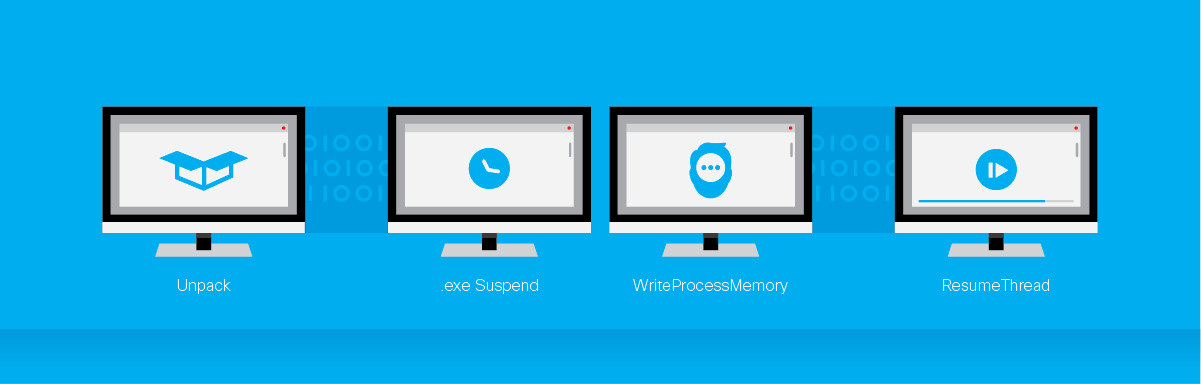
The binary has a total of three routines responsible for unpacking and injection. The first routine injects via the following steps:
Unpacking algorithm unpacks code to be written
Creates a suspended process of the executable written to %temp% from the document with CreateProcessA
Writes to that image with WriteProcessMemory
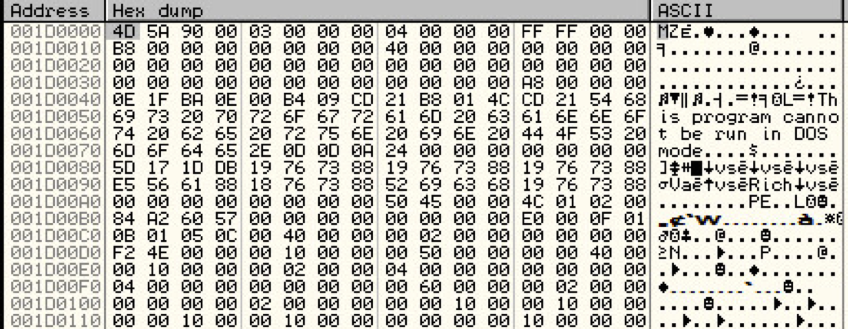
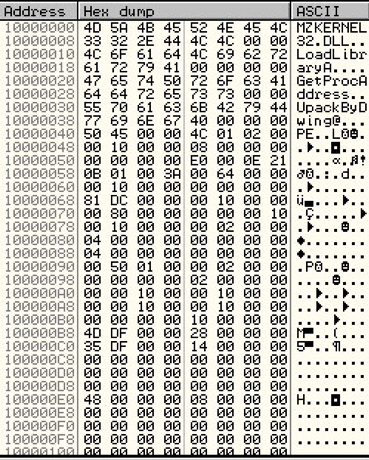
Uses GetThreatContext, SetThreadContext and ResumeThread to execute at the EP of the unpacked executable. On the call to WriteProcessMemory we see the lpBuffer address points to a complete PE, as is indicated by the MZ header:
9.0: First MZ from WriteProcessMemory lpBuffer argument
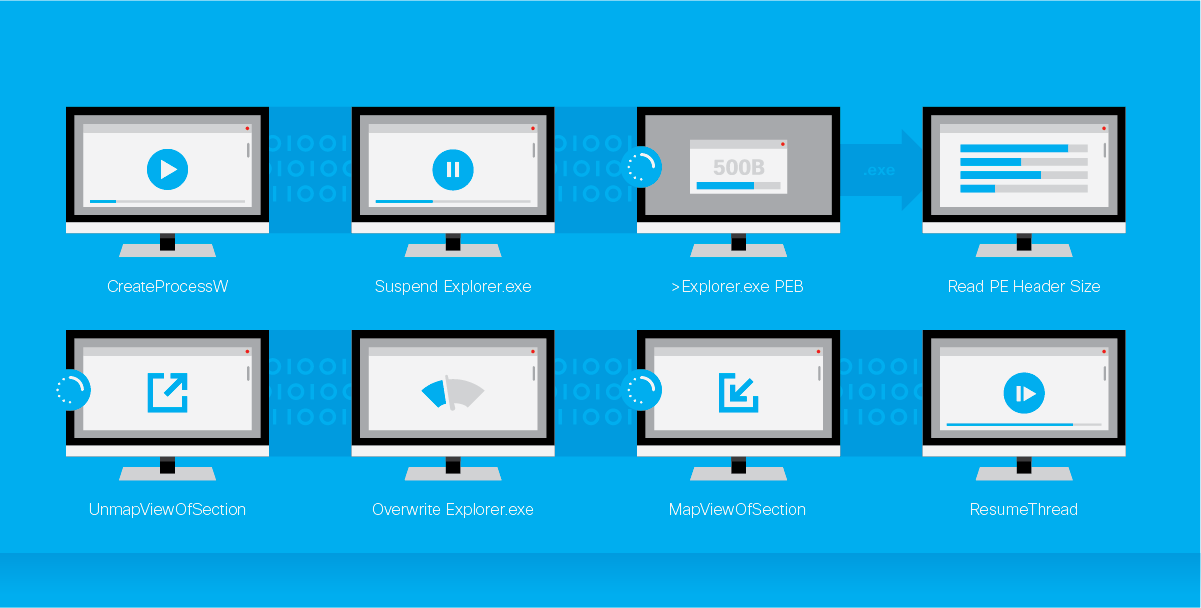
We can then dump this to disk for analysis of the next unpacking stage. The next routine makes use of the injection method used by Duqu to write its unpacked image3:
CreateProcessW is called to create a suspended ‘Explorer.exe’ process
Use the handle from PROCESS_INFORMATION produced by CreateProcessW with ZwQueryInformationProcess to get Explorer.exe PEB and ImageBaseAddress
Allocate and write up to 500 bytes of of the Explorer.exe process using ReadProcessMemory
Get actual image size from PE header, allocated this size, and write entire Explorer.exe image into memory
Use UnMapViewOfSection with ImageBaseAddress and process handle of Explorer.exe from step 2 to un-map the current section in order to avoid STATUS_CONFLICTING_ADDRESSES upon mapping of the new section
Overwrite image sections of Explorer.exe with unpacked (of the current step) executable code
Use MapViewOfSection to map the manipulated Explorer.exe using the process handle from step 2
Call ResumeThread to start execution of unpacked code (of the current step)
In order to continue to trace the execution of this code (to what we discovered was more unpacking code) we wrote 0xEBFE (relative JMP to offset 0) to the entry point of the newly written Explorer.exe. This causes Explorer.exe to spin until we can attach to this process with a debugger.
Breaking on the first VirtualAlloc performed by the injected process enabled us to see a large allocation occur, and setting a breakpoint on writing to this memory location makes it apparent that an entire DLL is written to this memory location by the (current) unpacking code:
Figure 10.0: Upack MZ to be injected
Looking at the PE header the string “UpackByDwing” is apparent which indicates that this packer is being used on the final binary. Opening up this code with a disassembler (in this case IDA Pro) showed the following jump that could not be followed when the functions were graphed:
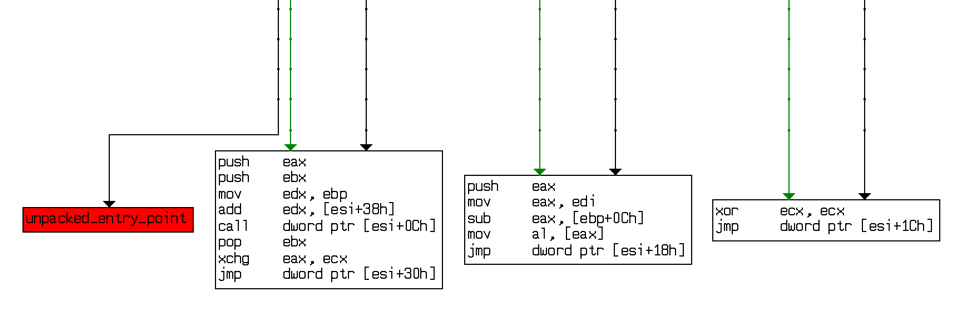
Figure 11.0: Function graph for final Upack unpacking stage
There is an infamous POPAD prior to this jump, which for those seasoned unpackers, is indicative of leading to the OEP of an unpacked binary due to restoring of the register state prior to the unpacked code being called. If a breakpoint is set on the OEP identified and we continue to trace through the injected code within Explorer.exe, it becomes clear that this address is eventually called from the unpacking code. At this point, once the breakpoint is hit, we can dump the unpacked binary to disk.
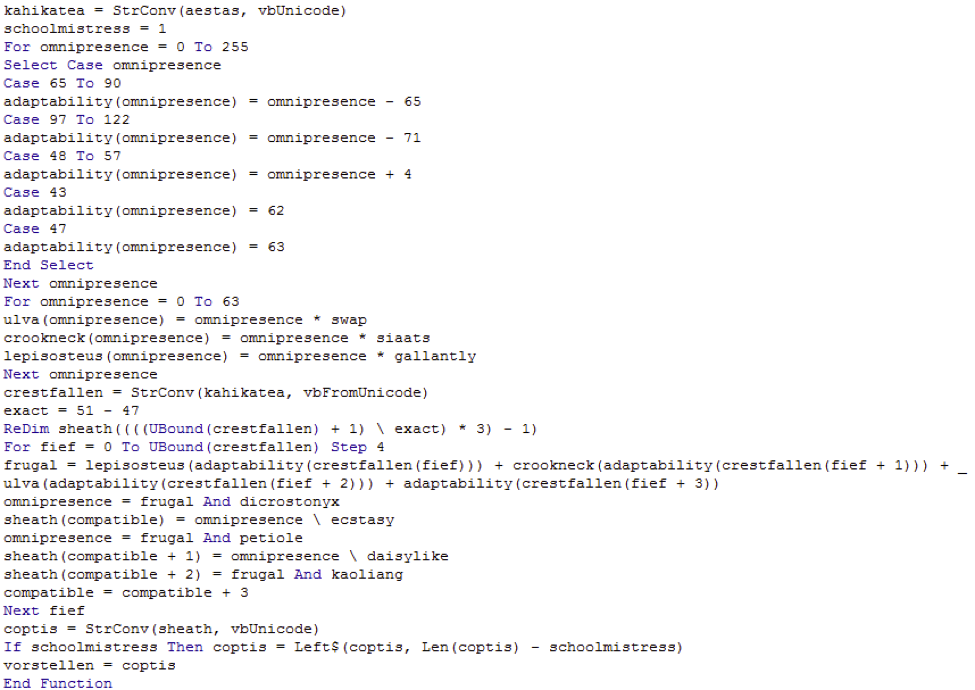
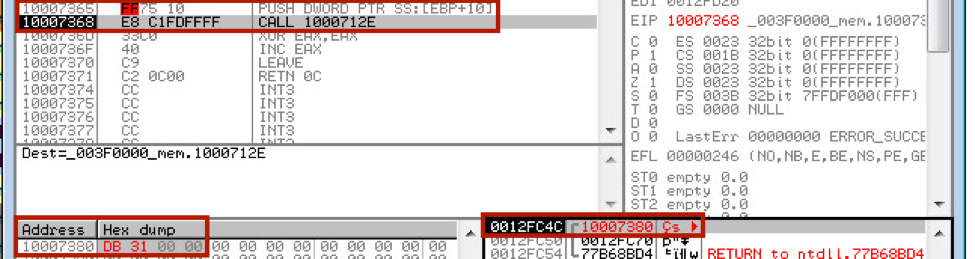
One final hurdle is required in order to get an independent executable that can be debugged. When the binary is written and jumped to, a pointer argument is passed on the stack that is later dereferenced within the binary. This is provided when the binary is unpacked from the injected Explorer.exe, however a null pointer is passed when the binary is executed independently. This argument points to a size value of 0x31DB used for a call to VirtualAlloc. We can edit the unpacked code in-line to point to a known address with this value:
Figure 12.0: In-line edits to allow independent binary execution
Analysis
I’m only going to cover the obfuscation techniques used by H1N1 in this blog. The remaining analysis of H1N1 will be posted in my next blog.
Obfuscation
Upon opening the binary in a disassembler (in this case IDA Pro) we see that imports are resolved dynamically using hashing of DLLs and exports, and a string obfuscation technique used throughout the binary.
String Obfuscation
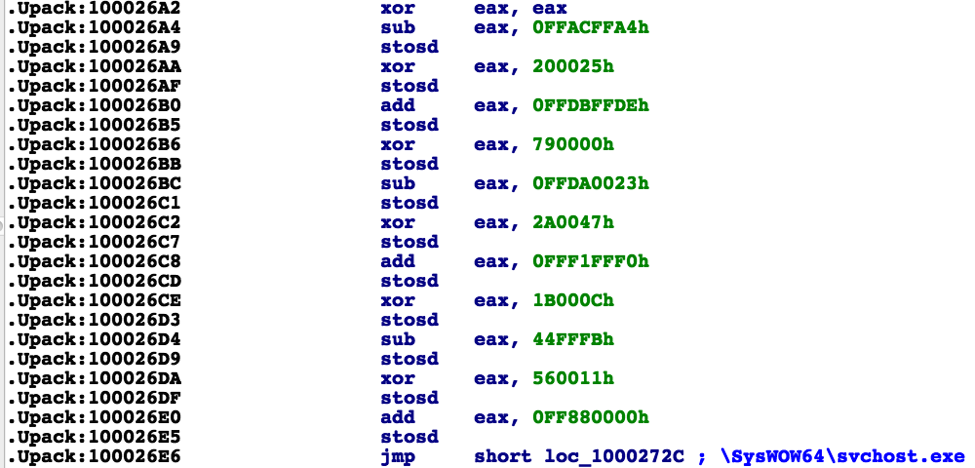
The string obfuscation technique makes use of SUB, XOR, and ADD with fixed DWORD values, and the result of each step using is stored using STOSD. The result of each operation is then used as the input (within EAX) for each subsequent step. For example:
Figure 13.0: String obfuscation technique example
The result of these operations produces the path to the WOW64 version of svchost.exe. We’ve written an IDAPython script to automatically decode these strings from a provided address starting with the XORing of EAX, performing operations on the DWORDs involved up to a certain “depth” (as strings vary in length), and adding the resulting string as a comment next to the next instruction head.4
Import Obfuscation (via Import Hashing)
Hashed imports can be resolved by hashing the library export names ourselves. Import name strings are obfuscated using the technique mentioned above, and export names from each library are hashed by walking the export table and performing a simple XOR and ROL loop over each name:
for(i = 0; i < strlen(export_name); i++) {
r = rol32(r, 7);
r ^= export_name[i];
}
We’ve replicated the hashing algorithm and all exports can be hashed from a given DLL. These hash values can be mapped within IDA using a C header file generated by our python script.5
To be continued…
In the next blog I’ll provide the analysis of H1N1’s execution. Stay tuned!
Time off to give back. We talk about it on this blog a lot, because employees love the idea of giving back. But a lot of the stories are about going big. Traveling to Honduras, volunteering for the big cats. But the great thing about this time off to give back, is that it doesn’t HAVE to be about going big. We can find ways to help in our communities every day!
Take for example Amy Cable, a Career Services Manager who I spoke with recently.
Amy has been recruiting at Cisco for roughly 10 years. She lives in Austin, TX and is an avid volunteer! She loves Cisco’s Time2Give initiative because it gives her paid time off to do the things that she already does!
“I now have the option to volunteer during the workday instead of having to bring my laptop with me! It gives me more motivation to volunteer now that I know I have the time.”
Amy’s son is on his high school’s baseball team, and as with most sports, parents are asked to help work concession stands and volunteer to plan events. Last year she put in over 100 hours to volunteer and found herself bringing her laptop to these events so that she could work while fulfilling her parental duties.
“It’s so nice to now be able to say, ‘hey, I’m going to take this time off, and Cisco’s offering to pay me to do the things that I love to do’—volunteering and giving back!”
Most recently, Amy lead a team of parents to host the baseball booster club banquet—an event that had over 190 RSVPs! She had been planning the event since August and was able to use a half-day of her Time2Give on the day of the event to set up, decorate, and oversee the event itself.
“It wasn’t a Cisco event, but it was so nice that I could take off and not have to worry about work!”
This program gives Cisco employees the freedom to choose how they give back. Amy suggests finding volunteer opportunities through your local Civic Council or just a simple Web search.
For employees, theres a Cisco Citizen Web page to help you find upcoming volunteer opportunities according to your location. You can also look up other charities to volunteer at on your own that Cisco already supports! For these organizations, Cisco will contribute up to a certain dollar amount for your volunteer time, as well as match monetary donations.
Giving back doesn’t always have to be extravagant! As long as you’re giving back to the community in a way that matters to you and others, that’s what counts.
And that’s the real beauty about Cisco’s giving back benefit. Amy was able to help her son’s booster club on a workday, and spend her time making a difference for a cause that matters to her.
Tell us in comments – how do you plan on making a difference?
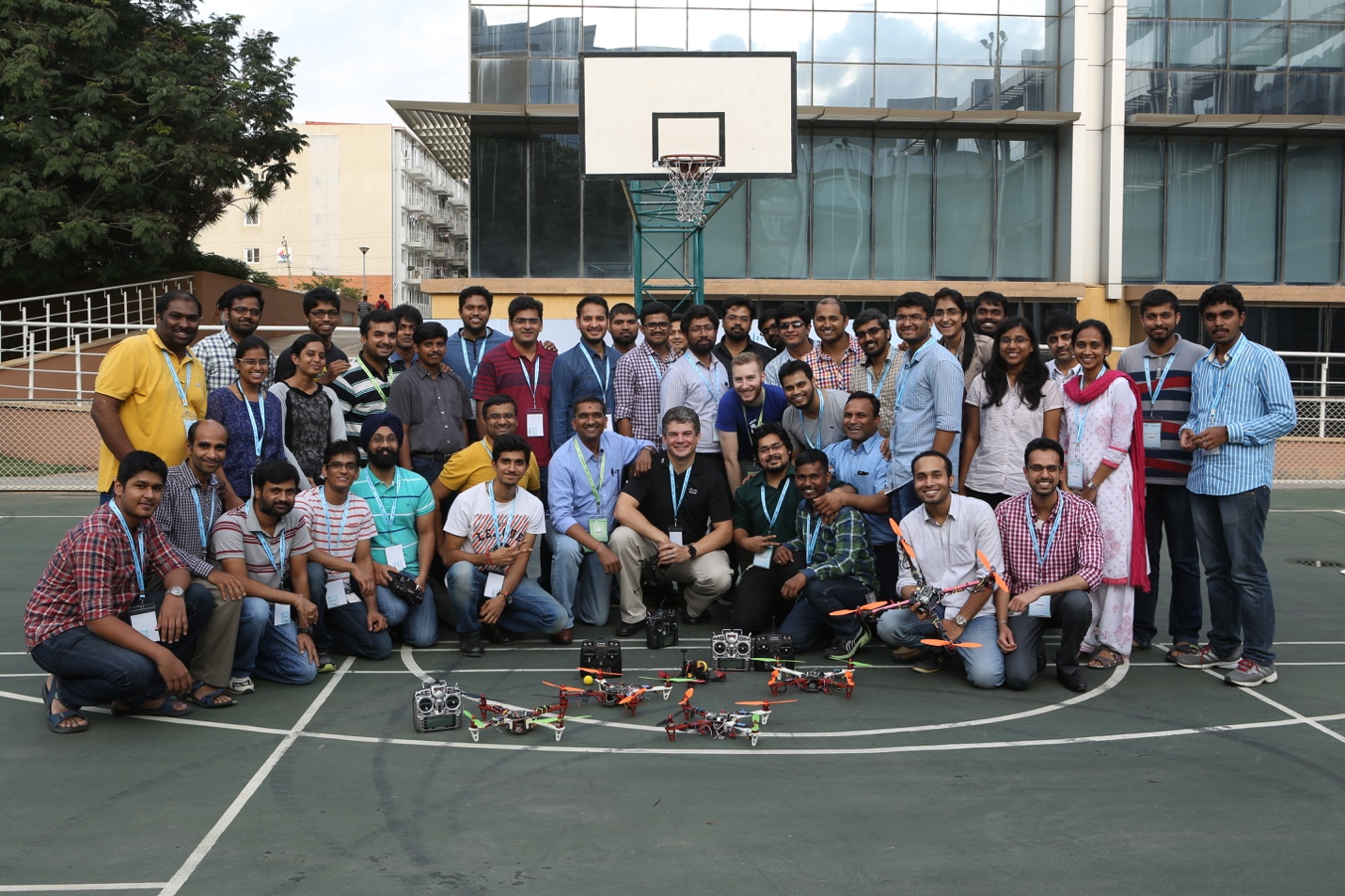
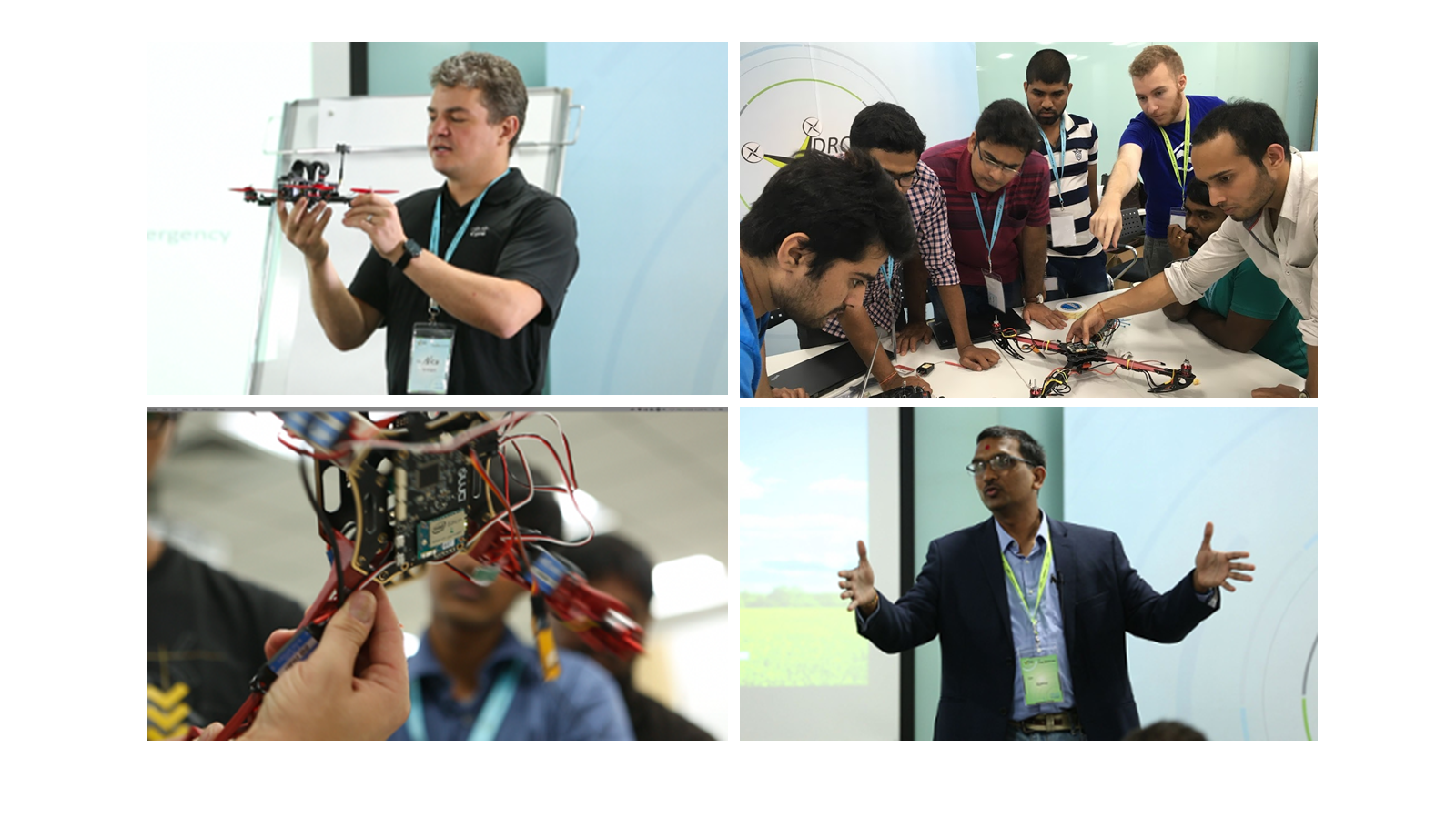
Last month, as part of Cisco’s ongoing drone innovation efforts, I helped organize Cisco’s first-ever hands-on drone workshop for employees in our Bangalore office. “Drone Stars” was jointly sponsored by the Corporate Strategic Innovations Group and thingQbator, Cisco’s internal maker lab, which supports people in trying out new ideas. We wanted to give attendees a fun and informative introduction to drones and to spark a lasting appetite for innovation.
Little did I realize the interest there would be in playing with drones! The 60 spots in the workshop were filled just 30 seconds after we sent the registration email. And the enthusiasm continued throughout the day. Chandrashekhar Raman and the entire thingQbator team tackled not only workshop logistics challenges but also fielded numerous enquiries about future such events from aspiring participants.
I began the workshop with a brief overview of the global drone ecosystem and Cisco’s drone strategy. People often wonder why Cisco is interested in drones. If drones are to become commercially viable, they will need to be networked and able to communicate with each other, with the cloud, and with ground controllers. The data they collect from sensors or cameras will need to be processed locally for intelligent real-time decisions, at the edge of the network while the drone is flying. In order to alleviate the challenges of limited bandwidth to the cloud or response time in getting computed results back in time, the next best processing place for colossal amounts of drone data would be on the ground station Fog Computing nodes. Resulting outcomes from data processing performed on Drone as well as Fog along with the raw data can later be transmitted to the cloud for further analysis. Cisco is a leader in all of these infrastructural capabilities, and we wanted the group to start thinking about the many ways we can leverage these core strengths into innovative new drone applications.
Then the real fun began, with the DIY part of the workshop. We invited two coaches to lead the hands-on activities: Nico Darrow is a drone enthusiast and Cisco sales engineer based in Atlanta, and Greg Friesmuth is co-founder and Chief Technology Officer of Dronesmith, a drone startup based in Las Vegas.
Nico and Greg led 6 teams of 10 people in building their own drones from scratch using Dronesmith Luci hardware. After about two hours people were ready to go outside to try out their DIY drones – and of course, since innovation is an iterative process, we witnessed some massive mishaps. The teams took to heart the innovation maxim of “fail fast, learn, and move on.” They went back inside, modified their drones, and went back out to try again. And sure enough, we had some successful flights by the end of the day—to enthusiastic cheers.
The following day, employees also had the opportunity to hear perspectives from three Indian drone startups – NavStik Labs, Aarav Unmanned Systems, and Skylark Drones. We are always talking to startups, looking for ways to collaborate to bring new ideas to market and support an ecosystem of disruptive technologies.
Nico and Greg also treated the entire Bangalore office to a demonstration of expert drone flying during lunch hour. And in the spirit of true innovation, when it started drizzling, the team simply wrapped a piece of plastic around the electronics and continued flying.
The Drone Stars workshop demonstrated that innovation is alive and well at Cisco. By giving employees the opportunity to build their own drones, troubleshoot challenges, and experience the exhilaration of success, we helped create a taste for innovation that could last a lifetime. And who knows where that could lead?
It’s hard to believe that we’ve had the modern smartphone – pioneered by the Apple iPhone of course – for only 9 years. Just nine years! Does anyone remember how they lived before smartphones?
Personally, I cannot live without my iPhone. I depend on it for maps and navigation. I don’t even know how I got around before smartphones. I depend on it for travel – check in, boarding passes, and flight status changes. I depend on it for news. And of course, I depend on it for work. Cisco Spark, email, and calendar are tools I need access to all the time. I would be ineffective without them.
I also depend on my iPhone for business calls. Like most folks, the smartphone has become my primary calling device. But here’s where things are interesting. With almost every other service I use, “there’s an app for that.” However, this hasn’t exactly been true for business calling. Most people just use the native dialer in their iPhones for business calling, despite the fact that Cisco – and other providers of IP communications infrastructure – have mobile apps available that connect to their infrastructure.
These mobile apps in many ways offer a superior experience for business calling. VoIP enables the usage of wideband speech codecs like Opus for a much clearer call. Video calling is possible and works great in Jabber and Cisco Spark. With Cisco Spark, you can easily move a call to another device, like a telepresence endpoint or a desk phone. These are all great experiences that you just don’t get when using the native phone app.
For the IT folks, mobile apps provide cheaper calling by using campus WiFi, and allow for lower cost international calling because they use the enterprise UC infrastructure. They’re also better for compliance and security.
Yet, despite all of these benefits, people still use the native dialer instead of VoIP apps. Why? Because the native phone app is universal – allowing them to call and be called by anyone, not just work contacts. And, it’s a core part of the phone itself. The native phone app is what gets invoked when you call someone from your recent calls list or the address book. It’s what rings on the lock-screen when you receive an incoming call. Simply put – the native phone app is how the iPhone phones.
All this changes today.
With the release of iOS 10, the partnership between Cisco and Apple comes to fruition. iOS 10 includes CallKit, a new API which allows apps like Cisco Spark to be built to take full advantage of the features in iOS 10. Ultimately, the goal of this integration is to allow users to keep using the iPhone the way they are used to using it – via the native phone app – but instead, the actual calls are handled by Cisco Spark. This delivers the best of both worlds. It brings the ease of use and continuity of habit of the native phone experience, yet, at the same time, enables the superior capabilities of VoIP apps running on the iPhone.
What exactly does this do for end users?
Before iOS 10…if you were already on a cellular call when a second incoming cellular call arrived, you’d have a choice about which call to take. However, if you were on a VoIP call when that cellular call arrived, the VoIP call would drop.With iOS 10, VoIP calls behave like a native call and you will get the same call-waiting experience as with a cellular call.
Before iOS 10…if you received an incoming cellular call while the phone was locked, you get a familiar swipe-to-answer screen to answer the call. But, if that incoming call was a VoIP call, you’d get a system notification and you’d need to unlock your phone to launch the VoIP app to answer – often too late.With iOS 10, incoming VoIP calls behave like a native call and you get the same incoming call experience as a cellular call.
Before iOS 10… if you missed a cellular call, you could visit the recents list to call back with a single tap. But, if you missed an incoming VoIP call, you’d have to separately find and launch the VoIP app and call from there.With iOS 10, the recents list includes VoIP calls just like cellular calls, allowing you to call the person over VoIP just like call backs for cellular calls.
Do you see the theme here? iOS 10 does a magic trick yet unseen on any smartphone – it unifies VoIP calling and cellular calling so that the native phone app handles both. Now you get the same experience with all of your calls, while still preserving the unique benefits the VoIP app provides.
We’re super excited about iOS 10 making its way into the hands of end users, and along with it, an updated Cisco Spark app which will be among the first apps to take advantage of this new innovation.
As if I needed another reason to be completely dependent on my iPhone :-). Now I can proudly say that Cisco Spark is also how the iPhone phones.
Learn more about the latest from Apple and Cisco, including more posts with detail on Apple iOS 10.
At Cisco, we are on a mission to help our customer embrace digital transformation—deploying new capabilities to help them make money or save money in new ways.
The network is the foundation for digital transformation, and mobility has never been a more important part of the customer and employee experience. To help our customers transform their business through mobility, we needed to help our customers put their workers’ business phones in their pockets. Since iPhone was already in most of those pockets, we partnered with Apple last year to improve the experience. Now it is a thrill to deliver what is available via iOS 10: optimized Wi-Fi connectivity, prioritization of business apps, and the integration of voice and enabling of collaboration.
Over the summer, more than 30 customers and partners — ranging from BT (UK) to KDDI (Japan) to IAG (Australia) and DT (Germany) — participated in early field trials to help us refine our solution.
The results of tests have been really exciting:
– roaming got 8x faster
– Voice over Wi-Fi and Spark calling became up to 66x more reliable
– 90 percent reduction in web browsing failures
With these improvements, your battery will last longer, you’ll say “wait a minute you’re breaking up” a lot less. Plus, this makes things simple for your IT department. And we’ve made the iPhone an extension of the desk phone by optimizing Cisco Spark for iOS 10—so not only are calling experiences now familiar and intuitive but we’re making it easier than ever for users to communicate.
You can read more about what we’ve done to optimize Wi-Fi and prioritize applications here and more on the collaboration updates here.
A year ago, Apple and Cisco announced a partnership to transform business through mobility. Lofty goal to be sure. Since then we’ve been hard at work behind the scenes. Over the summer, more than 30 customers and partners — ranging from BT (UK) and DT (Germany), to KDDI (Japan) and IAG (Australia) — participated in early field trials to help us refine our solution.
As the head of engineering for enterprise networking at Cisco, I’m especially proud of what my team has accomplished. We’ve worked together with Apple so that with iOS 10, iOS devices and Cisco network can recognize each other, similar to a handshake, which then turns on Wi-Fi optimization and prioritization for business critical apps. (The third iOS 10 feature enables Cisco Spark to provide a first-class voice and video calling experience on iOS devices. and Jonathan Rosenberg goes into details here).
So let’s get into the details. What exactly have we been up to over the last year.
Optimizing Wi-Fi connectivity:
Our challenge was to deliver intelligent and efficient roaming for iOS devices, giving apps the best connection. And that’s exactly what we’ve done. Let me explain.
Let’s say you connect your iPad to the Wi-Fi network, get on a WebEx meeting and start walking. On most networks, a mobile device will connect to the AP with the strongest signal. Then when the AP signal becomes too poor to maintain a connection, your mobile device will scan all channels (up to 25 of them!) in search of the next strongest signal for that SSID.
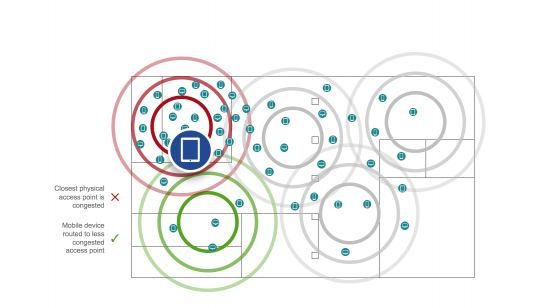
Now, as iOS devices connect to a Cisco enterprise wireless network, our AP uses 802.11k to provide a list of the top six neighboring APs. Your roaming iPhone only has to check up to six channels, saving the time and battery. Even better, as your iPhone gets to the edge of the cell, we check its location and use 802.11v to provide a short list with the next best AP, based on signal and utilization. As a result, your iPhone will connect to the less busy access point offering the best signal, maximizing the network connection speed and performance.
Finding the next AP is great, but jumping to that AP may take time if you need to negotiate security parameters. 802.11r solves that issue by providing fast security negotiation and fast roaming. The problem is that most networks do not implement 802.11r (some old devices do not react well to 802.11r, and not all networks implement new features). So we also solved that problem by enabling a sort of handshake with iOS 10 devices. We recognize each other and we turn on 802.11r selectively for your iOS 10 iPhone or iPad, even if the SSID did not explicitly enable 802.11r. That means the device will roam quickly and seamlessly from access point to access point. Apps perform faster, and VoIP calls stay on the line.
The network does the heavy lifting, configuring all these capabilities by default, making it even easier for IT to deploy advanced features.
Prioritizing business apps:
But that’s just the beginning. We’re also helping you prioritize apps that are most important to your business.
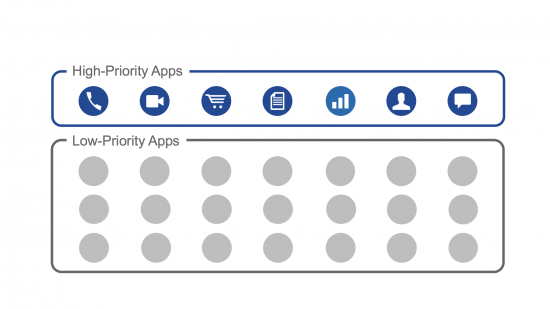
Business networks have a wide range of content on their networks and not all of it has the same importance. Typically, apps are given the same level of priority whether they’re business apps such as voice, video conferencing, messaging, and document sharing apps — or if they’re games, movies, and social media apps. As a result, apps that are important to your business end up sharing the same network resources with non-business apps, bogging down your work experience.
You can configure QoS on your infrastructure of course, and that’s great, but until now you could not control the ‘last mile’: the link from your client to the AP. Now you can. With iOS 10, we’ve improved the app experience on a Cisco network to ensure that even if the wireless network is congested with different app traffic, we can use new capabilities in iOS and the Cisco Wi-Fi network to prioritize the most critical apps and data over noncritical apps.
IT managers are empowered to simply “white list” or select the apps they want to prioritize over the regular traffic with a simple configuration profile provisioned to the iOS device. When you mark apps for priority, you put the apps that are most critical for your business in the Fast lane.
When your iOS device joins a Cisco network, the AP activates the profile on the device. Apps in the Fast lane get prioritized. Even better: the profile is SSID-specific. You can have different profiles and different white lists, depending on whether you are on the office network, at school, at home, or somewhere else. For the first time, your network QoS matches the client QoS. Same view of what apps matter most, same efficiency. So when a user is on a Spark call, their conversation does not get choppy even if there is another wireless user loading the network with a non-work related video streaming app.
All just one software update away…
Sounds cool, right? And our tests reveal that once again promise meets reality. These new environments deliver the following benefits based on the internal tests that Apple and Cisco have conducted together:
up to 8 times faster roaming
90 percent reduction in web browsing failures
up to 66 percent more reliable calling
management overhead can be reduced by 50 percent.
For many of you all of these amazing features are just one iOS update away. Wi-Fi optimization and app prioritization are already available in Cisco AireOS WLC 8.3. Cisco Meraki started supporting these features with a new MR firmware rolled out to customers in October and November.
Sound interesting? We have some other exciting innovation in the hopper. But we’d also be interested in hearing your ideas. Pop your thoughts into the comments and I’ll make sure to read them all!




















 Time off to give back. We talk about it on this blog a lot, because employees love the idea of giving back. But a lot of the stories are about going big.
 This program gives Cisco employees the freedom to choose how they give back. Amy suggests finding volunteer opportunities through your local Civic Council or just a simple Web search.
 I began the workshop with a brief overview of the global drone ecosystem and