The Missouri State Highway Patrol (MSHP) is one of the largest law enforcement agencies in the state of Missouri. In addition to being responsible for highway safety throughout the state, we often work in conjunction with other state, local, and federal agencies to respond to emergency situations, such as natural disasters or public safety incidents.
One of the issues that we ran into time and time again when working with other agencies – and an issue that occurs often in multi-agency operations across the country – was that often our communications networks weren’t interoperable. One agency used a certain kind of radio, another used a different kind. In a situation where time is of the essence, MSHP and our fellow agencies were wasting it figuring out which network to use and how to best communicate.
To fix this, we went looking for a technology solution that would help us increase interoperability and communicate quickly and easily across different agencies. To achieve this, and to generally increase the agility of our emergency response, MSHP deployed a mobile command and communications vehicle (MCCV). The MCCV can go onsite when disaster strikes and serve as a command center from which to organize multi-agency operations from the location itself. The MCCV is equipped with a suite of technology designed to make communication easier, including Cisco TelePresence technology, video surveillance, satellite communications, and IP telephony.
The vehicle also is equipped with Cisco IPICS (originally called the Cisco IP Interoperability and Collaboration System). The IPCS server software can bridge together different types of communications networks over a single, reliable, and secure IP network. That means multiple agencies can use different types of communications devices – whether different kinds of radios, computers, cell phones, or regular phones – over one network. IPICS makes it easy for agencies to communicate with each other when they respond in these emergency situations, ultimately improving the effectiveness of the operation.
We have used the MCCV with IPICS in situations such as the Joplin tornado and the protests in Ferguson, Missouri. To find out how the solution helped our agency and other law enforcement in these situations and more, check out this recent article in GCN or visit Cisco.com to see the full case study.
Most malware analysis technologies, like sandboxes, put some sort of hook or software inside their analysis environment in order to observe what is actually happening. This could be a specific DLL file, or a debugger. The problem with this approach is that malware authors are aware of it, they look for it, and they build code into their products to identify these hooks and prevent the malware from detonating if they are present. This makes it difficult to catch malware that is environment-aware, such as ransomware.
Ransomware is some of the most evasive malware out there right now. It does everything it can to evade detection. First, it looks to see if it’s operating in a virtual environment, because why bother locking up a machine that can simply be reimaged without losing anything? Second, it will check to see if it’s in a sandbox (back to looking for specific binaries or debuggers). If it finds these conditions to exist, it will not execute. But if it thinks everything is okay, it will proceed to contact the C2 servers to get the decryption key before locking up all your precious files! And if you’re mapped to a large network drive with read/write access, it’ll take that down as well.
So how do you detect ransomware? Not all malware analysis platforms are created equally. Cisco’s AMP Threat Grid platform uses an outside-looking-in approach to analysis. That means there is no instrumentation inside the analysis environment. Not only does this help us outsmart environment-aware malware, it also provides for much richer analysis with greater context. We can see:
All DNS traffic
What domains and IP’s the malware is communicating with
Artifacts that are being created
Any processes that take place during runtime
All registry activity (add, modify, delete) that takes place during runtime
Here is a video showing execution of a sample of TeslaCrypt in Threat Grid’s malware analysis environment. In this video the ransomware executes and encrypts the sandbox incredibly quickly, completely unaware that it is both inside a virtual environment and a malware analysis platform. This highlights how Threat Grid is evading detection, and able to provide rich context about what the malware is doing.
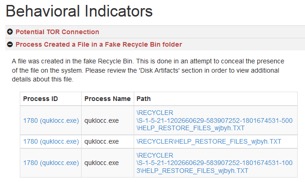
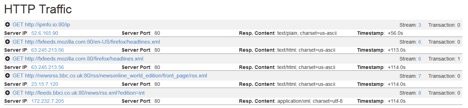
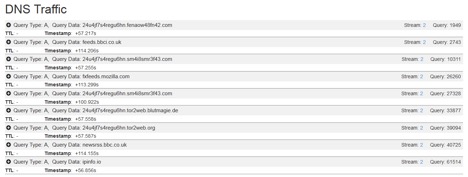
Thanks to this outside-looking in approach, you’re able to see a host of information and take action on it. For example, looking at the behavioral indicators we see:
1. Files that are being created/dropped by the malware, as shown below. Use this to search for other potentially affected systems.
2. HTTP and DNS traffic that is being generated, connections established, and proactively block those URL’s in your web proxy while also generating a list of potentially affected endpoints.
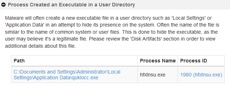
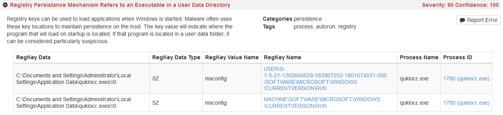
3. What registry and filesystem activity has taken place? In this case we see an executable that was created in the user’s home directory instead of the program files path is being set to persist through a reboot. Using a group policy, such as in AMP for Networks, configured to disallow applications from running from a user’s home directory is one example of a countermeasure to this type of persistence mechanism (additionally, not letting users have administrator privileges can have a substantial positive impact in combating threats such as this ransomware).
If you are evaluating security technologies and have “sandbox” as a required item, make sure it’s not simply a check box on a vendor’s features list. If it doesn’t use an outside-looking-in approach it’s likely not effective against advanced malware, especially ransomware.
To hear how others are taking advantage of AMP Threat Grid, visit www.cisco.com/go/amptg.
The heart of automation is about reducing the intricacies of deploying and managing complex services and applications. Its about translating manual processes into automated workflows that deliver significant value to your business while allowing your staff to focus on more strategic projects.
LightEdge is an enterprise-grade service provider and consulting company that is focused on the needs of small and medium-sized business with sophisticated IT requirements. They deliver a broad range of product and service offerings that include comprehensive hosted as well as on premise-based solutions. Their full-service approach delivers infrastructure, network and expertise so their customers have peace of mind. Watch this video to learn more.
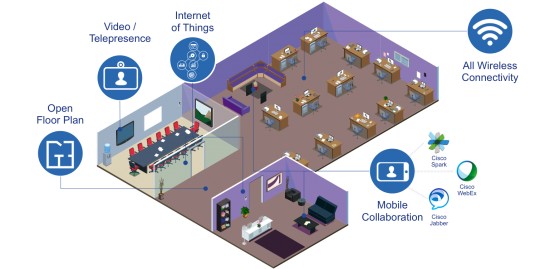
A number of organizations are looking at how they can improve the utilization of their physical environments while at the same time improving employee productivity. Many of these organizations have started to look towards open workspaces.
When it comes to open workspaces, organizations are already reaping the benefits. According to the Wall Street Journal GlaxoSmithKline is seeing that people are communicating more effectively in an open workspace. Their email traffic has gone down by 50% while at the same time decision-making has accelerated by 25%.
To truly adopt an open workspace, there is more pressure on the wireless network to not only use high-performance Wi-Fi, but more intelligent wireless connectivity. By its nature, open workspaces employ open floor plans which leave less areas for cable drops, making Wi-Fi the primary means of access. Employees are using more collaborating video from large systems—even on their mobile devices—and new, non-user devices are all increasingly attaching to the wireless network.
Here are some considerations you should think about when moving to an open workspace:
Consideration 1: Wi-Fi has to reach everywhere, not just where workstations are.
With the open workspace environment organizations are allowing employees to do their jobs anywhere. That means that any spaces from shared desks to common areas to the cafeteria can be considered a workspace . This new approach means that not only does the Wi-Fi have to have vast coverage there can be no dead spots.
In open workspaces it is also common for workers to spontaneously gather in groups, not necessarily in meeting or conference rooms, but in common areas to have impromptu discussions. These flash crowds can impact the experience of the users in a given physical footprint. To counteract the increased bandwidth usage, Wi-Fi should be able to identify the increase in devices and demand in a given area and automatically adapt to better suit the types of devices. This will improve the capacity of the network for the time the flash crowd is there. Using technologies such as Flexible Radio Assignment found in the Cisco Aironet 2800 and 3800 Access Points.
Consideration 2: Securing access to protect assets and the business
The open workspace allows employees, contractors and guests to access the network using the device of their choice. These devices add to the number of devices or “things” not associated with a users such as sensors and video cameras—basically the Internet of Things (IoT). It is becoming less manageable to physically segment this traffic using VLANs and organizations are looking to ways to secure the network using deep context, by understanding:
• Who the user is—or in some cases that there isn’t a user,
• Which device is connecting to the network
• Where the device is located
• How the device is connecting (on the wireless network, VPN or wired network)
• When the device is connecting
This allows for the best decision to be made about what the device can and cannot access based on an established context. Technology found in solutions like Cisco Identity Service Engine can build centralized polices that take into account granular context.
Some real-life organizations are already using Cisco products to reshape their work environments. Read all about it here.
Consideration 3: Can the organization use the wireless network to make the environment more efficient?
With the Wi-Fi network extending everywhere, organizations can leverage location-based analytics to better understand where employees spend the most time. From this data they can take a look at areas of the physical environment to identify low-utilized areas and adapt the physical environment to be more cost effective. Technology like Cisco Connected Mobile Experience can help provide these types of insight.
As an example based on a real world scenario: an organization was showing phenomenal employee growth and soon it would require the company to build a new facility. By examining their existing facility it was determined that there was an average occupancy rate of 77% for the 1507 employees, Using this data, it was determined that the company could support this growth by moving to an open workspace instead of building a new facility. Furthermore, many employees do not go to the current facility everyday, but still have assigned workstations.
If you estimate the cost per workstation it equates to about $7,800 per year and the estimated cost per employees is $10,000 per year. The organization calculated utilization over the last 6 months by deriving insight from the wireless network. In this example, utilization is 31% on average, 38% at peak and 51% maximum. With these numbers the organization identified an opportunity to increase occupancy to 90%, which would increase peak utilization from 38% to 75% and allow them to support an additional 3,547 employees in the current building.
The key to this finding was examining when employees come to the facility. The findings showed 46.5% of employees come in five days a week, 47.2% of employees come in one-to-three-and-a-half times a week and 6.4% come in one-to-five times a month. So 50+% of employees are in the office less than 3.5 days a week. The company calculated that they could use desk sharing with a 3:2 ratio for the mobile employees. This reduced the cost per employee from $10,000 to about $3,200 by increasing the number of employees they can support within a single location. This was more than a 66% cost reduction per capita and resulted in them avoiding $24 million in costs.
What considerations are you looking into when moving to an open workspace? Please comment and let us know.
“Digital disruption will displace nearly 4 of the top 10 incumbents by industry over the next five years.*” It’s loud and clear – the digital era has arrived, with technology playing a pivotal role in today’s business strategy thanks largely to mobility, cloud, analytics, and IoT. Organizations in this digital transformation need to evolve their networks to adapt to growing business needs, since the network connects all things digital.
According to the Global Center for Digital Business Transformation, four of the top 10 incumbents within their industries will be displaced in the next five years. There’s no question that a customer loss of any kind can have a huge revenue impact on your business, and with odds like that, it’s definitely time to pay close attention to what drives customer retention.
And while it can still be said that establishing meaningful customer relationships begins with the sales organization, today, more than ever, customer retention is driven by the ability to ensure that the product or service investments your customers have made will deliver the business outcomes they signed up for.
That’s no simple task, and it’s a big reason why Customer Success practices are becoming more and more commonplace in the world’s leading businesses. But, the truth is, just pulling together a Customer Success practice isn’t enough. Making it work and getting the most out of the initiative will require a full-on cultural revolution within your organization.
As we all know, each and every touch point throughout the customer lifecycle – from the land and adopt, to expand and renew phases – can leave a positive or a negative impression on the customer. Whether the touch point involves the buyer, the “user” or the C-suite executive within the customer organization, your entire staff must have a Customer Success mindset of helping them realize their goals, both short- and long-term.
To help make that mindset a reality at your company, take a look at these five strategies for creating a culture of customer success (developed based on insight from our friends at Gainsight):
Make your Customer Success organization a priority with VP-level leadership– The goals of your Customer Success organization should weigh as heavily as those of sales, marketing and engineering, and it deserves on-par leadership at the helm. Investments in the right people, processes and technology can help organizations yield the best Customer Success outcomes.
Promote Customer Success as an organizational value – Virtually every line of business will interact with the customer at various points in its lifecycle, and each of these encounters have the ability to influence Customer Success, for better or for worse. By ensuring that every employee understands what Customer Success means to the organization as well as to his or her individual role, your company can foster a culture centered on helping your customers succeed.
Hire with Customer Success in mind – Institutionalize the importance of Customer Success within your hiring practices. Consider the skill sets necessary to help your customers succeed when hiring across different departments, as well as the temperament, interpersonal, presentation and problem-solving skills required by all your customer-facing personnel.
Understand your customers’ desired business outcomes: Deriving value from your service or solution is the ultimate facilitator of Customer Success. Identify your logical customer segments (by vertical industry, size, use case, revenue potential, etc.) and understand the unique business outcome(s) that each customer is seeking to achieve. These metrics will help your organization create more effective content, processes and interactions designed to help customers achieve their objectives.
Hold Customer Success architects accountable: Consider Customer Success goals and quotas when developing compensation plans, particularly for any job function that is intimately tied to Customer Success management. Clearly define retention, renewal and upsell goals, and ensure that performance is evaluated against these benchmarks, either individually, as an organization or even company-wide. Reward and promote personal achievements, and take the opportunity to learn from lost opportunities and re-adjust accordingly.
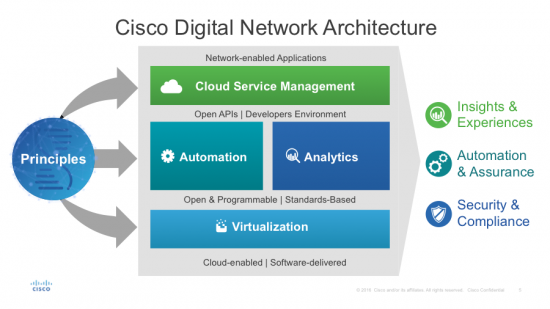
We’ve been talking about WAN automation and SD-WAN for some time. Now, with the recent introduction of the Cisco Digital Network Architecture (#CiscoDNA), it is part of a much broader and more comprehensive architecture for networking.
And we’re not the only ones saying it…for example, Dan Conde from the ESG Research company wrote in his recent blog “ESG research has shown that automation can equally benefit enterprises in areas of (a) agility, (b) meeting SLAs, and (c) achieving consistency in configuration. DNA systems such as Intelligent WAN automation helps to relieve much of the tedious work.”
“What we want for our customers is a seamless experience. No headaches, very easy, simple to use.” – Collette Navarrette, Director of Marketing, Santana Row, a Federal Realty property
Deploying location-based services doesn’t have to be expensive or complicated, as Santana Row discovered.
Santana Row, a mixed-use development property owned by Federal Realty Investment trust, is home to luxury shopping, entertainment, a residential community, and corporate offices. They strive to draw in digitally savvy consumers with a more relevant shopping, entertainment, living, and officing experiences. But it’s no different in other industries. Nearly every organization is undergoing a digital transformation thanks in part to mobility, cloud, and analytics.
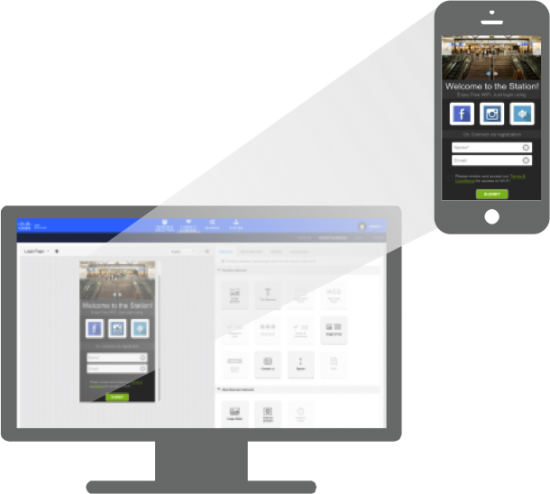
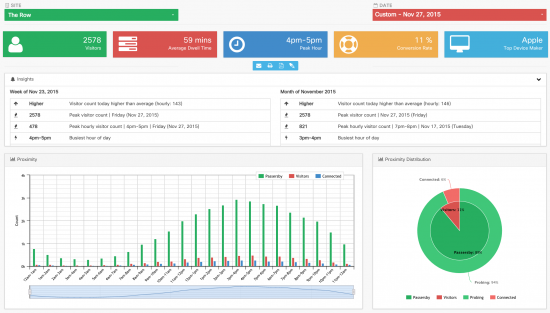
With Cisco Connected Mobile Experiences (CMX) Cloud, a SaaS-delivered location services solution, Santana Row and other public-facing organizations are now able to easily provide customers with more than free Wi-Fi access. You can build a Welcome splash page that offers customized promotions and other relevant content with CMX Cloud’s Connect tool. And CMX Cloud’s Presence Analytics allows you – whether you’re in IT, marketing, or operations – to dig into location analytics to better understand your customers and guests.
Cisco CMX Cloud is enabled by the new Digital Network Architecture, which redefines networking by moving to an open, software-driven network architecture design. What does that mean for your business and ultimately your IT? Among other benefits, you can now consume cloud services quickly and easily, to get business results faster while reducing costs and complexity in operations.
“DNA-enabled solutions such as CMX Cloud allow us to quickly deliver easy Wi-Fi, gain new business insights on customer trends and preferences, and substantially improve the way we engage visitors that were once largely anonymous to us.” – Abbas Rizvi, Senior Network Manager, Santana Row, a Federal Realty property
With CMX Cloud and the new DNA, Santana Row can gain real-time insights and deliver relevant experiences to get customers to stay a little longer and keep them coming back.
Experience CMX Cloud for yourself with a free 60-day trial, so take it for a spin to explore whether location services can help you engage your customers: http://cmxcloud.cisco.com.
Then come back and let me know what you think! You can also connect with me on Twitter @jolenetam if you want to talk #CiscoCMX Cloud.
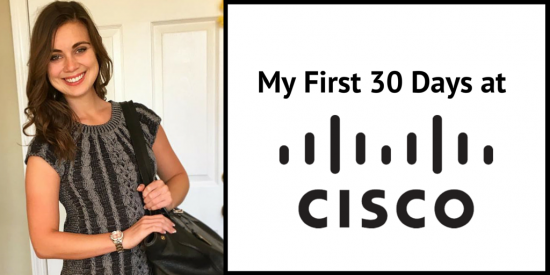
I understand that not everyone defines success in the same way, but my first 30 days at Cisco were filled with small victories. By far the most important may have been how not to be that employee that burns popcorn and stinks up the entire floor. Office Life 101!
It’s from these tiny mishaps, however, that I’ve learned that it’s important to recognize small accomplishments when first starting a job.
My journey at Cisco did not start on my hiring date. But 2 years prior to that at the NC State Career Fair. Thankfully the years of networking, researching, and interning all paid off on February 8th when I started my full time role as a Human Resources Representative on the Talent Brand team.
My first day brought me back to an excitable 5 year old version of myself. You can bet I made my roommate take a picture of me with the caption “I may be too old to take a first day of school picture, but I’m not too old to take a first day of work picture!”
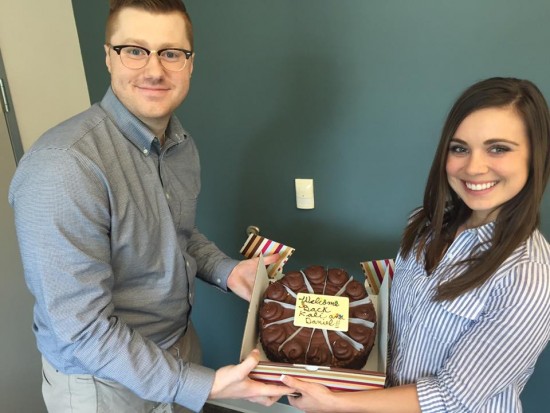
I loved coming home during the first week to brag to my friends about my team taking me out to amazing restaurants (yes plural), and how cheesecake from the Cheesecake Factory was brought into one of my meetings to welcome me back. There was even a game night that my coworkers held so we could all hang out as friends outside the office!
Another small success: not getting stressed out by the onboarding process. Of course as with any job there was technology to set up and a few hiccups to solve, but going through it with people that cared about my success made the process – dare I say – exciting!
Week 2 was when the real action began. During my first team meeting, I even had an opportunity to contribute when someone asked for my opinion on their work. To be honest it caught me off guard to the point that my face turned red – but I was extremely grateful that they valued my opinion so early on!
If there’s one thing I learned early in my first 30 days, it is that being successful at Cisco always involves an important trend: teamwork.
This clicked when I had the chance to participate in the HR Breakathon. My team was just a fraction of the hundreds of people around the world, working together to propose new ideas about our current HR systems. What a fantastic way to really grasp Cisco’s innovative culture!
Three weeks in and I was looking to take full advantage of the opportunities Cisco provided me. The most impressive benefit to me is Cisco’s Wellness Center. They have a beautiful gym that they encourage employees to use by contributing $5 a day into their health savings account…simply for exercising. Hello?! Yes Please!
Mini success for week three: getting paid to workout.
I’m also blown away by their medical benefits. Maybe I’m naïve, but I don’t know many other companies that have doctors on campus for almost all your medical needs! Again, my frugal college student mentality came out when I learned that Cisco contributes $300 into your health savings account when you go for a free health screening. I signed up immediately.
All benefits aside, the real Cisco perk is the ability to advance my career with a diverse, hardworking team. In addition to the Global Talent Brand team that I work on, my fourth week at Cisco offered a chance to meet people from other functions at New Employee Orientation or NEO as they call it. (Cisco loves acronyms!)
Spending two full days with other new hires throughout the company was a great chance to network. Although we come from different experiences and expertise, we were able to bond over our common encounters as new full time employees.
Hearing from other NEO participants and reflecting on my mistakes and accomplishments as a new employee, I realize that there is no way to come to Cisco fully prepared because everyone has a different “First 30 Day Challenge”. With that in mind, my biggest piece of advice to anyone approaching their first day at Cisco, is to keep everything in perspective.
Your first day of a job is almost always a memorable experience, good or bad! I think it’s important to perceive each week, each day, and each meeting in that way—as a completely new opportunity for it to be memorable learning experience on your path to success at Cisco.













 I loved coming home during the first week to brag to my friends about my team taking me out to amazing restaurants (yes plural), and how cheesecake from the Cheesecake Factory was brought into one of my meetings to welcome me back. There was even a game night that my coworkers held so we could all hang out as friends outside the office!