

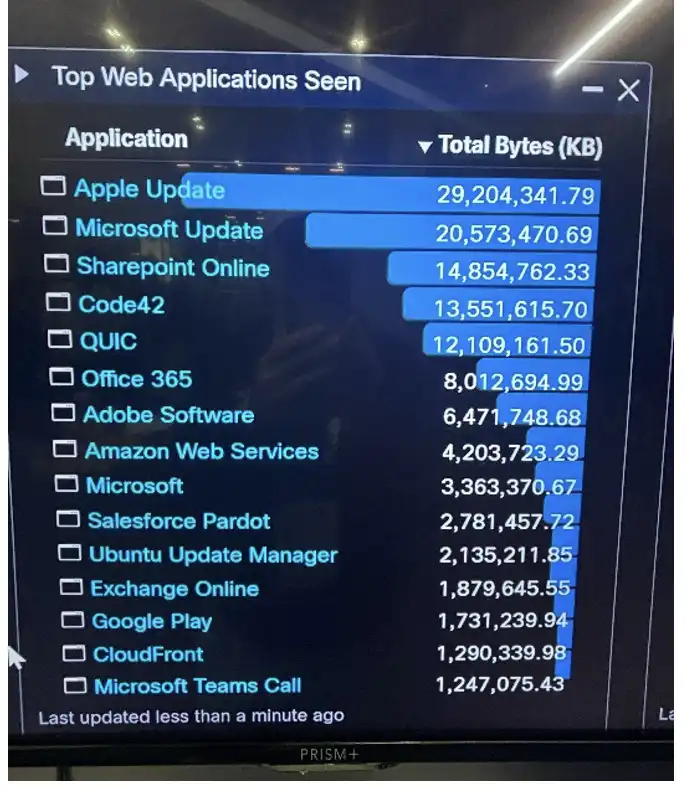
At every conference we attend to build and operate a SOC (security operations center), we notice that Apple Updates consume a significant portion of network bandwidth. Above is an image of our Firewall Management Center dashboard showing Apple Updates as the top web application seen on the network on day one of getting the network online. At this conference the WAN uplink that is provided for the entire conference is 300mb which is quite limited for the number of people in attendance. In order to conserve bandwidth, we implemented an Apple content cache server on a Mac Mini.
Digging into the documentation, it seemed that setting up a content cache server is actually quite simple provided the network is simple. Content caching has been built into Mac OS since Mojave (10.14) which was released in 2018. Navigate to System Settings then to Sharing, and enable the check box for Content Caching. I connected the Mac Mini using an ethernet cable, which is the suggested best practice from Apple, to the switch in our back of house “SOC in a Box”. I gave it a static IP in the same subnet as the conference attendee wireless space and put the switch port in the correct VLAN. Content caching shows a green dot indicating it’s successfully enabled.
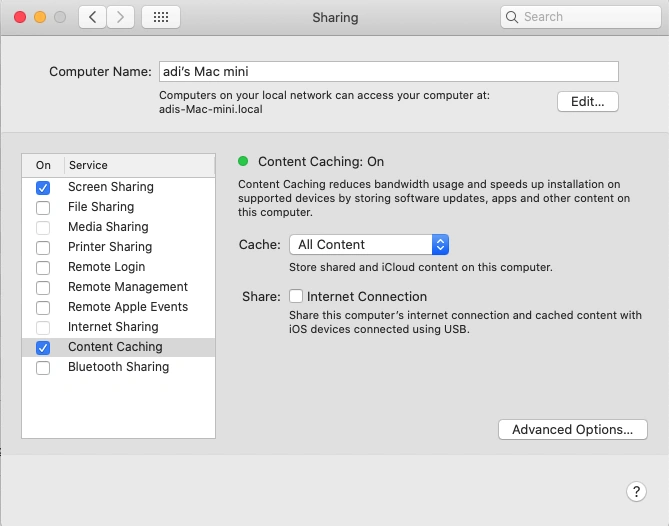
If only it were that really that simple!… Although technically the content cache server is running it wasn’t serving up much cached files. This could be for a multitude of reasons. iOS devices may need to be restarted before they can discover a content cache server. We must also keep in mind that these are not managed devices, and this is a BYOD (Bring Your Own Device) network which means there are a wide variety of devices. Every iPhone, iPad, and Mac model request a different update file from Apple so the chances of a second request of the same file could be slim.
Another reason the amount of cached content served could be so low is because it is mentioned in Apple documentation this set up works if the content cache server is in the same subnet as the clients and uses the same public IP. However, in the GovWare network we had six public IPs in a round robin PAT pool on the Firewall’s outside interface. This means that the content cache server will use its public IP to register with Apple’s servers and clients may reach out to Apple’s servers for an update with a different public IP. Apple’s servers won’t be able to cross match the discovery request of the client with the registration of the cache server which means the client won’t get directed to the content cache server.
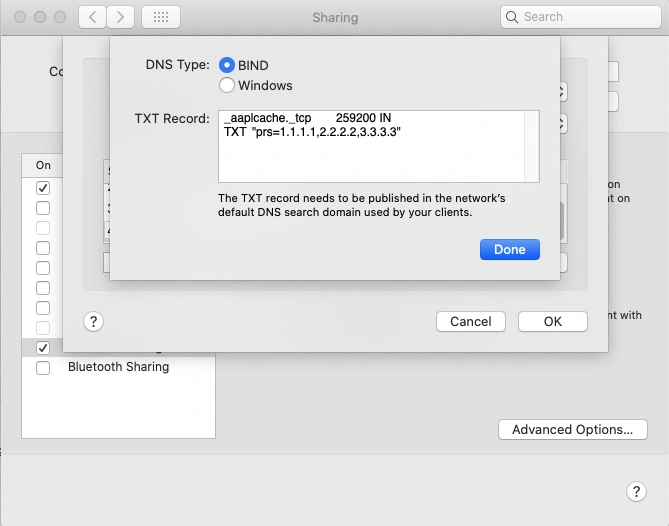
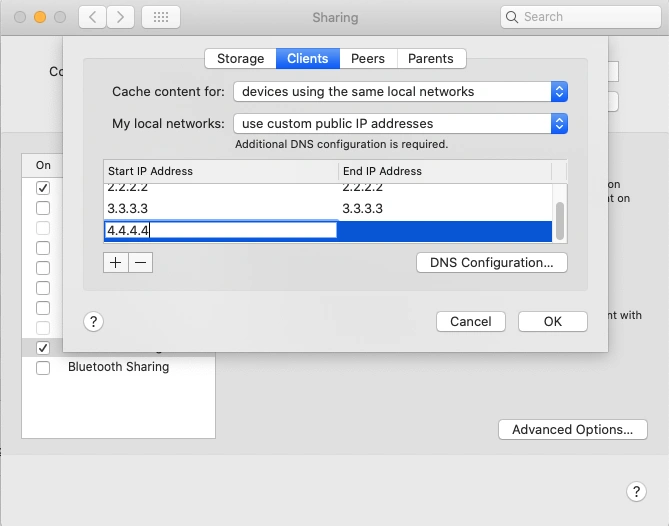
To mitigate this issue, it’s recommended to use DNS TXT records to ensure Apple can cross-match registration and discovery requests. Pressing and holding the option key while on the Sharing settings reveals the Advanced Options. Under the Clients section we can specify the public IP’s we are using. When choosing this setting a message is displayed that additional DNS configuration is required. Clicking the DNS Configuration button reveals an option to choose BIND as the DNS type and the Mac Mini auto-generates the TXT record that needs to be added to the DNS server.
To set up a DNS server I deployed two ubuntu machines on our UCS M8 server in the DMZ subnet that is behind our Firewall but that the attendee wireless network can still reach. I then installed the BIND9 DNS utility for Linux on them which was pretty straight forward. With BIND installed I began modifying the config files to meet our needs. Firstly, I modified the named.conf.options file to allow recursive DNS queries, set a forwarders list and an allow-query list. Next, I modified the named.conf.local file to add a zone for govware.local. Finally, I created a db.govware.local where I added the DNS TXT record with our six public IPs in it.
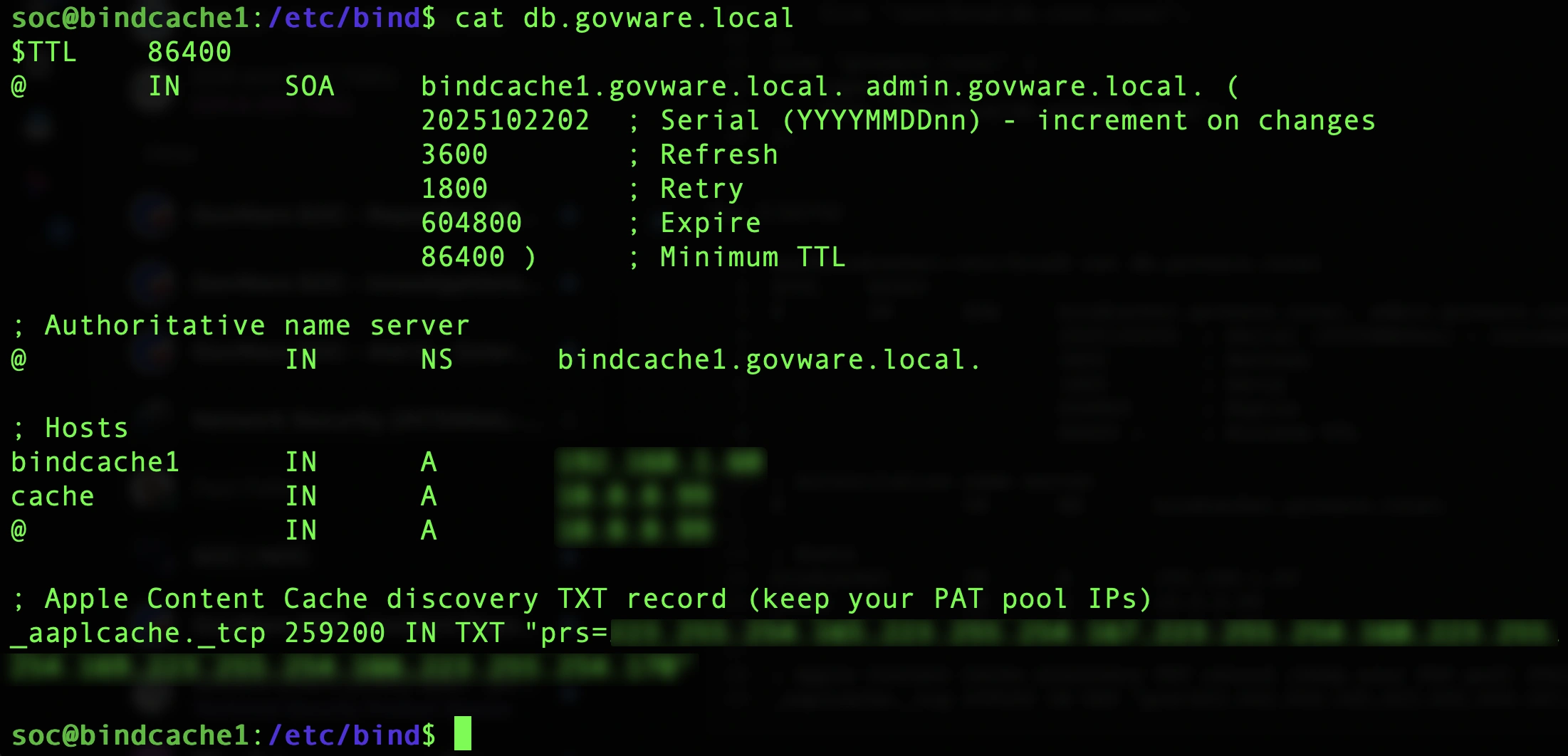
Even though the BIND DNS server is set up, we do face some additional hurdles. The attendee wireless subnet is getting DHCP from our Kea DHCP server. However, it was not configured to hand out goveware.local as the search domain in DHCP option 119. Since the network was already in production, I simply added the search domain manually to my machine for testing. The other challenge is that the DHCP server is handing out our Secure Access virtual appliance IPs for all the clients to use for DNS. This is important because this gives us internal IP visibility so we know exactly which client made which DNS requests. We don’t want to lose this visibility by putting the BIND DNS server in front of the Secure Access virtual appliances so we need to configure local DNS forwarding. This means that DNS queries for govware.local that are sent to the virtual appliances will be forwarded to the BIND DNS server and appropriate TXT record will be returned without losing client attribution for DNS requests.
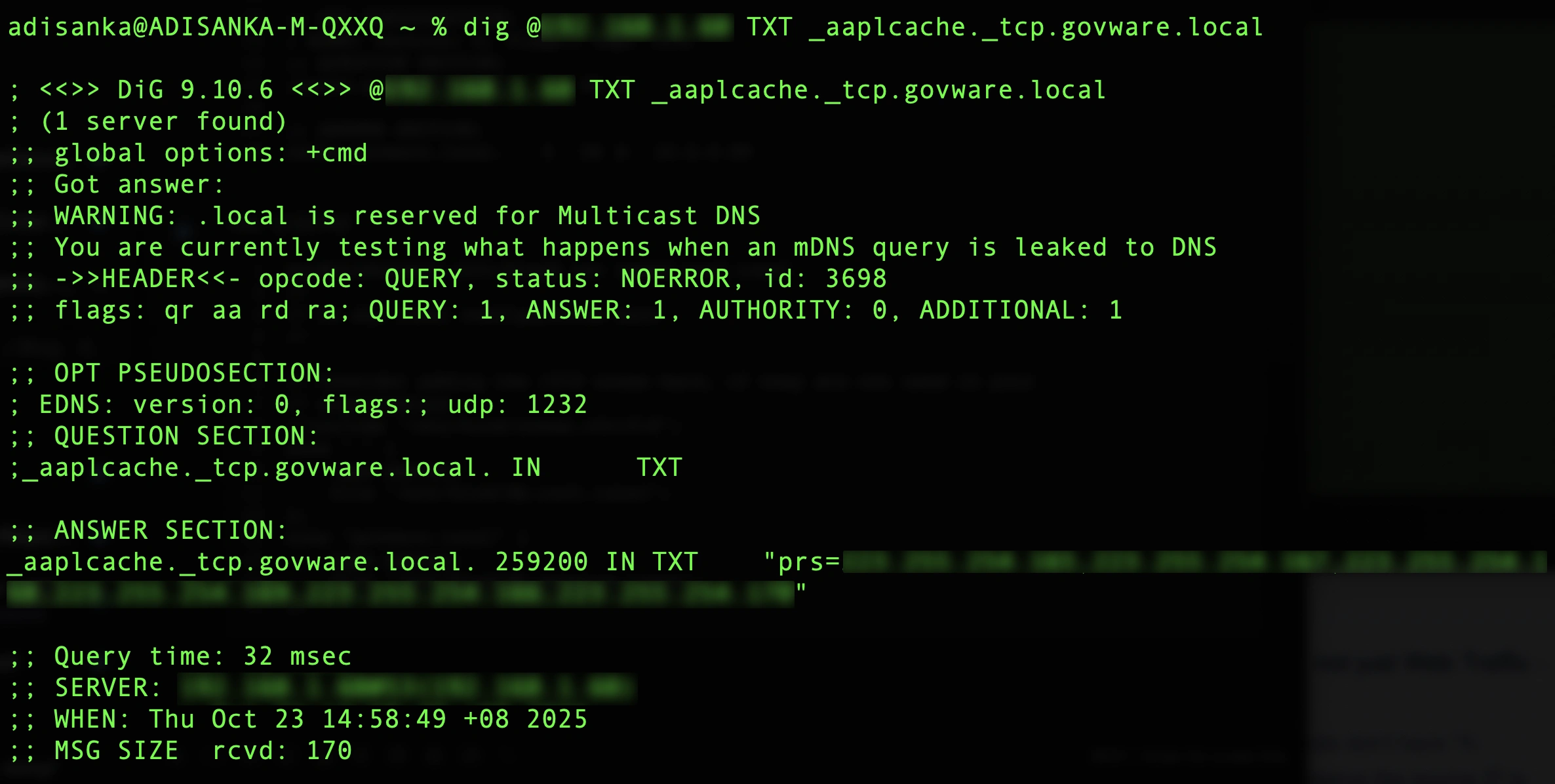
Why does this work? When an Apple device boots, or requests App Store/ iCloud / OS updates, it performs DNS queries like: TXT _aaplcache._tcp.<your-domain>. If the TXT record is missing or misconfigured Apple devices simply go out to the internet but if the proper response is provided, they will be directed to the content cache server. Here is the expected response from the BIND DNS server when testing from my machine on the attendee wireless network.
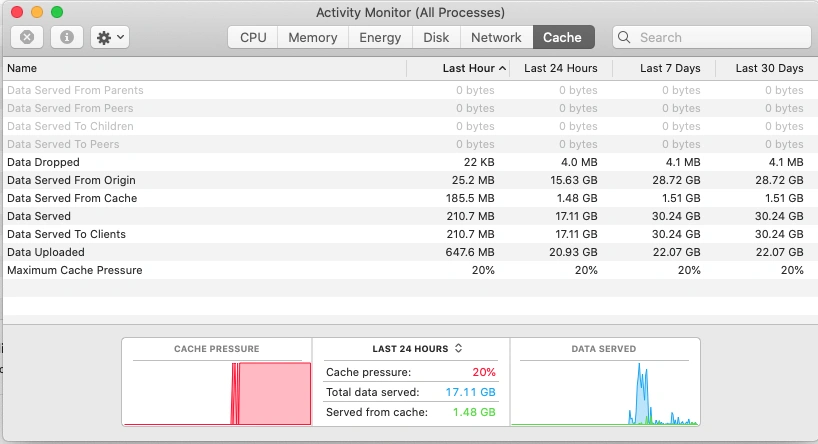
Now we fully understand how to properly implement the Apple Content Caching server, we need to dig into the metrics of how much data was cached and how much data was served from cache. The closer these numbers are to each other the more the content cache server is helping conserve network bandwidth. The metrics seen in the cache tab of activity monitor are defined in Apple documentation. In addition to activity monitor, metrics can be collected in this directory /Library/Application Support/Apple/AssetCache/Metrics. Apple provides sample code to read the Metrics.db file which constitutes an SQLite database that can be read. This .db file has more granular data since a new row is stored every 60 seconds.
While at the conference I learned the term “vibe coding” which means using a natural language AI prompt to write code. Using AI to vibe code a simple script we are able to calculate a cache hit ratio. In our case the cache hit ratio is quite low since we weren’t able to fully implement all the changes required while the network was in production.
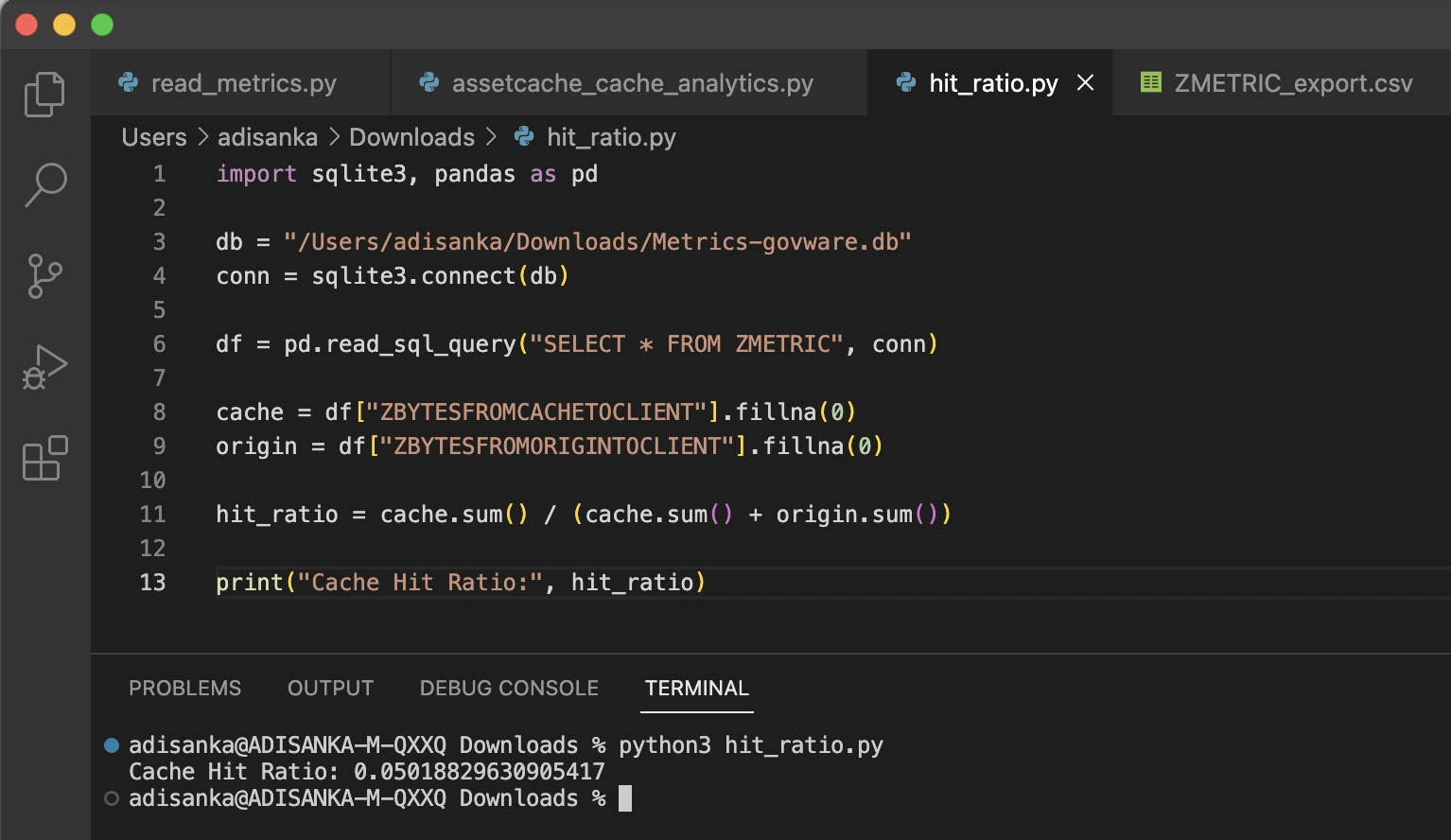
Even though our content cache didn’t reach the hit ratio we hoped for, the experience gave us a clear roadmap for future deployments. We now understand exactly how Apple devices discover cache servers, how DNS and public IP alignment impact success, and how to measure caching effectiveness with real metrics. With these lessons in hand, we can refine our approach and deliver a far more efficient bandwidth strategy at the next large-scale event. There is still a lot left to be learned about Apple content caching and more innovation to come.
Check out the other blogs by my colleagues in the GovWare SOC.
About GovWare
GovWare Conference and Exhibition is the region’s premier cyber information and connectivity platform, offering multi-channel touchpoints to drive community intel sharing, training, and strategic collaborations.
A trusted nexus for over three decades, GovWare unites policymakers, tech innovators, and end-users across Asia and beyond, driving pertinent dialogues on the latest trends and critical information flow. It empowers growth and innovation through collective insights and partnerships.
Its success lies in the trust and support from the cybersecurity and broader cyber community that it has had the privilege to serve over the years, as well as organisational partners who share the same values and mission to enrich the cyber ecosystem.
We’d love to hear what you think! Ask a question and stay connected with Cisco Security on social media.
Cisco Security Social Media