October 2017 will mark the 20-year anniversary of the world record set for the fastest automobile ever recorded – the appropriately named “ThrustSSC” that distinguished itself as the first car to ever break the sound barrier
The ThrustSSC driven by Andy Green traveled more than 763 miles per hour over one mile becoming the fastest car ever.
Almost two decades later, the Cisco Nexus 9516 Switch put up some serious performance numbers of its own such as the ability to handle more than 1 million IPv4/v6 routes and a record 10.2 million multicast routes, all the while dropping zero packets during grueling stress tests across its fully loaded 1024 50G-Ethernet ports. The test was independently conducted by Network World, and was the highest density core-switch test ever done by the publication.
OK, fine, the car thing might be a bit cooler in terms of pop culture but that doesn’t diminish the Nexus 9516 achievements in the networking world. Network World proved the record-setting capabilities of the Nexus 9516 switch in its exclusive Clear Choice Test, including putting some of these records into some eye-opening perspective from David Newman:
The results were staggering. Among the key takeaways:
Line-rate throughput for all frame sizes in tests involving IPv4, IPv6, and multicast traffic
Support for more than 1 million IPv4 and 1 million IPv6 routes
Support for 10,000 IP multicast groups and 10.2 million multicast routes. Both numbers are the highest levels ever achieved in multicast testing of a single system
Student success looks quite different today than it has in the past. As the picture of success changes, so too do the types of learning opportunities we need to create for our students.
In our new eBook, “Empowered Education,” we address how educators can empower students to achieve increasingly greater levels of success, from providing baseline connectivity and access to driving innovation and a love of learning. Check out an excerpt of the book below, and read the full book here.
The primary mission of every school is to give every student the opportunity to achieve success. This is not a provocative statement. Every teacher, administrator, policymaker, parent, and student commits to this core aspiration. Primary, secondary, or higher ed. Public or private. Non-profit or for-profit. Large or small. Urban or rural. Past, present, and future. They are all concerned, first and foremost, with helping students succeed.
However, the world is changing quickly—and the education landscape is shifting under our feet. Advancements in pedagogy, evaluation, and student engagement are improving education daily. But challenges—old and new—threaten progress and jeopardize student success. That’s why Cisco is committed to forward-thinking solutions that lay the framework for connected campuses, empowered educators, informed administrators, and students who have the tools they need for success in a new digital world.
What does student success look like in today’s world? Let’s take a look.
Cisco is a BIG workplace. With about 70,000 employees worldwide – we are the most connected company and, yet, at the same time we often don’t know who the other employee is sitting directly next to us in the office. We’re all busy, and often work in siloes – confined to our own teams and projects. This isn’t necessarily done on purpose, but it’s “just the way it is” with large companies and human beings.
Sometimes the hardest word to say is, “Hello.”
At Cisco, local grass root efforts and informal programs are encouraged when employees identify an opportunity to improve the business or culture.
This is exactly what happened when I (Derek) joined the Cisco family in 2014. I realized that many people in my local New York City office were missing that feeling of community. Employees were regularly passing one another in the halls, but they didn’t have a name to put with the faces they would so often see. After witnessing this same behavior month after month, I decided to do something about it, and launched an informal initiative called “Cisco Link.”
Community and Inclusion is, really, at the heart of Cisco – but we needed something to help us get out of our boxes and start to engage with our fellow Cisconians. Cisco Link is designed to do just that. Participation is voluntary and open to anyone that is interested. At the beginning of each month, Cisco employees that participate are randomly matched to meet 1:1 during the course of that next month. They are encouraged to grab a cup of coffee, take a walk outside to get a break from the office, or even have a quick introductory video call using our Cisco technology if meeting in person doesn’t work with often busy schedules.
The initiative was originally aimed at making new connections and fostering a sense of community in our local New York City office – however, the direct impact has proven to be much more.
Across the pond, in Spain, Cisconian Gonzalo Albaladejo was experiencing a similar situation. “I started my career at Cisco in Krakow, Poland,” Gonzalo says, “And in this office it was very easy to get to know everyone else no matter what department we were in. The office in Krakow was simply designed to make employees interact and build relationships. When I got to Cisco Spain, this same bond seemed more difficult to achieve. That’s when I attended an Inclusion & Diversity call last September, and I came across this man, Derek, who had an idea to solve the very problem I was already seeing for many months at Cisco Spain. Not only that, but he had also implemented this idea at his office in New York City and was obtaining very good results and great feedback from it!”
Gonzalo knew he had to try bringing Cisco Link to Spain.
Gonzalo continues, “I decided to set Cisco Link up in Spain and, after four rounds, we now have over 160 participants! About half of them are members of the Early in Career Network, who were automatically signed up for Cisco Link here due to its importance in their career stage. The seniors happily joined stimulated by the idea of meeting all the juniors that keep entering the company, and even our local Executive Leadership Team and managers were happy to join and encouraged other employees to participate as well! Link was and is the solution for Cisco employees in Spain!”
Gonzalo has also been hard at work expanding the Cisco Link program to our global offices. He’s automated the process of creating lists and sending individual emails to each participant, while also contacting Early Career Network leaders around the world to provide them with this automated Excel file so that they can start Link in their countries as well!
From our initial days with Cisco Link in New York City to its adoption in Spain, the stories that I hear on a monthly basis make it clear to me that this initiative is worth the effort. Our employees are meeting people that they connect with on a personal level, and who can help to support them in their current role or even help them find their next role within the company.
We are breaking down the walls of hierarchy and promoting inclusivity in the most natural way possible while enabling an easy way for our employees to expand their professional network. The Cisco Link initiative is now being adopted at Cisco offices around the world aimed at tackling the same opportunity that employees are seeing in their local communities.
Office spaces have the potential to be more than just a place you go. It can be a hub to drive people together and makes lasting connections. The next time you’re in the office and see an unfamiliar face in the break room or walking the hall – smile and say, “Hello.”
You never know where a new connection can take you.
Just before Cisco Live US, Cisco unveiled “The Network. Intuitive.” and with it is “Introducing an entirely new era of networking.” If you’re like me, you are likely intrigued, and are asking yourself.. “How do I get started?”.
A great first place to start is reading Jeff McLaughlin’s recent blog post “The New Network – It’s for Developers!” In it, Jeff talks about four features of IOS XE that provide developers new capabilities and options for working with IOS XE. They are
Zero Touch Provisioning
NETCONF/YANG
On-Box Python
Application Hosting
With these new features, one might say “the sky is the limit” or “you are only limited by your imagination”. While true, it can be a bit daunting for an experienced network engineer new to network programmability. I’ve been working in the “Software Defined Networking” space for a while now and I still find myself needing a strategy to learn the new features that are being so rapidly developed and provided today. So today I’m going to show how you can ease into new technologies using the safety and mastery of CLI. Let’s look at how I approached learning about and leveraging one of these new features, NETCONF/YANG. If you are unfamiliar with NETCONF/YANG, let me provide a quick explanation.
NETCONF (Network Configuration Protocol) is a standard transport protocol for communicating with network devices, retrieving operational data and both setting and reading configuration data. Operational data would include interface statistics, memory utilization, errors, and so on. The configuration data refers to how particular interfaces, routing protocols, and other features are enabled and provisioned. NETCONF purely defines how to communicate with the devices, but doesn’t address the what related to the data that is sent and received.
YANG (Yet Another Next Generation) is the standard data modeling language for NETCONF and is used to describe the what in this new method of network configuration. NETCONF/YANG are often referred to as “Model Driven Programmability” and YANG refers to the “models” that are “driving programmability”. The networking industry is using YANG to develop well defined data models to describe the networking concepts in a way that is reliable and consistent. For example, using the ietf-interfaces YANG model, the industry now has a standard way to describe everything about a network interface, and everyone who understands this model can communicate with confidence across hardware and software platforms as well as across vendors.
Used together, NETCONF and YANG provide both the what (YANG) and how (NETCONF) so you can programmatically interface with the network.
Training wheels or a security blanket … Let’s Start out with CLI
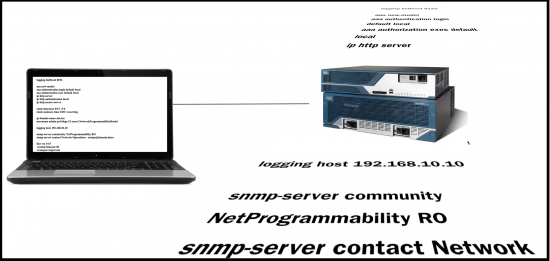
So, newly informed about the fact that there is a new standard for configuring our network kit, I want to dive in and test it out… My general strategy when approached with this challenge is to start at the end and work backwards. What I mean by that is rather than taking a blank configuration and try to stumble through how to use NETCONF/YANG to implement the configuration, I will configure my device the same way I normally do (CLI) and then see how I can read back that known configuration using the new tool.
Figure 1 – Configuring as usual
I’d like to develop a Python script that will configure the standard device configuration parameters I deploy to every switch and router in my network using NETCONF and YANG. In this case, that includes:
domain-name information
time zone
AAA configuration
SNMP communities
Syslog servers
Line config
NTP Servers
Rather than completely try to blindly stumble around the new network APIs, it would be good to get a little bit of training to kick start me in the right direction, and it so happens that up on DevNet Learning Labs, there is a learning module on Standard Device Interfaces that will give me an introduction to using NETCONF and YANG, as well as some sample code I can use as a starting point.
It’s one of several modules in DevNet’s Network Programmability for Network Engineers Learning Track. This learning track includes 10 different labs – taking you from programming foundation elements where you’ll learn the basics of how to use REST APIs, to understanding device level interfaces (e.g., NETCONF/YANG), and how to develop with network controllers like APIC-EM.
By investing an hour into these labs I’m in good shape to get started.
The next hurdle to jump is what gear to use to do my testing and coding. Well, it just so happens that same Learning Lab that provided me the sample code and some knowledge, also introduced me to the DevNet Sandbox where I can spin up and get access to my very own IOS XE Sandbox for learning about and testing my NETCONF/YANG code.
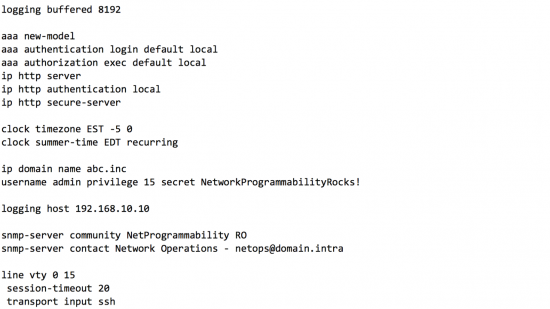
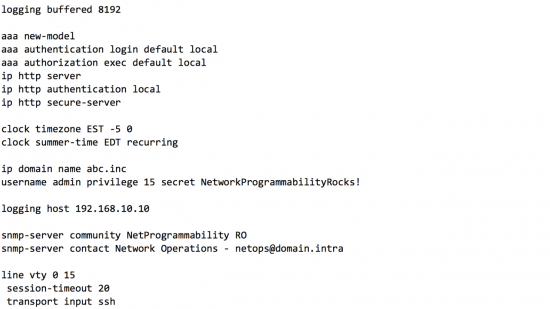
The premise behind this exercise is that I’m going to go ahead and configure my device using the CLI to start out. So here is the configuration that I manually enter into my newly reserved IOS XE device.
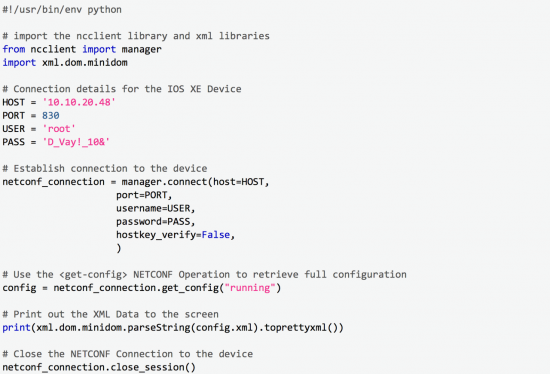
Now, with my device configured, I use the sample code and knowledge from the Learning Labs to from my device and see what I get back. Here is the bit of code that will connect to the device using NETCONF and return back the full configuration as modeled by YANG.
I’ve created this script and named it “get_full_configuration.py” on my workstation. I run it with this command:
python get_full_configuration.py
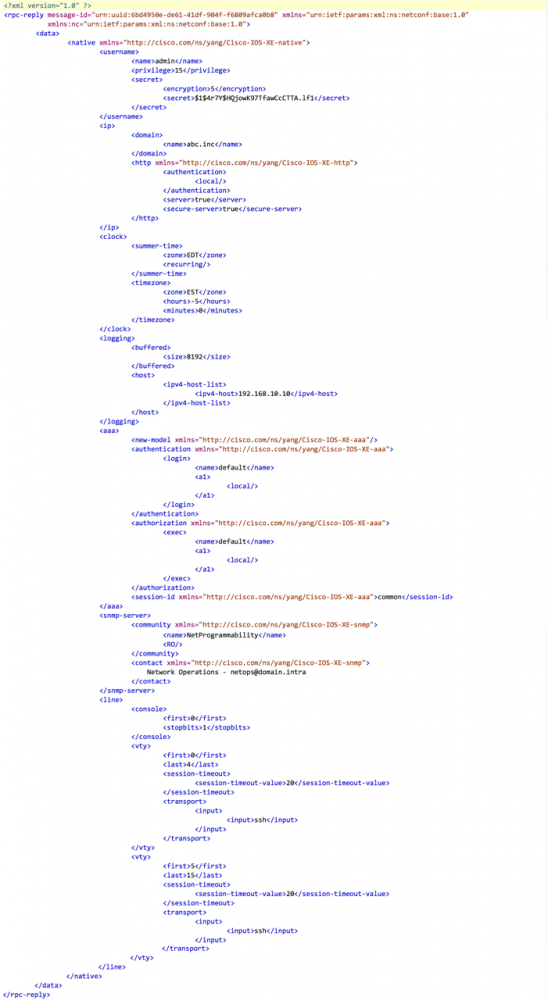
When I run this script I get the following output in my terminal window.
(The output in this post has been abridged to include the relevant configuration parameters from the example. The full output includes the full configuration and can be viewed by replicating the example on your own)
Okay… now what do I do?
Alright, I’ve connected to my device and printed out a lot of information, but what next? The first step is to just read through it and become comfortable with the XML data format that is used by NETCONF. At this stage, there are really just a few key parts of the format that are important to understand.
XML is a tag based format like HTML, so you’ll always find opening <tags> and closing <tags> surrounding elements
If there is no data in an element, the opening and closing tags can be combined like this: <tag/>
NETCONF leverages RPCs or Remote Procedure Calls, and this is evident because the <data> is enclosed in an <rpc-reply>
The YANG data (the what) exists between the <data> and </data> tags
Within a <tag> references to xmlns (XML Namespace) indicate the YANG data model that is being used
For example: <native xmlns=”http://cisco.com/ns/yang/Cisco-IOS-XE-native”>
Though the data model listed looks like a web url, it is not a navigable path. Find details on this YANG Data Model on GitHub
When I review the outputted data, I can find all the configuration standards I manually configured represented in the XML format. If I had tried to construct this XML representation from scratch, I expect I would have struggled quite a bit, but by reading the configuration from the IOS XE device and printing it out, I now have generated a known good NETCONF configuration for my standards. With that I can build a script that would read that data from a file and push the configuration via NETCONF to my device. Let’s look at that next.
The Configuration Script
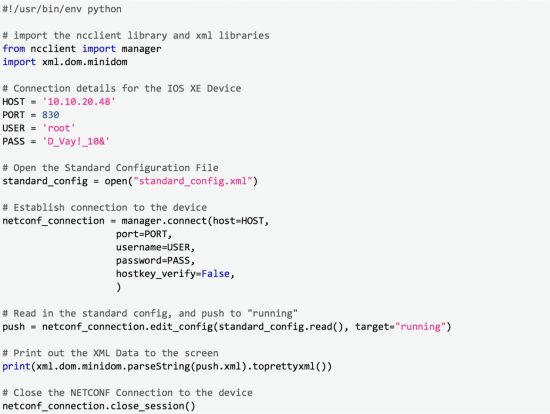
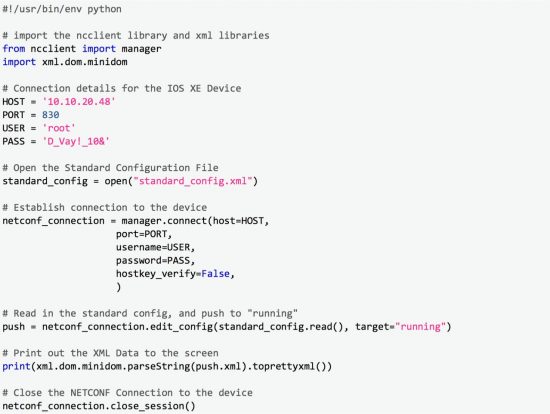
The script to do the configuration is very similar to the first script, with the difference being that we are now using edit_config instead of get_config.
In addition, you should notice that we are referencing an external file called “standard_config.xml”. This file is the YANG payload from the previous script surrounded by tags, which are used in the NETCONF standard to indicate configuration data being sent to a device for implementation.
By George … we’ve done it!
And just like that we’ve completed the task we set out to complete. We have built a Python script that we can use to implement our standard network configuration using NETCONF and YANG, and we’ve done it with only a dozen lines of functional code (comments and line wraps don’t count :-). Whats nice in this example is that we didn’t need a full understanding of the new protocols of NETCONF and YANG. Rather we are leveraging our existing knowledge base, and some basic crawl, walk, run learning methodology that has served us well throughout our career.
If you’d like to see all the code used in this exercise, you can find it on my GitHub account
We’d love to hear what you think. Ask a question or leave a comment below.
And stay connected with Cisco DevNet on social!
Just before Cisco Live US, Cisco unveiled “The Network. Intuitive.” and with it is “Introducing an entirely new era of networking.” If you’re like me, you are likely intrigued, and are asking yourself.. “How do I get started?”.
A great first place to start is reading Jeff McLaughlin’s recent blog post “The New Network – It’s for Developers!” In it, Jeff talks about four features of IOS XE that provide developers new capabilities and options for working with IOS XE. They are
Zero Touch Provisioning
NETCONF/YANG
On-Box Python
Application Hosting
With these new features, one might say “the sky is the limit” or “you are only limited by your imagination”. While true, it can be a bit daunting for an experienced network engineer new to network programmability. I’ve been working in the “Software Defined Networking” space for a while now and I still find myself needing a strategy to learn the new features that are being so rapidly developed and provided today. So today I’m going to show how you can ease into new technologies using the safety and mastery of CLI. Let’s look at how I approached learning about and leveraging one of these new features, NETCONF/YANG. If you are unfamiliar with NETCONF/YANG, let me provide a quick explanation.
NETCONF (Network Configuration Protocol) is a standard transport protocol for communicating with network devices, retrieving operational data and both setting and reading configuration data. Operational data would include interface statistics, memory utilization, errors, and so on. The configuration data refers to how particular interfaces, routing protocols, and other features are enabled and provisioned. NETCONF purely defines how to communicate with the devices, but doesn’t address the what related to the data that is sent and received.
YANG (Yet Another Next Generation) is the standard data modeling language for NETCONF and is used to describe the what in this new method of network configuration. NETCONF/YANG are often referred to as “Model Driven Programmability” and YANG refers to the “models” that are “driving programmability”. The networking industry is using YANG to develop well defined data models to describe the networking concepts in a way that is reliable and consistent. For example, using the ietf-interfaces YANG model, the industry now has a standard way to describe everything about a network interface, and everyone who understands this model can communicate with confidence across hardware and software platforms as well as across vendors.
Used together, NETCONF and YANG provide both the what (YANG) and how (NETCONF) so you can programmatically interface with the network.
Training wheels or a security blanket … Let’s Start out with CLI
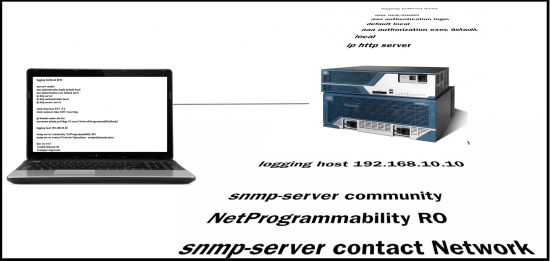
So, newly informed about the fact that there is a new standard for configuring our network kit, I want to dive in and test it out… My general strategy when approached with this challenge is to start at the end and work backwards. What I mean by that is rather than taking a blank configuration and try to stumble through how to use NETCONF/YANG to implement the configuration, I will configure my device the same way I normally do (CLI) and then see how I can read back that known configuration using the new tool.
Figure 1 – Configuring as usual
I’d like to develop a Python script that will configure the standard device configuration parameters I deploy to every switch and router in my network using NETCONF and YANG. In this case, that includes:
domain-name information
time zone
AAA configuration
SNMP communities
Syslog servers
Line config
NTP Servers
Rather than completely try to blindly stumble around the new network APIs, it would be good to get a little bit of training to kick start me in the right direction, and it so happens that up on DevNet Learning Labs, there is a learning module on Standard Device Interfaces that will give me an introduction to using NETCONF and YANG, as well as some sample code I can use as a starting point.
It’s one of several modules in DevNet’s Network Programmability for Network Engineers Learning Track. This learning track includes 10 different labs – taking you from programming foundation elements where you’ll learn the basics of how to use REST APIs, to understanding device level interfaces (e.g., NETCONF/YANG), and how to develop with network controllers like APIC-EM.
By investing an hour into these labs I’m in good shape to get started.
The next hurdle to jump is what gear to use to do my testing and coding. Well, it just so happens that same Learning Lab that provided me the sample code and some knowledge, also introduced me to the DevNet Sandbox where I can spin up and get access to my very own IOS XE Sandbox for learning about and testing my NETCONF/YANG code.
The premise behind this exercise is that I’m going to go ahead and configure my device using the CLI to start out. So here is the configuration that I manually enter into my newly reserved IOS XE device.
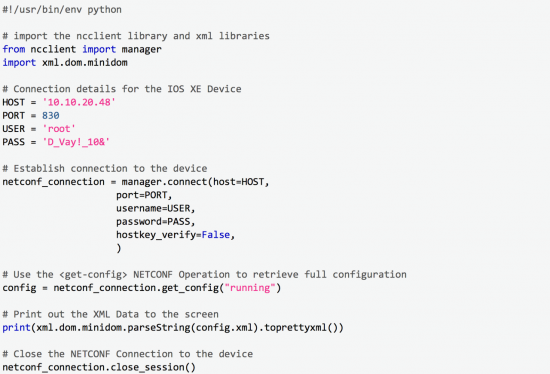
Now, with my device configured, I use the sample code and knowledge from the Learning Labs to from my device and see what I get back. Here is the bit of code that will connect to the device using NETCONF and return back the full configuration as modeled by YANG.
I’ve created this script and named it “get_full_configuration.py” on my workstation. I run it with this command:
python get_full_configuration.py
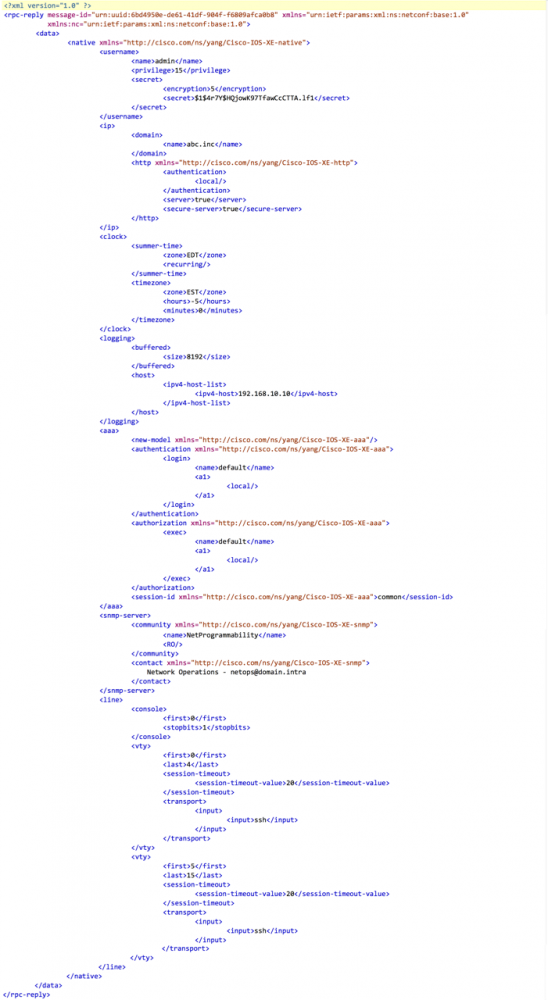
When I run this script I get the following output in my terminal window.
(The output in this post has been abridged to include the relevant configuration parameters from the example. The full output includes the full configuration and can be viewed by replicating the example on your own)
Okay… now what do I do?
Alright, I’ve connected to my device and printed out a lot of information, but what next? The first step is to just read through it and become comfortable with the XML data format that is used by NETCONF. At this stage, there are really just a few key parts of the format that are important to understand.
XML is a tag based format like HTML, so you’ll always find opening <tags> and closing <tags> surrounding elements
If there is no data in an element, the opening and closing tags can be combined like this: <tag/>
NETCONF leverages RPCs or Remote Procedure Calls, and this is evident because the <data> is enclosed in an <rpc-reply>
The YANG data (the what) exists between the <data> and </data> tags
Within a <tag> references to xmlns (XML Namespace) indicate the YANG data model that is being used
For example: <native xmlns=”http://cisco.com/ns/yang/Cisco-IOS-XE-native”>
Though the data model listed looks like a web url, it is not a navigable path. Find details on this YANG Data Model on GitHub
When I review the outputted data, I can find all the configuration standards I manually configured represented in the XML format. If I had tried to construct this XML representation from scratch, I expect I would have struggled quite a bit, but by reading the configuration from the IOS XE device and printing it out, I now have generated a known good NETCONF configuration for my standards. With that I can build a script that would read that data from a file and push the configuration via NETCONF to my device. Let’s look at that next.
The Configuration Script
The script to do the configuration is very similar to the first script, with the difference being that we are now using edit_config instead of get_config.
In addition, you should notice that we are referencing an external file called “standard_config.xml”. This file is the YANG payload from the previous script surrounded by tags, which are used in the NETCONF standard to indicate configuration data being sent to a device for implementation.
By George … we’ve done it!
And just like that we’ve completed the task we set out to complete. We have built a Python script that we can use to implement our standard network configuration using NETCONF and YANG, and we’ve done it with only a dozen lines of functional code (comments and line wraps don’t count :-). Whats nice in this example is that we didn’t need a full understanding of the new protocols of NETCONF and YANG. Rather we are leveraging our existing knowledge base, and some basic crawl, walk, run learning methodology that has served us well throughout our career.
If you’d like to see all the code used in this exercise, you can find it on my GitHub account
We’d love to hear what you think. Ask a question or leave a comment below.
And stay connected with Cisco DevNet on social!
JavaScript is frequently used by malware authors to execute malicious code on Windows systems because it is powerful, natively available and rarely disabled. Our previous article on .NET analysis generated much interest relating to how to use WinDBG to analyse .js files. In this post we extend our description of using WinDBG to describe the analysis of JavaScript using the 64 bit version of wscript.exe. It is strongly recommended to read our previous article first.
I was recently introduced to Dave McGrew – Cisco’s version of Yoda!
This unassuming, humble engineer looks like a geography teacher and is the kind of guy who creates encryption algorithms in his spare time as a hobby – just like we might do crosswords (OK, I don’t do crosswords but you get my point).
However, Dave is a Cisco Fellow – to put this in perspective Cisco has over 20,000 world-class engineers but it only has about 15 Fellows – these guys are the elite. And Dave has just invented something totally new.
So why should you be interested in Dave and what he and his wider team have done? Well, Dave has just invented a truly ground breaking product – Encrypted Traffic Analytics (ETA). OK, so you may be losing interest already but stay with it.
https://youtu.be/KL8SxtZLeqc
What is Encrypted Traffic Analytics?
In a connected world, businesses are trying to find the balance between user privacy and security. More and more network traffic is encrypted as people and businesses try to keep their data private and secure as it travels through the network. However, this creates a problem for Cyber Security teams who are trying to keep their Banks and Insurance companies safe from attack because increasingly cyber criminals are placing malware into encrypted traffic. This means the security team has to either reject encrypted traffic for further investigation, slowing down business, or allow it through and increase the risk of a breach.
Previously this was an unsolvable problem – not now!
With Encrypted Traffic Analytics, your network managers and security teams can analyze encrypted traffic to see if it contains malware without decryption – the data stays encrypted. Using Cisco threat intelligence capabilities and machine learning this solution learns what malware to look out for and know how to detect it.
To explain it in non-techie language…
Think of data packets like your suitcases when you fly around the world. If you don’t want anyone else to see in your case, you lock it with a big padlock. However, airline security needs to know what is in the case to keep everyone safe but doesn’t want to open every locked case. So it uses scanners to check that the suitcase doesn’t contain guns, liquids etc. without having to open the case. ETA does the same with encrypted network traffic – analyzes it for malware without opening the packet.
In banking and insurance, this is a major step forward. Customers and third parties are increasingly interacting with us using encrypted messages – especially as everyone is worried about privacy and data security. Now customers and third parties can continue to act in this way while the organization can ensure that this increased privacy and security does not come at the expense of their network integrity or cyber security – no hidden malware sneaking in under the cover of encrypted traffic.
This is very relevant in Financial Services as we look after our customers’ most treasured assets – their data and their digital money. A breach of a bank or insurance company is a serious breach of trust – a valuable commodity in financial services.
Why should you care if you don’t work in IT?
Now, this encrypted data traffic can travel more quickly and more safely which improves customer service while keeping our organizations and customers safe. It creates a good balance between user privacy and cyber security.
To learn more about this groundbreaking development, please view this white paper.
Formula 1 racing is a highly controlled, technical masterpiece. It demands expert drivers, finely-tuned race cars, top-notch pit crews and world class tracks to draw 300 million viewers per race.
But notice: The drivers drive the same car in every race, at every venue. They don’t build a new car for each track. IT applications should be similar. You should be able to build your application once and use it wherever you want, whether that’s in a world-wide public cloud infrastructure, a private data center or even a small tactical deployment.
In the world of DevOps, agility is king. We’re at the forefront of an exciting time where organizations can quickly move development into production and use actual feedback from users to refine what’s been deployed. Now, the reality of this massive agility can strain traditional business processes. As the owners of the information technology assets, IT leaders must figure out how to deliver the agility while maintaining cost, policy and security. That is not an easy task when most developers, given the chance, will spend what they want to quickly get their idea to market.
What IT leaders have to deliver is the ability to cap costs, maintain policy and increase security in the new hybrid cloud environment. After all, once an application or database becomes compliant with federal, financial or other strict guidelines, there’s a cost and risk trade to changing it. However, performance, cost or intellectual property concerns may lend to moving the application from one data center to another, or from a private data center to a public cloud. Hence the desire to build once and deliver anywhere.
Tools from Cisco help you get the most from a hybrid cloud.
With tools from Cisco, IT leaders can offer developers that exact ability. Tools like Enterprise Cloud Center and Cisco’s On-Prem Hybrid Cloud provide that ultimate agility. Now, your developers can bring their ideas to life and business and policy leaders can determine where those applications live. After all, the data sits somewhere.
You might, for example, decide that a customer-facing application should consume the most financial resources and an internal application should be a lower priority. With Cisco’s tools, you can set budgets and cost parameters that allow your teams to see the cost of deploying in an internal data center or in a public cloud. Let them decide where to go based on their budget and performance limitations.
Oh, and if you want to be able to deliver that application in the back of a truck or in a small data center, Cisco’s on-premise clouds go from small tactical deployments up to full data centers. So now, you can meet all your business requirements with a single build. You will also get your internal teams accustomed to cloud like consumption models since we can deliver the on-premise solution in that manner.
So, stop worrying about the new speed of DevOps! With Cisco, you’ll get there fast and you’ll be enjoying all the benefits even faster.
Imagine your hospital or clinic. Clinicians seamlessly engage with patients and care teams on mobile devices in a highly secure environment, expanding their reach within the facility and around the world. Wi-Fi and sensors securely connect the hospital to a cohesive data infrastructure that dramatically improves operational efficiency and workflows.
That is the bright future of healthcare. Are you on track to make it your reality?
As connectivity increases across the board, healthcare organizations can leverage the power of digital technology to increase efficiency and innovation. When your hospital goes digital, you can deploy a range of new solutions to coordinate better care, keep patients safer, and foster engagement for improved health outcomes.
But there are some challenges you need to overcome to realize these benefits:
Increasingly complex workflows
Threats to patient-data and medical-device security
Demand for better patient experiences
Pressure to reduce costs
With the right digital tools, you can address these challenges and connect patients, clinicians, and technology securely to improve access and quality of care.
Not sure where to start? We can help. Check out our new e-book to learn how.








 purpose, but it’s “just the way it is” with large companies and human beings.
 Community and Inclusion is, really, at the heart of Cisco – but we needed something to help us get out of our boxes and start to engage with our fellow Cisconians. Cisco Link is designed to do just that. Participation is voluntary and open to anyone that is interested. At the beginning of each month, Cisco employees that participate are randomly matched to meet 1:1 during the course of that next month. They are encouraged to grab a cup of coffee, take a walk outside to get a break from the office, or even have a quick introductory video call using our Cisco technology if meeting in person doesn’t work with often busy schedules.
 Across the pond, in Spain, Cisconian Gonzalo Albaladejo was experiencing a similar situation. “I started my career at Cisco in Krakow, Poland,” Gonzalo says, “And in this office it was very easy to get to know everyone else no matter what department we were in. The office in Krakow was simply designed to make employees interact and build relationships. When I got to Cisco Spain, this same bond seemed more difficult to achieve. That’s when I attended an Inclusion & Diversity call last September, and I came across this man, Derek, who had an idea to solve the very problem I was already seeing for many months at Cisco Spain. Not only that, but he had also implemented this idea at his office in New York City and was obtaining very good results and great feedback from it!”
 Gonzalo continues, “I decided to set Cisco Link up in Spain and, after four rounds, we now have over 160 participants! About half of them are members of the Early in Career Network, who were automatically signed up for Cisco Link here due to its importance in their career stage. The seniors happily joined stimulated by the idea of meeting all the juniors that keep entering the company, and even our local Executive Leadership Team and managers were happy to join and encouraged other employees to participate as well! Link was and is the solution for Cisco employees in Spain!”
 From our initial days with Cisco Link in New York City to its adoption in Spain, the stories that I hear on a monthly basis make it clear to me that this initiative is worth the effort. Our employees are meeting people that they connect with on a personal level, and who can help to support them in their current role or even help them find their next role within the company.