Avatar

This month marks the 50th anniversary of Burt Munro setting the land speed record on a motorcycle. Munro used a 1920, 1,000 CC Indian motorcycle at the Bonneville Salt Flats in Utah to set a record of 184.087 mph—a record that stands unbroken for its class to this very day. He was 68 years old when he accomplished the feat.

But how did Munro do it? He didn’t have the newest bike. Munro’s modified version was more than 40 years old at the time the record was set. Without modifications, the bike’s top speed was around 60 mph. Munro performed a lot of testing and learned from many failures to develop the configuration that would eventually set the record. He raced all over his native land of New Zealand before eventually working his way to Bonneville, where he continued to push the bike’s limits. He talked with other enthusiasts and built up his knowledge to continually improve his model and manufacture better parts. Compiling information, testing, and modifying gave Munro the determination he needed to etch his name into the record books.

Munro and his record-setting Indian motorcycle. Photo on Munro from https://roadtrippers.com/stories/breaking-burt-munro-record

Break records using your manufacturing data

Much like Munro, manufacturers are on a quest to continually improve and boost their productivity. Munro was continually improving on a 40-year-old model. Similarly, manufacturers don’t always have the luxury of swapping out to new equipment and must use and improve on what they currently have deployed. The common thread is using data to gain a competitive advantage.

Technology advancements have moved the acquisition of data from a manual process to “always-on” and automated. Munro did not have that luxury in 1967 and had to build from trial and error. Manufacturers in this day and age have access to modern networks, IoT devices, software, and sensors for end-to-end visibility in their factories. This actionable information from IoT systems in turn creates new opportunities for record-breaking, such as:

  • Increasing profitability
  • Identifying efficiencies
  • Improve business operations

Data pitfalls to watch out for

Despite its benefits, more data also comes with challenges, including an overload of information that can slow operations if not carefully managed. Understanding the frequency, prioritization, and orchestration of the data is a key to avoiding setbacks.

Munro also recognized that the original bike wasn’t built to support a rider at the speeds he wished to achieve. More speed equaled more risk. Munro created a large fairing around the bike that gave him a speed advantage, but it also served as better protection for him at high speeds. The same is true of more devices and information. Protection must be built in and managed properly as more data and information come onto the network. Threats will continue to advance at a rapid pace, and manufacturers must use protective gear to mitigate the risk.

A handbook for driving data in manufacturing

To help manufacturers with the speed at which data is coming at them, we developed a guide to Data Management in Digital Manufacturing. The guide provides best practices around data management, as well as tips for embracing the possibilities without introducing new risk. It also includes key case studies as well as resources that can help you shift into this new data model. Remember, data is the new fuel of industry—and the key to record achievements.
 

I also invite you to explore the following manufacturing topics:

Authors

Eric Ehlers

No Longer at Cisco

Avatar

A few weeks ago, I was named the 2017 Women in Cable Telecommunications (WICT) Woman to Watch for their newly established Technology category.  Talk about honored—I am going to be sharing the stage with some seriously badass movers and shakers: Sara Barnett, BBC America’s President and GM; D’Arcy Rudnay, EVP and Chief Communications Officer at Comcast; Tina Thorton, SVP for ESPN; and Charlene Keys, AVP of Charter.

Can I Get a Hell Yeah!?

This award represents so much to me personally and professionally (which I will share in a subsequent blog post,) but more importantly it represents a phenomenal shift in our industry.  The award has traditionally been given to a Programmer and an Operator.  2017 represents the first year where Technology is a focus area—which to me signals the following:

  1. Digitization of content workflows is now recognized as mainstream and essential to the survival of the industry,
  2. Cisco is the FIRST technology company viewed by WICT as enabling our customers to make a meaningful contribution,
  3. Technical women are being seen as serious subject matter experts within the Cable Telecom/Media industry. 

These signal #progress—Cisco (and me) are being recognized by the industry as having something very powerful to supply the transition occurring, and I believe this clearly affirms our position as the best technical counterpart to savvy conglomerates and content creators looking to accelerate their transition from SDI and Satellite to IP.

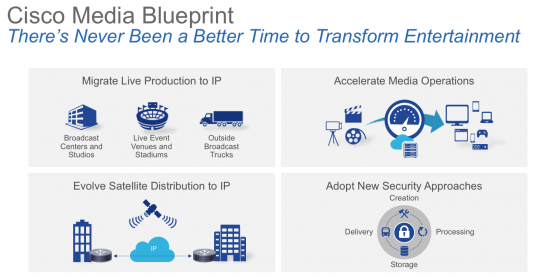
Cisco Media Blueprint: Transforming Entertainment

Cisco won’t enter a market if we cannot be a leader in it.  Media is no different.  My rockstar team is executing a clear, open, and productized strategy for this space. We call it the Media Blueprint, the foundation of which is an end-to-end ecosystem approach which is a strong challenge to point-providers who do not have that vision.  And it is based on open, standards-based IP technology for production and delivery to propel our industry towards digitization ahead of legacy organizations who have not yet breached this frontier.

We Are Cisco

As a millennial, it’s fairly atypical that I just commenced my 12th year with Cisco.  Staying anywhere that long is a sin in today’s break-neck paced environment—but I stay nevertheless—impassioned by the EXTRAORDINARY opportunity that sits in front of the cable and media industry.  Never again will we witness the digitization, virtualization, and automation of the production or distribution of content, where legacy technologies are being forced to adapt to meet the new business models and consumption models.  Web players have gone from online book stores to major production companies and content distributors, and the industry as a whole is faced with a simple truth: #AdaptOrDie.

What could be more exciting than being a part of an elite team that is tasked with helping our industry clients—the world’s biggest conglomerates—create and implement the technical solutions they need to make the transition?  IMHO, NOTHING!

Authors

Samira Panah Bakhtiar

Director, Cisco's Media Operation

Global Service Provider Organization

Avatar

In this era of remote work and global organizations, our ability to connect and meet from anywhere is more than just “nice to have.” It’s a necessity.

So the real question now is how do you find the right technology provider? With many options, it can be tough to sift through endless feature comparisons, pricing options, and general industry FUD. So how do you decide? Start with this list to define your needs:

  • How will your organization use web-based conferencing?
  • Is improving employee productivity a primary goal?
  • Is simple solution management important?
  • Have you thought about risk-proofing your investment?

OK, now let’s dig into each area.

How will your organization use web-based conferencing?

Are your meetings for internal teams? With clients? Partners? Vendors? All of the above?

Make sure the solution you choose offers options for users to customize the experience. People are more likely to adopt a conferencing solution that lets them connect their choice of devices such as laptops, tablets, mobile phones, video devices, and video-enabled desk phones. That way your employees don’t have to adapt to the solution – it lets them work the way they work. Recording options, auto callback, and the ability to use with scheduling tools like Outlook make it simpler to use and integrate with their existing tools and work styles. The ability to initiate meetings on demand gives people the ability to connect quickly and easily, whenever inspiration strikes.

If you’re using online meetings as part of your customer care solution, the reliability and ease of use are critical. A negative customer experience can affect client perceptions of your company. Technology integration is also essential. Beware of niche solution providers that offer only a small piece of the puzzle. More comprehensive solutions simplify integration and reduce the number of vendors you need to engage. A fully integrated solution will be important here. Consider how the various pieces will need to work together (voice, web conferencing, collaboration tools and customer care).

Solutions that offer the most breadth will help you avoid a “patchwork” solution where you have to engage multiple vendors to meet your feature needs. In a multi-vendor situation, implementation, troubleshooting, and support become much more challenging.

Consider your company’s policies and need around secure communication. Be sure to weigh the strength and track record of each conferencing vendor in this area as well.  Along with all that’s great about our digital world, it also comes with hackers and malware.

Is improving employee productivity a primary goal?

The modern workplace is mobile. If not extinct, the days of “everyone in the same room” meetings are on the endangered species list. Enabling workers in multiple locations is essential, whether remote offices, living rooms, or coffee shops. To be most productive, employees need the ability to use the device of their choice – and move easily between devices. Limitations or complex systems mean employees are often wasting valuable meeting time troubleshooting rather than focusing on work.

Simple options for starting and joining meetings keep meetings on schedule – and teams productive. Functions like single button start and Call Me (where the meeting calls you) can keep meetings running on time.

Limiting distractions or interruptions during meetings is also important. A new innovation from Cisco offers background noise detection, which recognizes sounds including sirens, typing, or barking dogs. If it detects background sounds on a user’s line, WebEx pops a notification that encourages the user to mute.

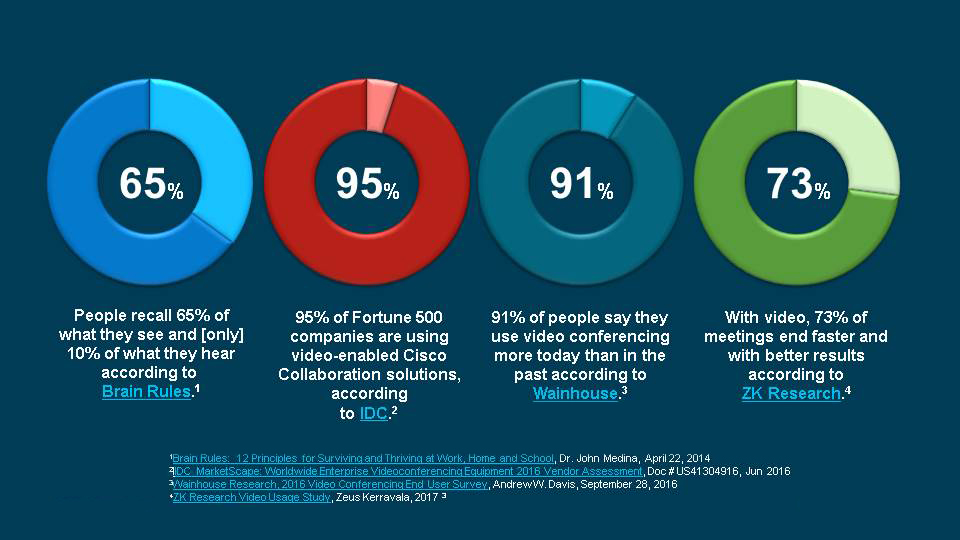
Just using video can also make meetings much more productive. Workers feel more connected, focused, and engaged, while also retaining more of the information shared by others.

“With our distributed workforce, video has been a vital and natural way to keep people connected and productive.”
Jay Moran, VP Technical Operations, Cimpress


Is simple solution management important?

Consider which vendors offer the most comprehensive solution and the easiest integration across your communications portfolio. The alternative is juggling vendors or having to patch together multiple systems. This is where niche providers (or one-trick ponies) pose the biggest challenges. Choosing a provider that offers only a basic, limited meeting solution can lead to operational and troubleshooting challenges, especially with integration or as your needs grow.

Broader, more integrated solutions can also increase solution adoption and decrease support cases.

Have you thought about risk-proofing your investment?

With the speed of change in markets and business trends in general, it’s hard to predict future needs. How fast will you grow? Will you have more partners in different regions a year from now? Today’s needs are important, but tomorrow has to be part of the equation.

Smaller providers come and go. And when they go, where do their customers go? Choose a vendor with a solid balance sheet and a strong solution roadmap.

A proven ability to innovate is important. If your provider’s solution stagnates, how do you keep up with competitors and customer expectations?

Next Steps

Now that you’ve outlined your needs, be sure you properly research your top provider options.

Always verify vendor claims, both in terms of what they say about their own solution and what they say about competitors. It’s no surprise that companies can (and will) stretch the truth when it best serves them. In fact, in my research, I noticed that another conferencing vendor claims on its web site to have the “#1 web and video conferencing solution.” However, it wasn’t based on any publicly available source. Having spent many years in marketing myself, I can’t blame them – it’s their job to make their product look good. But, as with any major buying decision, buyers should beware. Ask the tough questions, and then verify their answers.

We live in the digital age where communication between employees and with customers is your lifeline. And things like customer support and business agility can make or break market viability.

Bauer used Cisco meeting solutions to cut down on travel. But the benefits of video conferencing have gone beyond time and cost savings. “Getting to market 10% faster is a huge advantage over our competitors,” reports Andreas Schitter, the company’s CFO. Teams have become more productive and agile, and that’s great for business.

With so much at stake, this is no place to sacrifice quality for cut rate meeting service. So consider Cisco WebEx. Not only does Gartner place Cisco as a leader in four separate Magic Quadrants for unified communications, web conferencing, contact center infrastructure, and group video systems, but Cisco is also leader in the Intrusion Detection and Prevention Systems Magic Quadrant. (See our listing of analyst reports for more.)

We know collaboration. We know security. And we offer the leading, most used and trusted conferencing solution in the industry.


Looking for a reliable, enterprise-grade conferencing system for your business? Try WebEx today with a 30-day free trial.


Authors

Erin Broecker

No Longer with Cisco

Avatar

Overview

Talos is disclosing a pair of code execution vulnerabilities in Lexmark Perceptive Document Filters. Perceptive Document Filters are a series of libraries that are used to parse massive amounts of different types of file formats for multiple purposes. Talos has previously discussed in detail these filters and how they operate. The software update to resolve these vulnerabilities can be found here.

Read More >>

Authors

Talos Group

Talos Security Intelligence & Research Group

Avatar

This blog is the first in a series of blogs focusing on DevNet Sandbox and the awesome free access to Cisco and Open Source technologies it provides all our DevNet users.

I’m a developer. I’m also somewhat an architect, manager and evangelist which makes life super fun, but pretty fast paced. For the most part, I love having my hands dirty in code and tech.

When I want to learn something new, I want to get hands on with it. And generally, I want to do that fast as there’s a whole bunch of other stuff on my plate. I don’t want to have to wait for delivery of hardware, licence keys or other devices to show up at my office to get started. I also want to pay as little up front as possible while I test things out and see if it is right for me, if it has the right functionality, if it’s right for my solution or application and if I can integrate the way I want to!

And if I can’t get hands on quickly, I tend to quickly drift to some other solution or method of filling my needs or solving my problems.

Now, I’d go out on a limb here and say that’s pretty much the same as any other developer. You want easy access to solutions and tools quickly, before you commit to them!

This is why DevNet Sandbox exists at Cisco.

DevNet Sandbox provides our fantastic ever-growing community of customer, partner and ISV developers super simple, fast, on-demand access to a world of Cisco technology, third party solutions and developer tools. For FREE!

We have over 60 technology packed Sandboxes for you to choose from and they are all available today through the Sandbox Portal, which you can navigate to right now at https://developer.cisco.com/Sandbox.

There’s also overviews, documentation and links to our latest blogs and developer community forums on the portal to get stuck into later.

But to get started and jump right into a Sandbox, just create yourself an account, which takes seconds, then select the Sandbox Catalog.

The Catalog presents up all the different Sandboxes you can choose from, handily colour coded (‘colour’ split the UK way – I’m British, see – and I’m drinking tea while writing this for stereotype value) to make it easy for you to identify the technology category you’re looking for.

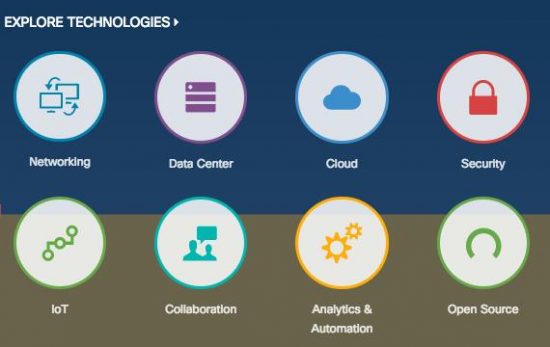
Our technology categories are extensive. They range from what you might expect – Data Center and Networking (I’ll spell ‘Center’ the US way, to even things out) – but far beyond to our extensive collaboration portfolio, IoT & Security solutions, Cloud and of course open source tech we help out with in the wider communities.

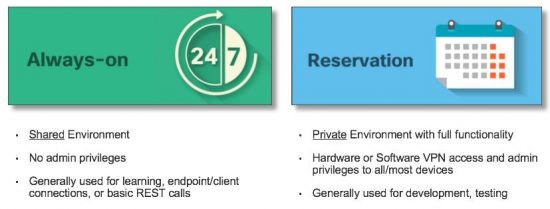
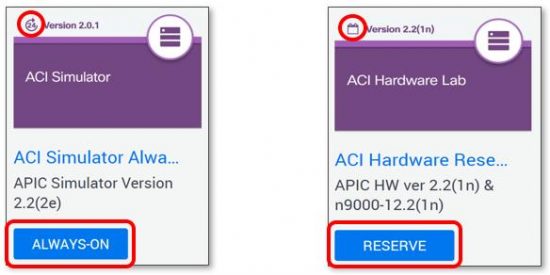
Once you’ve found the technology you want instant access to, you might find you have two options…Always-On or Reserved.


Always-On Sandboxes provide instantaneous access to that technology through the details that you can find by selecting the tile for that Sandbox. They’re very much a shared environment, with any number of users playing into that sandbox at any one time. For that reason, they are best for quick tests, learning and familiarisation.

Reservation based Sandboxes provide you with an environment entirely to yourself. They are spun up for you on-demand and require VPN access, which we set up for you and provide the details in an email straight to your account. You’ll need a VPN client like AnyConnect or OpenConnect, which we provide details on how to use in each Sandbox. At that point they are yours alone!

That allows us, on the whole, to give you complete admin access to hardware, virtualised infra and software in reservation sandboxes. It makes them ideal for development, testing, deeper learning and innovating upon. Once again, more instructions about any particular sandbox can be accessed by clicking on the sandbox tile of your choosing.

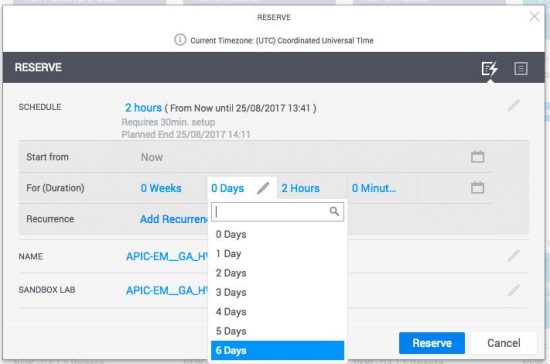
To reserve a Sandbox, hit the ‘reserve’ button. That will bring up a dialogue box, where in the simplest case, you just need to select a duration (up to a week) and hit the reserve button and boom – we’ll send you emails of confirmation, when your Sandbox is ready and VPN details to connect!

That should get you started!

In the second blog of this mini-series, I’ll talk around options when reserving, email alerts, other advanced Sandbox features, hello world example, Learning Labs and much more!

Until then … enjoy!


We’d love to hear what you think. Ask a question or leave a comment below.
And stay connected with Cisco DevNet on social!

Twitter @CiscoDevNet | Facebook | LinkedIn

Visit the new Developer Video Channel

Authors

Tom Davies

Manager, DevNet Sandbox

Developer Experience

Avatar

What is in a name?

A lot, actually. A rose by any other name would certainly smell just as sweet. But if I sold you a dozen dandelions, calling them roses, as the perfect Valentine’s Day gift for your sweetheart, neither of you would be none too pleased, would you?

It makes me think of the early days of extreme sports. Remember? The term represented athletes who were constantly pushing themselves and the sports they loved beyond limits that anyone could have imagined. “Extreme” was a mindset. It was a culture. Then, companies latched on to the term to make their products seem edgy and exciting. Eventually it got to the point when the world was introduced to “extreme” snack chips… And “extreme” lost all meaning.

It’s no different in the security world. If you ever visit the vendor areas of the big security shows, you know it’s the same with terms like “threat intelligence” and “artificial intelligence (AI).” As overused and misused as the terms may be, they are important concepts in information security, so let’s attach some real meaning to these terms.

Data -> Information -> Intelligence

Let’s be clear. Data is not the same as intelligence. Data is information in its raw form, and intelligence is the distillation of information to conclusions that mean something to me.

Consider a single IP address. What can it tell you about an actor’s motive, intent, etc.? “Nothing” is the short answer. But, you can add geolocation data to learn where that IP’s traffic is originating. Firewall data will show you to which port(s) that host is trying to connect. You get the idea. You’re enriching the data into a form of information upon which analysis can begin. And for this information to become intelligence, you need context.

For instance, what if you have no business interests in the country where the IP is located? And you know that the IP address belongs to a newly-created domain, which can be an indicator of a new malware command and control infrastructure. Add that you had detected a recent email spamming campaign containing malicious attachments targeting your executives. And you know that there has been an increase in conversation in a particular underground chat room about your organization. These add up to something from which you want to make sure you’re currently defending. That’s threat intelligence.

The trick is to get to the meat of the problem amidst an overwhelming amount of useless data.  So, let’s talk about AI.

Data Deluge

There’s no shortage of data out there. A 2016 estimate found that 90% of the world’s data was created in the previous two years. Think about this: our researchers receive about 2TB of information for analysis every day. That includes nearly two million malware samples and up to 600 billion (with a “b”) emails. Every. Day.

It’s clear that analysis must be automated with AI and machine learning to cut through the noise, to identify the low-hanging fruit, and to pass the real tricky stuff to human analysts. (We have over 250 individuals globally with language skills in about 100 languages, collectively. Just saying.) But not all AI is created equal. And with so many security companies claiming to use AI, how can you tell if one AI implementation is most likely to protect you better? Might I suggest reviewing the results of the Fake News Challenge, a competition created to foster development of AI to detect fake news stories?

AI FTW

The Cisco Talos AI team entered the Fake News Challenge, and we’re proud to say, took first place ahead of university and other researchers whose life work is AI. That’s saying something! This is the quality of automated analysis that helps us derive pertinent threat intelligence from massive data sets to feed back into our products. Also, AI helps us keep our data current and relevant, and reduces bloat. For instance, the IP and domain reputation data we keep within Cisco Umbrella is continuously analyzed with several different algorithms to ensure that our intelligence is as effective as it can be to protect our customers.

You can hear what the team had to say about the Fake News Challenge in episode 7 of the Beers with Talos podcast and read about the competition in this blog post.

TL;DR: What’s in it for you?

We believe we can protect our customers better than anyone else. The output and experience of our threat, malware, and vulnerability research, of our automated email, network, and web monitoring, our cloud, DNS, and behavioral analytics, and of our talented incident responders, consultants, and hundreds of skilled analysts, all ends up in our technology and services that protect our customers.

Our threat intelligence and research output is also fed back to the open-source security community through Snort IDPS, ClamAV antivirus, utilities such MBRFilter, and many more. We all face the same threats and we’re all better off if we’re collaborating. (I’ll write about our open source contributions in a future blog post.)

You can keep up to date on our research and security news, in general, at our Continuum web site and the Cisco Security blog.

Authors

Marc Blackmer

Product Manager, Engineering

IoT Product Mgmt Networking

Avatar

You’re already a big fan of Cisco dCloud, right? You love how the dCloud platform brings relevancy and immediacy to your sale presentations. dCloud demonstrations enable customers to see solutions doing actual work—real software and real data, not some boring slideshow presentation.

But it’s Saturday afternoon and you’re in the pool chillaxing on your pretty pink float when you suddenly realize you forgot to schedule that dCloud demo for Monday morning! Now what?

Fear not, sunbather. Cisco dCloud has a new mobile app that you can use anywhere with an Internet connection and a mobile device.

Richard didn’t have to go to the office to start his demo, he just hopped out of the pool. Weekend saved!

Are you ever without your phone? You’re not. Ever. In fact, you’re always on. The POV Services team gets that, which is why the Cisco dCloud mobile app is optimized for smartphones and tablets.

Ron’s telling John Chambers about the dCloud mobile app, but we’re not sure John’s listening.

The dCloud mobile app is available for free on the App Store and Google Play. Just download the app to any Apple or Android device and log in using your cisco.com single sign on (SSO) credentials.

The Cisco dCloud mobile app’s highly responsive, attractive UI allows you to schedule, manage, and share content with just a few taps. The mobile-specific search wizard makes it easy to filter and sort so you can find what you’re looking for fast.

Brad’s on vacation, but there’s no need to leave the luau. He can manage his content from anywhere. Disclaimer: dCloud does not endorse working while on vacation, Brad.

Use the mobile app to view scheduled sessions, manage favorites, and update your user profile. Receive push notifications so you’re always up-to-date on the latest platform news. And although we hope you never need it, you can even contact Support. Use the mobile app to open tickets, get help, and provide dCloud with feedback to potentially shape the future of the platform.

Melissa can schedule demos on the dCloud mobile app ’til the cows come home.

Cisco dCloud is more accessible than ever, so what are you waiting for? Download the mobile app today. Demo from anywhere. Tell your friends.

Authors

Laura Marsh

Technical Writer

Cisco dCloud

Avatar

For those of you who have followed earlier blogs, you will have seen the major enhancements we have been making in open IOS XE. Jeff McLaughlin mentioned Day Zero deployment in his recent blog.

Day Zero is a critical step in automation

In the past, in order to install a new network device, a highly skilled network engineer would go out on site, connect and configure the device. This process was quite manual (cut/paste) and hence error prone. A great opportunity for automation.

There has been lots of interest in Network Plug and Play (PnP) over the past few years and the PnP protocol is widely supported on Cisco switches, routers and Access Points. I have been working with customers who have saved hundreds of hours with PnP deployments.

Today I want to introduce you to the most recent automation capability in open IOS XE 16.6 – Zero Touch Provisioning (ZTP).

You are probably asking an obvious question, “Why another protocol for day zero deployment?” Good question. There are some subtle, yet important differences. Network PnP provides a powerful and simple user experience. It has an intuitive UI on APIC-EM controller, a smart phone application and a sophisticated agent on the device that manages security and serviceability. The workflow (certificate – for security, image upgrade, configuration push) is fixed and it is a turnkey solution.

ZTP by contrast is open (I just provide a URL for a python script via DHCP) and extremely flexible. It is not a turn-key solution like PnP with a UI and cloud component. With ZTP I can implement any workflow I like all through a python script. Anything I can do through python, I can do to the device.

Let’s take a look at some use-cases for ZTP deployment.

Simple Configuration – bootstrap

I will start with a very simple use case. I want the device to boot up, and apply a default set of credentials (or configure an authentication server) so I can connect to it with another automation tool. This is essentially a bootstrap configuration.

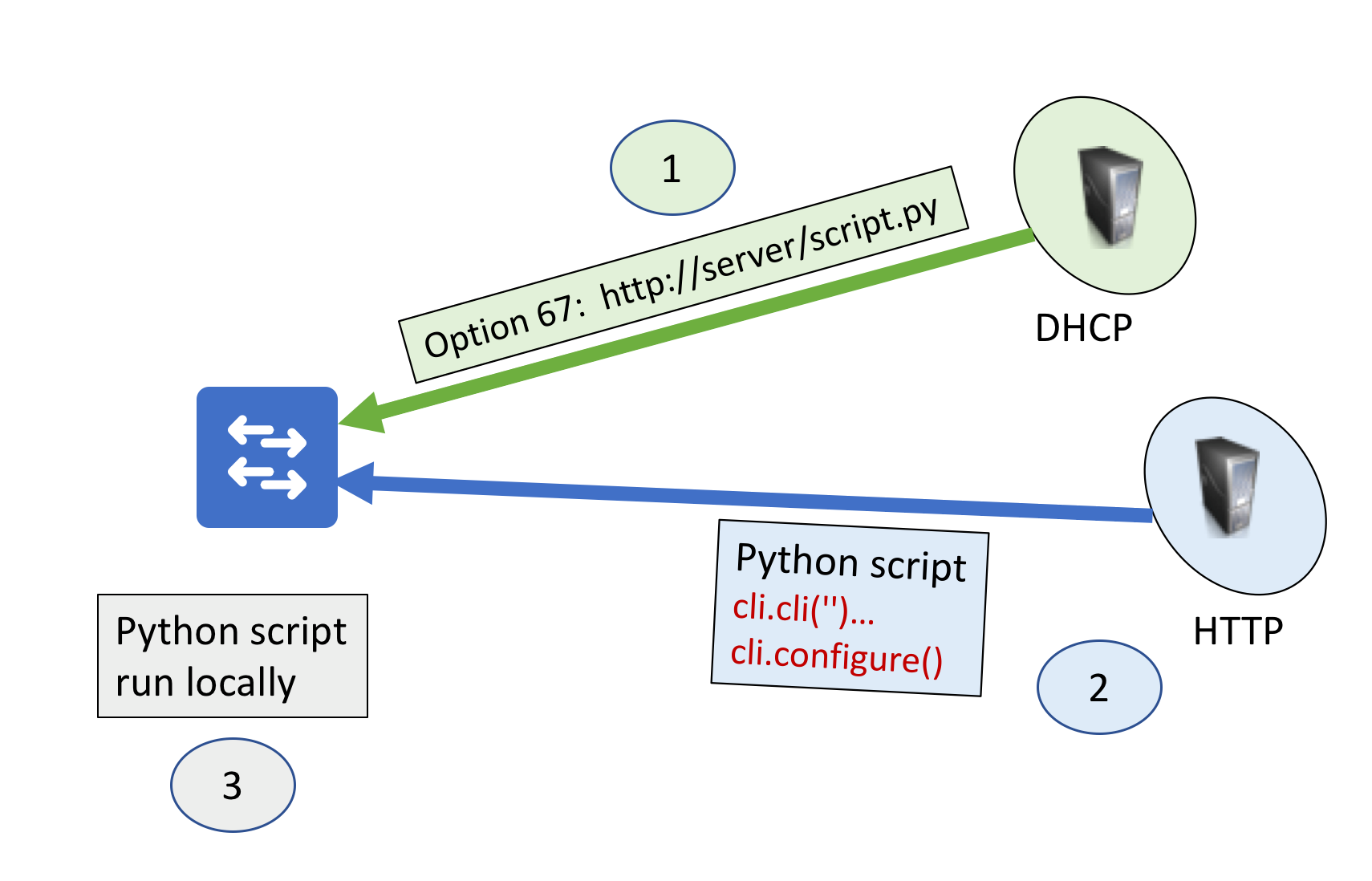
radford IOS XEFigure 1 Basic ZTP Use Case

The device boots up, uses DHCP to obtain an IP address (Step 1). The DHCP response contains a URL in option 67 which is the location of a python script.
Step 2 downloads this script, starts an on-box guestshell, and runs the python script locally.

Here is a simple example of this base script. The code below simply configures base credentials for the device using the built-in cli python library.

from cli import configure, cli

USER="cisco"
PASSWORD="cisco"
ENABLE="cisco"

def base_config():
    configure(['hostname adam-ztp'])
    configure(['username {} privilege 15 password {}'.format(USER,PASSWORD)])
    configure(['enable secret {}'.format(ENABLE)])
    configure(['line vty 0 4', 'login local'])

base_config()

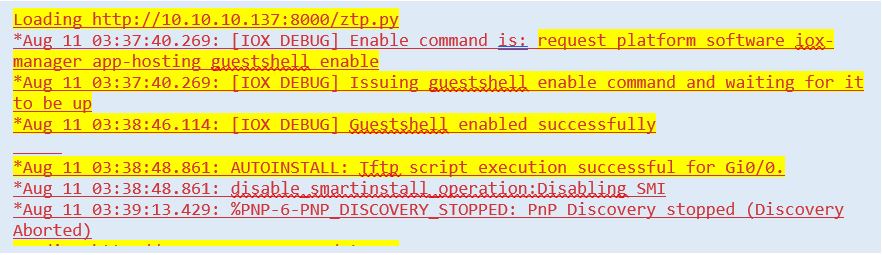
When the device boots, I see the following messages on the console. I have cut out other messages for brevity.

Radford IOS XEFigure 2 – Log messages during device boot process
You can see the switch booting up, then it looks at option 67 for a python script to download. It then starts the guest-shell, and runs the python script.

Remember to save the configuration, in your script, if you want it to persist.

You can learn more about on-box Python and Guestshell on the Cisco DevNet Python Network Automation site. Read on for some more examples!

Dynamic Configuration – Serial Number

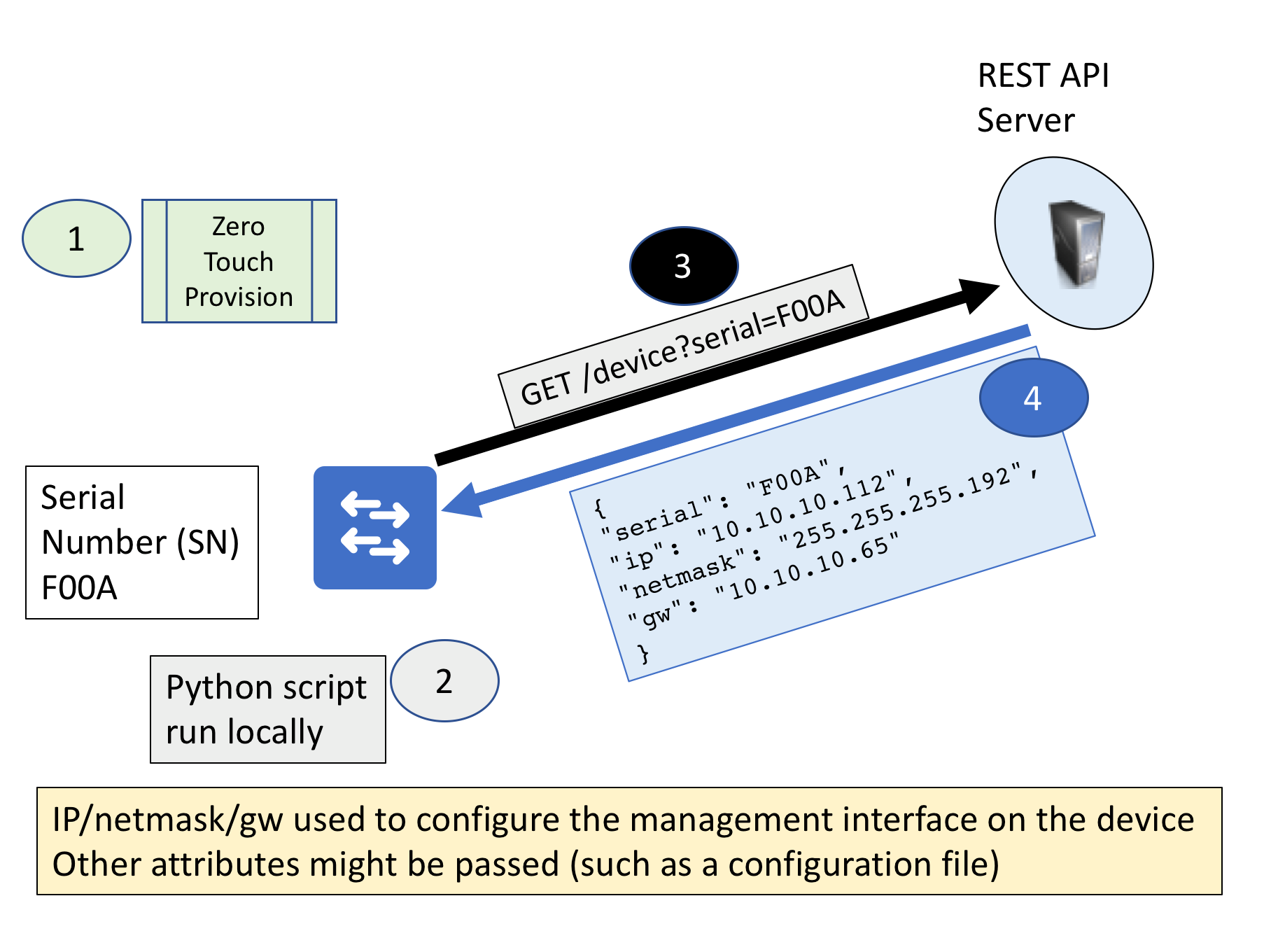
The next example takes this a little further and uses the serial number of the device to make a REST API call to collect parameters such as IP address/mask used to configure the device. This could contain other attributes such as a configuration file URL. My web-service (implemented in node-red) has a DB of serial numbers and attributes.

Radford IOS XEFigure 3 Dynamic Use Case

The device uses ZTP as in the previous use-case. In step 2, the python script will get the serial number of the device and make a REST API call to the server (step 3). The server will return a list of parameters for the script to use in configuration (step 4). In this example the IP address of the management interface, network mask, and default gateway are returned.

There are lots of options to extend this. For example, the API could return a URL for the configuration file to be used for the device. The script could download that file and use that to configure the device.

Advanced Configuration – Switch Stacking Order

One of the benefits of ZTP is you can interact with the device before you apply a configuration. There are a couple of situations where this is important, and switch stacking is a big one.

The key point with stacking is the order of the stack members determines the names of device interfaces. For example, all of the interfaces on switch #1 will start with “1” (e.g. GigabitEthernet1/0/1). This can cause challenges as often uplink connections will only be on a subset of the stack members. You need to know in advance the order the switches are connected, and you need to reboot to change the order of the stack members.

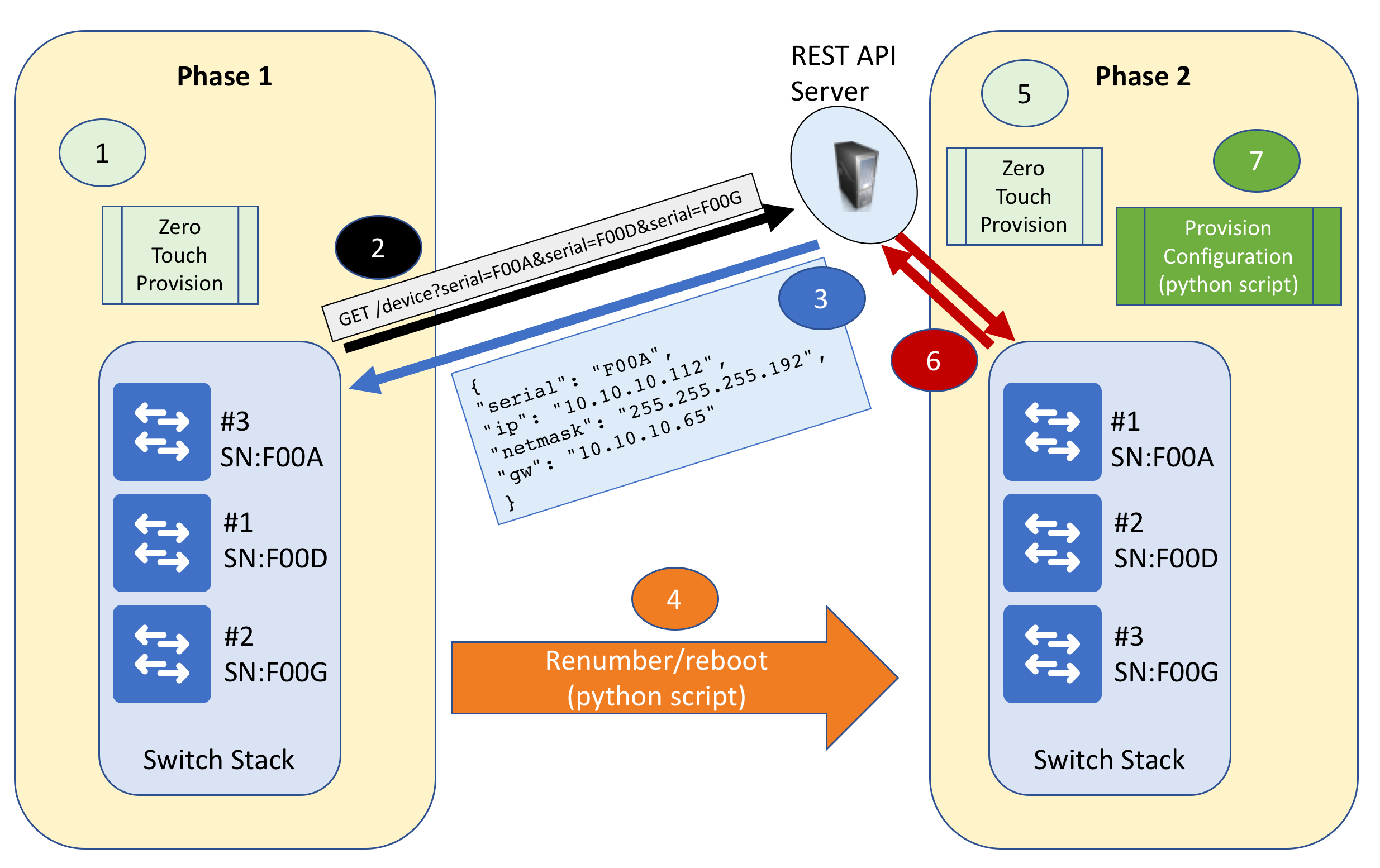
I have extended use-case #2 to handle a list of serial numbers. The API will return the serial number of the device which should be “top of stack”. The python script will renumber the switches (if required) and reboot. If no renumbering is required, the device will go straight to step 7.

Radford IOS XEFigure 4 Stacking

The first 3 steps are identical to use-case #2. The big difference is step number 4, where the python script detects that the serial number returned is not currently the top of stack, so it needs to renumber and reboot.

When the stack comes back up, it redoes the ZTP process (step 5) and makes the API call again (step 6). This time the top of stack matches, so the script proceeds to configure the device (step 7). This process is deliberately stateless to make it more robust.

As in the earlier example, you could also download a complete configuration file from a http(s) server at the completion of the stack re-order.

There are a number of other examples where a device may need to have something done to it before it can be provisioned. Software upgrade is an obvious one, but there are others. For example, ether-switch modules in ISR routers require a reboot before the internal interface can be provisioned.

Conclusion

ZTP is a powerful addition to your automation toolset. These examples give you a taste of the many possibilities for using ZTP. I have published sample scripts in a Github repository https://github.com/aradford123/ZTP-samples to help you get started. I also included a node-red flow in the repository.
And, as I mentioned earlier, if you would like to get some tutorial style information about how to do this, the Cisco DevNet Python Network Automation site is just waiting for you to sign in and get started.


We’d love to hear what you think. Ask a question or leave a comment below.
And stay connected with Cisco DevNet on social!

Twitter @CiscoDevNet | Facebook | LinkedIn

Visit the new Developer Video Channel

Authors

Adam Radford

Distinguished System Engineer

APJ

Avatar

Hint: ISE 2.3 Plays Key Role

We recently announced the Network Intuitive architecture, a new era of networking that removes complexity and enables automation, assurance, and security. With built-in security, you get dynamic protection that enables your business to evolve at the breakneck pace the market demands. Recent events highlight the criticality of securing the digital network against today’s AND tomorrow’s threats.

Wannacry accentuates how quickly attackers can move laterally once inside the network perimeter, and how damaging the attacks can be. For example, some healthcare providers’ patient care systems were encrypted, which impacted their ability to deliver services. And this attack was not even intentionally targeting critical infrastructure. But WannaCry was not the first ransomware attack, and there are certainly more to come. Criminals have a strong economic motivation and frankly, it’s just too easy.

In late June a South Korean firm reportedly paid a one million dollar ransom, the largest reported ransomware payout to date, to recover systems and data that were encrypted. It impacted not only the business but also that of its customers. As ransomware attackers get more sophisticated, they will become more targeted, and more judicious in the price of the ransom.  When they are able to ascertain the value of an asset, then they are able to extract maximum value for it.

These examples show why securing the business is critical and co-equal with growth initiatives. With an intent-based network, the two don’t have to be mutually exclusive but are in fact complementary. The Cisco Identity Services Engine (ISE) and TrustSec software-defined segmentation are integral to the intuitive network, helping embed security into the network fabric for automation and scale.  Key aspects of the new ISE 2.3 release center around visibility, automated control, and simplicity. All of these improvements were designed with the ultimate purpose of enabling your business to excel with the intuitive network.

1. Visibility: The scale and complexity of devices connecting to the network continues to grow at a rapid pace. You can’t protect what you can’t see, so getting detailed, actionable device context is critical to ensure compliance against vulnerabilities and other policy violations. ISE in conjunction with Cisco AnyConnect now provides additional endpoint visibility, including BIOS-level details such as the computer’s serial number, USB attachments, and resource utilization, including disk and memory usage. There’s also never been more ways to realize this level of visibility. ISE can now use a temporal agent that does not require endpoint administrative privileges or browser plugins. This includes the option for a stealth agent to display flexible notifications via OS messaging frameworks.

2. Automated Control:  Defining network security policy can be highly manual and prone to human error. But automating policy functions allows you to focus on business intent and not the minutiae of implementing security controls. And now you can automate your network security policy for the Intuitive network, thanks to ISE, because it is a critical pillar of the Cisco Software-Defined Access solution, integrating with Cisco DNA Center.  ISE allows you to define security policies (who can talk to whom, what systems can talk to other systems, and on what ports and protocols) based on security classifications that you define for your business needs. It dynamically assigns endpoints and systems to those classifications using rich contextual data (who, what, where, when, and how someone or something is attaching to the network), allowing the network to automatically enforce who and what gets access to business resources. This level of controls helps you easily segment the network to limit the scope of damages from an attack – including preventing lateral movement of threats — as well as dynamically respond to those threats.

3. Simplicity: ISE can potentially save admins hundreds of hours managing network security policy. Its new policy interface makes the process of policy creation and maintenance much easier. It does this through simplified policy sets that are more readable and with built-in authentication and authorization rules that allow you to easily create and reuse conditions. After upgrading, your policies will work as before, even though additional policy sets have been created. The new policy UI also includes a hit counter for each policy set. Finally, we have added the option for guests to use Facebook login for guest portals. Social login provides seamless access to the guest network without exposing corporate assets.

Learn more about ISE @ cisco.com/go/ise. You can also learn about how ISE specifically can address ransomware like WannaCry here.

Authors

Kevin Skahill

Senior Director for Security Policy & Access

Secure Access and Mobility Product Group