

You’re two hours into the Design module on the CCIE Collaboration lab. A customer brief sits in front of you: a 40-site enterprise, a couple of PSTN contracts that can’t be broken, a board that wants survivability at the top stores.
Below it, four design options. Here’s the uncomfortable part: three of them would technically work. Only one is right for this customer.
There’s no device to log in to, no show command to confirm you guessed correctly, and the answer isn’t written down anywhere. Either you reason your way to it, or you don’t.
Here’s why the Design module trips good engineers. Not because it’s unfair, but because it tests a different muscle than the rest of the exam. Deploy rewards recall and speed, but the Design module rewards judgment: justifying why one architecture beats another, across all seven blueprint domains, under the clock. Most candidates over-prepare what they can lab and under-prepare what they can’t.
The good news, and the reason for this post: Design is learnable. Not by memorizing more SRND guides, but by studying the decision instead of the topic. This is the method we teach—the same one a TAC engineer used to pass the CCIE Collaboration v3.1 Practical Exam from scratch, and the same one you can apply to every line of the CCIE Collaboration Practical Exam blueprint.
What ‘Design-grade’ actually means
A Design answer is never just the setting.
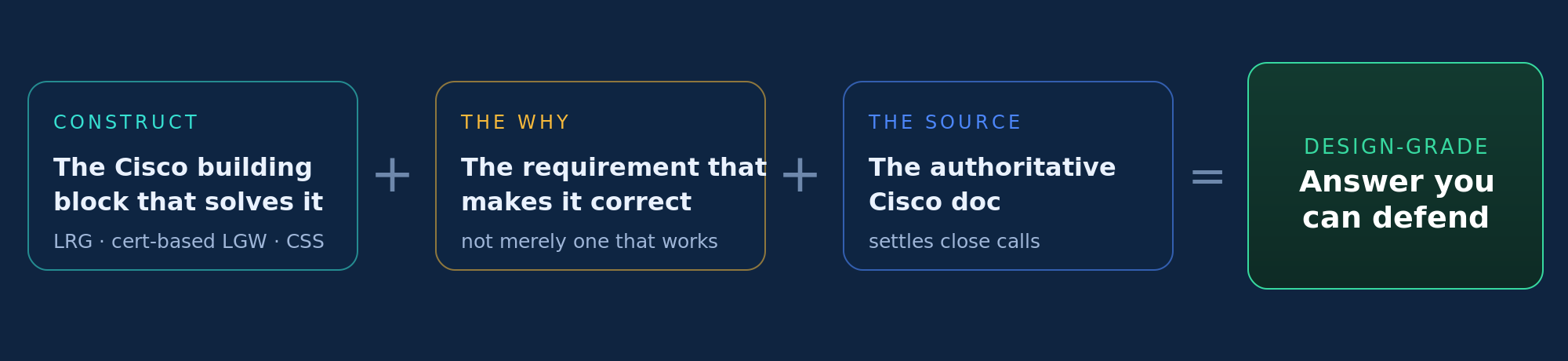
Get this framing right, and the rest follows. A Design-grade answer is three things at once—the construct, plus the why, plus the source.
Figure 1. Produce all three for a topic and you own it at exam level. Only the construct? You know the product, not the design—and that gap is exactly what the module hunts for.
The technique that breaks ties
Find the differentiator constraint.
When you’re down to two options that both look valid, stop comparing the options and go back to the brief.
Somewhere in the customer’s documents—an email snippet, a topology note, one line of business context—is a keyword that decides it. OPEX reduction. End-to-end encryption. Minimal user disruption. No on-prem assets. That word is the tie-breaker, and it renders one of your two “correct” options wrong.
Figure 2. The elimination method. Read the brief first and write the facts down before you look at a single option — then eliminate against the brief, not against the docs.
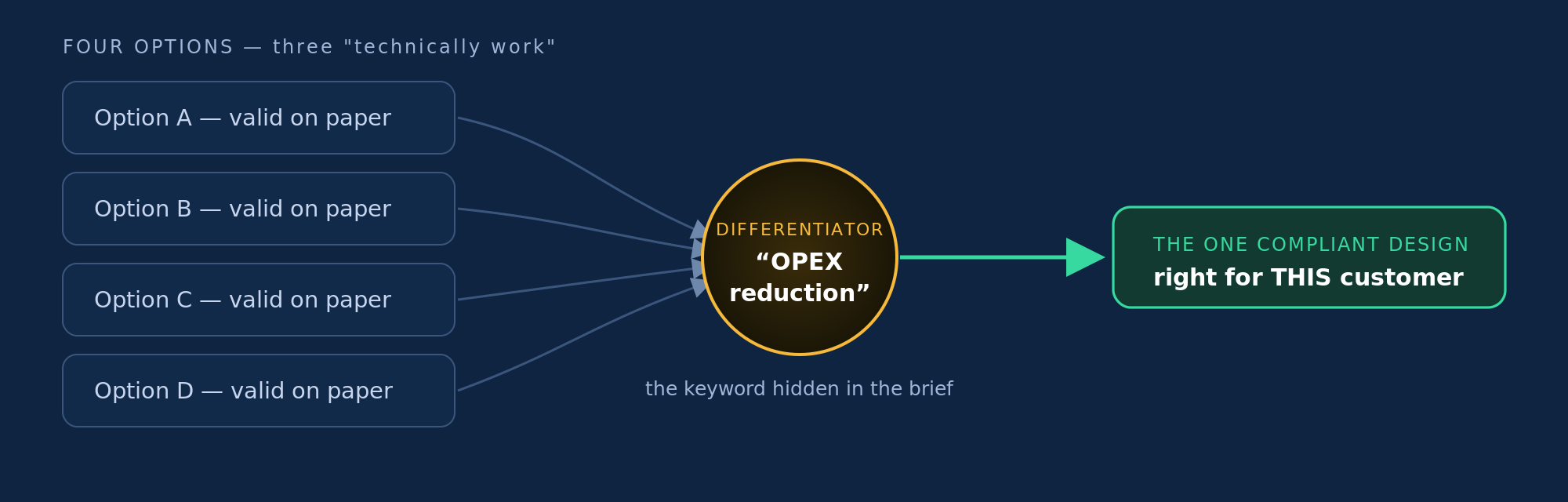
The line to remember: “Supported in the documentation” is not the same as “right for this customer.” The brief decides.
Decode-to-Design Pipeline
Decode exam topics → Design-grade items.
One pipeline. Run every blueprint topic through it.
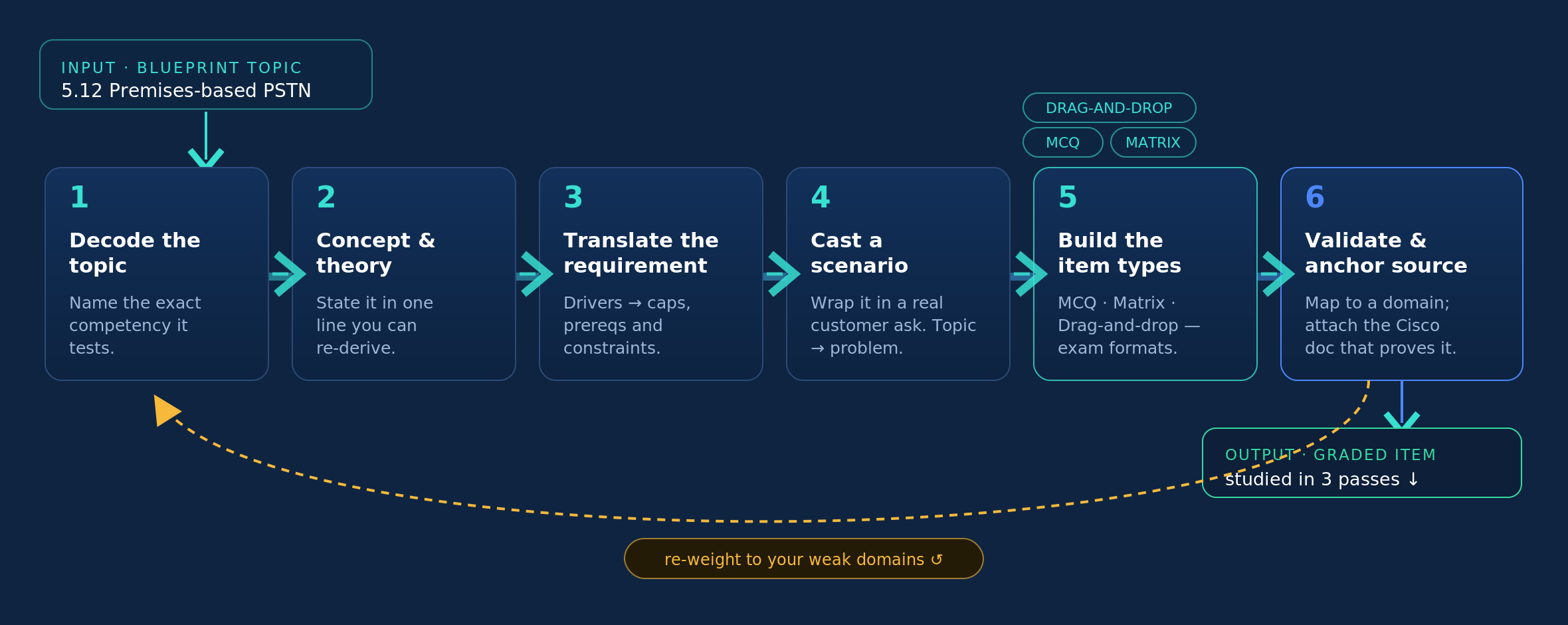
Here’s the engine. Take any subtask on the blueprint and push it through the same six stages every time. It converts a dry topic line into practice that looks and feels like the exam — and teaches you to generate that practice for yourself.
Figure 3. The Decode-to-Design pipeline. Run it across the blueprint, and you build a personal bank of design-grade items and internalize the decoding habit the module actually rewards.
Run it across every domain, and you get a whole bank.
That’s exactly what we did. Fifteen design items (D1–D15) cover all seven blueprint domains—60 scenario questions, 6 matrix items, 4 drag-and-drops, every answer source-anchored—and the whole thing is published as an open repo you can clone, drill, and extend.
Figure 4. The bank, mapped to the blueprint. Bars are domain weights — notice Call Control and Edge Services are 20% each, so the item mix leans there, just like the exam.
Each item carries all three exam formats (the same three item types the Design module uses):
- Multiple-choice questions (select all that apply)
- Matrix (e.g., registration vs certificate Local Gateway across capacity, auth, and NAT)
- Drag-and-drop (order the nine UCM objects for the Webex interconnect, or place the hybrid PSTN topology)
One topic, decoded end to end
Watch it run on a single blueprint line.
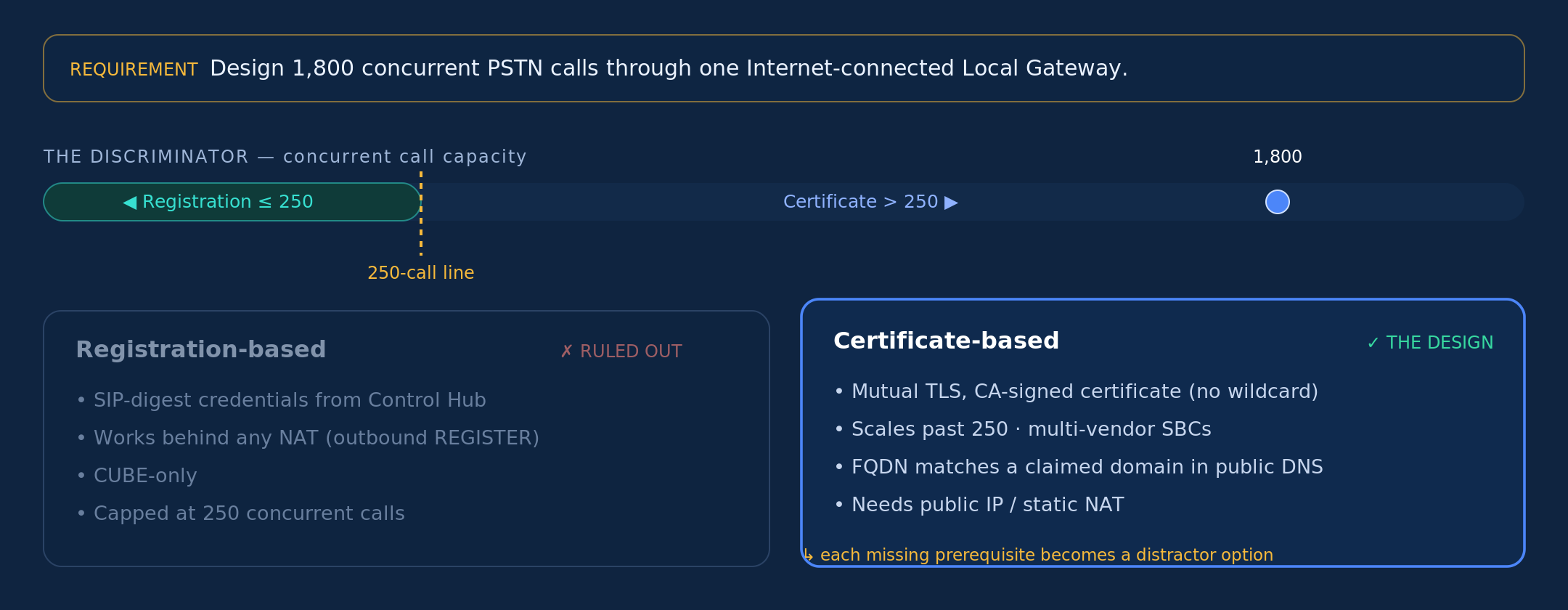
Take topic 5.12 – Premises-based PSTN via Local Gateway. An LGW authenticates to the Webex cloud one of two ways, and the whole design hinges on a single number: 250 concurrent calls.
Figure 5. 1,800 > 250 → certificate-based, full stop. The prerequisites it drags in (claim the domain, publish the FQDN, buy the cert, static NAT) are the exact traps the Design item plants as distractors.
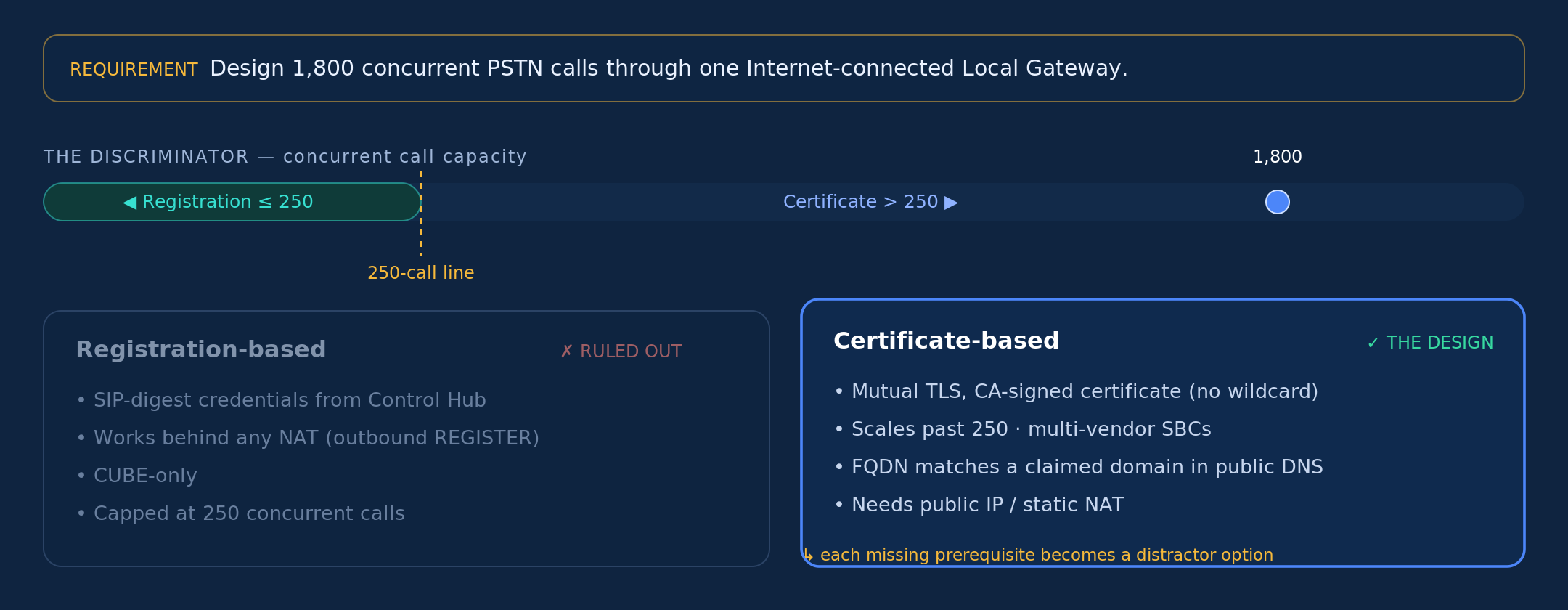
Now notice how you’d study the finished item—in three passes. Read the concept, then the worked example, then the exam angle. Then close the page and re-derive the design rule from memory before you move on. (Most people skip that last step, but it’s the one that makes it stick.)
A takeaway you can use today
Requirement → Design answer.
Design speed comes from turning recognizable requirement phrases into instant reflexes. Here are a few from the Webex Calling PSTN family, to show the shape of it:
| When the brief says… | The design answer is… |
|---|---|
| No on-prem assets, country is covered | Cisco Calling Plan |
| Keep our carrier contracts, no SBC | Cloud Connected PSTN |
| Connect to an existing on-prem UCM | Local Gateway—the only option that can handle 1,800 concurrent calls through one LGW; certificate-based trunk (> 250) |
| All UCM features, in the cloud | Dedicated Instance |
Build your own version of this table for every domain as you decode it. By exam day, half your work is pattern-recognition, and you’ve reserved your thinking time for the genuinely close calls.
Proof it’s passable
You don’t have to design for a living to pass this.
Some of the strongest recent passes come from engineers with narrow backgrounds—TAC break/fix specialists, application admins—who had never routed a call or drawn an architecture before they started. The updated v3.1 lab, with its Webex Calling integration, is very passable in months of focused prep, not years.
The path that works is consistent: start broad (CLCOR takes you from a single product to the whole portfolio—call routing on CUCM and CUBE, dial plans, QoS), lean on the official CCIE Collaboration preparation guide, drill deploying from scratch until end-to-end calling is second nature, and only then pay for timed practice reps.
For Design specifically, do exactly what this method describes—read the brief, write the facts down before touching the options, and eliminate per site. It is very passable. Sit it sooner rather than later — the blueprint only grows from here.
Your design prep kit
You already have most of what you need, and nearly all of it is free:
- CCIE Collaboration Preparation Guide (Cisco Learning Network)—the backbone. Start here.
- CCIE Practice Labs: Rentable pods mirroring the real exam devices, software, and topology. For timing and polish once you can already build end-to-end—not for learning the basics. Reserve a 4-hour timeslot
- dCloud: Migrating to Webex Calling: A free, public lab walking through a full migration (onboarding, licensing, dial plan, local gateway). The best hands-on for the Webex Calling side.
- Build your own: A few VMs in ESXi on a similar topology get you most of the way at no cost. Rehearse deploying from scratch—the muscle break/fix work never builds.
- Webex Calling configuration workflow & help.webex.com: Reachable during the exam’s DOO module, with the Control Hub AI assistant. Practice using them so they’re fast on the day.
- CollabForge: The item bank behind this post: 15 design items across all seven domains, 60 self-test questions, 6 matrix + 4 drag-and-drop items, each source-anchored, plus a runnable CLI (collabforge quiz –domain 5). Clone it and drill today, add your own items from the template, or hand a blueprint line to an AI agent and generate a new one. The method in this post, turned into something you can run.
Why you should book the lab now
The exam validates the hybrid, cloud-and-on-prem calling skills real deployments need today, and the blueprint only gets broader from here—more Webex, more cloud, and an AI-augmented roadmap. Every revision adds surface area.
The exam is the most familiar it will ever be to you right now.
Think like an architect prepare for success on the Design module
It isn’t a memory test, and it isn’t luck. It’s a method. Decode a topic, state the concept, translate the requirement, cast the scenario, build the item, anchor the source.
Do that across the blueprint and you’ll walk into Module 1 doing what the module is actually testing: thinking like the architect the customer hired.

Join Cisco Networking Academy
Prep for your first cert or your first career.
Join Cisco Networking Academy