“Yak-shaving” is an informal term often used in the US and UK to describe a situation where you have to do a series of tedious, unrelated tasks before you can accomplish your actual goal. For example, if you want to write code but need to install missing libraries, then fix your container, then update your OS, and so on – you’re “shaving yaks” instead of doing the main job…
Hey there! My name is Alfonso (Poncho), and I’m a Developer Advocate 🥑 at Cisco DevNet. Before joining this organization, I was part of the SAO (Software and Automation) Team within CX (Customer Experience), also at Cisco. For almost four years, my day-to-day work consisted mostly of delivering automation solutions to customers to seamlessly manage their Enterprise and Service Provider networks. This encompassed a range of use cases and platforms: from service provisioning and compliance monitoring to assurance, NetDevOps, and closed-loop workflows.
As I joined account teams — first as a Developer and later as a Developer Lead — I noticed a recurring situation at the beginning of projects: How do we get started coding?
Today, I want to focus on this situation: the importance of a versionable development environment for these kinds of projects, and how to get it just right.
The Initial Pain: Developer Onboarding Frustrations
Picture this: you join a project at your company to revolutionize network management. There are a handful of solutions and platforms based on network automation that your colleagues are developing and maintaining. You’re greeted by your Developer Lead, given a quick knowledge transfer, and then — you’re off!
However, before you can get the code flowing, you need to prepare a development environment. Of course, you’re provided the link with (allegedly) all the information needed to set up your computer. Nevertheless, soon enough, you find yourself stumbling through confusing and incomplete steps, multiple information sources, and broken links. In no time, this becomes a game of troubleshooting, debugging, and figuring out your own way just to have somewhere to start coding.
Colleagues who joined the project before you might give you some hints about what worked for them — which may or may not work for you. All of this just adds fuel to the frustration you’re already feeling. And remember: the clock is ticking!
Finally, you manage to get a half-baked version of the development environment working. With just a couple of days left in the sprint, you deliver your very first user story. Unfortunately, the requirements change and now you have to make all sorts of tweaks and enhancements in your environment to keep up.
What Is an “Ideal” Environment?
Even though network automation projects are often specific in purpose, the number of variables (platform types, use cases, etc.) makes it difficult to define what “ideal” means in this context. Nevertheless, I can tell you that reliability and replicability are key terms here.
Ideally, you want to have an environment that you can pull into any host — whether a corporate virtual machine, a cloud instance, or your own computer — and it will work every time, whether it’s spun up, destroyed, or spun up again. Also, it should always have the same features and capabilities, regardless of who is deploying it.
When it comes to the minimum requirements, these can be summarized as follows:
- Standardization: Everyone should have the same types and versions of the underlying platforms — the frameworks and drivers. For example, if you’re working with Ansible playbooks, everyone should have the same Ansible version and support modules for the target network devices and drivers. If, instead of a platform, you’re working with a library — let’s say, a pyATS or a Nornir project — you need everyone to have the same version, as well as the same Python libraries for the other components. Since we’re talking about network automation, it’s also important to have the same network simulation environment if the project relies on one for development: the same virtual topologies, device types and versions, pre-configurations, and so on.
- Documentation: I know, I know — it can be a burden. But a development environment with no README is about as useful as none at all. The last thing you want is users relying on trial and error to spin up the environment’s components. More often than not, you can rely on your favorite LLM to generate an initial draft of this documentation!
- Ease of Setup: Last but not least: if a user has to set up many things manually, click through multiple places, or tweak a hardcoded variable or two, the purpose of having this development environment is lost. Time is essential — and also is your team’s peace of mind.
Version Control: Not Just for Your Code
It’s good practice to have a space in your code repository for your development environments, and to actually treat them as deliverables in your sprints. By doing this, you get the following benefits:
Single Source of Truth — for Environments too
All team members have access to the same versions of the environment, reducing the risk of misunderstandings and compatibility issues when everyone is working on their user stories and later integrating them.
Adapt Easily to Changing Requirements
If the scope of the project changes and tools need to be added or adapted in pre-production/integration or production environments, the development environment keeps up. A single commit keeps it up to date with the new demands.
Tools and Formats at Your Disposal
Depending on the elements you want to include in your environment, there are different tools and file formats you can use.
Containers
It is a good idea to base as much of your environment as possible on containerized components. The benefits are immediate: modular architecture, easy to spin up in a variety of environments, and orchestration tooling like docker-compose.
Will your network automation platform of choice have an official container image available? Most likely, yes. Here is a table with examples of platforms that provide their own images:
| Tool | Docker Image Name / Registry | Download / Reference Link |
|---|---|---|
| Cisco NSO | N/A (Downloadable from Cisco Software Central) | Cisco Software Central |
| NetBox | netboxcommunity/netbox | Docker Hub |
| Nornir | nornirautomation/nornir | Docker Hub |
| Napalm | napalm/napalm | Docker Hub |
| Ansible | ansible/ansible | Docker Hub |
| Batfish | batfish/batfish | Docker Hub |
| pyATS/Genie | ciscotestautomation/pyats | Docker Hub |
| OpenDaylight | opendaylight/odl | Docker Hub |
| GNS3 | gns3/gns3-server | Docker Hub |
| Containerlab | hellt/containerlab | Docker Hub |
| FRRouting | frrouting/frr | Docker Hub |
If you want to create your own custom image for your project — perhaps because it needs to include other tools and libraries in the same container — you can use a Dockerfile to define the specifications for this new image.
Artifacts
We have the container; now we need the artifacts. An artifact is just a fancy name for any binary file needed for your environment. In the context of network automation, this is often a driver or plugin that enables your platform of choice to talk to a specific network device vendor and version.
A good practice is to store these in an artifact server, so they’re available at a fixed URL and can be downloaded after successful user authentication. Servers such as JFrog Artifactory and GitHub Releases are popular examples.
Virtual Networks
Finally, we come to the last challenge when selecting tools for our toolbox: network simulation. Depending on the type of project being developed (and the budget, certainly), there may be a pre-production or integration environment with a network topology similar to production that developers can actually use when working on their use cases.
This is by far the best way to ensure there won’t be unpleasant surprises when deploying the network automation project in production — primarily because obscure, specific corner cases are often only discovered in production environments.
However, when it isn’t possible to have such an environment, a virtual network is the way to go. So, which is the right platform for simulating a network? Well, it depends on what you want to simulate, which, once again, is dictated by your use cases.
If your use cases involve traffic-forwarding applications like ACLs, QoS, NAT, or stateless configurations (IP addresses, security policies, etc.), you are looking for basic Data Plane simulation. Fortunately, this is the easiest type to achieve. Some tools such as Cisco Netsims can do the job.
On the other hand, if you need to simulate more complex topologies where device states matter (for example, setting up a routing protocol and monitoring state changes), you need to simulate how traffic is routed — in other words, you need to mimic the Control Plane of a mock topology. Robust tools for this purpose include Cisco CML and Containerlab. The great thing about these tools is that they allow you to define different network topologies as simple YAML files, and they support numerous vendors for simulating various devices within your setup.
File Definitions
Now, how do you actually put all this into versionable files? Here are some examples of element definitions you can easily version in your repository as text files:
| Component | File Format(s) | Example |
|---|---|---|
| Python Libraries | requirements.txt | Pin exact versions from the command pip freeze for Python |
| Docker Base Images | Dockerfile | Use explicit tags, minimal images, document choices |
| Artifact URLs | .env, config.yml | Pin URLs/checksums, avoid secrets in repo |
| Virtual Device Topology | YAML/JSON | Network topology definitions |
Putting It All Together
Now that we’ve gone through the different components and options available, let’s look at a practical example.
Use Case: Cisco NSO Consistent Development Environment
Cisco NSO is a powerful platform for network automation. With code, developers can create services that handle the different configurations and states of onboarded network devices.
This project is a compilation of personal experiences as an NSO Developer and Developer Lead, with the aim of streamlining the development experience as much as possible—regardless of the use cases or features of the NSO automation project.
You can clone, fork, and report issues in this repository: NSO-developer/nso-consistent-dev-environment.
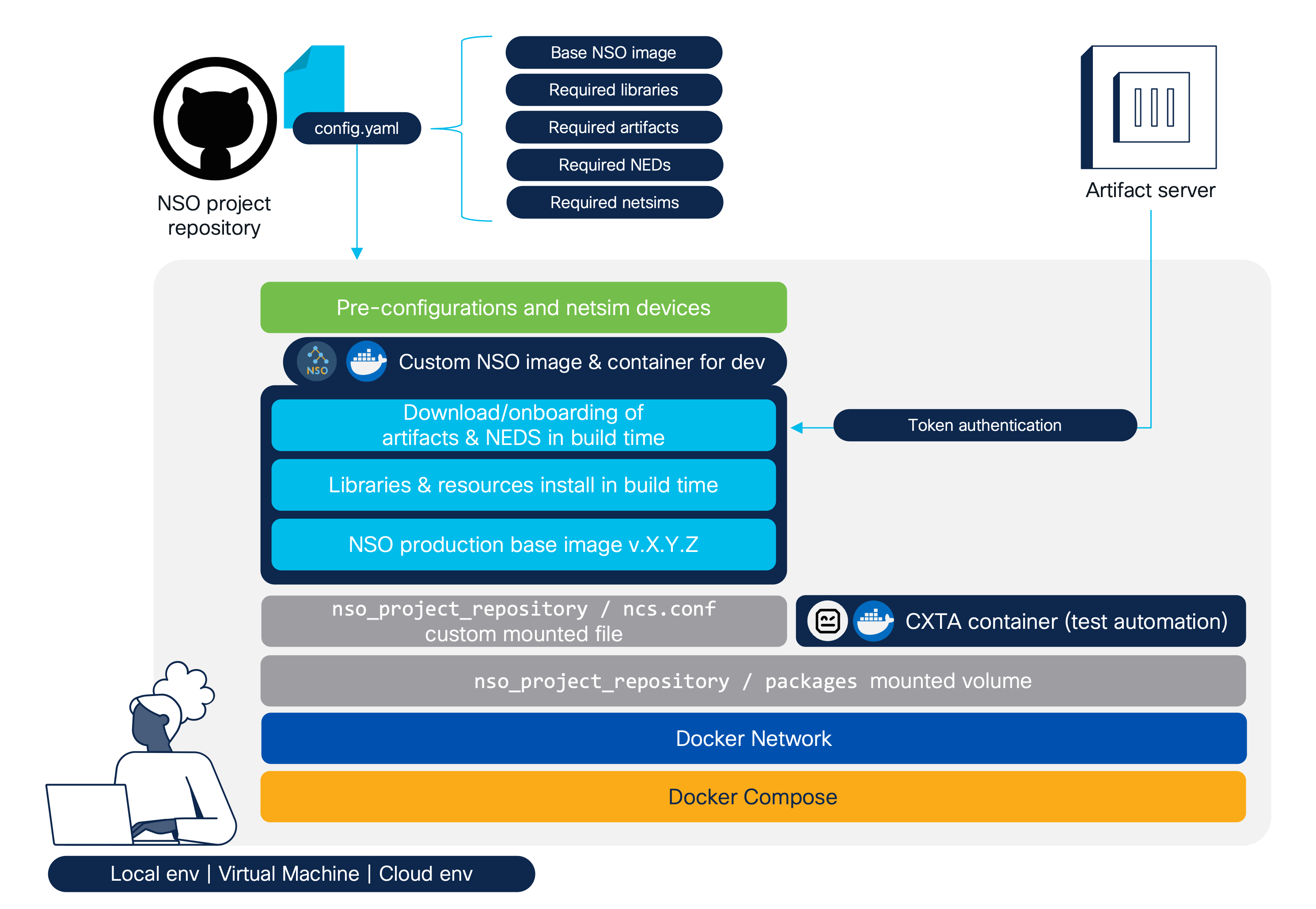
The following diagram shows the components of this project:
Here’s the repository structure:
| File/Directory | Description |
|---|---|
| config.yaml | Artifacts to download and packages to skip compilation |
| docker-compose.j2 | NSO and CXTA service definitions template |
| Dockerfile.j2 | Instructions template for custom NSO image building |
| Makefile | Build and orchestration commands |
| ncs/ncs.conf* | Custom ncs.conf for your NSO container. Mounted in /nso/etc |
| packages/ | Versioned NSO packages. Mounted in /nso/run/packages |
| setup/ | Bash scripts for template rendering and custom NSO image building |
| preconfigs/ | XML files with NSO pre-configurations (e.g., netsim authgroup). Mounted in /tmp/nso |
*About the included ncs/ncs.conf file: It contains the configurations to mount two directories for the NSO packages:
/opt/ncs/packagesfor the NEDs and artifacts in general/nso/run/packagesfor your custom services under development
This isolation keeps the environment clean, so you can focus on the services you’re coding.
The docker-compose.yml defines two key services:
my-nso-dev:
Your custom NSO container, built from themy-custom-nsoimage. It mounts yourncs.confandpackagesdirectory for development flexibility. It exposes NSO’s WebUI on port 8080 and SSH/NETCONF on port 2022.my-cxta-dev:
A CXTA container (dockerhub.cisco.com/cxta-docker/cxta:latest). It also mounts thepackagesdirectory for test automation.
To set up a new development environment, you need to specify the components in the config.yaml file as follows:
nso-base: The NSO base image name:tag to use, as it appears in thedocker imagescommand.nso-image: The name of the new custom NSO container image.nso-name: The name of the NSO container when it is created.cxta-base: The CXTA base image name:tag to use, as it appears in thedocker imagescommand.cxta-name: The name of the CXTA container when it is created.downloads: The artifacts you wish to download during the image build. URLs must point to the actual binaries in your artifact server.skip-compilation: Artifacts that don’t need to be compiled during the onboarding process. Ideally, all artifacts come precompiled, but sometimes you may need to compile them during image build.netsims > NED_name > [netsims names]: Specifies the netsim devices you need per NED. A netsim device will be created and named based on this YAML.
nso-base: cisco-nso-prod:6.5
nso-image: my-nso-custom-dev
nso-name: my-nso-dev

cxta-base: dockerhub.cisco.com/cxta-docker/cxta:latest
cxta-name: my-cxta-dev

downloads:
  - https://github.com/ponchotitlan/dummy_artefact_repository/releases/download/resourcemanager6.5/ncs-6.5-resource-manager-project-4.2.11.tar.gz
  - https://github.com/ponchotitlan/dummy_artefact_repository/releases/download/nx6.5/ncs-6.5-cisco-nx-5.27.3.tar.gz
  - https://github.com/ponchotitlan/dummy_artefact_repository/releases/download/iosxr6.5/ncs-6.5-cisco-iosxr-7.69.tar.gz
  - https://github.com/ponchotitlan/dummy_artefact_repository/releases/download/ios6.5/ncs-6.5-cisco-ios-6.109.4.tar.gz
  - https://github.com/ponchotitlan/dummy_artefact_repository/releases/download/asa6.5/ncs-6.5-cisco-asa-6.18.23.tar.gz

skip-compilation:
  - resource-manager
  - cisco-iosxr-cli-7.69
  - cisco-ios-cli-6.109
  - cisco-asa-cli-6.18
  - cisco-nx-cli-5.27

netsims:
  cisco-iosxr-cli-7.69:
    - asr9k-xr-7601
    - ncs5k-xr-5702
  cisco-ios-cli-6.109:
    - router-ios-01
    - switch-ios-01
  cisco-asa-cli-6.18:
    - asa-fw-01
    - asa-virtual-02
  cisco-nx-cli-5.27:
    - nexus-9000-01
    - nexus-7000-02
---
The Makefile provides convenient commands to manage your custom NSO environment.
| Command | Description |
|---|---|
make |
Default target: builds and then starts all services using the render, register, build, run, compile, reload and netsims targets. |
make render |
Renders the templates docker-compose.j2 and Dockerfile.j2. |
make register |
Mounts a local Docker registry for the NSO container image if your NSO base image is not registered anywhere. |
make build |
Builds the NSO custom Docker image with BuildKit secrets. |
make run |
Starts Docker Compose services with health checks. |
make compile |
Compiles your services using the NSO container. |
make reload |
Reloads all the services by running the packages reload command in the NSO container CLI. |
make netsims |
Loads the preconfiguration files from the repository and creates/onboards the netsim devices. |
make down |
Stops Docker Compose services. |
Finally, to build and mount the environment, it is possible to use either the default make target, or to use the individual ones for specific operations in sequence:
make build--- 🏗️ Building NSO custom image with BuildKit secrets ---
...
🔑 Enter your username and artifact server token in this format ➡️ username:token (or hit Enter if not required):
...
Your artifacts are downloaded and extracted in opt/ncs/packages. Your image is ready to be used!
make run--- 🚀 Starting Docker Compose services ---
[+] Running 2/2
✔ Container my-cxta-dev Running
✔ Container my-nso-dev Started
...
⌛️ Waiting for my-nso-dev to become healthy...
[🐋💤] Waiting for 'my-nso-dev' to become healthy (current status: "starting")...
...
[🐋] my-nso-dev is healthy and ready!Your containers for both custom NSO and CXTA are up and running!
make compile--- 🛠️ Compiling your services ---
...
[📦] Compiling package (demo-rfs) from directory (/nso/run/packages) ...
...
[🛠️] Compiling done!All the services from your packages/ location are properly compiled now. (In this case, it is just our demo-rfs/)
make reload--- 🔀 Reloading the services ---
...
{
package cisco-asa-cli-6.18
result true
}
reload-result {
package cisco-ios-cli-6.109
result true
}
reload-result {
package cisco-iosxr-cli-7.69
result true
}
reload-result {
package cisco-nx-cli-5.27
result true
}
reload-result {
package demo-rfs
result true
}
reload-result {
package resource-manager
result true
}All the services are now properly onboarded on NSO.
make netsims--- ⬇️ Loading preconfiguration files ---
...
[⬇️] Loading done!
--- 🛸 Loading netsims ---
...
DEVICE dummy0 OK STARTED
DEVICE asr9k-xr-7601 OK STARTED
DEVICE ncs5k-xr-5702 OK STARTED
DEVICE router-ios-01 OK STARTED
DEVICE switch-ios-01 OK STARTED
DEVICE asa-fw-01 OK STARTED
DEVICE asa-virtual-02 OK STARTED
DEVICE nexus-9000-01 OK STARTED
DEVICE nexus-7000-02 OK STARTED
...
sync-result {
device asa-fw-01
result true
}
sync-result {
device asa-virtual-02
result true
}
sync-result {
device asr9k-xr-7601
result true
}
sync-result {
device dummy0
result true
}
sync-result {
device ncs5k-xr-5702
result true
}
sync-result {
device nexus-7000-02
result true
}
sync-result {
device nexus-9000-01
result true
}
sync-result {
device router-ios-01
result true
}
sync-result {
device switch-ios-01
result true
}
[🛸] Loading done!All your netsim devices are created, synced and happy.
✅ Now, your environment is ready for use! You can verify your containers with the following command:
% docker ps

CONTAINER ID   IMAGE                                         COMMAND                  CREATED        STATUS                    PORTS                                            NAMES
a5ee6114e149   my-nso-custom-dev                             "/run-nso.sh"            17 hours ago   Up 11 minutes (healthy)   0.0.0.0:2022->2022/tcp, 0.0.0.0:8080->8080/tcp   my-nso-dev
76f4de91d18c   dockerhub.cisco.com/cxta-docker/cxta:latest   "/docker-entrypoint.…"   17 hours ago   Up 12 minutes                                                              my-cxta-dev
f8f892c7cd3b   registry:2                                    "/entrypoint.sh /etc…"   17 hours ago   Up 16 minutes             0.0.0.0:5000->5000/tcp                           local-registry
✅ Also, you can verify the deployment of your artifacts, NEDs and services:
% docker exec my-nso-dev /bin/bash -c "echo 'show packages package * oper-status | tab' | ncs_cli -Cu admin"

                                                                                                        PACKAGE
                          PROGRAM                                                                       META     FILE
                          CODE     JAVA           PYTHON         BAD NCS  PACKAGE  PACKAGE  CIRCULAR    DATA     LOAD   ERROR
NAME                  UP  ERROR    UNINITIALIZED  UNINITIALIZED  VERSION  NAME     VERSION  DEPENDENCY  ERROR    ERROR  INFO   WARNINGS
-----------------------------------------------------------------------------------------------------------------------------------------
cisco-asa-cli-6.18    X   -        -              -              -        -        -        -           -        -      -      -
cisco-ios-cli-6.109   X   -        -              -              -        -        -        -           -        -      -      -
cisco-iosxr-cli-7.69  X   -        -              -              -        -        -        -           -        -      -      -
cisco-nx-cli-5.27     X   -        -              -              -        -        -        -           -        -      -      -
demo-rfs              X   -        -              -              -        -        -        -           -        -      -      -
resource-manager      X   -        -              -              -        -        -        -           -        -      -      -
✅ Your artifacts and NEDs are in a different location:
% docker exec my-nso-dev /bin/bash -c "ls -lh /opt/ncs/packages"

total 20K
drwxr-xr-x  8 9001 users 4.0K May 15 09:00 cisco-asa-cli-6.18
drwxr-xr-x  8 9001 users 4.0K May  8 12:20 cisco-ios-cli-6.109
drwxr-xr-x  9 9001 users 4.0K May  8 11:23 cisco-iosxr-cli-7.69
drwxr-xr-x  9 9001 users 4.0K May 13 09:31 cisco-nx-cli-5.27
drwxr-xr-x 11 root root  4.0K Sep  8 15:42 resource-manager
✅ Your services under development are in this mounted volume, mapped to your repository:
% docker exec my-nso-dev /bin/bash -c "ls -lh /nso/run/packages"

total 0
drwxr-xr-x 8 nso root 256 Sep  2 15:44 demo-rfs
✅ Finally, your netsim devices are onboarded and synced:
% docker exec my-nso-dev /bin/bash -c "echo 'show devices list' | ncs_cli -Cu admin"

NAME            ADDRESS    DESCRIPTION  NED ID                ADMIN STATE
-------------------------------------------------------------------------
asa-fw-01       127.0.0.1  -            cisco-asa-cli-6.18    unlocked
asa-virtual-02  127.0.0.1  -            cisco-asa-cli-6.18    unlocked
asr9k-xr-7601   127.0.0.1  -            cisco-iosxr-cli-7.69  unlocked
dummy0          127.0.0.1  -            cisco-iosxr-cli-7.69  unlocked
ncs5k-xr-5702   127.0.0.1  -            cisco-iosxr-cli-7.69  unlocked
nexus-7000-02   127.0.0.1  -            cisco-nx-cli-5.27     unlocked
nexus-9000-01   127.0.0.1  -            cisco-nx-cli-5.27     unlocked
router-ios-01   127.0.0.1  -            cisco-ios-cli-6.109   unlocked
switch-ios-01   127.0.0.1  -            cisco-ios-cli-6.109   unlocked
If you are using the Visual Studio IDE, you can attach your IDE to your NSO running container and use it like if it was your local environment.
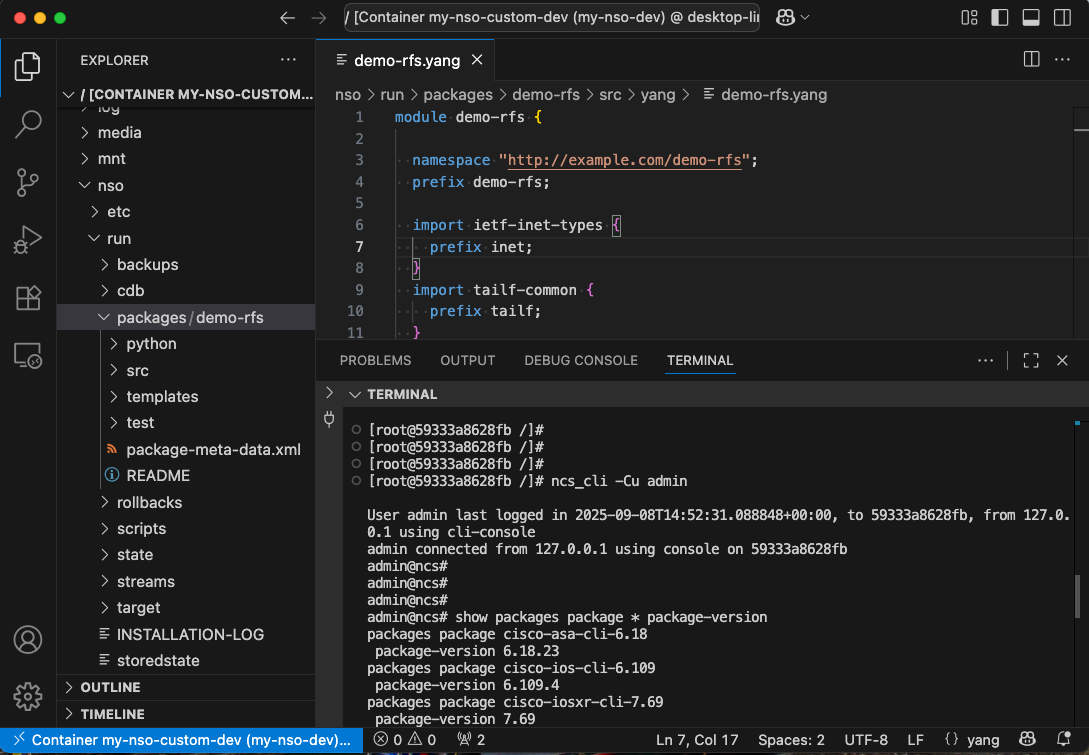
Given that your working services are mounted in a volume, any changes done will reflect in your local repository. Therefore, you can commit and push changes when you release a new version of your services.
Finally, to destroy the development environment, you can use the following command:
make down--- 🛑 Stopping Docker Compose services ---
docker compose down
[+] Running 3/3
✔ Container my-cxta-dev Removed 10.1s
✔ Container my-nso-dev Removed 1.5s
✔ Network nso-consistent-dev-environment_dev-netwk Removed 0.2s All your containers are gone now.
Bear in mind: this is just an example of how useful, powerful, and convenient a development environment for network automation can be.
Final Remarks
The definition and diligent maintenance of a versionable development environment are not merely good practices but essential pillars for any successful network automation project. This critical component must be integrated into the earliest planning stages, treated as a proper deliverable with its own requirements, rather than an afterthought.
While the initial effort to establish such an environment can seem significant, the investment quickly yields substantial returns. It dramatically reduces the time and friction associated with onboarding new engineers, enabling them to become productive contributors almost immediately.
This consistency also empowers development teams to focus on innovation by eliminating environmental inconsistencies, leading to more efficient and predictable sprints, and ultimately safeguarding the long-term health and scalability of your network automation initiatives.
So, bid farewell to the endless pursuit of the elusive yak; a versionable dev environment is your definitive answer to truly enabling ‘No More Yak-Shaving’.
This is it for now! Thank you for reading.
See you in the next one.