Avatar

Part 1 of 2

Tackling the planet’s largest, most fearsome waves motivates surfing pros to take terrifying risks.   Take Carlos Burle, a Brazilian big wave surfer, who unofficially broke the word record for the biggest wave ever surfed by riding a 100-foot wave off the coast of Portugal.

However the excitement doesn’t stop there.  Surfers also account for more than half of shark attack victims in the world with many incidences taking place during championship events. If you recall last year, 3-time world champion Mick Fanning (AUS) came face to face with a great white, and miraculously, walked away unscathed from the attack.

Today, CIOs and IT leaders are experiencing a mix of the fear of sharks and the thrill of surfing big waves. As many businesses are trying to decide how to respond to threats and opportunities arising from digitization, organizations are demanding IT departments to quickly and flexibly offer the services that best equip a modern workforce. As a result, ITSM suites, service management apps and service catalog tools are rapidly evolving to enable business agility in today’s digital world.

With the continued expansion of consumerization, cloud, social and mobility, the demand for next generation ITSM to deliver increased IT infrastructure & operations (I&O) effectiveness is magnified. Furthermore, new requirements for hybrid cloud services, bi-modal apps, DevOps adoption and software-defined infrastructure drive the evaluation of transformational technologies to determine which provides an early advantage, and which represents excessive risk.

IT departments are taking on the challenge of ITSM evolution in the following three main segments with stakeholders across segments driving towards common end goal – to create competitive differentiation for the business through IT service operational agility.

Continue reading “How Digital Transformation is Disrupting IT Service Management”

Authors

Adam Ozkan

Hybrid Cloud Infrastructure

Avatar

We are pleased to announce the availability of the cryptolocker 4 white paper. Over the past year, Talos has devoted a significant amount of time to better understanding how ransomware operates, its relation to other malware, and its economic impact. This research has proven valuable for Talos and led the development of better detection methods within the products we support along with the disruption of adversarial operations. CryptoWall is one ransomware variant that has shown gradual evolution over the past year with CryptoWall 2 and Cryptowall 3. Despite global efforts to detect and disrupt the distribution of CryptoWall, adversaries have continued to innovate and evolve their craft, leading to the release of CryptoWall 4. In order to ensure we have the most effective detection possible, Talos reverse engineered CryptoWall 4 to better understand its execution, behavior, deltas from previous versions and share our research and findings with the community. The white paper is located here.

Authors

Talos Group

Talos Security Intelligence & Research Group

Avatar

You have secrets in your cluster. Everybody does, it’s a fact of life. Database passwords, API keys, deployment tokens, just to name a few. Secrets are hard to manage, even before you throw in the fact that most of us now are operating in a cloud environment. In software development, the common advice to “never roll your own crypto” tends to get thrown out the window when you’re talking about infrastructure secrets. These home-grown solutions are hard to maintain and rarely audited properly. But the alternatives aren’t great: go without or suffer vendor lock in. And that’s without even mentioning tasks we all need to know we need to do like key rolling. Add containers into the mix and you’ve got a real headache on your hands.

At Cisco, as we developed our opensource microservices platform Mantl, we wanted to address all aspects of the software developers security concerns. Security is still one of the top concerns in cloud today and it should be.  To address security in depth, you need to start at the beginning of the project with security practices and controls in mind. In this post we are looking at secrets. We leveraged Vault, an open-source tool recently released by Hashicorp to manage secret sharing within a datacenter. We’re going to highlight some key features that you’ll want to know about, and then get into how to actually use the software in MantlVault on Mantl means that you can have more secure integration with your cloud resources as well as enhanced operational procedures internally. We think that it sets Mantl apart as a microservices  infrastructure that takes security seriously.

The first, and arguably most useful, feature of Vault is automatic secret rolling. As the administrator, you set up and manage secure backends like PostgreSQL or AWS. Essentially, you give Vault permissions to create and manage users with a specific set of access permissions in these systems, and Vault will take care of issuing and revoking secrets. It has the concept of a lease on secrets, so a client knows how long the secret it has is good for, and when it will need to get a new one.

But secret rolling isn’t very useful without the ability to audit secret issuance and access, and Vault delivers here too. It can write audit logs to a file on the system or to syslog for your log solution to slurp up for later review. And how do you connect with this system? Vault ships a handful of auth backends. For operators, Vault has LDAP, MFA tokens, and Github authentication. For automated consumers, there are the methods you’d expect like TLS certificates and token-based authentication plus “app ID”, a mechanism for new nodes to authenticate with Vault.

You can either download Vault for your platform at the Vault project download page. A note about the download and release process: Hashicorp publishes checksums signed by their GPG key for verification. The codebase itself, besides being open source, is professionally audited by iSec. That is not to say that it’s perfect, but it’s quite a step up from unsigned release binaries on Github. Of course, since Vault is open source you can also choose to compile a release yourself with the instructions in their README.

Let’s get started using Vault. We’ll be running these examples locally, and I’m assuming that the vault tool is in your path. If you’ve just downloaded the release, navigate to the directory and at the command line use ./vault instead. In these examples, $ indicates terminal input, all other lines are output.

Dev Server

We’ll be using Vault’s dev server locally. To start it, run vault server -dev:

$ vault server -dev

==> WARNING: Dev mode is enabled!

In this mode, Vault is completely in-memory and unsealed. Vault is configured to only have a single unseal key. The root token has already been authenticated with the CLI, so you can immediately begin using the Vault CLI.

The only step you need to take is to set the following environment variables:

export VAULT_ADDR=’http://127.0.0.1:8200′
The unseal key and root token are reproduced below in case you want to seal/unseal the Vault or play with authentication.

Unseal Key: 6968dc217d5d7e9af8cba3abb1ca9547a57b68482301306018b1b9b50f640c07 Root Token: 4f02a7b0-93ff-fe5e-dc20-9aa26635cd5e

==> Vault server configuration:

   Log Level: info
        Mlock: supported: false, enabled: false
      Backend: inmem
   Listener 1: tcp (addr: “127.0.0.1:8200”, tls: “disabled”)
      Version: Vault v0.5.2
==> Vault server started! Log data will stream in below:

2016/04/25 10:32:02 [INFO] core: security barrier initialized (shares: 1, threshold 1)

2016/04/25 10:32:02 [INFO] core: post-unseal setup starting

2016/04/25 10:32:02 [INFO] core: mounted backend of type generic at secret/

2016/04/25 10:32:02 [INFO] core: mounted backend of type cubbyhole at cubbyhole/

2016/04/25 10:32:02 [INFO] core: mounted backend of type system at sys/

2016/04/25 10:32:02 [INFO] rollback: starting rollback manager

2016/04/25 10:32:02 [INFO] core: post-unseal setup complete

2016/04/25 10:32:02 [INFO] core: root token generated

2016/04/25 10:32:02 [INFO] core: pre-seal teardown starting

2016/04/25 10:32:02 [INFO] rollback: stopping rollback manager

2016/04/25 10:32:02 [INFO] core: pre-seal teardown complete

2016/04/25 10:32:02 [INFO] core: vault is unsealed

2016/04/25 10:32:02 [INFO] core: post-unseal setup starting

2016/04/25 10:32:02 [INFO] core: mounted backend of type generic at secret/

2016/04/25 10:32:02 [INFO] core: mounted backend of type cubbyhole at cubbyhole/

2016/04/25 10:32:02 [INFO] core: mounted backend of type system at sys/

2016/04/25 10:32:02 [INFO] rollback: starting rollback manager

2016/04/25 10:32:02 [INFO] core: post-unseal setup complete

$ export VAULT_ADDR=’http://127.0.0.1:8200′

Vault shows some basic instructions for getting connected. Write down the unseal key and root token, we’ll need them later. Note that this method of running the server is inappropriate for putting into production since the data is only held locally and in-memory. This dev server also does not encrypt communication between the server and the client (which is why we explictly have to set the protocol to http in VAULT_ADDR.)

Setting and Retrieving a Secret

Once we have the VAULT_ADDR environment variable in place, we can read and write secrets. These secrets operate quite like a K/V store. The key is a slash-separated path which you can use as an identifier. The big difference here is that the value is a mapping of keys and values itself. Let’s demonstrate by writing a key named test/cisco under the default secret namespace used for generic secret storage:

$ vault write secret/test/cisco hello=world

Success! Data written to: secret/test/cisco

That data has been written to Vault, and we can get it out again with the inverse operation, vault read:

$ vault read secret/test/cisco

Key            Value

lease_duration 2592000

Hello          world

The result is a little table (by default for human consumption, but you can also ask for JSON or YAML with -format=.) We’ll come back to the lease duration, but see that our key and value is set exactly as we formatted it on the command line. Since this is a map of data, we can set more keys in the data as well:

$ vault write secret/test/cisco hello=world vault=works

Success! Data written to: secret/test/cisco

$ vault read secret/test/cisco

Key            Value

lease_duration 2592000

Hello          world

vault          works

Sealing and Unsealing

Now that we have some data to work with, let’s demonstrate sealing Vault’s secret store. Vault has two states: sealed and unsealed. When Vault is sealed, no secret material can go in or out, and the master key is revoked. The dev server starts off unsealed, but in production Vault will start sealed. Unsealing Vault requires a quorum of keys (so-called “unseal keys”), which you can distribute around your organization however you see fit.

Since we’re using the dev server, the vault is open right now. Let’s seal it to demonstrate:

$ vault seal

Vault is now sealed.

This is your panic button. If there is a detected intrusion, you can seal Vault right away to limit the damage. Of course, it will render secret backends temporarily inoperable but desperate times call for desperate measures! To demonstrate this, try reading our key from earlier:

$ vault read secret/test/cisco

Error reading secret/test/cisco: Error making API request.

URL: GET http://127.0.0.1:8200/v1/secret/test/cisco

Code: 503.

Errors:

* Vault is sealed

Fortunately we can recover from this with the vault unseal command using the unseal key from earlier:

$ vault unseal 6968dc217d5d7e9af8cba3abb1ca9547a57b68482301306018b1b9b50f640c07

Sealed: false

Key Shares: 1

Key Threshold: 1

Unseal Progress: 0

In this case, we can recover with a single unseal key. In production, you will want to have multiple key shards distributed among your trusted operators, a quorum of which will be required to unseal.

Dynamic Secret Backends

Now that we’ve unsealed, let’s put a cherry on top by setting up a dynamic secret backend. We’ll use AWS as an easy example. Using the AWS backend, you can issue users with arbitrary IAM permissions whose lifecycle will be fully managed by Vault. To get started, we need to mount the AWS backend:

$ vault mount aws

Successfully mounted ‘aws’ at ‘aws’!

Next, we’ll need to create an IAM user with access to create and modify users. You can limit this however you feel comfortable. After retrieving the credentials from the AWS management console, we’ll feed them to Vault:

$ vault write aws/config/root \

   access_key=… \

   secret_key=… \

   region=us-east-1

Success! Data written to: aws/config/root

The last step before we can issue new users is setting a policy. You can write your own policies, of course, or you can use a predefined AWS policy. We’ll do that here to give our users read-only access to EC2.

$ vault write aws/roles/readonly arn=arn:aws:iam::aws:policy/AmazonEC2ReadOnlyAccess

Success! Data written to: aws/roles/readonly

Now to get a new set of credentials, we just need to read them out. Vault will generate new users with appropriate permissions on the fly.

$ vault read aws/creds/readonly

Key             Value

lease_id        aws/creds/readonly/2839a94d-e43c-fd78-6df3-54d463f3e651 lease_duration  2592000

lease_renewable true

access_key      AKIAJAOZWGRYNCIZQTYQ

secret_key      h7fTJRpx5v6tzdW02IV5ruM3BCu3Uh7mIPWs64+T

security_token  <nil>

Success! If you check your AWS console you will now be able to see a new user with the AmazonEC2ReadOnlyAccess policy attached. Note the lease_id and lease_duration parameters above. These are used for key rotation. The lease can be renewed; in this case, for 30 days. However, the default lease duration can be changed, along with the maximum key lifetime.

Of course, these credentials can be revoked at any time with vault revoke and the lease ID:

$ vault revoke aws/creds/readonly/2839a94d-e43c-fd78-6df3-54d463f3e651

Key revoked with ID ‘aws/creds/readonly/2839a94d-e43c-fd78-6df3-54d463f3e651’.

And the user is gone.

Now that we’ve seen how and why to use Vault, how are you going to get it into production? You could try to figure it all out yourself, but it (along with HA mode and some service integration) are built into Cisco’s Mantl. You could be up and running in the cloud of your choice and building applications with Vault within the hour. Give Mantl a try and let us know your thoughts about security concerns in a microservices infrastructure.  Stay tuned for additional enhancements Cisco’s making in microservices infrastructure.

Authors

Kenneth Owens

Chief Technical Officer, Cloud Infrastructure Services

Avatar

Are you missing the Interop Conference and want a taste of Enterprise NFV? Starting at 2:30pm on Thursday, May 5th we will be presenting to six awesome bloggers about everything Enterprise NFV! Here is where you can view the livestream: Cisco at Tech Field Day Extra – Interop

Kicking off the dynamic is Senior Vice President of Enterprise Infrastructure and Solutions Jeff Reed. If you’ve been wondering what the heck Cisco DNA is Jeff will be giving a great overview!

Continue reading “Catch the Livestream of #TFDx at the #Interop 2016 Conference”

Authors

Breana Jordan

Product Marketing Specialist

Products and Solutions Marketing

Avatar

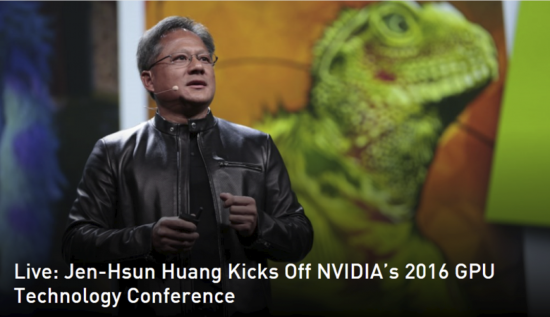
This year Cisco was a Platinum sponsor of the GPU Technology Conference in San Jose. Colloquially known as “GTC2016” or “The Graphics Conference,” it gave us a great platform to show off some of the latest developments from Cisco and our partners.

GPU-event2

We showed a host of applications and solutions along with NVIDIA and our ecosystem partners:

Deep Learning

You may be wondering – what does Cisco have to do with deep learning? As Francoise Rees shared in the pre-event blog, “a lot more than you might think!”

Hugo Latapie, Cisco Principal Engineer, presented a session on Deep Learning at the Edge of the Network. He highlighted use cases in IoT, SmartCities, retail, event analytics, and transportation. His talk was targeted primarily towards engineers either actively engaged in product development or seriously contemplating it.

The idea is to use these techniques of data collection at the edge (fog computing) along with virtualized graphics from NVIDIA within the high performance Cisco UCS data center computing environment along with deep learning algorithms in visual, crowd, and behavioral analytics projects at Cisco. Why? Deep Learning is used to improve a whole bunch of applications for vehicle, pedestrian, and landmark identification for driver assistance – and for Image recognition and Life Sciences.

Partnerships

Cisco also works with application vendors to deliver validated solutions for deploying highly specialized 3D applications virtually. We have solutions for the PTC Creo Suite (Manufacturing) and Esri ArcGIS Pro (geospatial mapping) among others. Last year we heard how Ford is using NVIDIA GPUs in their Cisco UCS infrastructure and are improving engineering/design productivity by partnering with Citrix.

This year there was a new message from Ford. Last year they shared it can take 7 hours for a designer to download the data sets he or she needs to work on to do ten minutes work. Now they are saying:

“You don’t need to move your data to an expensive workstation possibly out-of-your control or out of the country to get work done”

The Booth

This year we hosted our partner Citrix in our booth to show how professionals can avoid expensive workstations with the use of technology.. Citrix demonstrated the latest remote graphics solution powered by Cisco and NVIDIA. Visitors experienced the HDX 3D Pro user experience (built on the flexible Cisco UCS platform), Citrix HDX Framehawk with GPU support, and HDX USB device redirection to support additional USB drawing tools used by professionals.

There were all sorts of new NVIDIA GRID 2.0 products on display. One standout was the new TESLA M6 MXM GPU, which brings graphics acceleration to our VDI workhorse – the UCS B200 M4 blade server. This provides UCS customers a wide range of configurations to support any VDI deployment needs they may have.

We also showed our new Cisco HyperFlex hyper-converged infrastructure (HCI) solution in the booth. Cisco HyperFlex is the first end-to-end HCI solution that combines compute, networking, and next generation storage.

We also had ESRI in our booth showing ArcGIS Pro, which shows geospatial data on desktops and is used in the utility and oil and gas industries for visualizing, analyzing, and sharing data. At last year’s Cisco Live I showed this on BitStew demo screens. The pièce de résistance here is that you can run the app miles away on a Cisco UCS datacenter, without the need for big local workstations.

Around the Event

Other folks were showing off cool technologies, and I asked our own Philip Laidlaw what he saw there this month:

“Autonomous cars (of course) and a very cool wave powered floating drone from Liquid Robotics that can head to a point anywhere in the open oceans to do data collection, and investigate with missions specific payloads.”

This would be great for the oil and gas industry.

Were you there? If so, what did you think? Share your thoughts in the comments section below.

Also, see how we can help your industry here.


Authors

Peter Granger

Senior Sales Transformation Manager

Avatar

From the STEM Education Caucus, to the US Joint Economic Committee’s report on STEM education, to White House STEM Fairs, encouraging students on the path to careers in Science, Technology, Engineering, and Math is a topic that politicians from both sides of the aisle have championed. At Cisco, we take our part in promoting STEM education very seriously.

Just how seriously?  Yesterday, Cisco kicked off  Girls Power Tech, a  global mentoring initiative —  in conjunction with the 6th annual United Nation’s International Girls in ICT Day. Day-long learning events took place at 105 Cisco offices in 61 countries around the world, beginning on April 28 through May 19.

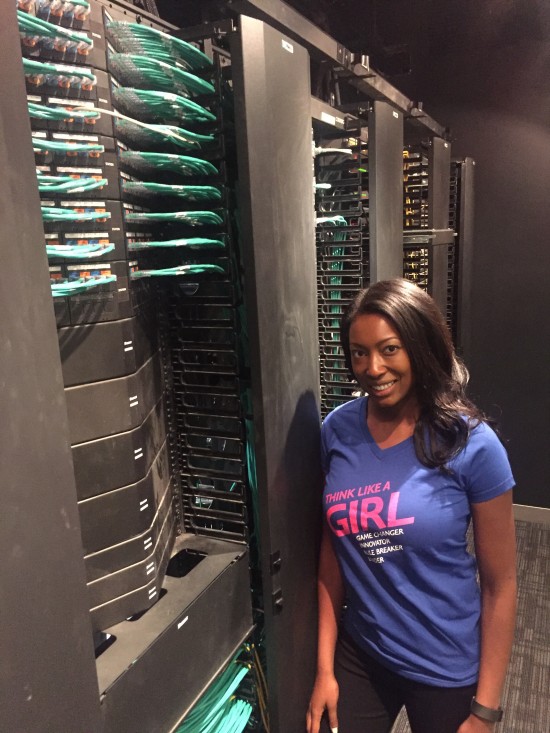
Aisha Bowe, CEO STEMboard and guest speaker for Girls Power Tech, in front of the rack space at the Cisco office.

These events will empower and inspire students to pursue careers in information and communication technologies (ICT) through exposure to the Internet of Things, Cisco technology and mentoring by Cisco employees.

In our Washington D.C. Office, we were thrilled to host Aisha Bowe, CEO of STEMBoard, who presented via Telepresence to 150 girls gathered at Cisco facilities up and down the east coast and in Ottawa.  Aisha has had a distinguished engineering career, first at NASA where she designed and built scientific satellites, and more recently at her own company, which provides engineering services to a wide range of customers, including major US government agencies.

Through the video conference, the girls “leaned in” as she told them what kind of satellites she designed, what it is like to be an engineer, and showed them how technology affects almost everything they do in their lives- from the apps they use, to the fashion they wear, to the future technologies she said she hoped they would invent in the future.

She encouraged the girls to vocalize their career interests and identify mentors.  Aisha said, “ I wanted to make sure the girls knew that they have the power to start a movement even now while they are in middle and high school to leverage their experiences and innovate.”

Over 4,000 young women from all around the world will be coming to a Cisco campus over the next few weeks to learn about technology and engage with over 2,000 Cisco employee volunteers with one single goal in mind – inspiring them to see the possibilities that a career in IT can offer.

Authors

Megan DePorter Zeishner

Community Relations Program Manager

Avatar

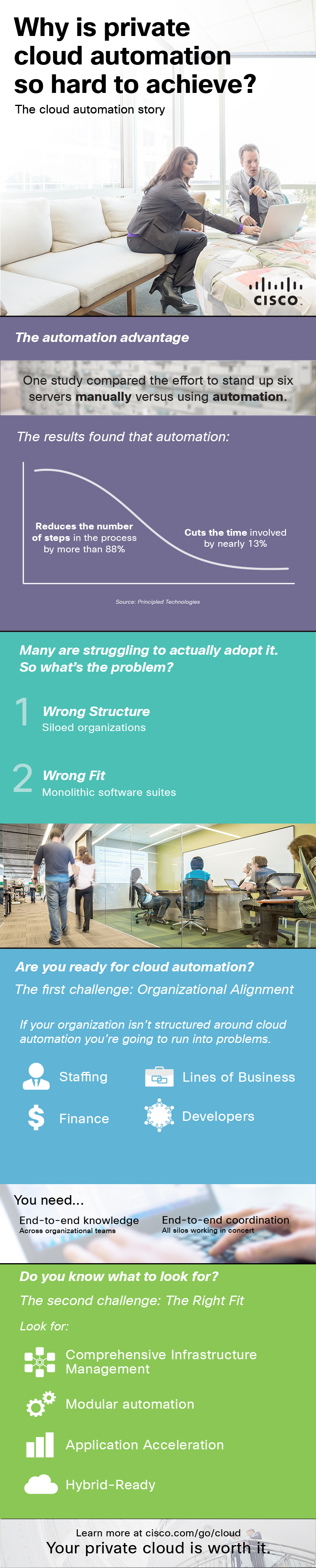
Private cloud automation is on the agenda of the majority of organizations today because it delivers the speed, flexibility and agility required to be competitive in today’s business environment.   There is a perception that private cloud is hard to achieve and with some solutions that may be true. Cisco has been in the cloud business for over 5 years now and we have learned a thing or two.   First, cloud automation delivers speed and agility by replacing manual error-prone processes with automated workflows.   Second, installing only the components you want to use today and then organically grow helps your organization adopt automation at a more comfortable pace.   Finally, not all organizations move at the same pace or want to use the same solution so you need choice.  Cisco cloud understands these needs and can help.


3- Private Cloud Automation infographic- final

Authors

Joann Starke

No Longer with Cisco

Avatar

Public safety is becoming an increasing concern, just about everywhere you go. It seems every time you turn on the news, there’s someone or something else harming people, killing people, or putting them in danger. There are public safety organizations for cities, borders, college campuses, and more, whose job it is to keep you safe from these threats. Are they prepared to do that? Do they have a plan in place? That’s the topic of our next #CiscoChat, on Tuesday, May 17th from 10-11am PTContinue reading “Live #CiscoChat May 17th: Safer Communities and Countries in a Digital World – Are You Prepared?”

Authors

Laura Re

Content Marketing Manager, Data Center Marketing

Ent Solutions- Data Center Marketing- UCS