Policy Control is most commonly associated with PCRF, the 3GPP-defined standard for implementing policy and charging rules. It is the enforcement of these rules at the various network gateways that enable mobile operators to control and monetize their services. Network-based policies create the foundation for delivering a better user experience (and thus a successful business) — everything from family share plans to voice quality for voice-over-LTE calling, to protecting against bandwidth abuse.
While not altogether new, the concept of policy control at the device level is seeing renewed interest in recent use cases that extend mobile operator control to end-user devices. From more intelligent offload decisions to network entitlement of device capabilities, device-based policy is proving to be an invaluable tool in carriers’ quest to differentiate their services. These use cases will evolve as the variety of connected devices grows to include personal transport and commercial vehicles and the vast array of M2M devices. The proliferation of such “devices” represents an extension of the network itself and maintaining control of these networks (through network policies) will continue to be essential to the service provider business.
Join the on-demand replay of the recent IHS webcast, “Extending Network Policy to the Device” with Shira Levine, the Research Director for IHS’s Service Enablement and Subscriber Intelligence, and Kishen Mangat, Cisco’s General Manager of Cisco’s Policy Business Unit. During the webinar, they discuss the recent trends in policy management for the device, including carrier needs, use cases, addressing barriers to deployment and customer examples.
As a bonus, everyone who registers for this webinar will receive a custom report titled Leveraging the Device for Subscriber Engagement by Research Director Shira Levine.
Growing up in India, I biked everywhere, every day, as a child.
I grew up, as we all do, moved to the United States and set biking aside. However, three years ago, I started biking again.
The first time I got on my Cannonade (that’s a really great bike, if you don’t know) something just felt right. I have that feeling when I get on the saddle every Sunday morning.
I see more when I’m on my bike than when I’m in a car. I usually take the roads and routes that I haven’t explored. It is an amazing hobby that allows me to slow down, even when I’m going 20+ miles per hour. I stop to talk to people. For the next few hours that I’m on my bike, it’s just me, nature, and my fellow biking enthusiasts. I am always amazed at how new many friends I make see when I’m riding. These friends I made, we call ourselves, “CRANK OF DAWN” because we like to ride early.
It’s the same during my 8+ years at Cisco, where I get to see how many great people I work with. I am a Software Technology Manager and while we’re all moving fast to innovate and to change the world, when we take a moment to slow down, enjoy what we do, we get to see a little more, take a few unexplored paths, and just talk to each other. We also have time to give back together.
I learned about the Canary Foundation through Cisco’s volunteer program. It is the non-profit organization dedicated solely to the funding, discovery and development of tests for early cancer detection. This photo of me is during a 50-mile ride for the Canary Challenge. I like that Cisco encourages us to give back in ways that are personal to us, and in our local communities.
My father started one of the first early cancer detection centers back in the 1970s in Gujarat, India. When I ride for Canary, I feel that sense of connection between where I am now, at Cisco, and where I came from, all while contributing to a worthy cause.
This is my reason to #LoveWhereYouWork, what’s yours?
Model-driven telemetry has been one of the most fun projects I’ve worked on in a long time. Right from the start, we worked hand-in-hand with customers to identify their biggest pain points when it came to network operational data. To my surprise, the primary ask was not for new types of data or fancy new counters. Quite the opposite, in fact. The most useful data already exists in the network, it’s just too hard to get. The most frequent culprit? SNMP polling. Almost 30 years since it was first standardized, SNMP has done many good things but it hasn’t kept up with the speed and scale that modern networks require.
We talk a lot about “push” being a better mechanism than “pull”, but what exactly does that mean? To retrieve large amounts of data, SNMP polling relies on the GetBulk operation. Introduced in SNMPv2, GetBulk performs a continuous GetNext operation that retrieves all the columns of a given table (e.g. statistics for all interfaces). The router will return as many columns as can fit into a packet (subject to the max-repetitions parameter). If the polling client detects that the end of the table has not yet been reached, it will do another GetBulk and so on.
Take a look at a packet trace for a GetBulk for interface statistics (the IF-Table of the IF-MIB). The router (172.30.8.51) responds with 70 OIDs in the first packet and the poller (172.30.8.11) does a second request for the remaining OIDs. On receiving the second request, the router continues its lexicographical walk and fills up another packet. When the poller detects that the router has “walked off the table” (by sending OIDs that belong to the next table), it stops sending GetBulks. For very large tables, this could take a lot of requests and the router has to process each one as it arrives.
This situation is bad enough if you have a single SNMP poller, but what if you have two or more polling stations (which most people do if only for redundancy)? The router has to process each request independently, finding the requested place in the lexical tree and doing the walk, even if both pollers requested the same MIB at more-or-less the same time. Many network operators know this empirically: the more pollers you have, the slower the SNMP response.
Telemetry gains efficiency over SNMP by eliminating the polling process altogether. Instead of sending requests with specific instructions that the router has to process each and every time, telemetry uses a configured policy to know what data to collect, how often and to whom it should be sent.
Take a look at a packet capture of interface statistics sent with telemetry using the compact Google Protocol Buffer encoding instead of SNMP. (This represents a superset of SNMP interface statistics since the router stores 36 statistics for every interface and the IF-Table has less.) At any rate, as you can see, all of the statistics fit into a single UDP packet. But the biggest gains have nothing to do with packet size. The really important thing is that the router does a single dip into the internal data structures to acquire the data and, if there are multiple interested receivers, the router can just duplicate the packet for different destinations (a simple and efficient operation for a router). So sending telemetry to one receiver has the same latency and overhead as sending it to five.
Push Bags, Not Columns
Polling is not the only computational burden that SNMP imposes on a router. An equally significant performance factor is how data is ordered and exported. I know that sounds incredibly boring and abstract, but hey, nobody said performance optimization was exciting!
SNMP imposes a very tight model when it comes to indexing and exporting. Take the example of the SNMP IF-Table. Each column of the table represents a different parameter for a given interface, indexed by the ifIndex. I’ve shown the first five columns below:
The strict semantics of the GetNext/GetBulk operations force the router to traverse the table column by column (returning the list of ifIndex, followed by a list of ifDescr, etc) from lowest index value to highest. From a router’s perspective, that’s just not natural.
Not surprisingly, routers store internal data in a way that’s most efficient for routers. In IOS XR, for example, the internal data structure for interface statistics is indexed by interface name and is stored in a structure called a bag (basically, an unordered superset of the data in a row of the IF-Table above). The router’s most efficient internal bulk data retrieval is to grab a whole bag (or, even better, bags) of data at once. But the router can’t just send the bag in SNMP. Instead, it has to re-order the data into a table and walk the columns to fulfill the GetBulk request. Now, the router can do all kinds of internal optimizations to make this process better (like auxiliary indices and caching techniques) but that all adds up to extra processing work and may also result in stale data.
How much better it would be if we could just free the router to present its data in the natural order! Well, that’s exactly what telemetry does. Telemetry collects data using the internal bulk data collection mechanisms, does some minimal processing to filter and translate the internal structure to a Google Protocol Buffer, and then pushes the whole thing to the collector at the configured intervals. We’ve worked hard to minimize processing overhead at every step, so you get the fastest, freshest data possible with the least amount of work.
Bringing The Network Into Focus
After nearly 30 years, SNMP is nearly ubiquitous. Almost all modern network monitoring platforms rely on it to some degree or another. But for large-scale networks with real-time monitoring requirements, the fundamental operational characteristics of the SNMP protocol create bottlenecks that prevent valuable operational data from getting off the router. Model-driven telemetry frees the data from the constraints of SNMP and delivers it at a velocity that is often orders of magnitude better. Earlier this year, our first customers began turning off SNMP in favor of telemetry. Now it feels a bit like getting a new telescope for my tenth birthday — I can’t wait to see what new insights will emerge from the volume of network data we can access now.
Coming to NANOG 67 in Chicago next week? Stop by my presentation “Ten Lessons from Telemetry” on Wednesday June 27th, from 10:30am to 11:00am. There will be lots to talk about!
This guest post was written by Gena Pirtle, Marketing & Workforce Programs Manager for Cisco Corporate Affairs. She has been with Cisco since 1998 and currently oversees the Talent Bridge initiative, connecting Cisco and its partners to world-class talent.
The NBA draws its fans by creating an environment of excitement and thrilling spectators with superstar athletes and explosive action. Cisco, the official technology sponsor of the NBA, has helped to enhance the fan experience through connected network solutions.
Behind the scenes, a group of Cisco Networking Academy students help make it possible for fans around the world to see the action as it happens. They’re part of the NetAcad Dream Team, a group of top United States and Canada students who gain real-world experience at NBA events and Cisco Live each year.
Cisco’s partnership with the NBA has created countless opportunities for these Dream Team participants, many of whom have gone on to successful careers in the IT industry. Since 2014, 91 students have participated in 13 global events around the world. Michael Gliedman, the NBA’s Senior Vice President and Chief Information Officer, calls the Dream Team a “secret weapon” at events like the NBA All Star Games.
“Over the past few years, Cisco’s Networking Academy students have become a secret weapon for us at events. They are a great adjunct to the NBA IT team on-the-ground and work shoulder-to-shoulder with my team as they build out the infrastructure for major events such as the NBA All-Star game and the NBA Draft. The students are eager to learn and they work hard – certainly a great combination. We are delighted to continue working with the Cisco Networking Academy.”
This summer, the Dream Team will work on-site at two NBA events — the 2016 NBA Draft Lottery in Chicago and the 2016 NBA Draft in New York. But the opportunities don’t stop with the NBA. Cisco Talent Bridge, a new NetAcad employment program, connects pre-qualified students and alumni with career opportunities in the IT/networking field.
Dream Team participants gain visibility and exposure to jobs at Cisco and other employers who recognize Cisco NetAcad students as some of the most qualified entry-level candidates and future global problem solvers. There’s never been a better time to consider NetAcad talent as a secret weapon to build the future IT workforce.
Read more about the NetAcad Dream Team and see how hands-on experience is preparing today’s students for jobs in the industry!
The first SNMP release came out in 1988. 28 years later, SNMP is still around… Will this still be the case in 10 years from now? Difficult to say but the odds are lower these days. Why are we predicting SNMP could go away?
If you’re already savvy about SNMP, check out this blog for getting insight into current SNMP limitations and why we are making this prediction.
SNMP was designed to make it simple for the NMS to request and consume data. But those same data models and operations make it difficult for routers to scale to the needs of today’s networks. To understand this, you first need to understand the fundamentals of SNMP.
SNMP stands for Simple Network Management Protocol. It was introduced to meet the growing need for managing IP devices in a standard way. SNMP provides its users with a “simple” set of operations that allows these devices to be managed remotely. SNMP was designed to make it simple for the NMS to request and consume data. But those same data models and operations make it difficult for routers to scale to the needs of today’s networks. To understand this, you first need to understand the fundamentals of SNMP.
For example, you can use SNMP to shut down an interface on your router or check the speed at which your Ethernet interface is operating. SNMP can even monitor the temperature on your router and warn you when it is getting too high.
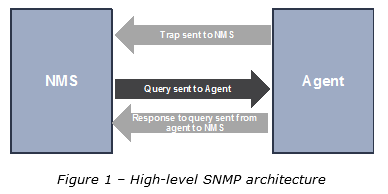
The overall architecture is rather simple – there are essentially 2 main components (see Figure 1)
A centralized NMS system
Distributed agents (little piece of software running on managed network devices)
NMS is responsible for polling and receiving traps from agents in the network:
Polling a network device is the act of querying an agent for some piece of information.
A trap is a way for the agent to alert the NMS that something wrong has happened. Traps are sent asynchronously, not in response to queries from the NMS.
How is information actually structured on network devices? A Management Information Base (MIB) is present on every network device. This can be thought as a database of objects that the agent tracks. Any piece of information that can be accessed by the NMS is defined in a MIB.
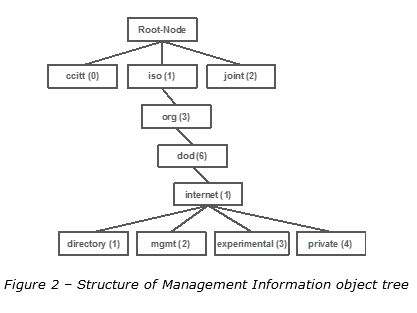
Managed objects are stored into a treelike hierarchy as described in Figure 2:
The directory branch is actually not used. The management branch (mgmt) defines a standard set of objects that every network device needs to support. The experimental branch is for research purposes only and finally the private branch is for vendors to define objects specific to their devices.
Each managed object is uniquely defined by a name, e.g. an OID (Object Identifier). An object ID consists of a series of integers based on the nodes in the tree, separated by dots (.).
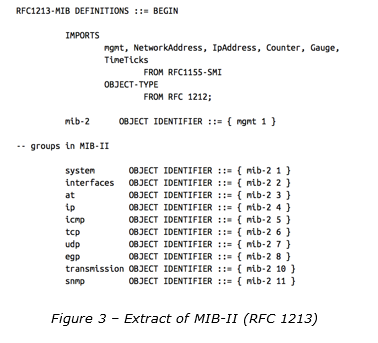
Under the mgmt branch, one can find the MIB-II that is an important MIB for TCP/IP networks. It is defined in RFC 1213 and you can see an extract in Figure 3.
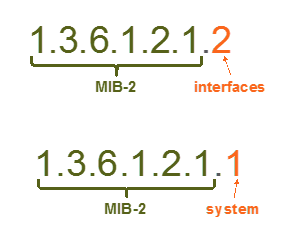
With that mind, the OID for accessing information related to interfaces is: 1.3.6.1.2.1.2 and for information related to system: 1.3.6.1.2.1.1
Finally, there are 2 main SNMP request types to retrieve information.
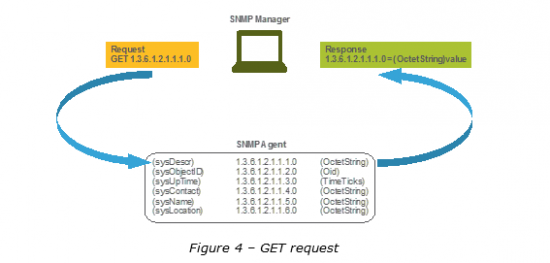
GET request – request a single value by its Object identifier (see Figure 4)
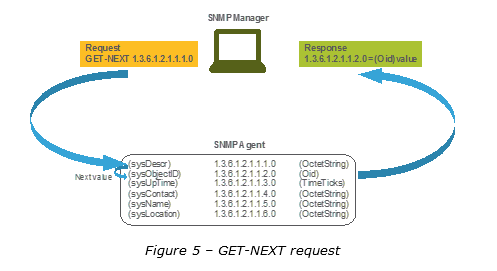
GET-NEXT request – request a single value that is next in the lexical order from the requested Object Identifier (see Figure 5)
Every day, the world is becoming more and more connected. And that’s good; being connected allows for people to trade ideas easier, monitor their health more efficiently and get things done quicker. In today’s mobile world, a typical user brings up to four devices to work: a smartphone, a laptop, a tablet, and a smart watch. What does each of these devices have in common?
No wired Ethernet ports!
This means that all of these devices connect to your wireless network and all of these devices need a piece of your bandwidth. Multiply those four devices with the amount of employees in your organization and you’ll see the problem: there isn’t enough bandwidth to go around. Now add in the data being transferred to and from those devices (a lot of video) and you see where this is going; even more bandwidth bottlenecks.
The good new is: Cisco has designed the New Aironet 3800 Series and 2800 Series Access Points specifically to break these bottlenecks. The better news is that we’re excited to announce that both the Aironet 3800 and 2800 Access Points are shipping!
These new products address the following customer trends:
• Increased number of clients per user
• More clients preferring the 5GHz band
• Mobility and quality of client roaming ensures customer satisfaction
• Greater overall traffic generated on the network, requiring greater backhaul capability
The Cisco Aironet 3800 and 2800 series Access Points provides bandwidth for IOT devices as they join your network, a great high density experience for open office spaces and allows your customers easy access to your network.
The Cisco Aironet 3800 Series and 2800 Series Access Points are changing the industry standards by increasing client capacity and improving performance with features such as:
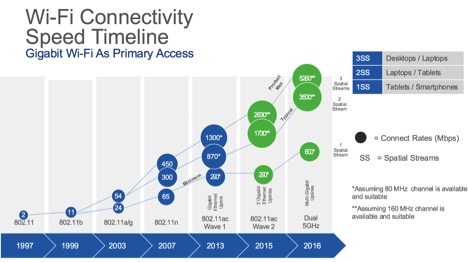
• 802.11ac Wave 2, 160MHz channel support – The industry’s only three-spatial stream that is three times the speed of the nearest competitor. The access point allows up to 2.34Gbps with a single client or 2.6Gbps with multiple clients. When operating in Dual-5GHz mode, the access points provide up-to 5.2Gbps over-the-air.
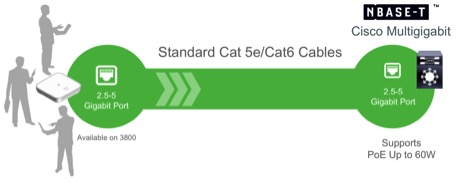
• Multi-Gigabit Ethernet support – With over-the-air data rates approaching 5.2Gbps per access point, you need a backhaul to support these data rates. The Aironet 3800 Series Access Point supports Multi-Gigabit Ethernet capable of 5G, 2.5G, 1G, and 100M. This is the industry’s only 5Gbps capable mGig access point.
For a complete Cisco end-to-end solution that improves the overall network experience, directly connect the Cisco Aironet 3800 Access Point to the Cisco Catalyst 4500, Cisco Catalyst 3850, or the compact C3560-CX switches. This will provide Mutli-gigabit speeds throughout your network.
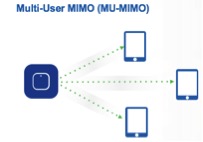
• Multi User, Multiple Input Multiple Output (MU-MIMO) – Supporting three spatial streams, MU-MIMO enables access points to split spatial streams between client devices, to maximize throughput. MU-MIMO provides up to a 1.9% increase in overall performance efficiency.
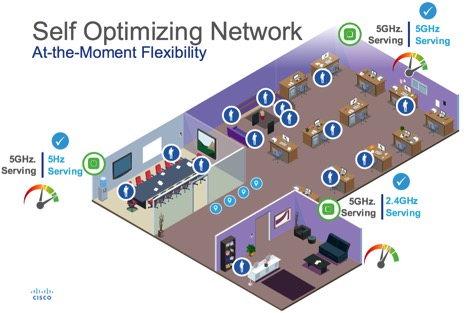
• Flexible Radio Assignment (FRA) – the access points automatically determine the operating mode of serving radios based on the RF environment.
Below, a three-access point deployment provides 2.4GHz coverage and 5 x 5GHz radios, focusing on providing capacity and performance. Other wireless providers would need 5 access points to provide similar overall coverage.
• Dual-5GHz – Enables both radios to operate in 5GHz client serving mode, allowing an industry leading 5.2Gbps (2 x 2.6Gbps) over the air speeds while increase client capacity
• High Density Experience (HDX) – Best-in-Class RF Architecture, which provides high performance coverage for a high density of client devices giving the end user a seamless wireless experience. HDX leverages custom hardware in 802.11ac Wave 2 radios, CleanAir 160MHz, ClientLink 4.0, and an optimized client roaming experience to provide an excellent client experience.
• Modularity –New side-mount connection allows companies to add and remove modules as needed without having to dismount the access point from the ceiling. Modules can range from a 3G/LTE small cell offload, video surveillance, or potential partner built modules
The Cisco Aironet 3800 and 2800 Series access points are supported on the AirOS 8.2.110.0 code base, download the new code now!
For more information on the Cisco Aironet 3800 Series Access Points, click here. For more information on the Cisco Aironet 2800 Series Access Point, click here.
Here’s an observation that happened to serve as the basis of a keynote I had the opportunity to give the other day, at the TIA 2016 “Network of the Future” conference, in Dallas: Yes, it would be wonderful indeed if broadband service providers saw 50% annual revenue growth — if only to offset that 50% in additional capacity they’ve had to build, year-after-year-after-year, every year, since about 2009.
But that’s not the case, as we all well know. Here’s what is: In four years (by 2020), 82% of the world’s Internet traffic will be video. Fixed Wi-Fi will generate half of global IP traffic. In weight, IP traffic will grow to 194 Exabytes (EBs) per month — which is 2.3 Zetabytes (ZBs) per year. (That’s all freshly mined from our latest Visual Networking Index (VNI) Forecast, by the way, which came out on the 7th..)
Refresher: A Zetabyte is 1,000 Exabytes; an Exabyte is 1,000 Petabytes; a Petabyte is 1,000 Terabytes, and so on. It’s a lot — a quick online search shows that 5 Exabytes represents all of the words ever spoken by humankind.
Which brings me back to the title of this blog. Extreme times — well, isn’t that where we all live now? Competitors and customers alike, we’re all part of the caretaker continuum for the world’s broadband connections.
Extreme times call for extreme measures. In this context, “extreme” means it’s time (again!) to look at our networks in a whole, different way.
Starting with the traffic itself. Long gone are the days when the cable and broadcast pipes sent video only, or the mobile networks sent phone calls only, or the Internet pipes sent web pages only. The new norm is traffic that comes from all different directions, in all different sizes — a chaotic digital soup measured in exabytes.
Extreme measures equates to a need for the infrastructure that moves the massive stuff of the Internet to be elastic and flexible, expanding and shrinking based on what’s happening in a given moment.
What do we need to do to get there? Three things: Accelerate, through the techniques of agile development and continuous improvement. Monetize, to keep up with the explosive growth in broadband consumption. Optimize, particularly as it relates to cost.
Agility comes from virtualization — as much as we can, as soon as possible. Monetization is a longer story, worthy of its own blog, but it’s there. Optimization comes from moving apps, self-healing techniques and other hardware-historical elements into the cloud. It also involves the economics that come with open systems.
Here’s another necessary extreme, as important: We have to transform. All of us. As people, as colleagues, as coworkers. We need to be able to say goodbye, and quickly, to the days of the RFP sequence: Write it. Wait for responses. Pick vendors. Review. Hand off. Find a bug. Report it. Wait. Instead, we need to do what it takes (which brings us back to “agile”) to continuously improve, continuously integrate, continuously automate.
Happily, I can shift now from proselytizing to a few proof points, based on actual experiences of agile partnerships between a vendor, and a service provider. Because when we do it, it works really, really well. Let’s start with cloud-DVR: When DVR functions are virtualized by putting them in the cloud, not in the home, the potential for a 15% TCO savings is real, as is a seven percent lift in revenue.
Virtualizing the mobile packet core presents a stunning 53% TCO savings, and a 50% savings in mobile backhaul; in our experience, moving voice over Wi-Fi (VoWi-Fi) saved 23% in TCO, and a 12% lift in profitability.
You get the picture. These examples go on and on and on, and will continue to do so.
My thanks to the fine people at the TIA for inviting me to share my thoughts on the network of the future. We’re lucky to be living in such exciting and transformative times!
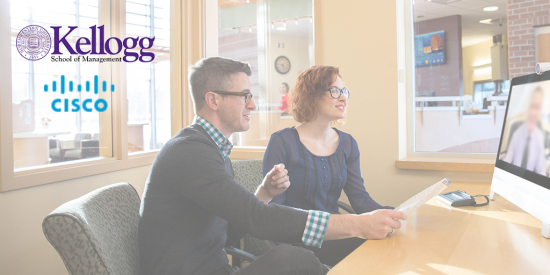
To explore and refine pedagogical models for providing lifelong learning opportunities to alumni around the world, Northwestern University’s Kellogg School of Management was in search of an effective way to deliver education and leverage technology. Their solution? Cisco TelePresence.
Rather than provide Massive Open Online Courses (MOOCs) to their alumni, Kellogg wanted to focus on immersive education with high fidelity experiences that provided the same richness of face-to-face instruction and social interaction that students would experience in a program setting.
To test this innovative method for delivering continuing education to alumni, Kellogg offered a three-part series of seminars via Cisco TelePresence, delivered by Professor Mohan Sawhney, the McCormick Foundation Professor of Technology, Clinical Professor of Marketing and the Director, Center for Research in Technology & Innovation at the Kellogg School.
Each of the three 60-minute sessions on modern marketing took place in seven locations worldwide that were connected digitally through TelePresence. The worldwide locations where alumni met to virtually join the seminar were Chicago, Toronto, Miami, Israel, Beijing, Hong Kong, Dusseldorf and New York, and the seminars were open to Kellogg alumni in each of the cities.
Following the third and final seminar, Kellogg polled participating alumni to learn more about their experience with the virtual seminars. Overall, the alumni said that this program provided a highly effective means of delivering lifelong learning to alumni while still allowing a degree of networking. In fact, the only negative comments were from alumni asking for a longer session to provide more opportunities for interaction with classmates around the world.
Participants commended Kellogg on their “stunning focus on continuing education,” and for partnering with Cisco to provide great potential to expand the Kellogg experience beyond the campus in a timely and cost effective manner.
Run your own virtual machine directly on a Cisco router.
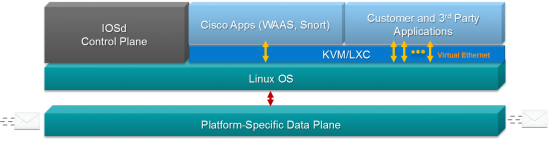
In 2013 we introduced a pretty cool new trick for Cisco routers. The ISR 4000 Series and ASR 1000 Series can host virtual applications directly in IOS XE operating system. Since then the ISR 4000 has supported a range of Cisco applications: starting with WAAS expanding to include Snort and now StealthWatch Learning Network. I introduced the architecture in a blog post here:
That was more than 2 years ago, and things have progressed. The idea of hosting network services and applications within network devices is no longer extreme. Augmenting the capabilities of a network device through virtualization has become mainstream with other Cisco devices like the Nexus 9000 and the 800 Series Industrial Routers incorporating virtualization.
What’s New?
This summer, Cisco will officially introduce a capability that we quietly rolled out in a software release last November (IOS XE 3.17). You can now host your own custom or third party KVM lightweight applications directly on your ISR 4000 or ASR 1000. If you aren’t familiar with it, Kernel-based Virtual Machines are the standard virtualization technology in the embedded Linux world. If you’re writing applications to be hosted across a network, odds are you’re already using it. The ability to virtualize across the network is a key aspect of Cisco DNA so this capability dovetails very nicely with the larger solution for enterprise environments.
Built for Virtualization
Let’s re-visit the underlying architecture for the ISR 4000 and ASR 1000. Both of these platforms use a customized high-performance data plane for the actual business of forwarding and manipulating packets. The control plane is entirely Linux running on an x86
CPU from Intel. Since the control plane of most routers isn’t busy, that opens up the possibility for hosting Kernel Virtual Machines (KVM) directly on those spare CPU cycles.
The ISR 4000 Series specifically were overbuilt and include roughly 3 times more control plane processing power than necessary to run the router. They were designed from the onset to serve as a network function and application hosting platform.
What about performance? Since these virtual machines are not hosted in the data plane of the router, there is no impact on performance for packet forwarding and feature processing. Control plane functions (routing protocols and forwarding table management), run at a higher priority than hosted virtual machines. Again no impact on performance for the system. However, any time the router does not need all the resources reserved for control plane functions, that CPU time and memory can be used for virtual services. This is industry-standard Linux virtualization at its finest.
Designed for Quick Development
While we are supporting KVM applications with no restrictions, unfortunately, there is no real “standard” for a KVM package file. Most KVM deployments require a complex XML file that is version dependent and prone to human errors. To simplify things, we’ve cre
ated a human-readable YAML (Yet Another Markup Language – no kidding) format to describe the resources (CPU, memory, storage, networking, console, etc.) for the VM. If you have an existing KVM application, creating this YAML file takes about 10 minutes.
And that’s it. The next learning curve is learning to build KVM applications. We have a developer guide as well as a packaging script for you. We even take it one step further. KVM app hosting also works in our virtual router, the CSR 1000v. This makes it convenient to prototype your application and get all the kinks worked out before moving to a hardware deployment.
Use Cases
You’ll soon see third parties app offer for the ISR 4000 and ASR 1000 platforms. However, that doesn’t mean you can’t develop your own lightweight KVM application. There are also a few open source projects and even end customers that have developed and deployed their own applications. Here are a couple.
Validation and troubleshooting tools. Programs like Wireshark, iPerf, and other open source tools run just fine, and the enterprise router provides a unique hosting location for a troubleshooting VM.
Network Agents There is an entire industry of companies building network diagnostic tools that capture and analyze application traffic across a network. Many of these 3rd parties have agents that run in remote offices adding a unique perspective to discover what’s going on within the network. Many of these companies are building and testing agents to run directly on ISR4K and ASR1K routers. This is the technology they’re using when they announce their products in the coming months.
Virtualized Network Functions Plenty of network functions need to be run in small to medium offices but they might not justify a heavyweight server. Things like print servers, domain controllers, file storage, DNS and DHCP servers are just a few examples that can be hosted within the network.
Sandbox for education and research projects. Cisco Academy instructors, interested in creating a hosted NFV VM as an assignment for their students, had used the CSR 1000v as a development platform.
The only real limit to what you can do with a hosted function inside a router is what you can imagine. Because ISR4K and ASR1K routers are often found in remote branch offices with no IT staff and minimal infrastructure, finding a place to host a network function or application can often be a challenge. With the router already there providing other network functions, it makes an ideal place to host other functions within the branch office.
I’m Excited Now – Where Do I Start?
You need three things to host a virtual machine on a router: CPU, Memory and Storage. We’ve already covered performance in the “Optimized for Virtualization” section above. For memory and storage, just simply add more as needed. If your VM needs 2GB memory and 120GB of storage, you would upgrade an ISR 4000 to 8GB of memory and add in a 200GB SSD drive (NIM-SSD or SSD-MSATA-200G). Today we reserve the base 4GB of memory for the system itself. For example, with 8GB of memory, 4GB is preserved for the routing function; the remaining 4GB can be used for your virtual application.
The main source for support building your own KVM application for an ISR4K or ASR1K is going to be through Cisco DevNet. DevNet is the premiere watering-hole for networking geeks looking to build cool things on top of the network. The Open Device Programmability area is where you’ll find information on IOS-XE support for 3rd party KVM as well as some of the APIs your applications can make use of. Please join us there and let us know what you’re working on.
Shameless plug time. If you’re planning to visit Cisco Live next month I’d love to meet you. We’re going to have tons of exciting Enterprise Routing content in the World of Solutions as well as a few breakout sessions that will be covering this technology in more depth.
BRKARC-2014– Branch Virtualization – The Evolving NFV Landscape
BRKARC-2091 – Emerging Trends in Branch Office Architectures
BRKARC-3001 – Cisco Integrated Services Router – Architectural Overview and Use Cases








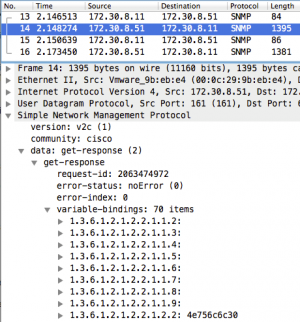 Take a look at a packet trace for a GetBulk for interface statistics (the IF-Table of the IF-MIB). The router (172.30.8.51) responds with 70 OIDs in the first packet and the poller (172.30.8.11) does a second request for the remaining OIDs. On receiving the second request, the router continues its lexicographical walk and fills up another packet. When the poller detects that the router has “walked off the table” (by sending OIDs that belong to the next table), it stops sending GetBulks. For very large tables, this could take a lot of requests and the router has to process each one as it arrives.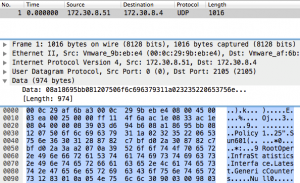



 Affairs. She has been with Cisco since 1998 and currently oversees the Talent Bridge initiative, connecting Cisco and its partners to world-class talent.






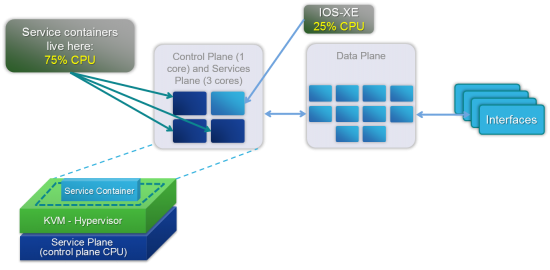 The ISR 4000 Series specifically were overbuilt and include roughly 3 times more control plane processing power than necessary to run the router. They were designed from the onset to serve as a network function and application hosting platform.
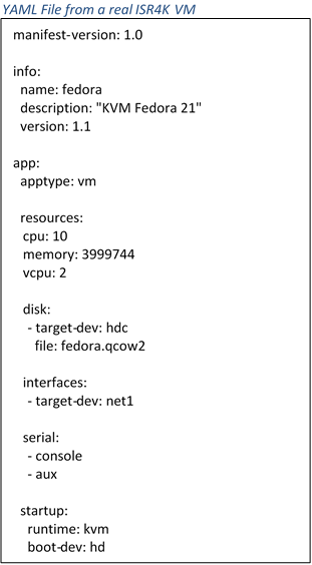 networking, console, etc.) for the VM. If you have an existing KVM application, creating this YAML file takes about 10 minutes.