On the eve of Microsoft’s first Lync User Conference, I think it’s a great time to start a frank and direct conversation about what’s changed in collaboration and, because of those changes, what’s really important for IT decision makers to consider as they evaluate collaboration vendors and solutions. This conversation, which I’m confident will spark a lively and healthy debate, will last for weeks and will include input from a variety of Cisco Collaboration leaders.
So, to start, what has changed in collaboration? At the macro level, I would argue that collaboration has evolved from a tolerated office tool into the single most important technology investment that an organization can make. Why? Because the next breakthrough levels of performance and productivity needed in business won’t come from a better-looking web portal or a bigger Inbox — they’ll come from the ability to tap into the collective knowledge and creativity of our people.
But, here’s the catch: not all collaboration solutions are designed to help people engage the way they want to engage, and they’re also not architected from the ground up to cater to IT’s needs and requirements.
Customers tell us time and again that a modern collaboration platform needs to deliver more than the basics like IM, conferencing and VoIP. It needs to offer flexibility and choice in support of trends such as BYOD (Bring Your Own Device), high-quality video, and cloud-based deployments (private, public, hybrid, and hosted). The modern collaboration platform needs to be usable not just by office workers but by anyone, from physicians to customer care agents, executives, mobile and desk-less workers. And it needs to be as complete of a solution as possible — including the underlying infrastructure, a wide choice of compatible endpoints, and world-class support and maintenance — to maximize business and IT value.
In a recent interview, the Director of IT Operations at a New York based Enterprise said that one of the biggest problems he was facing was maintaining customer satisfaction on performance as the data deluge grew unabated. According to an IDC 2012 report “..Data creation is taking place at an unprecedented rate and is currently growing at over 60% per year. IDC’s Digital Universe Study predicts that between 2009 and 2020, digital data will grow 44-fold to 35ZB per year..”. One ZB or Zettabyte is 1000 billion gigabytes… you get the picture.
The implications are that more data will be stored and processed on servers. Data could be on local disks or it could be in some large storage arrays, which are connected to the server by a network. It may be pre-processed and stored in a database for faster analysis. The computer (server) or applications must now quickly access the partially processed or raw data. The data could be structured as in ERP solutions or unstructured and handled by scale out Big Data applications. Nevertheless, data will have to flow back and forth through the network connecting servers and the storage. Additionally as Client Virtualization gains traction, data center servers would need to access large files located in storage devices most likely connected through networks. These use cases are addressed by the Cisco UCS and Fusion-IO partnership and therefore generated a whole lot of interest in the June 2012 announcement. In a recent interview at CiscoLive London, Cisco Executive, Paul Perez, reiterated the importance of the collaboration, and benefits to Cisco UCS customers.
https://www.youtube.com/watch?v=SnFheKoqeVs
So how does Fusion-io ioDrive2 accelerate data access? It optimizes the use of existing network bandwidth for data i/o intensive workloads with a low
Service Financial Management is the focus of Domain 6 in Cisco Services‘ DomainTenSM Model for Data Center and Cloud Transformation. Closely related to the User Portal (Domain 4) and Service Catalog and Management (Domain 5), service financial management is one of those organizationally challenging topics for the data center management team – although with the advent of cloud services, is becoming more widely appreciated and in many cases (e.g. a service provider offering cloud services to businesses, a public sector organization offering services to other regional public service organizations), a mandatory part of your offer. So let’s discuss this area and I’ll point you to a technical white paper from Cisco Services experts on this topic.
Cisco Domain Ten – Domain 6 – Service Financial Management
We do a lot of shows about video of course. It’s always a challenge I think when it comes to defining what the unique value of a given story needs to be. In this case, we were not featuring newly announced technology, which greatly simplifies the direction for us – but we were considering what we thought were some unmet needs.
Our goal for this episode: To make Cisco video for collaboration more approachable for every customer.
https://youtu.be/Wdvfu7qhrDw
Cisco does a lot of things in the broad category of ‘video.’ With more than 8,000 engineers working on video innovation, Cisco is a video powerhouse. Our teams have filed 1,700 video-related patents in the last five years. Innovations include TelePresence, Videoscape, Show and Share, Media Experience Engine, and Pulse Analytics. Internal innovation has been augmented with acquisitions including NDS, TANDBERG, BNI Video, Inlet, and ExtendMedia.
As we talked to customers and experts within Cisco, we kept coming back to a structure best defined as ‘where are you now’. In other words, video itself is not new as a concept…but as we narrow down to say this is about interactive video…it became helpful to consider where most Cisco customers might be starting from:
Cisco Voice – you are familiar with call manager but have not explored the video capabilities inherent to the platform.
Telepresence – you have some high quality video deployed but its special…only for high end events or people.
Tandberg – you are good with video but its a distinct system from your other communications – Cisco or otherwise
Third Party and Cave Dwellers – Anything from non-Cisco mixed environments to the luddites among us.
The assumption is that video is valuable and that the more pervasive and simple it can become in your organization, the more competitive and nimble you can be. So, with value established, the question becomes about execution.
Our executive guest has a very diverse business and video background who joined us from Tandberg. Jacob Nordan is Senior Director of Product Management for the Collaboration Business Unit. Powers had the honor of hosting his interview. Jacob set the tone for us by highlighting not just our success with various customers, but specifics around how these leaders were using video to pioneer change in their business.
Nathan Shaw joined us for our segment on ‘Understanding Video Endpoints.’ Nathan has been a guest on our show dating back to the very first Telepresence show we did where we helped him load up a Toyota 4-Runner with a CTS 500 so we could get it in the studio. Nathan is an awesome guy with a great background – AND…he is a gushing, proud new father. Could not be happier for him…and very impressed with his photography skills.
From endpoints, we pursued ‘Understanding Video Infrastructure’ with Cynthia Lee. She was a bundle of energy grabbing the pen from Jimmy Ray to help us understand where things like MCU’s and Border Controllers become important to achieve certain video communication objectives.
Jimmy Ray did a Master Class on the intersection of video and security. Its was pure fun with Network Address Translation (NAT), Application Level Gateways (ALG)…avoiding risk and things that will go bump in the night.
We stole a segment from our upcoming new BizTech show that covered some advancements in using ‘Remote Expert’.
We wrapped up with Phil Marachel. We wanted Phil on to talk strategy as he is with our Cisco Services team. His street creed for video is fantastic however as he was doing video way before it was mainstream. As an engineer Phil worked on the biggest systems from PictureTel, the first MultiPoint bridges from Accord…all giants in the earlier years of video.
Hope you enjoyed the show. This is officially episode number 126 of TechWiseTV and we are loving the support you all continue to show us.
More and more people, actually. With the commoditization of HPC, lots of newbie HPC users are intimidated by special, one-off, traditional HPC types of networks and opt for the simplicity and universality of Ethernet.
And it turns out that TCP doesn’t suck nearly as much as most (HPC) people think, particularly on modern servers, Ethernet fabrics, and powerful Ethernet NICs.
A good segue to Fabric-Based Infrastructure is Gartner’s Magic Quadrant for Blade Servers (March 2012), by Andrew Butler and George Weiss. To fully understand the tie in with Fabric-Based Infrastructure I suggest reading the section on Cisco UCS. Their observations are important because they tie directly to the subject of this blog. You will also get a better feel for why Cisco UCS is having such rapid customer adoption worldwide.
The emphasis for Fabric-Based Infrastructure is delivering value-add functionality that enables data centers to operate more efficiently and cost effectively. A good place to start is by looking at this Gartner report by George Weiss and Donna Scott – Fabric-Based Infrastructure Enablers and Inhibitors Through the Lens of User Experiences (April 2012). In this short research note, George and Donna go into the key drivers and reasons for the FBI architecture and the benefits that their clients have seen. My take away for the key benefits of Fabric-Based Infrastructure are:
OpEx and CapEx savings
Increased VM density
Time-To-Deploy reduced from months to hours via automation and standards implementation;
Reduce cost and complexity and improve agility;
Improved resiliency by recreating servers and connectivity in minutes using profiles and templates
While reading about a technology innovation is helpful, actually listening to experts discuss the architecture and give their individual perspectives can be more so.
I suggest that you make time to listen to this 34 minute video with featured guest Donna Scott (a VP and Distinguished Analyst at Gartner) and Paul Perez (VP and CTO for the Data Center Business Group at Cisco Systems) – Fabric-Based Infrastructure (FBI) in Today’s Data Center. Donna looks at the motivations and impact of customers moving to a Fabric Based Infrastructure with an eye toward what is important to adopters. Then Paul discusses Cisco UCS innovations and how they let FBI adopters achieve their goals. If you would like, you can download a podcast of the video from theCisco Analyst Reports page.
From my perspective the truly compelling part of this story is the extent to which Cisco UCS makes the promise of Fabric-Based Infrastructure a reality, while emphasizing safety, security and the risk reduction. These are critical considerations in today’s IT environment. Cisco continues to be a key innovator in data center technology and is continuing to grow from strength to strength, delivering value and benefit for your long term application solution needs.
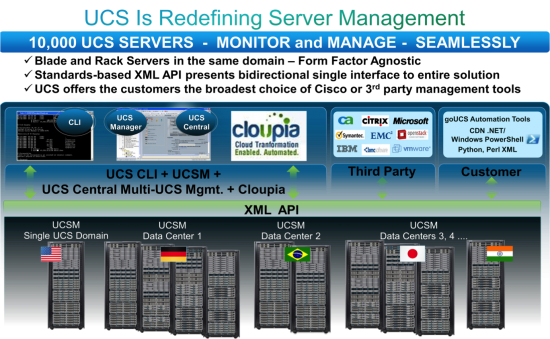
Below is how I think a Fabric-Based Infrastructure should look. Of course I am predisposed. Cisco UCS architecture provides the ability to define and manage over 120 different server identity parameters via service profile templates, using a native tool with Roles Based Access Controls and across geographies. UCS enables you to have a distributed environment that is centrally managed. Your admins can also use CLI, custom designed tools / scripts, or third party tools as they choose to meet the needs of their current management structure.
So this is the Million Dollar Question, right? You, along with the executives sponsoring your particular VDI project wanna know: How many desktops can I run on that blade? It’s funny how such an “it depends” question becomes a benchmark for various vendors blades, including said vendor here.
Well, for the purpose of this discussion series, the goal here is not to reach some maximum number by spending hours in the lab tweaking various knobs and dials of the underlying infrastructure. The goal of this overall series is to see what happens to the number of sessions as we change various aspects of the compute: CPU Speed/Cores, Memory Speed and capacity. Our series posts are as follows:
But for the purpose of this question, let’s look simply at the scaling numbers at the appropriate amount of RAM for the the VDI count we will achieve (e.g. no memory overcommit) and maximum allowed memory speed (1600MHz).
As Doron already revealed in question 1, we did find some maximum numbers in our test environment. Other than the customized Cisco ESX build on the hosts, and tuning our Windows 7 template per VMware’s View Optimization Guide for Windows 7, the VMware View 5.1.1 environment was a fairly default build out designed for simplicity of testing, not massive scale. We kept unlogged VMs in reserve like you would in the real world to facilitate the ability for users to login in quickly…yes that may affect some theoretical maximum number you could get out of the system, but again…not the goal.
And the overall test results look a little something like this:
E5-2643 Virtual Desktops
E5-2665 Virtual Desktops
1vCPU, 1600MHz
81
130
2vCPU, 1600MHz
54
93
As explained in Question 1, cores really do matter…but even then, surprisingly the two CPUs are neck and neck in the race until around 40 VM mark. Then the 2 vCPU desktops on the quad core CPU really take a turn for the worse:
Why?
Co-scheduling!
When a VM has two (or more) vCPUs, the hypervisor must find two (or more) physical cores to plant the VM on for execution within a fairly strict timeframe to keep that VM’s multiple vCPUs in sync.
MULTIPLE vCPU VMS ARE NOT FREE!
Multiple vCPUs create a constraint that takes time for the hypervisor to sort out every time it makes a scheduling decision, not to mention you simply have more cores allocated for hypervisor to schedule for the same number of sessions: DOUBLE that of the one vCPU VM. Only way to fix this issue is with more cores.
That said: the 2 vCPU VMs continue to scale consistently on the E5-2665 with its double core count to the E5-2643. At around the 85 session mark, the even the E5-2665 can no longer provide a consistent experience with 2vCPU VDI sessions running. I’ll stop here and jump off that soap box…we’ll dig more into the multiple vCPU virtual desktop configuration in a later question (hint hint hint)…
Now let’s take a look at the more traditional VDI desktop: the 1 vCPU VM:
With the quad-core E5-2643, performance holds strong until around the 60 session mark, then latency quickly builds as the 4000ms threshold is hit at 81 sessions. But look at the trooper that the E5-2665 is though! Follow its 1 vCPU scaling line in the chart and all those cores show a very consistent latency line up to around the 100 session mark, where then it becomes somewhat less consistent to the 4000ms VSImax of 130. 130 responsive systems on a single server! I remember when it was awesome to get 15 or so systems going on a dual socket box 10 or so years ago, and we are at 10x the quantity today!
Let’s say you want to impose harsher limits to your environment. You’ve got a pool of users that are a bit more sensitive to response time than others (like your executive sponsors!). 4000ms response time may be too much and you want to halve that to 2000ms. According to our test scenario, the E5-2665 can STILL sustain around 100 sessions before the scaling becomes a bit more erratic in this workload simulation.
Logic would suggest half the response time may mean half the sessions, but that simply isn’t the case as shown here. We reach Point of Chaos (POC!) where there is very inconsistent response times and behaviors as we continue to add sessions. In other words: It does not take many more desktop sessions in a well running environment that is close to the “compute cliff” before the latency doubles and your end users are not happy. But on the plus side, and assuming storage I/O latency isn’t an issue, our testing shows that you do not need to drop that many sessions from each individual server in your cluster to rapidly recover session response time as well.
So in conclusion, the E5-2643, with its high clock speed and lower core count, is best suited for smaller deployments of less than 80 desktops per blade. The E5-2665, with its moderate clock speed and higher core count, is best suited for larger deployments of greater than 100 desktops per blade.
Next up…what is the minimum amount of normalized CPU SPEC does a virtual desktop need?
By Leszek Izdebski, Cisco Internet Business Solutions Group (IBSG)
The past few years have brought sweeping transformation to television—a trend that will only accelerate in the coming decade. Following up on a 2011 study on the future of television, Cisco’s Internet Business Solutions Group (IBSG) recently examined the ways disruptive technology and user behavior trends are impacting TV advertising. We identified four major trends that will transform advertising and the viewer experience.
1. Channels Will Go Away
While we do not believe that all future distribution will be through on-demand unicast technologies, consumers will not think about “channels” as the means of accessing programming. Adoption of video on demand, Intelligent Programming Guides and personal video recorders (PVRs) is shifting viewing from linear broadcasts on a TV screen to a multiscreen, multi-device, multi-modal, on-my-schedule, user-controlled experience. Brands and networks will no longer be able to ensure that ads placed in specific episodes will have sufficient audience reach. This behavioral shift will force advertisers to focus on new forms of addressable advertising: Continue reading “Four Ways TV Advertising Will Change During this Decade”