
This was the test I most eagerly anticipated because of the lack of information on the web regarding running a Xeon-based system at a reduced memory speed. Here I am at Cisco, the company that produces one of the only blades in the industry capable of supporting both the top bin E5-2690 processor and 24 DIMMs (HP and Dell can’t say the same), yet I didn’t know the performance impact for using all 24 DIMM slots. Sure, technically I could tell you that the E5-26xx memory bus runs at 1600MHz at two DIMMs per channel (16 DIMMs) and a slower speed at three DIMMs per channel (24 DIMMs), but how does a change in MHz on a memory bus affect the entire system? Keep reading to find out.
Speaking of memory, don’t forget that this blog is just one in a series of blogs covering VDI:
- Introduction – VDI – The Questions you didn’t ask (but really should)
- VDI “The Missing Questions” #1: Core Count vs. Core Speed
- VDI “The Missing Questions” #2: Core Speed Scaling (Burst)
- VDI “The Missing Questions” #3: Realistic Virtual Desktop limits
- VDI “The Missing Questions” #4: How much SPECint is enough
- VDI “The Missing Questions” #5: How does 1vCPU scale compared to 2vCPU’s?
- VDI “The Missing Questions” #6: What do you really gain from a 2vCPU virtual desktop?
- VDI “The Missing Questions” #7: How memory bus speed affects scale (keep reading)
- VDI “The Missing Questions” #8: How does memory density affect VDI scalability?
- VDI “The Missing Questions” #9: How many storage IOPs?
- Join us for a free webinar on March 27 discussing this blog series. Register here.
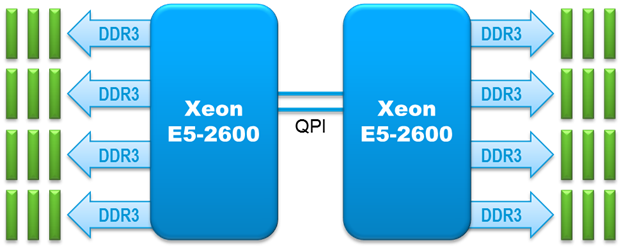
The situation. As you can see in the 2-socket block diagram below, the E5-2600 family of processors has four memory channels and supports three DIMMs per channel. For a 2-socket blade, that’s 24 DIMMs. That’s a lot of DIMMs. If you populate either 8 or 16 DIMMs (1 or 2 DIMMs per channel), the memory bus runs at the full 1600MHz (when using the appropriately rated DIMMs). But when you add a third DIMM to each channel (for 24 DIMMs), the bus slows down. When we performed this testing, going from 16 to 24 DIMMs slowed the entire memory bus to 1066MHz, so that’s what you’ll see in the results. Cisco has since qualified running the memory bus at 1333MHz in UCSM maintenance releases 2.0(5a) and 2.1(1b), so running updated UCSM firmware should yield even better results than we saw in our testing.
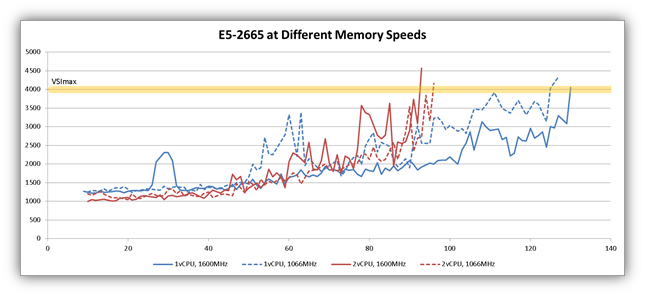
As we’ve done in all of our tests, we looked at two different blades with two very different processors. Let’s start with the results for the E5-2665 processor. The following graph summarizes the results from four different test runs. Let’s focus on the blue lines. We tested 1vCPU virtual desktops with the memory bus running at 1600MHz (the solid blue line) and 1066MHz (the dotted blue line). The test at 1600MHz achieved greater density, but only 4% greater density. That is effectively negligible considering that the load is random in these tests. LoginVSI is designed to randomize the load.
Continue reading “VDI “The Missing Questions” #7: How memory bus speed affects scale”





 You probably saw