


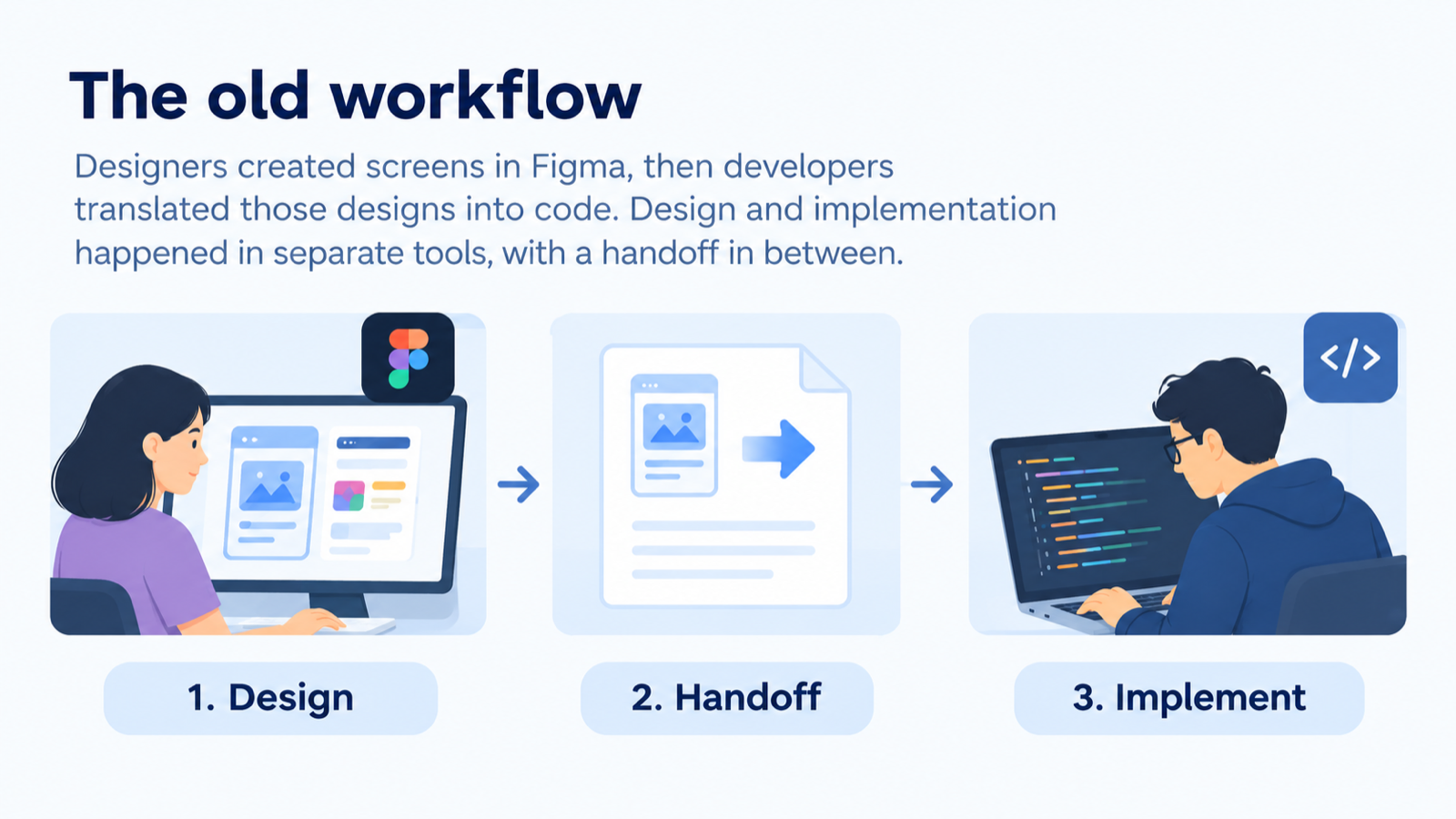
For a long time, our UI/UX workflow followed a familiar pattern: designers created screens in Figma, then developers translated those designs into code. Design and implementation happened in separate tools, with a handoff workflow in between.
That process worked well when we had time to design and build each experience carefully. On the latest revamp of PubHub (a DevNet internal publication tool), we didn’t. We needed to move quickly, so we tried a different approach: asking AI to build the interface directly from our user stories and backend APIs.
What followed was a series of experiments that changed not only our tools, but how designers and engineers worked together. This blog covers what we tried, what didn’t work, and the workflow we landed on, so other teams can adapt it.
A working product, with the wrong feel
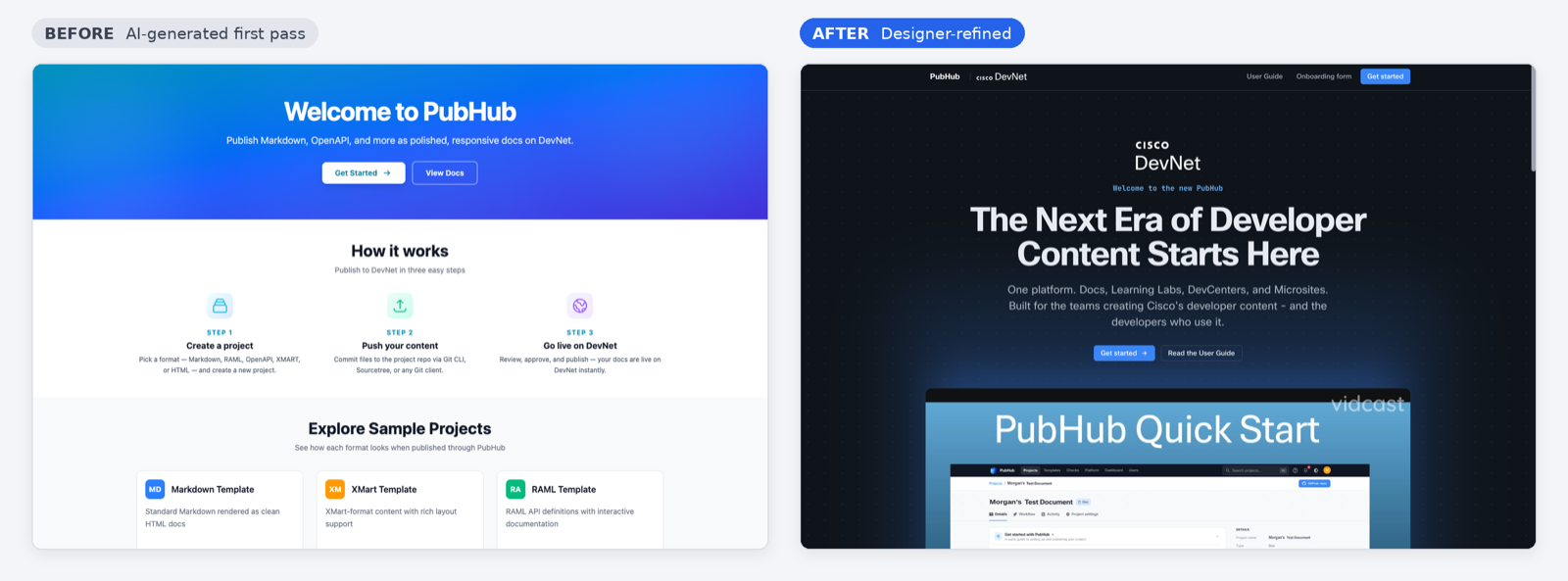
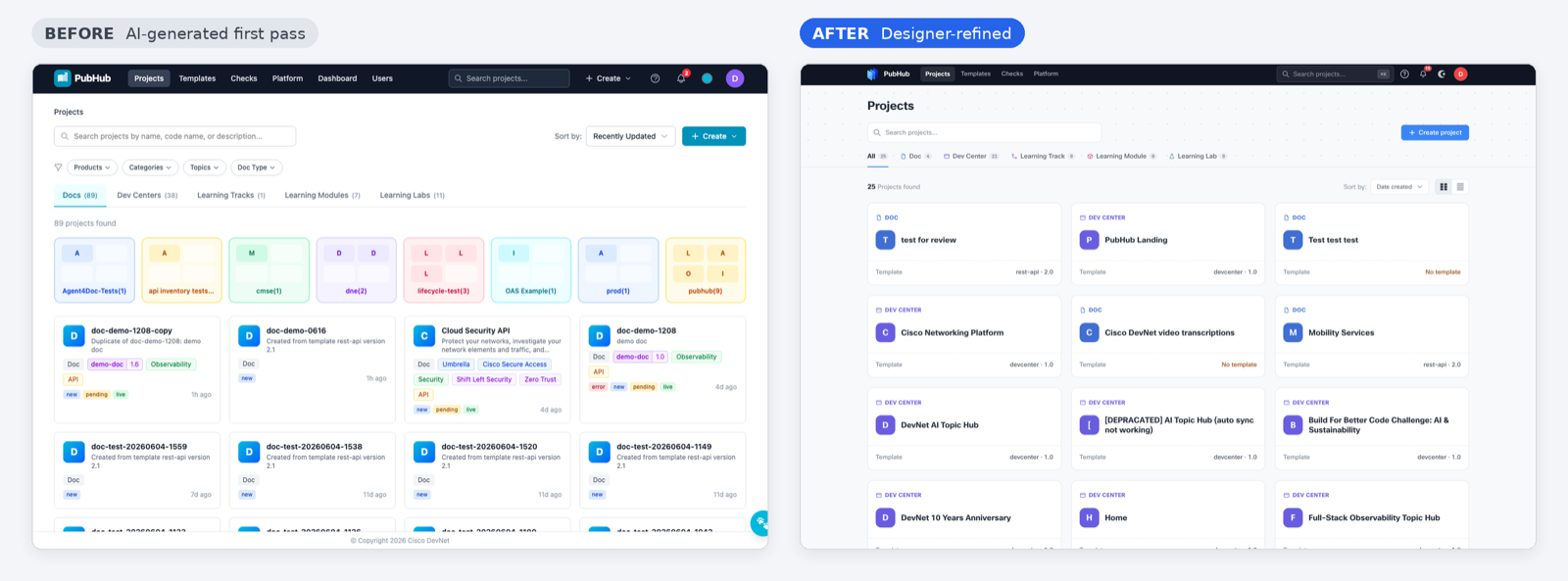
The AI-generated version worked end to end. Users could move through the main flows, and the interface was connected to the backend. But “working” didn’t mean “finished.” The app didn’t follow our visual language, some AI-generated components weren’t intuitive, and several workflows needed cleanup.
Designer had to review pages and flows on the working prototype one by one, then refine styling and interactions. That raised a practical question: how might we leverage AI to expedite the workflow of making design changes and incorporating them into the final product?
Trying to bring the interface into Figma
Our first option was to convert the existing HTML pages into Figma, the tool designers already use for mockups. With a Figma MCP connection, UI engineers could let Figma provide context to a coding agent, which would make the corresponding changes in code.
The idea was appealing: keep the design work in Figma, and use AI to carry those changes into implementation. In practice, three problems emerged.
- Detail was lost in translation. The round trip between Figma and code missed interactions, complete page and button flows, and animations. Those are exactly the parts of an experience that make it feel finished.
- Updates took longer than expected. Changing the HTML prototype by way of Figma was slower than our timeline allowed. Some pages also had to be reconstructed in Figma and reconnected into flows before any refinement could begin.
- The source of truth became unclear. With a Figma file and an HTML prototype evolving side by side, it was hard for designers and rest of team to know which version was current.
Figma still did some things well. It was the better tool for maintaining a library of assets and for precise work on small, highly detailed UI elements. But it wasn’t the quickest place to refine an interface that already worked in code, under a tight deadline.
Merging the design work with the existing implementation
We experimented another route: using an AI coding tool to inspect the existing prototype and adjust its HTML directly. This kept the design work in the interface that already existed, with no reconstruction step. The HTML prototype became the single source of truth.
Designers could then make changes in stages, review each iteration, and give the AI feedback along the way. Instead of first rebuilding the interface in a design tool, design work happened against a running implementation, including the interactions and flows Figma had struggled to carry.
One practical constraint surfaced quickly: token limits. Partway through the project, designer ran out of tokens and moved from Cursor to Claude to Codex, switching tools until limits reset. The work survived those switches because the HTML artifact, not any one tool, held the state of the design. Teams adopting this approach should plan for the same thing.
With this approach, designer could edit and deliver working HTML pages quickly, turning out new iterations every day. Under the old Figma-first process, a single page took days.
The speed compounded across the team. Faster design output meant faster engineering tests, which meant faster feedback for the next design iteration.
The new loop: design artifact, then implementation
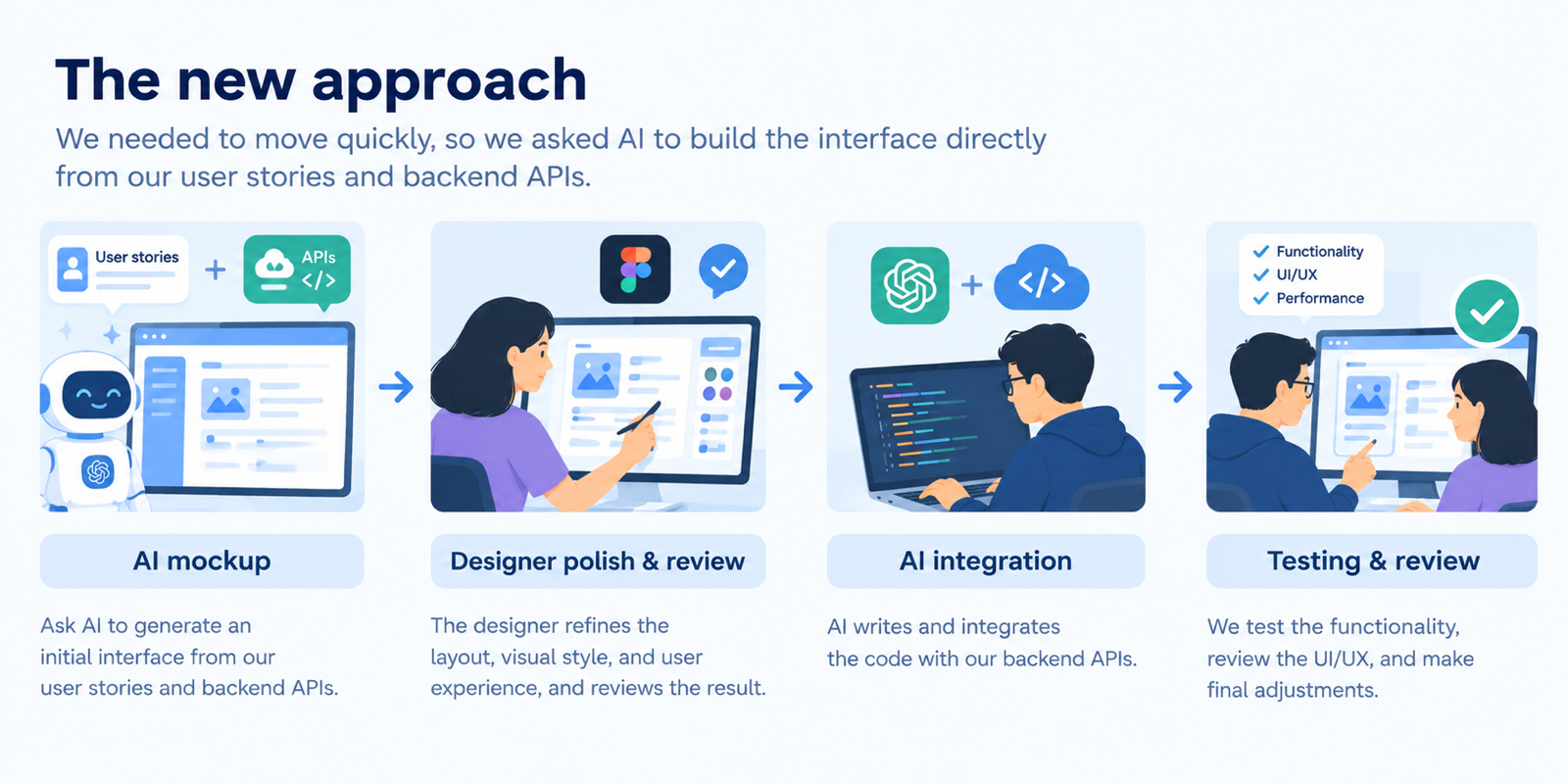
The resulting workflow is iterative:
- Product team defines user stories and backend APIs.
- An AI coding agent builds an end-to-end version of the UI accordingly.
- Designers review working HTML pages and flows, then refine the HTML prototype with an AI coding tool.
- Designers share the updated HTML artifact to the developers, along with its design system, end-to-end flows for different personas, and a changelog describing what changed.
- Developers give them to a coding agent, which works out and applies the design changes to the real project.
- The team tests and reviews the result, often live, and repeats the process.
The New Handoff Artifacts
The HTML prototype became more than a mockup. It was a handoff document that engineers could use to reproduce the design accurately, and it was surprisingly well received. The following elements made that possible:
- The HTML prototype. It became the center of this loop. It is a concrete, inspectable artifact designers can refine directly and developers can use to guide changes in production code.
- An embedded design system. Colors, typography, components, and spacing lived alongside the pages, so engineers could reference the rules rather than infer them from screens.
- A persona switcher. Our design required different user flows for different personas. By switching personas with a control in the prototype, engineers are able to see each flow and its variations clearly.
- Changelogs. Each iteration recorded what had changed, so engineers could apply updates incrementally instead of diffing whole pages.
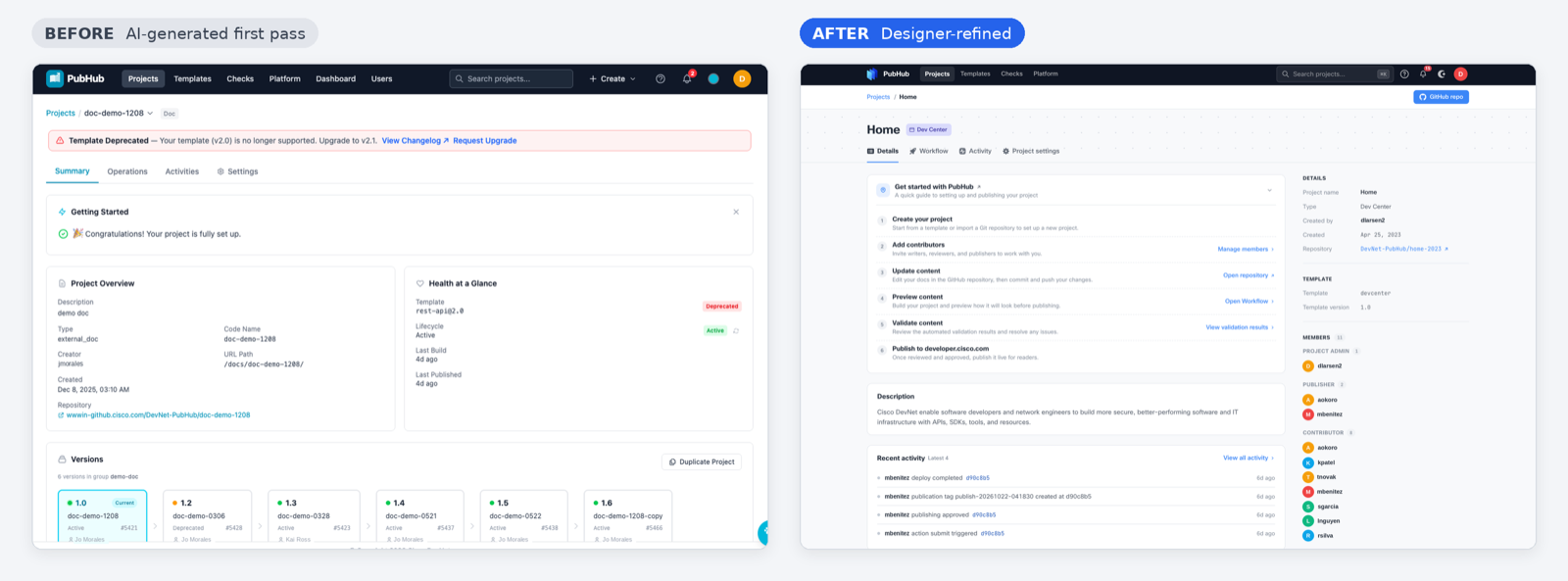
Challenge: Keeping design and code in sync
As the designer iterated, it became hard to tell what had changed between HTML versions. We first worked from an issue list, prompting our coding agent one fix at a time, which was slow and manual.
So we asked the designer to include a changelog with each new version. Now we give the changelog and the updated HTML to the agent together, and it applies the changes across the project automatically. The handoff went from one-off prompts to a largely automatic update step.
What we learned
The biggest change wasn’t using AI to write more code. It was moving the design and engineering feedback loop closer together, until the line between the two roles started to blur.
That shift took some learning.
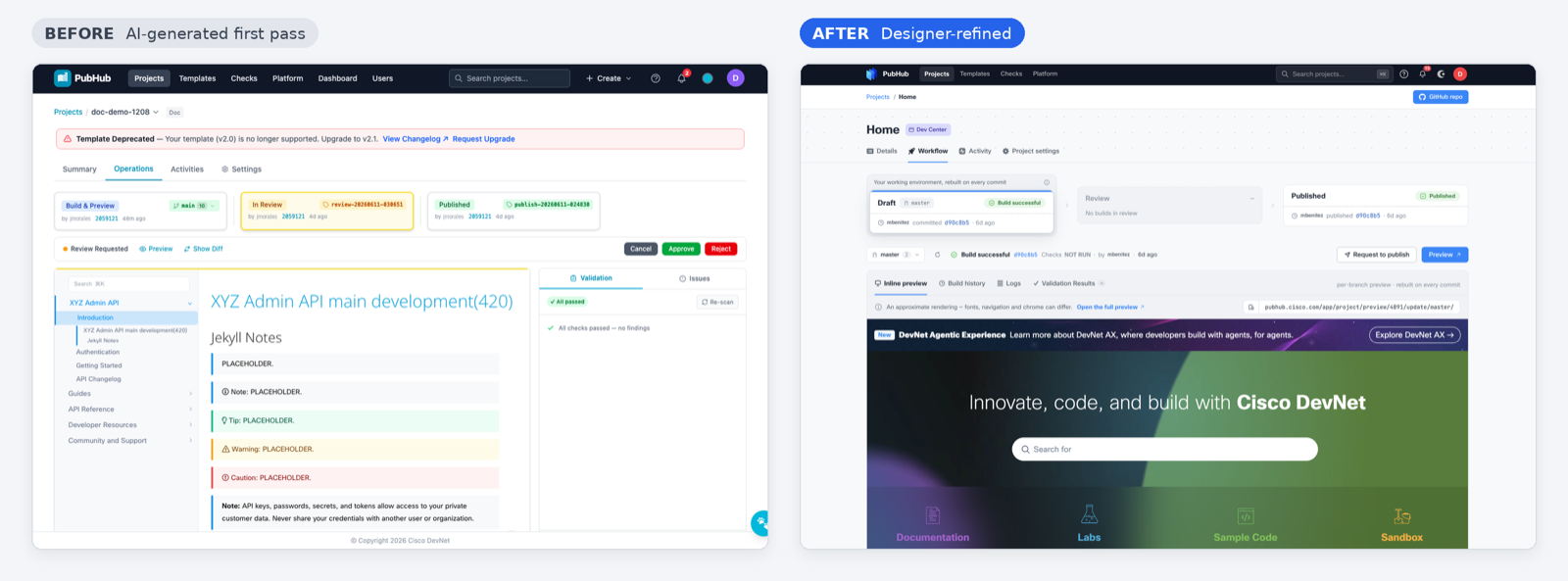
The faster pace changed the rhythm of the team:
- Reviews became more frequent. At times, designer made edits in real time during meetings.
- Engineers tested sooner. With working prototypes arriving quickly, they could test, give feedback, and even make minor design iterations themselves.
- Roles blurred. The separation between designer and engineer became less distinct. The whole team could spend more time on the experience and the product vision, and less on implementation logistics.
If your team wants to try this approach, these practices made the biggest difference for us:
- Start from a working build. Have an AI agent generate an end-to-end UI from your user stories and API specs, then design against it rather than from a blank canvas.
- Keep one source of truth. Make the HTML prototype the canonical design. Use Figma where it is strongest, such as asset libraries and fine detail, without maintaining a parallel copy of every screen.
- Build the handoff into the prototype. Include a design system, a changelog for each iteration, and a way to view every persona or flow variation.
- Specify what the agent can’t infer. Document secondary interactions and edge cases, or the coding agent will invent them.
- Plan for token limits. Expect to switch between AI tools mid-project. Because the HTML artifact holds the design state, the work carries over.
- Shorten the review cycle. Review more often, and be open to making edits live with engineers in the room.
- Keep the designer’s judgment central. AI produces a functional first pass quickly, but it doesn’t know your design language or which interactions feel right.
For us, the experiment produced a practical pattern: let AI create the first working version, let designer refine a functional prototype that doubles as the handoff, and let a coding agent carry those refinements into the project. That gave us a faster path from an interface that worked to one that felt like our product.
This blog is part of the series of AI & Agentic Workflows in PubHub [LINK TO PUBHUB SERIES IF ANY]. To learn more about how we bring the PubHub project to live with AI-assisted development, read here.