



Lessons from building production AI systems that nobody talks about.
The conversation around AI agents has moved fast. A year ago, everyone was optimizing RAG pipelines. Now the discourse centers on context engineering, MCP/A2A protocols, agentic coding tools that read/manage entire codebases, and multi-agent orchestration patterns. The frameworks keep advancing.
After 18 months building the AI Assistant at Cisco Customer Experience (CX), we’ve learned that the challenges determining real-world success are rarely the ones getting attention. Our system uses multi-agent design patterns over structured enterprise data (mostly SQL, like most enterprises). The patterns that follow emerged from making that system actually useful to the business.
This post isn’t about the obvious. It’s about some of the unglamorous patterns that determine whether your system gets used or abandoned.
1. The Acronym Problem
Enterprise environments are dense with internal terminology. A single conversation might include ATR, MRR, and NPS, each carrying specific internal meaning that differs from common usage.
To a foundation model, ATR might mean Average True Range or Annual Taxable Revenue. To our business users, it means Available to Renew. The same acronym can also mean completely different things within the company, depending on the context:
User: “Set up a meeting with our CSM to discuss the renewal strategy”
AI: CSM → Customer Success Manager (context: renewal)
User: “Check the CSM logs for that firewall issue”
AI: CSM → Cisco Security Manager (context: firewall)
NPS could be Net Promoter Score or Network Protection Solutions, both completely valid depending on context. Without disambiguation, the model guesses. It guesses confidently. It guesses wrong.
The naive solution is to expand acronyms in your prompt. But this creates two problems: first, you need to know which acronyms need expansion (and LLMs hallucinate expansions confidently). Second, enterprise acronyms are often ambiguous even within the same organization.
We maintain a curated company-wide collection of over 8,000 acronyms with domain-specific definitions. Early in the workflow, before queries reach our domain agents, we extract potential acronyms, capture surrounding context for disambiguation, and look up the correct expansion.
50% of all queries asked by CX users to the AI Assistant contain one or more acronyms and receive disambiguation before reaching our domain agents.
The key detail: we inject definitions as context while preserving the user’s original terminology. By the time domain agents execute, acronyms are already resolved.
2. The Clarification Paradox
Early in development, we built what seemed like a responsible system: when a user’s query lacked sufficient context, we asked for clarification. “Which customer are you asking about?” “What time period?” “Can you be more specific?”
Users did not like it, and a clarification question would often get downvoted.
The problem wasn’t the questions themselves. It was the repetition. A user would ask about “customer sentiment,” receive a clarification request, provide a customer name, and then get asked about time period. Three interactions to answer one question.
Research on multi-turn conversations shows a 39% performance degradation compared to single-turn interactions. When models take a wrong turn early, they rarely recover. Every clarification question is another turn where things can derail.
The fix was counterintuitive: classify clarification requests as a last resort, not a first instinct.
We implemented a precedence system where “proceed with reasonable defaults” outranks “ask for more information.” If a user provides any useful qualifier (a customer name, a time period, a region), assume “all” for missing dimensions. Missing time period? Default to the next two fiscal quarters. Missing customer filter? Assume all customers within the user’s access scope.
This is where intelligent reflection also helps tremendously: when an agent’s initial attempt returns limited results but a close alternative exists (say, a product name matching a slightly different variation), the system can automatically retry with the corrected input rather than bouncing a clarification question back to the user. The goal is resolving ambiguity behind the scenes whenever possible, and being transparent to users about what filters the agents used.
Early versions asked for clarification on 30%+ of queries. After tuning the decision flow with intelligent reflection, that dropped below 10%.
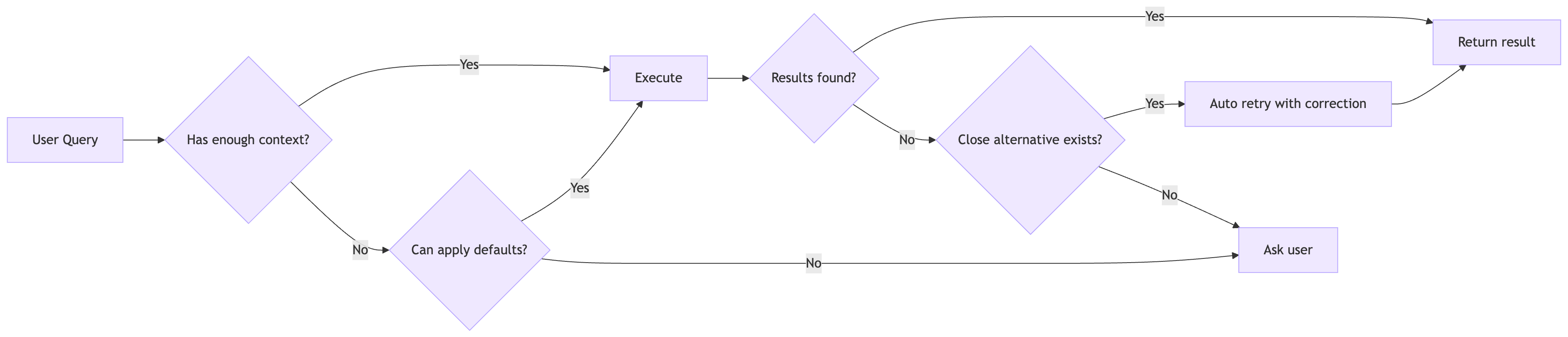
Figure: Decision flow for clarification, with intelligent reflection
The key insight: users would rather receive a broader result set they can filter mentally than endure a clarification dialogue. The cost of showing slightly more data is lower than the cost of friction.
3. Guided Discovery Over Open-Ended Conversation
We added a feature called “Compass” that suggests a logical next question after each response. “Would you like me to break down customer sentiment by product line?”
Why not just ask the LLM to suggest follow-ups? Because a foundation model that doesn’t understand your business will suggest queries your system can’t actually handle. It will hallucinate capabilities. It will propose analysis that sounds reasonable but leads nowhere.
Compass grounds suggestions in actual system capabilities. Rather than generating open-ended suggestions (“Is there anything else you’d like to know?”), it proposes specific queries the system can definitely fulfill, aligned to business workflows the user cares about.
This serves two purposes. First, it helps users who don’t know what to ask next. Enterprise data systems are complex; business users often don’t know what data is available. Guided suggestions teach them the system’s capabilities through example. Second, it keeps conversations productive and on-rails.
Approximately 40% of multi-turn conversations within the AI Assistant include an affirmative follow-up, demonstrating how contextually relevant follow up suggestions can improve user retention, conversation continuity and guide discovery.
We found this pattern valuable enough that we open-sourced a standalone implementation: langgraph-compass. The core insight is that follow-up generation should be decoupled from your main agent so it can be configured, constrained, and grounded independently.
4. Deterministic Security in Probabilistic Systems
Role-based access control cannot be delegated to an LLM.
The intuition might be to inject the user’s permissions into the prompt: “This user has access to accounts A, B, and C. Only return data from those accounts.” This does not work. The model might follow the instruction. It might not. It might follow it for the first query and forget by the third. It can be jailbroken. It can be confused by adversarial input. Prompt-based identity is not identity enforcement.
The risk is subtle but severe: a user crafts a query that tricks the model into revealing data outside their scope, or the model simply drifts from the access rules mid-conversation. Compliance and audit requirements make this untenable. You cannot explain to an auditor that access control “usually works.”
Our RBAC implementation is entirely deterministic and completely opaque to the LLM. Before any query executes, we parse it and inject access control predicates in code. The model never sees these predicates being added; it never makes access decisions. It formulates queries; deterministic code enforces boundaries.
When access filtering produces empty results, we detect it and tell the user: “No records are visible with your current access permissions.” They know they’re seeing a filtered view, not a complete absence.
Liz Centoni, Cisco’s EVP of Customer Experience, has written about the broader framework for building trust in agentic AI, including governance by design and RBAC as foundational principles. These aren’t afterthoughts. They’re prerequisites.
5. Empty Results Need Explanations
When a database query returns no rows, your first instinct might be to tell the user “no data found.” This is almost always the wrong answer.
“No data found” is ambiguous. Does it mean the entity doesn’t exist? The entity exists but has no data for this time period? The query was malformed? The user doesn’t have permission to see the data?
Each scenario requires a different response. The third is a bug. The fourth is a policy that needs transparency (see section above).
System-enforced filters (RBAC): The data exists, but the user doesn’t have permission to see it. The right response: “No records are visible with your current access permissions. Records matching your criteria exist in the system.” This is transparency, not an error.
User-applied filters: The user asked for something specific that doesn’t exist. “Show me upcoming subscription renewals for ACME Corp in Q3” returns empty because there are no renewals scheduled for that customer in that period. The right response explains what was searched: “I couldn’t find any subscriptions up for renewal for ACME Corp in Q3. This could mean there are no active subscriptions, or the data hasn’t been loaded yet.”
Query errors: The filter values don’t exist in the database at all. The user misspelled a customer name or used an invalid ID. The right response suggests corrections.
We handle this at multiple layers. When queries return empty, we analyze what filters eliminated records and whether filter values exist in the database. When access control filtering produces zero results, we check whether results would exist without the filter. The synthesis layer is instructed to never say “the SQL query returned no results.”
This transparency builds trust. Users understand the system’s boundaries rather than suspecting it’s broken.
6. Personalization is Not Optional
Most enterprise AI is designed as a one-size-fits-all interface. But people expect an “assistant” to adapt to their unique needs and support their way of working. Pushing a rigid system without primitives for customization causes friction. Users try it, find it doesn’t fit their workflow, and abandon it.
We addressed this on multiple fronts.
Shortcuts allow users to define command aliases that expand into full prompts. Instead of typing out “Summarize renewal risk for ACME Corp, provide a two paragraph summary highlighting key risk factors that may influence likelihood of non-renewal of Meraki subscriptions”, a user can simply type /risk ACME Corp. We took inspiration from agentic coding tools like Claude Code that support slash commands, but built it for business users to help them get more done quickly. Power users create shortcuts for their weekly reporting queries. Managers create shortcuts for their team review patterns. The same underlying system serves different workflows without modification.
Based on production traffic, we’ve noticed the most active shortcut users average 4+ uses per shortcut per day. Power users who create 5+ shortcuts generate 2-3x the query volume of casual users.
Scheduled prompts enable automated, asynchronous delivery of information. Instead of synchronous chat where users must remember to ask, tasks deliver insights on a schedule: “Every Monday morning, send me a summary of at-risk renewals for my territory.” This shifts the assistant from reactive to proactive.
Long-term memory remembers usage patterns and user behaviors across conversation threads. If a user always follows renewal risk queries with product adoption metrics, the system learns that pattern and recommends it. The goal is making AI feel truly personal, like it knows the user and what they care about, rather than starting fresh every session.
We track usage patterns across all these features. Heavily-used shortcuts indicate workflows that are worth optimizing and generalizing across the user community.
7. Carrying Context from the UI
Most AI assistants treat context as chat history. In dashboards with AI assistants, one of the challenges is context mismatch. Users may ask about a specific view, chart or table they are viewing, but the assistant usually sees chat text and broad metadata or perform queries that are outside the scope the user switched from. The assistant does not reliably know the exact live view behind the question. As filters, aggregations, and user focus change, responses become disconnected from what the user actually sees. For example, a user may apply a filter for assets that have reached end-of-support for one or more architectures or product types, but the assistant may still answer from a broader prior context.
We enabled an option in which UI context is explicit and continuous. Each AI turn is grounded in the actual view state of the selected dashboard content or even objects, not just conversation history. This gives the assistant precise situational awareness and keeps answers aligned with the user’s current screen. Users are made aware that they are within their view context when they switch to the assistant window,
For users, the biggest gain is accuracy they can verify quickly. Answers are tied to the exact view they are looking at, so responses feel relevant instead of generic. It also reduces friction: fewer clarification loops, and smoother transitions when switching between dashboard views and objects. The assistant feels less like a separate chat tool and more like an extension of the interface.
8. Building AI with AI
We develop these agentic systems using AI-assisted workflows. It’s about encoding a senior software engineer’s knowledge into machine-readable patterns that any new team member, human or AI, can follow.
We maintain rules that define code conventions, architectural patterns, and domain-specific requirements. These rules are always active during development, ensuring consistency regardless of who writes the code. For complex tasks, we maintain command files that break multi-step operations into structured sequences. These are shared across the team, so a new developer can pick things up quickly and contribute effectively from day one.
Features that previously required multi-week sprint cycles now ship in days.
The key insight: the value isn’t necessarily in AI’s general intelligence and what state-of-the-art model you use. It’s in the encoded constraints that channel that intelligence toward useful outputs. A general-purpose model with no context writes generic code. The same model with access to project conventions and example patterns writes code that fits the codebase.
There’s a moat in building a project as AI-native from the start. Teams that treat AI assistance as infrastructure, that invest in making their codebase legible to AI tools, move faster than teams that bolt AI on as an afterthought.
Conclusion
None of these patterns are technically sophisticated. They’re obvious in hindsight. The challenge isn’t knowing them; it’s prioritizing them over more exciting work.
It’s tempting to chase the latest protocol or orchestration framework. But users don’t care about your architecture. They care whether the system helps them do their job and is evolving quickly to inject efficiency into more elements of their workflow.
The gap between “technically impressive demo” and “actually useful tool” is filled with many of these unglamorous patterns. The teams that build lasting AI products are the ones willing to do the boring work well.
These patterns emerged from building a production AI Assistant at Cisco’s Customer Experience organization. None of this would exist without the team of architects, engineers and designers who argued about the right abstractions, debugged the edge cases, and kept pushing until the system actually worked for real users.


