Information is the fuel for the continuing transformation of healthcare, enabling a care system that can address the growing challenges of quality, equity and cost. But as health systems and hospitals digitally transform, as they increase their ability to acquire and process clinical information, the question is how effectively are they using that information to drive improved care processes. Are they fully leveraging the information opportunity that is before them?
Healthcare is unique, in that it is both highly analytical, dependent on complex and well-established process, as well as being deeply social, nuanced by the needs the individual patients and the staff that must work together as a team. Our information systems need to recognise this duality. At present, we often heavily focus on our ability to capture and process information, and less on how we integrate people with that information to deliver care. We need to step beyond the focus on our digital equivalent of a smart piece of paper…the PC, and learn from the community’s broader engagement with social collaboration technologies. We need to look at ways that we can integrate clinical data, text, video and voice securely into the workflow of a hospital. We need to create a more holistic environment that enables individuals to deliver the contextual information required but can also socially engage the care provider and patient so they can experience a better care process.
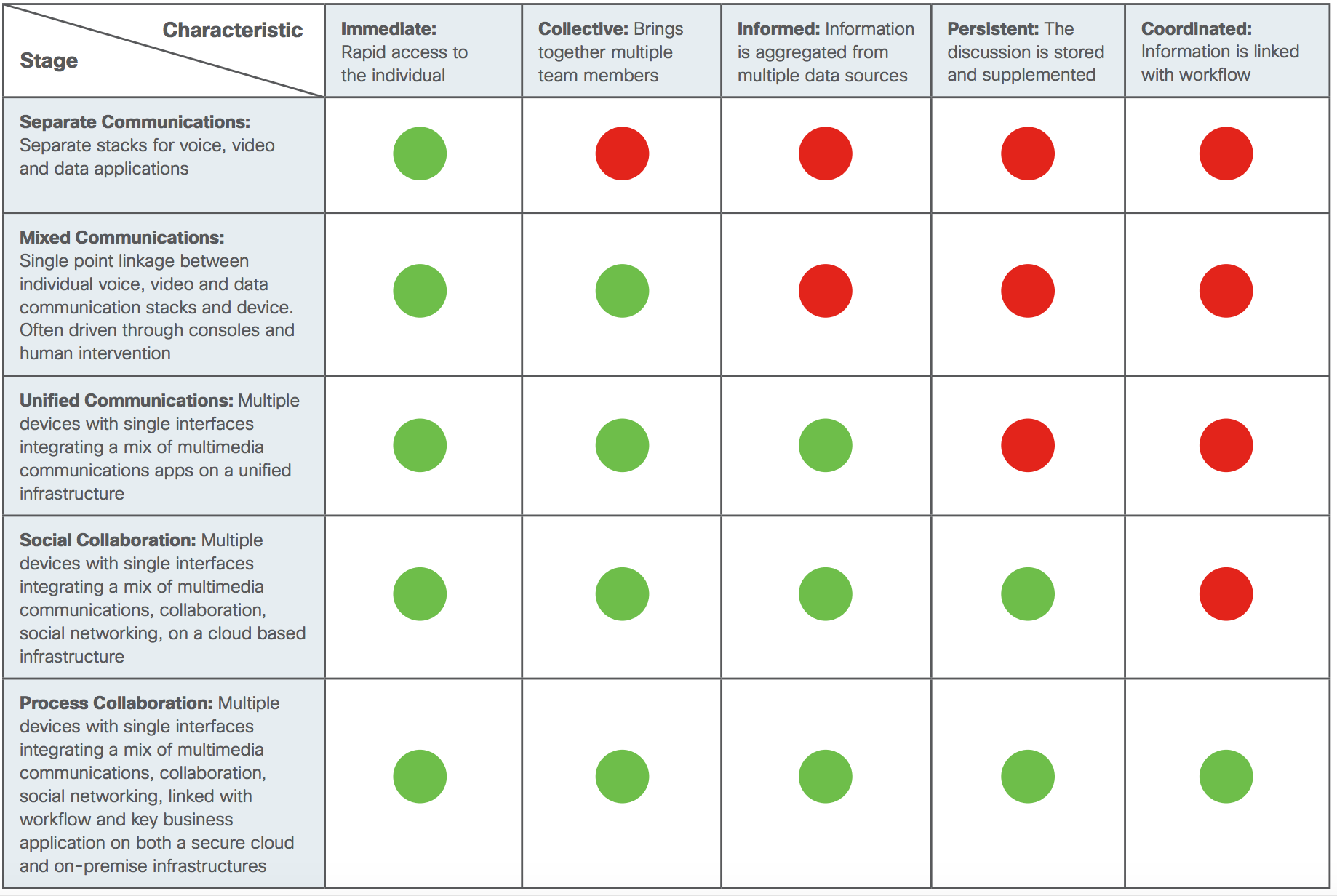
This is the emerging domain of Process Collaboration, the evolution of unified communication to social engagement, but integrated with the workflow of the healthcare system. This new environment is founded upon scalable and adaptable networks, comprehensive security and socially enabled collaboration processes. Mapping the capabilities required for a future process collaboration enabled healthcare community sees a progressive development of five communication sharing characteristics.
Immediate: Rapid access to the individual
Collective: Brings together multiple team members
Informed: Information is aggregated from multiple data sources
Persistent: The discussion is stored and supplemented
Coordinated: Information is linked to workflow
The relative presence of these characteristics defines an organisation’s information capability, from simple separate communications, through mixed and unified communications, through to process collaboration. In this environment collaboration is no longer just voice or video, it is the integration of all the information technology capabilities, encompassing transport, mobility, communications and security into a single set of sharing capabilities. Such an environment enables people to engage with others, care providers and patients using the full spectrum of sharing skills, both analytical and social.
Click to view full-size image.
Journey to process collaboration
Building such an environment requires the design of an interoperable information infrastructure which allows an organisation to evolve its capabilities progressively, as its needs develop. Technologies such as Cisco Digital Network Architecture, Unified Collaboration and Spark together with Cisco’s suite of security solutions provides the foundation for building a process collaboration enabled organisation. Read the white paper “Capturing the Opportunity of Digital Transformation in Healthcare” to find out more.
Henry Ford wasn’t the first person to build a car. He was, however, a pioneer in creating the Model T, a car that was affordable for the average consumer. It took years to develop and prototype this model—and, at the same time, to revolutionize the manufacturing process that led to the moving assembly line.
This combination of understanding the addressable market and improving process resulted in Ford taking a huge chunk of the automobile market share and advancing itself into the iconic brand it is today. It also set a standard for how manufacturers would introduce and produce products going forward.
New product introduction, or NPI, is one of the fundamentals of manufacturing. In a survey of manufacturing operations management, LNS Research found that getting new products to market faster was one of their top issues. For example, it’s estimated that new products account for nearly half of all discrete manufacturing revenue.
The Importance of New Product Introduction (NPI) in Manufacturing
Many people think NPI is relegated to marketing, but it usually has its roots in engineering and product management teams. Those groups are taking inputs from customers, watching the trends, and then using that information in the ideation process. The idea can be an entirely new product or an improvement on a current design.
The ideation process is where creativity and innovation begin. It typically occurs via collaboration among multiple teams. Usually engineering or a product manager will come up with the ideas and then look at the feasibility of the product, asking questions like:
What does the current market look like?
What is our competitive advantage?
Can we manufacture it, and if so, what do we need for production?
Are the right supplies (i.e. components, parts, equipment) available to develop this?
Building from these questions, documentation is created to support the business case for the new product or enhancement—and will often include multiple inputs from sales, marketing, engineering, accounting, and supply chain. A draft of these business case inputs will be circulated and pressure-tested across the company. Once this initial ideation is completed and the business case is approved, the product moves into the gated process of design, budgeting, prototype development, and production.
A Typical NPI Gating Process
Every company is different, but with multiple teams working on creating a product, there’s almost always a gating process with milestones, deliverables, and defined responsibilities. This balances the engineering side of the product with the sales and marketing side. A simple gating process would look like the following:
Ideation of product
Approval of business case
Production engineering and material acquisition
Prototyping and verification
Marketing plan development
Full production run
Product launch
Now, this was a simple example of what happens in the gating process, but during these gates there’s a lot of back-and-forth communication, especially during the transition from design to production. There are the weekly meetings, updates, reviews of prototypes and production runs, development of marketing materials in time for launch, and sales and partner training. Engineering and product management are usually working on one track while sales and marketing are working on a separate track that meets at the launch gate of the product into the field.
https://www.youtube.com/watch?v=hozW7uwWQyI
NPI and Collaboration Challenges
Henry Ford’s revolutionary process and product worked for the early 1900’s, but a lot has changed since then:
Multiple locations: Manufacturing is much more global now, and in many cases engineering might be in one location, while the actual manufacturing might be in another. Talent is often dispersed as well. Remote teams may not even see each other face to face more than a couple of times a year, but are tasked with developing and resourcing products together. Engineering teams often have to help troubleshoot an issue from the floor with operators while supply chain teams need to ensure they’re balancing the right investment with suppliers and materials.
Cross-team documentation: Documentation trails must be kept, with the ability to edit, view, and access across the teams as the product goes through the gating process. This ensures that any changes or updates correspond to the original business case that got the product green-lighted in the first place. Accessible documentation also ensures regular compliance and helps executive teams understand the current product road map as well as the vitality of their product portfolio.
3 Ways to Integrate Technology into Your NPI Process
While many manufacturers have worked to improve and fine-tune their NPI processes, they haven’t always aligned the process with the technology to drive better collaboration and speed time to market. Some use cases to consider:
Videoconferencing and real-time whiteboarding: Multiple teams can now come together and talk through design and development. This often involves complex details that can’t be articulated on paper alone early in the gating stages. Collaborating via email or phone isn’t efficient and can lose nuance. Having the ability to share technical drawings while annotating them in real time can help teams creatively while speeding the ideation and production processes. Integration of videoconferencing with messaging platforms also ensures that documentation and discussions during meetings can be saved in a central location.
Real time messaging: Email has often been the de facto way for teams to communicate. The problem with email is that it’s how lots of other communication comes in, beyond NPI projects. This means emails can be missed, or lost among threads that are hard to navigate and keep up with.The average company will likely lose a quarter of its productivity due to inefficient processes and internal bureaucracy. A messaging platform offers a better alternative and can support real-time threads. All files and messages are located in the same space for better project management. Meetings and calls can also be integrated to ensure a consistent thread throughout the project gates. A messaging platform can help ensure that product management and marketing are aligned through the various gates towards a product launch.
Visibility into prototyping and production: As small production runs begin within a factory cell, it’s inevitable that operators and engineering will have to fine-tune outputs that will drive smooth production runs. It’s not realistic to have engineering teams and production teams flying back and forth across locations during this ramp up. Having the ability to conference in with teams and view the outputs in real time can ensure quicker resolution of issues, improved prototypes, and quicker transition to full-scale production runs.
Aligning your existing gating process and your technology can address many aspects within the product can help drive an improved NPI process and team communication, while helping boost creativity, lower costs, and reduce the risk associated with new products.
To learn more about how Cisco is helping manufacturing teams improve collaboration, I invite you to check out some of the case studies around manufacturing and collaboration here.
I also invite you to explore the following manufacturing topics:
Today’s announcement from the Federal Communications Commission that it is launching a “Notice of Inquiry” for mid-band spectrum is a development that wireless users can cheer, just as industry players already have.
That’s because by the time this spectrum gets released for commercial use in a couple of years, rising demand for wireless data from phones, tablets and other devices will easily be able to access and utilize this new spectrum. Industry is cheering because this spectrum is terrific for small cell networking – neither too low (which is best for wide area mobility) nor too high (mid-band spectrum propagates through walls easier than millimeter wave). Just like the Goldilocks fairy tale, this spectrum is “just right.”
Moreover, the distinctions the FCC is making between licensed on the one hand, and unlicensed on the other, make good sense from a technology perspective. The bands under consideration are contiguous to other “like” bands: 3.7-4.2 GHz sits adjacent to the existing Consumer Broadband Radio Service, which is expected to use LTE technology for licensed and unlicensed connectivity. The 6 GHz unlicensed band is next to the existing 5 GHz band for unlicensed that uses Wi-Fi, sometimes referred to by its “standards” name, IEEE 802.11. In both bands, these adjacencies enable extensibility of radio technology, from the existing band into the new one. By way of example, IEEE 802.11ax – the next generation of Wi-Fi – will be able to extend from 5 GHz into 6 GHz channels. In fact, under the FCC’s plan, unlicensed would extend all the way up to 7125 MHz.
The FCC’s focus on mid-band spectrum for small cell networking is exactly right. Most of the data we generate from our devices is generated when we are indoors, at home (especially during peak hours in the evenings) or at work – places where it’s proven that small cells are successful. US peak Internet traffic will grow at a compound annual growth rate of 32% from 2016-2021, according to Cisco’s Visual Networking Index report. And that evening peak is supported in the main by home Wi-Fi networks connected to a wired broadband network.
Mobile data traffic using licensed spectrum is growing also. In the US, the average mobile connection will generate not quite 12 Gigabytes of Internet traffic per month in 2021, up from about 3.5 Gigabytes today.
Tough work lies ahead to open these bands to use by consumers. The bands identified have significant and important incumbent licensees whose operations will need to be protected from interference. There are a lot of issues to be resolved.
That said, the decision taken today by the FCC helps ensure that the user experience will continue to get better in the future, powered by additional spectrum availability.
Although cloud security has improved tremendously over the years, public cloud still gives some federal IT managers pause.
To at least some federal IT managers, the idea of trusting sensitive data to a public cloud provider is not much more appealing than spending a night in an abandoned house while being stalked by Stephen King’s Pennywise or some other evil clown (really, is there any other kind?)
The loss of control over their data and the necessity to trust an outside entity to maintain tight security is a bridge too far for many. Indeed, a recent survey found that only 36 percent of federal IT professionals would be comfortable entrusting mission-specific apps to a public cloud.
Meanwhile, a slightly older study from Meritalk, commissioned in part by Cisco, found that 75 percent of federal agencies would like to move more services to the cloud, but are concerned about retaining control over their data.
Federal agencies have more constraints on cloud than do private-sector organizations. Any cloud solution an agency deploys must be FedRAMP-authorized. FedRAMP, or Federal Risk and Management Authorization Program, requires solutions to meet minimum security standards.
Avoid this with Cisco hybrid cloud solutions.
FedRAMP isn’t required for state and local government organizations, but many of them rely on it too, as an alternative to performing their own security evaluations.
While the list of offerings that have been evaluated under the program is growing, it remains limited.
For federal IT leaders trying to balance security and agility, a hybrid cloud often provides an ideal solution. In a hybrid cloud, workloads can run in your data center or in the cloud; you decide which is more suitable for a given situation. The hybrid cloud can be said to provide the security of a data center and the agility of a public cloud. Moreover, depending on the configuration and systems chosen, administrators can often manage the multiple clouds from a single interface.
When powered by advanced technology such as Cisco’s HyperFlex Systems (learn more here), hybrid cloud addresses many of the concerns that IT professionals express about public cloud environments.
In March, Talos reported on the details of Crypt0l0cker based on an extensive analysis I carried out on the sample binaries. Binaries — plural — because, as noted in the original blog, the Crypt0l0cker payload leveraged numerous executable files which shared the same codebase. Those executables had nearly identical functions in each, but identifying all of those functions repeatedly is tedious and draws time away from improving the analysis. Enter FIRST, the Function Identification and Recovery Signature Tool released by Talos in December 2016.
FIRST allowed me to port my analysis from the unpacking dll to the payload file instantly. Once I was satisfied my analysis across both files, I was then handed a suspected previous version of the sample. FIRST was able to identify similar code across the versions and partially port the analysis back to the older file. When the next version of Crypt0l0cker comes out, I will be able to get a jump on my analysis by using FIRST to port that work forward to the similar code. You can use it to port my work to your sample as well. I will demonstrate doing just that with a Crypt0l0cker sample which appeared on VirusTotal in April 2017, more than a month after the Talos blog about it. There has been no targeted analysis of this file to provide background for this post.
Locating the Sample
Procuring a malware sample of a known family without analyzing it can feel like a heavy challenge to overcome. Thankfully, Talos can leverage Threat Grid sandbox reports of suspected malware samples that we receive. Such reports can be scanned for family IOCs. Per our previous analysis into Crypt0l0cker, the infection status of that version is stored in a file named ewiwobiz. By searching Cisco Threat Grid telemetry for files which created ewiwobiz, I identified a file which was probably a Crypt0l0cker executable.
Vodafone India’s motto is “to be the most loved service provider in India” and that’s why over 200 million Indians have chosen to stay connected with them.
Vodafone India is a 100% subsidiary of Vodafone Group. It commenced operations in 1994 when its predecessor Hutchison Telecom acquired the cellular license for Mumbai. Brand Vodafone was launched in India in September 2007, after Vodafone Plc. acquired a majority stake in Hutchinson Essar in May 2007. They have consistently been awarded for their best-in-class network, powerful brand, unique distribution and unmatched customer service. Whether an individual or enterprise, their customers always receive world-class services that cater to their needs.
Their knowledge of global best practices along with their deep exposure to local markets has made them leaders in the India telecommunications industry. At Vodafone India, their customers are at the heart of everything that they do.
Cisco advertisement in the Economic Times & Times of India Newspapers
At Cisco, we know that a lot goes into building networks. We are pleased that Vodafone India has added Cisco Self Optimizing Network (SON) into their Data Strong Network™ adding to the existing intelligence of the Cisco Ultra Mobile Core. By taking the benefits of SON technology to every corner of the country, Vodafone ensures an enhanced data and voice experience for their customers, even in the most congested of locations.
So now Vodafone India customers can watch HD movies non-stop on their mobile device, or make group video calls or broadcast live from anywhere. Whether the customer is on a fast train, crowded malls, or within a basement they can receive the same high performance that differentiates them from their competition.
Congratulations Vodafone on further enhancing your network to provide your customers with an even higher, network automated quality of customer experience.
Ymasumac Marañón Davis is an educational consultant, intuitive life coach and author. This blog is the first in a series around access.
The cloud and mobility in our devices have caused industries the world over to rethink how they conduct business. Education is no exception to this shift in culture. How does a public service industry tasked with the education of minors and often an extremely limited budget create access to the technological revolution for their students?
Addressing access requires a two-pronged approach of technical and cultural change. Both of these require a new mindset where we question our preconceived notions, adapt our perceptions, and reexamine our biases.
When schools begin discussing access, they often begin with devices. Students need them, so how do we get them? And once they have them, how do they get internet access in the classroom, at school, and at home? I don’t start here.
Start with perceptions. To drive change, you must first look at how others perceive the area you want to change and the emotional charge connected to this area. The stronger the charge, the stronger the perceptions they have that will drive their decisions. Whether their perceptions are true or false, it doesn’t matter; the perception will drive the decision making. So we need to engage everyone’s perceptions. All stakeholders need to be included in this conversation.
When engaging people’s perceptions, we need to look at where they are most emotionally charged, because that’s their biggest belief system – right or wrong, this is often where they will stake their flag. With technology, I have found that the biggest emotional charge is fear. Fear of technology taking over. Fear of losing jobs to technology. Fear of people not “communicating” anymore. Fear everywhere.
The problem is that the world today demands a skill set aligned with a 21st-century work and learning culture. We cannot afford to have students spend twelve formative years in a learning culture that is quickly dying. This new learning culture requires all participants to have certain skill sets. Students today need to be innovative, strong virtual collaborators with social intelligence, and insatiably curious with (at minimum) rudimentary coding skills. (More on our learning culture shift to come in a later post.)
I was visiting a cousin recently in Brooklyn, New York. She co-founded a cooperative of small organic farms. Over the years, they have branched out and now collaborate with other small organic farms and cooperatives throughout the world. While visiting my cousin, she informed me she would be on a phone conference at 4:00 a.m. I was surprised by the time. She said it was because the team she was on came from 5 different continents and finding a time-zone that works for everyone has been a challenge. This, I thought, is the 21st-century team – international, from 5 different continents, facing similar challenges and working together to solve them! How, I wondered, are we preparing our students for this?
We know the need is there, so how can we shift perception to give access to all students anytime and anywhere? By alleviating the fears of stakeholders.
I begin many of my presentations and workshops with images of exactly what stakeholders fear the most: kids on their phones “not talking” to each other. We then dive into the perceptions of what the stakeholders think is happening. Usually, this opens up all their fears and concerns about why technology is a detriment to learning. And this is where I get to shift their perceptions. I tell them a story.
I tell them a story of a time when my fifteen-year-old son and I were grocery shopping and he wanted chocolate milk. Being health conscious, I quickly looked at him like he had lost his mind and then said, “Uh, no, we’ve never bought chocolate milk in this home!” I’m holding my phone up with a collaborative list app that has my grocery list on it. My son quickly whips out his phone and says, “I’m pulling up 3 research articles right now that prove chocolate milk is good for runners.”
In that moment anyone walking by is looking at us and thinking: How sad, even in the grocery store they can’t put their phones away! No one talks to each other anymore! Look at them, they can’t even go grocery shopping without their phones out. And of course nothing could be further from the truth.
All of us have a story of how we have used our devices in powerful ways. Engaging all stakeholders in recognizing how their devices can make their lives easier and ultimately allow them to participate in the global discourse is key to changing our learning cultures and addressing access. The sooner we enable stakeholders to leverage their devices, the sooner they will see this as true for students.
Shifting perceptions about technology is important for all stakeholders, especially families. Families are our learning partners in educating the next generation, and we need to be aligned on the kind of learning culture we want to create. If families are not intimately connected to the profound changes happening at school, they can neither support them nor be a part of them. If we want to ensure access for all students, we have to ensure that all stakeholders believe access is truly necessary.
Often, people do not believe technology is necessary because they just see it as an addition, as opposed to a powerful tool for learning; failing to see how technology is able to amplify learning and connect learners in ways not otherwise possible. Yet, when talking about using devices in learning, devices are secondary — they amplify what is happening in the classroom. All of it. If dynamic and innovative teaching and learning is happening, technology will take it to the next level. If low-level teaching and learning is happening, that will also be amplified. Learning drives the classroom culture and technology augments its impact.
If stakeholders don’t understand what students are accessing and how powerful a learning tool devices connected to the internet can be, they will not advocate for access to them. Once stakeholders see that the value of technology equals (and even surpasses) that of paper and pen, they will support purchasing and implementing these learning tools.
Creating equity in access isn’t monetary; at its core, it’s a belief. It’s understanding the why. When teachers, administrators and parents understand why a device connected to the internet will give greater access to developing 21st-century learning skills, they’re in! Of course, just the device and internet do not create the magic, but without them, the magic of learning is fundamentally limited.
If you’ve been to a security conference in the last year you’ve probably seen more than 20 different vendors all talking about endpoint security. Some might be talking about next generation anti-virus, endpoint detection and response, and even the much lauded machine learning. How do you cut through the clutter and noise to find what you are looking for?
Next generation endpoint security (NGES) is the convergence of multiple technologies. When I talk to customers about what’s missing in their AV, they say it doesn’t do a good job of showing anything after the fact, so they picked up an endpoint detection and response (EDR) tool. Now they have the insight they need, but have an additional technology they need to learn to use, another console to use that doesn’t tie in with their existing infrastructure, and another vendor to manage. NGES is designed to provide protection, detection, and response capabilities in an integrated solution. We leverage the cloud to perform all the heavy analytics so it doesn’t affect system performance.
Can we agree on why anti-virus is no longer effective?
Detection: or more aptly, our belief in the lack thereof. However, we don’t know what we don’t know and that means if your endpoint security is missing something, you have no idea. This is why you need something that not only inspects files at point-of-entry onto the endpoint, but also looks at file activity in a sandbox, and continuously analyzes file behavior once they’re on the endpoint to rapidly detect malicious behavior when it happens. One detection mechanism alone isn’t going to cut it.
Bloat: Unless you’ve already adopted a cloud based solution, much of the analysis from legacy antivirus is being done on the endpoint. And rescans are process intensive. Additionally, many organization have multiple endpoint tools running alongside each other. That’s bad. You and all the employees in your company have a job to do. Slowing endpoints to a crawl while something is being analyzed in the background by multiple tools just causes frustration, and the belief that it’s the system’s fault. Cue the “My computer is running really slow” IT ticket!
Visibility: The lack of visibility is probably the biggest problem with most legacy endpoint security technologies out there. They don’t provide security teams with a comprehensive view of file or user activity over time, across all of their endpoints. You can’t stop what you can’t see. The defense in depth models persists today because attackers are always finding new and innovative ways to get their hands on your data.
Alert Fatigue and False Positives: How many alerts do you have to deal with each day? Are the alerts prioritized or correlated to tell the whole story? If the answers to those questions are “way too much; and no…” then alerts have become more of a hindrance than what they should be—a first responder to help you contain and eliminate threats, and inform your security decision-making.
There is a reason the defense in depth model still exists today. Attackers are always finding new and innovative ways to get their hands on your data.
So what’s really an effective strategy?
Cut the fat
Agent bloat doesn’t have to be an issue anymore. First of all, get a solution that does the analysis in the cloud – either public or private. Your users will thank you. Second, consolidate the bulk of endpoint security tools into one. When smartphones came along, they could still do everything your old flip phone could – make calls, text, tell time. They also gave you capabilities you never had before – web browsing, email, applications, video calls. Next generation endpoint security brings together a lot of what you know with new protection, detection, and response techniques.
The integrated approach This has long been accepted as a best practice in many industries. For example, cars have anti-lock brakes, seat belts, air bags, tire-pressure monitoring, lane-departure warning systems, blind-spot detection, the list goes on. If you relied solely on one of these, you create a single point of failure. Don’t rely on a single detection engine or method. It creates a single point of failure in your endpoint security. It’s not worth it. Having multiple detection engines all working together in one solution, is critical.
…One last thing
Machine Learning has been a hot topic this year. Between random forest and super forest techniques (read: Using Decision Forests to Detect Advanced Threats), these are detection techniques, not a silver bullet. Cisco uses machine learning in many different ways. We recently launched Encrypted Traffic Analytics where we apply machine learning to detect malware in encrypted network traffic. We use it inside AMP for Endpoints to analyze web traffic and to pinpoint malware operating inside a network. It’s one of the techniques we use, but it’s not a silver bullet.
Many of you know Lauren Malhoit our incredible co-host of TechWiseTV. She asked for my help getting this blog out and who am I to say no even though you know me as the UCS/TCO blogger?
There are many things we think about when considering Software Defined Networking. Mostly, it’s the controllers, and the ability to apply configs and policies to our networks. In fact, we almost forget about the hardware, because as long as it’s setup properly, we don’t NEED to think about it. However, as any good network engineer knows, that is not the end of the hardware story.
Applications are using more and more bandwidth, especially in an East/West traffic flow. We have more applications than we used to. We have things like Big Data and analytics taking up bandwidth. And, if we’re lucky, we gain more and more customers who are using our applications or taking up room in our internal apps. That’s actually a good problem to have, but what it means for the network folks is that we need to add more hardware.
How Does ACI Help?
ACI helps in many ways, but in this blog we’re concentrating on hardware scalability. So let’s first talk about the initial setup, referred to as Automatic Fabric Discovery. It couldn’t be easier. Once your boxes are racked and connected, you connect your APICs (Application Policy Infrastructure Contorllers). Answer about 10 questions in a CLI wizard, simple things like usernames, passwords, and VTEP (VXLAN Tunnel End Point) IP pools. Then just log into the GUI. The GUI will automatically discover the first leaf switch it finds (it uses LLDP for discovery) and you just need to enter a name and node number for the switch. It will then find all the other leaf and spine switches automatically. Again, you just enter a name and node number, and in minutes you’ll have a full network topology.
You could even do this programmatically, too! Create a REST call using a REST client like Postman or a Python script that uses a pre-populated list of node names and numbers.
Scaling
We were talking about growing our networks to meet bandwidth needs at the beginning of the blog. This is even easier than the initial discovery, because we just add some leaf switches to get more end ports. We could add more spine switches in the same way. Give these names and node numbers, and we’re off and running.
Again, we could do this programmatically as well. We can also add in descriptions of which rack, or which building in which these switches are located to help with later troubleshooting and ease the burden of creating detailed network diagrams.
Best of all, every switch is configured properly. There’s no box-by-box configuration, no human error configuration problems, no IP addresses to even configure…because it all comes from IP pools and configs set in the APIC.
Cloud Like Configuration On-Premises
Now we can scale our networks with a few clicks to support application demands. When we combine that with a converged compute system like UCS or even a hyperconverged solution like HyperFlex we get even more automated scaling for operational needs. Again, this concentrates heavily on the hardware, but bring in things like Cloud Center to deploy and orchestrate applications from a self-service GUI, and we truly get cloud-like ease of use but with the control, security, and ROI we want. To see other demos on how these solutions work together click here!








 Although cloud security has improved tremendously over the years, public cloud still gives some federal IT managers pause.