

As cyber threats intensify and compliance expectations tighten, security leaders increasingly recognize that perimeter defenses alone can’t keep pace. Organizations are now contending with thousands of attack attempts each week and a daily flood of alerts that far exceed human capacity to investigate.
Threat actors are exploiting AI-driven techniques and fragmented visibility across networks, endpoints, and cloud environments, slipping through the gaps between edge defenses and SOC operations. It’s no surprise that a majority of analysts believe compromises may already be underway without detection.
To counter this reality, forward-leaning enterprises are moving toward integrated security models that connect telemetry, context, and threat analytics from the perimeter all the way into the SOC.
The Growing Log Volume Challenge
Network environments generate massive volumes of security data daily. Typically, 25% of all network logs consumed are from firewalls, creating an overwhelming data management challenge. Traditional approaches struggle with:
- Data Overload and Noise — Security teams face overwhelming volumes of log data from various sources, making it difficult to prioritize and identify critical alerts. An estimated 41% of alerts are ignored due to analyst bandwidth constraints.
- Correlation Complexity — Isolated firewall logs provide limited visibility into attack patterns that span multiple network segments and timeframes. Modern threats employ lateral movement techniques that require cross-device correlation to detect effectively. A primary obstacle for SOC teams is the lack of contextual information around security events.
- Challenges With Data Management and Pipeline — Data is the new gold, but how do you gather the data efficiently and in a scalable fashion. Firewall logs are an indispensable component of modern data management pipeline. This requires that we support various industry standards for Firewall logs so it can be converted into suitable formats for analysis, while being easily consumed by Splunk Data Management Pipeline Builders; Edge Processor and Ingest Processor.
- Data Retention and Compliance Pressures — Regulatory frameworks require comprehensive logging and monitoring of all access to system components and cardholder data. Organizations must maintain detailed audit trails while ensuring that sensitive information remains protected throughout the retention lifecycle.
The challenge extends beyond simple storage. Organizations need intelligent data management that can automatically archive, index, and retrieve historical security events for forensic analysis and compliance reporting.
The AI Era: New Threats Demand New Approaches
The emergence of AI-powered attacks has fundamentally changed the threat landscape. Traditional signature-based detection methods cannot identify previously unknown attack vectors or adaptive malware that evolves in real-time. Organizations need behavioral analytics and machine learning capabilities to detect anomalous patterns that indicate sophisticated threats.
Flexibility in data handling becomes critical when dealing with diverse log formats, varying event types, and the need to correlate firewall data with endpoint, cloud, and application security events. Static logging configurations cannot adapt to evolving threat patterns or changing compliance requirements.
Cisco Firewalls Meet Splunk Intelligence
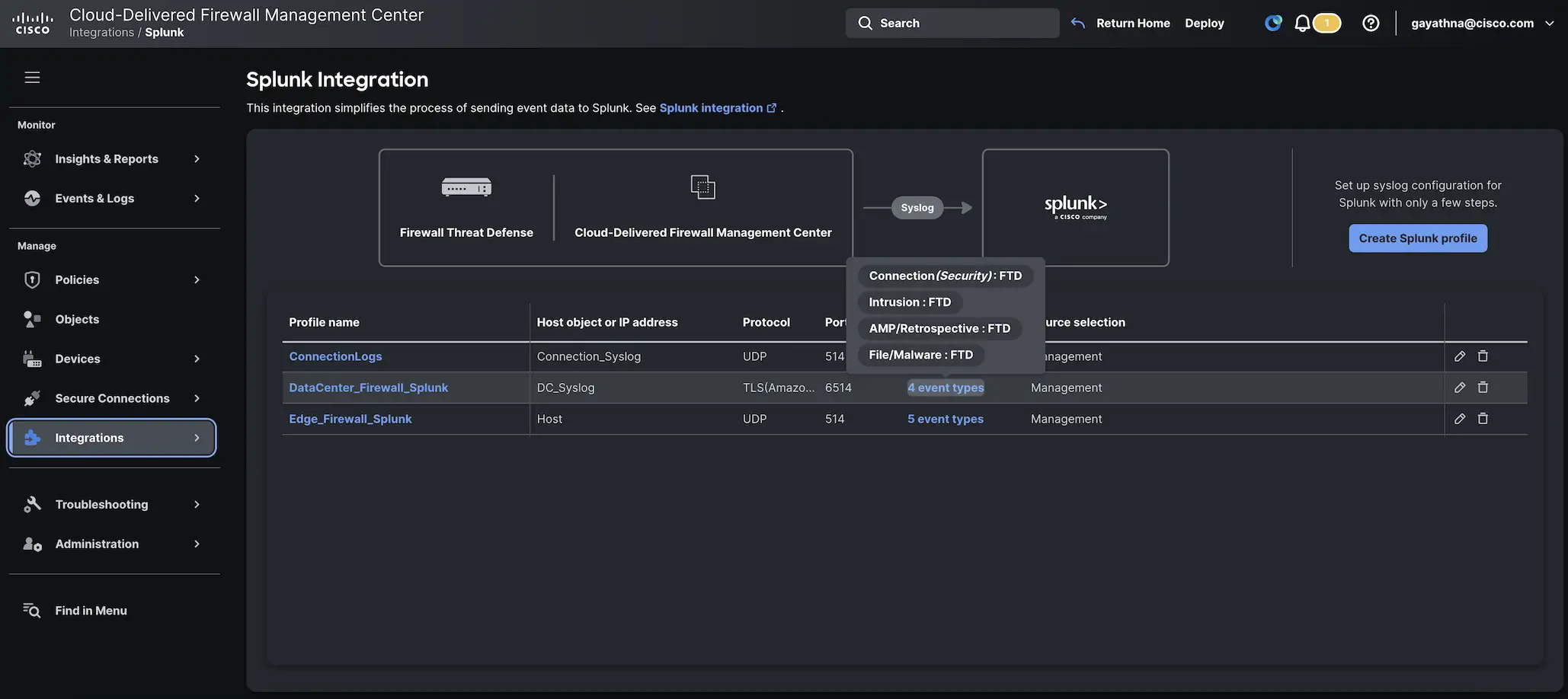
Cisco Firewall Management Center (FMC) and Security Cloud Control provide in-built integration with Splunk for Firewall in upcoming release.
- In built Guided Splunk integration workflow
- Splunk Log forwarding profile provides flexibility to choose event types and devices
- Support for UDP, TCP, and TLS protocols for secure transmission
- Alternative to eStreamer for sending events from FMC to Splunk
- Three flexible device selection methods: Management interfaces, Security Zones, or Manual selection
- Domain-specific configuration support for multi-tenant environments
- Event Types Supported are Connection, Intrusion, Malware, File, User activity, Correlation, Discovery and Intrusion packet events from FMC.
Moving Beyond Legacy Logging
The integration enables organizations to transition from legacy eStreamer implementations to more flexible syslog-based data collection. While eStreamer provided rich data, the new Splunk integration workflow additionally offers:
- Simplified configuration and integration workflow
- Reduced infrastructure complexity
- Better scalability for high-volume environments
- Native integration with Cisco Security Cloud App
Benefits Post-Integration: Transforming Security Operations
Real-Time Dashboards and Visualization
Integration transforms raw firewall data into actionable security intelligence through customizable dashboards that provide real-time visibility into network threats, user behavior, and compliance status. Security teams gain immediate insight into connection patterns, intrusion attempts, malware detection, and policy violations.
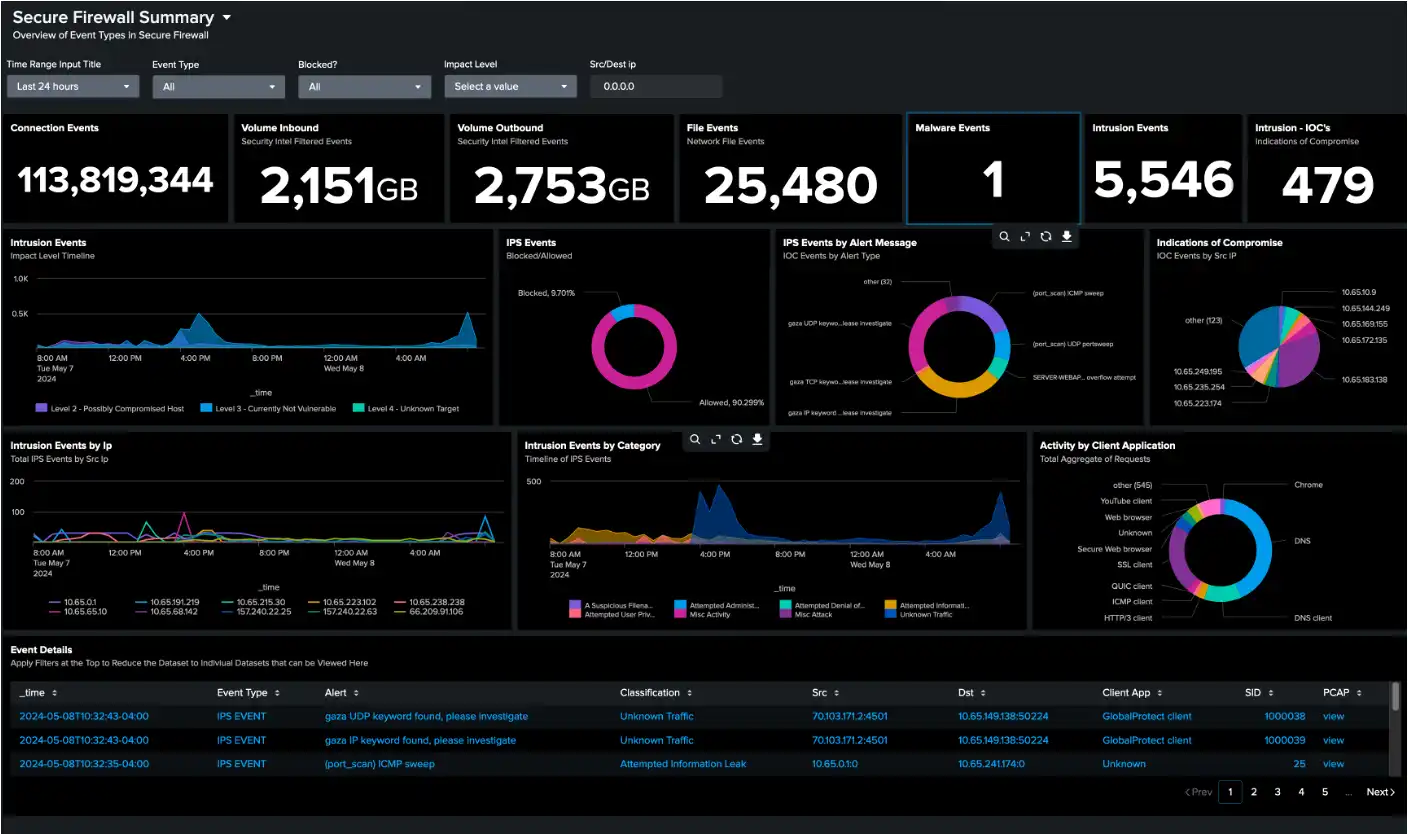
Interactive visualizations enable drill-down analysis from high-level metrics to specific event details. Teams can track threat trends over time, identify attack sources, and monitor the effectiveness of security controls through dynamic reporting interfaces.
Advanced Threat Detection with Splunk Enterprise Security 8.2
The Splunk Threat Research Team (STRT) along with Cisco Talos has developed targeted threat detections specifically for Cisco Secure Firewall integration. This collaboration analyzed over 650,000 events across four different event types in just 60 days to create production-ready detections that provide immediate SOC value.
Key Detection Examples:
- Cisco Secure Firewall — BITS Network Activity
This detection identifies potentially suspicious use of the Windows BITS service by leveraging Cisco Secure Firewall’s built-in application detectors. BITS is commonly used by adversaries to establish command-and-control channels while appearing as legitimate Windows update traffic. - Cisco Secure Firewall — Binary File Type Download
This analytic detects file downloads involving executable, archive, or scripting-related file types commonly used in malware delivery, including PE executables, shell scripts, autorun files, and installers. - Cisco Secure Firewall — High Volume of Intrusion Events Per Host
This detection identifies systems triggering an unusually high number of intrusion alerts within a 30-minute window, which may indicate an active attack or compromise. The detection aggregates events to reduce false positives while highlighting systems under active threat.
The detections are organized into the Cisco Secure Firewall Threat Defense Analytics analytic story, available through Enterprise Security Content Update (ESCU) 5.4.0 release, with each detection mapped to the MITRE ATT&CK framework for enhanced threat context.
More details can be found on the Splunk blog.
Compliance With Splunk: How It Shows Up for Firewall Customers
Splunk offers powerful capabilities for performing compliance checks by automating the monitoring, assessment, and reporting of compliance controls across IT environments.
It supports pre-built dashboards and visualizations tailored for security and compliance monitoring based on Firewall Events, such as PCI Compliance Posture and Audit Dashboards. Using Splunk Compliance Essentials app, you can continually monitor the compliance posture across various control frameworks like CMMC, FISMA, RMF, DFARS, and even OMB M-21-31.
Splunk can help agencies comply with the Federal Information Security Modernization Act (FISMA), by aligning with security controls as articulated in NIST Special Publication 800-53.
Call to Action
Leverage the Cisco Firewall Promotional Splunk Offer
Starting August 2025, ingestion of logs from Cisco Secure Firewalls into Splunk will be FREE up to 5GB per day. This revolutionary offer requires a Cisco Firewall Threat Defense subscription and Splunk license, removing cost barriers to comprehensive security monitoring.
The free ingestion program enables organizations to experience the full benefits of integrated threat detection and compliance reporting. This initiative demonstrates the strategic partnership between Cisco and Splunk in delivering accessible, powerful security solutions. More details on eligibility criteria on the Splunk website.
Logging Best Practices
When implementing Cisco firewall integration with Splunk, organizations should follow these established best practices:
Logging Configuration
- Configure appropriate log levels to balance visibility with volume management
- Implement log rotation and retention policies aligned with compliance requirements
- Use TLS encryption for secure log transmission between firewalls and Splunk
- Set up proper filtering to reduce noise while maintaining critical security visibility
Data Management
- Establish proper indexing strategies to optimize search performance
- Configure data retention policies based on regulatory and business requirements
- Implement monitoring for data pipeline health and integrity
- Plan for scalable infrastructure to accommodate growing log volumes
More details can be found in the Secure Firewall documentation.
How to get started
- Download the Cisco Security Cloud App from Splunkbase
- Configure the integration workflow available in the upcoming release of FMC 10.0 and Security Cloud Control
- Set up your first data sources using the guided configuration wizard
- Take advantage of the free 5GB daily ingestion to experience unified security visibility
The future of cybersecurity lies in intelligent integration that transforms isolated security tools into comprehensive threat detection and response platforms. Organizations that embrace this evolution position themselves to meet both current and future security challenges effectively, ensuring business resilience in an increasingly complex threat landscape.
We’d love to hear what you think! Ask a question and stay connected with Cisco Security on social media.
Cisco Security Social Media