
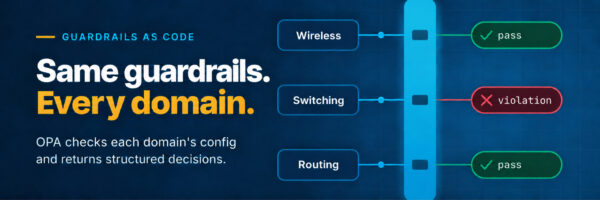
Every network team keeps a mental list of things that should never reach production: telnet left enabled, SNMP community strings in the clear, a management plane reachable from anywhere. Writing a policy to catch those is the easy part. The hard part, however, is keeping that policy consistent, complete, and secure across every domain it governs. Network guardrails as code turn that mental list into rules a machine can check.
A requirement such as “management access must use secure protocols” may span the data center, campus, SD-WAN, and cloud. But each domain expresses that intent through different APIs, configuration models, and teams. When intent crosses those boundaries, teams reinterpret, omit, or weaken controls. As a result, you get gaps and drift that are hard to see from any single domain.
Open Policy Agent (OPA) offers a way out. It works on one simple idea. You write rules as code and hand the engine some structured data, and it returns a clear decision about that data. OPA built its reputation in the cloud-native world. There, for example, it decides which workloads may run in a Kubernetes cluster and which services may talk to each other. You can also apply the same idea to network configuration.
A device’s running configuration, pulled as JSON, is structured data like any other. “Does every device have telnet turned off?” is exactly the kind of question a policy engine answers well. The policy intent stays central, versioned, and testable, while domain adapters handle the local details. Each domain then enforces the decisions with its own native tools. This post shows how to catch insecure configuration before it reaches a device, then hold one security standard across every domain.
Why this matters for your network
Writing network guardrails as code is not about elegance. Instead, it changes what your organization can prevent, prove, and rely on across the network:
- Catch problems before they cause an incident. You test each guardrail against known-good and known-bad configurations. The engine then flags an insecure or off-standard change before it reaches a device, not during an outage or a post-incident review.
- Be audit-ready without the scramble. The rules and their full change history live in version control. Run them on demand whenever you need a point-in-time report of where the network stands. An audit becomes a query instead of a manual evidence hunt.
- One security posture across every domain. Your definition of “secure” applies equally to the data center, campus, and SD-WAN. Every domain enforces the standard the same way, instead of each product reinterpreting it and drifting apart.
- Less manual review, broader coverage. You describe what a good configuration looks like once, then let the engine check every device. Engineers stop reviewing line by line, and the checks reach far more of the estate than spot checks ever could.
- Fits the tools you already run. Because results come back as structured data, the same guardrail can gate a change pipeline, open a ticket, or feed a dashboard, with no custom glue and no new platform.
The examples that follow show each of these in action.
A two-minute primer on OPA and Rego
If you have not used OPA before, here is everything you need for the rest of this post.
OPA is a small, standalone decision engine. You give it two things: a policy (rules, written in a language called Rego) and some input (any JSON document). It gives you back a decision (also JSON). That is the whole model. OPA does not reach into your systems or change anything. It answers questions about the data you hand it, and what you do with the answer is up to you.
Rego is the language you write the rules in. It reads like a set of claims that are true when their conditions hold. A rule names a result, then lists the conditions underneath. When every condition holds, the rule produces the result. Unlike most languages, Rego has no loops or control flow to manage. Instead, you describe what counts as a violation, and OPA figures out the rest.
Two ideas carry most of the weight:
- Policy and data are separate. Rules express logic (“flag any interface using telnet”), while a separate JSON data file holds the values (“here is the list of approved management protocols”). So operators can update the values without touching the logic, and the same rule works for everyone.
- A decision is just data. OPA does not have to return a bare yes/no. A rule can return a structured object (which violations fired, why, and how to fix them). Other tools can then read that object and act on it.
You can try everything that follows in the Rego Playground in your browser, or with the opa command-line tool locally. No cluster, no agent, no setup.
Catching insecure configuration before it reaches a device
The challenge
A single insecure setting can become an outage, an audit finding, or the foothold for a breach. Telnet left enabled, an open HTTP server, weak SNMP: each one slips in through a hurried change or a copied-in template. Each is easy to miss in a review but expensive to explain afterward. Meanwhile, the exposure grows with every device that quietly carries the same mistake. Teams want to catch these automatically, the way a linter catches bad code, before the change ever reaches a device.
The approach
Modern IOS XE devices can return their running configuration as structured JSON over RESTCONF. The document’s root is Cisco-IOS-XE-native:native. Once the config is JSON, it is just input for OPA, and “does this device allow telnet?” becomes a rule. The VTY lines control telnet access (transport input), while the HTTP server lives under the ip settings. Here is a small guardrail package with two rules:
package cisco.iosxe.hardening

# `config` is the device's running configuration, as returned by RESTCONF.
config := input["Cisco-IOS-XE-native:native"]

# One entry point: everything that violates a guardrail.
violations contains v if some v in telnet_violations
violations contains v if some v in http_violations

telnet_violations contains v if {
	some line in config.line.vty
	telnet_allowed(line.transport.input)
	v := {
		"guardrail": "no-telnet",
		"domain": "iosxe",
		"detail": "VTY lines accept telnet; credentials and data travel in plaintext.",
		"remediation": "Use 'transport input ssh' on all VTY lines.",
	}
}

# `transport input all` is an empty leaf. A bare field reference is a presence
# check: it succeeds only when the field exists, and if it is absent the
# reference is undefined and this rule does not fire.
telnet_allowed(transport) if transport.all

# `transport input telnet` or `transport input telnet ssh`.
telnet_allowed(transport) if "telnet" in transport.input
By contrast, the HTTP check is a plain comparison:
http_violations contains v if {
	config.ip["Cisco-IOS-XE-http:http"].server == true
	v := {
		"guardrail": "no-http-server",
		"domain": "iosxe",
		"detail": "The HTTP server is enabled; use HTTPS instead.",
		"remediation": "Replace 'ip http server' with 'ip http secure-server'.",
	}
}
Each rule contributes structured findings to a single violations set rather than a bare true/false.
The result
Then feed it a configuration, config.json, whose VTY lines accept telnet and which has a plain HTTP server enabled:
{
  "Cisco-IOS-XE-native:native": {
    "line": {
      "vty": [
        {
          "first": 0,
          "last": 4,
          "transport": {
            "input": {"input": ["telnet", "ssh"]}
          }
        }
      ]
    },
    "ip": {
      "Cisco-IOS-XE-http:http": {
        "server": true,
        "secure-server": true
      }
    }
  }
}
$ opa eval --format=pretty -d hardening.rego -i config.json \
    'data.cisco.iosxe.hardening.violations'
[
  {
    "detail": "The HTTP server is enabled; use HTTPS instead.",
    "domain": "iosxe",
    "guardrail": "no-http-server",
    "remediation": "Replace 'ip http server' with 'ip http secure-server'."
  },
  {
    "detail": "VTY lines accept telnet; credentials and data travel in plaintext.",
    "domain": "iosxe",
    "guardrail": "no-telnet",
    "remediation": "Use 'transport input ssh' on all VTY lines."
  }
]
A clean configuration returns []. The output is machine-readable, so the same result can fail a CI pipeline, open a ticket, or feed a dashboard.
Test it like code
Because a guardrail is just code, you can test it like code. OPA has a built-in test runner. Write a rule whose name starts with test_, pin the input inline, then assert the result.
package cisco.iosxe.hardening

test_insecure_config_has_two_violations if {
	count(violations) == 2 with input as {"Cisco-IOS-XE-native:native": {
		"line": {"vty": [{"first": 0, "last": 4, "transport": {"input": {"input": ["telnet", "ssh"]}}}]},
		"ip": {"Cisco-IOS-XE-http:http": {"server": true}},
	}}
}

test_clean_config_has_no_violations if {
	count(violations) == 0 with input as {"Cisco-IOS-XE-native:native": {
		"line": {"vty": [{"first": 0, "last": 4, "transport": {"input": {"input": ["ssh"]}}}]},
		"ip": {"Cisco-IOS-XE-http:http": {"server": false, "secure-server": true}},
	}}
}
$ opa test hardening.rego hardening_test.rego
PASS: 2/2
With that, a whole class of insecure changes simply cannot reach a device unnoticed. And you can prove it. You version, review, and test the guardrail with the same discipline you already trust for the rest of your infrastructure as code.
Network guardrails as code: Write once, enforce across domains
The challenge
A security standard delivers its greatest value when it applies consistently across every domain. The intent, such as ensuring secure management access, stays the same across IOS XE, Meraki, and SD-WAN. However, each platform models its configuration differently. Checking each domain separately therefore leaves room for uneven coverage and drift. It also makes enforcement harder to demonstrate across the network. Instead, the goal is to define the standard once. Then you gain a single, trustworthy view of the entire estate, regardless of domain.
The approach
Rego packages give us a natural way to organize this. Each domain gets its own package that knows how to read that domain’s configuration. A thin top-level package then stitches their results together. The hardening rules from the previous section already live in cisco.iosxe. A Meraki guardrail is a sibling package that reads a very different shape. Its input is each network’s SSIDs, as returned by the Dashboard API’s wireless SSIDs endpoint. The package flags any enabled SSID that is open:
package cisco.meraki.hardening

violations contains v if {
	some net in input.networks
	some ssid in net.ssids
	ssid.enabled
	ssid.authMode == "open"
	v := {
		"guardrail": "no-open-ssid",
		"domain": "meraki",
		"detail": sprintf("Network %s has an open SSID: %s.", [net.name, ssid.name]),
		"remediation": "Require WPA2 or WPA3 authentication on every enabled SSID.",
	}
}
The two packages share no structure. One walks the native config’s VTY lines and ip settings, while the other walks input.networks. But they agree on the shape of an answer. Every violation is an object with a guardrail, a domain, a detail, and a remediation. Because of that agreement, a single top-level package can combine them:
package cisco

# One guardrail package per domain. Adding a domain means adding it here.
domains := [
	data.cisco.iosxe.hardening,
	data.cisco.meraki.hardening,
]

violations := [v |
	some pkg in domains
	some v in pkg.violations
]

report := {
	"compliant": count(violations) == 0,
	"violations": violations,
}
The result
Now one query reports on the whole estate at once. Before you run it, lay out the three files as cisco/iosxe/hardening.rego, cisco/meraki/hardening.rego, and cisco/report.rego. The estate itself is a single JSON document, estate.json, holding each domain’s data side by side:
{
  "Cisco-IOS-XE-native:native": {
    "line": {
      "vty": [
        {
          "first": 0,
          "last": 4,
          "transport": {
            "input": {"all": [null]}
          }
        }
      ]
    }
  },
  "networks": [
    {
      "name": "Branch",
      "ssids": [
        {"number": 0, "name": "Corp", "enabled": true, "authMode": "psk"},
        {"number": 1, "name": "Guest", "enabled": true, "authMode": "open"}
      ]
    }
  ]
}
Given an IOS XE device whose VTY lines accept telnet and a Meraki network with an open SSID:
$ opa eval --format=pretty -d cisco/ -i estate.json 'data.cisco.report'
{
  "compliant": false,
  "violations": [
    {
      "detail": "VTY lines accept telnet; credentials and data travel in plaintext.",
      "domain": "iosxe",
      "guardrail": "no-telnet",
      "remediation": "Use 'transport input ssh' on all VTY lines."
    },
    {
      "detail": "Network Branch has an open SSID: Guest.",
      "domain": "meraki",
      "guardrail": "no-open-ssid",
      "remediation": "Require WPA2 or WPA3 authentication on every enabled SSID."
    }
  ]
}
How the layers fit together
This is the layered idea behind the design. A high-level intent (“flag insecure configuration”) stays constant, while each domain package maps it onto that domain’s own constructs. As a result, the top level never needs to know how a domain represents telnet or an open SSID. Instead, it only collects answers in a common shape.
Adding SD-WAN later is additive. Write cisco.sdwan, add one line to the list, and every report picks up its findings automatically. That list is also where you choose what to enforce. For example, a site subject to specific standards enables only the domains and rule sets it needs. The same report machinery still covers it.
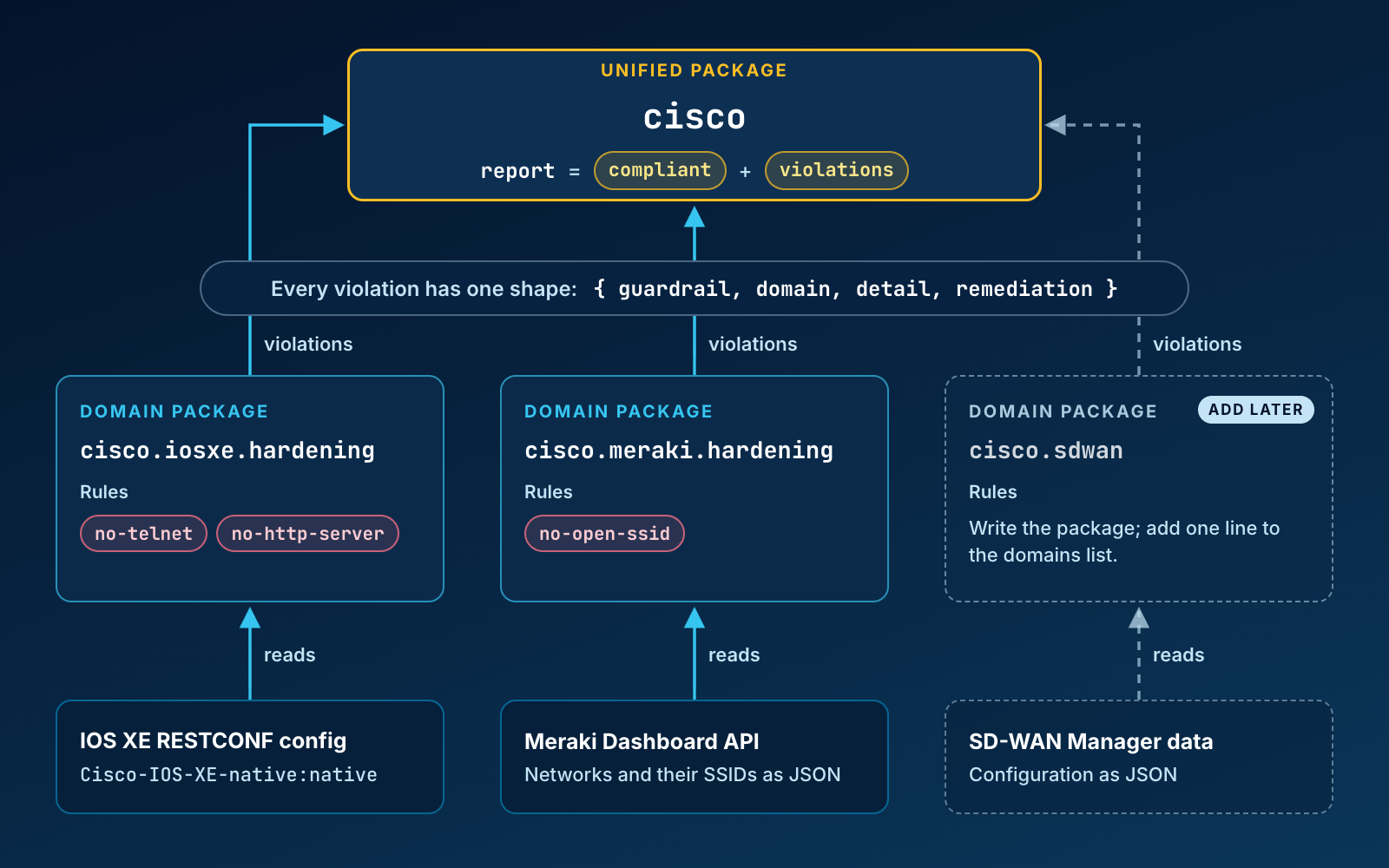
One unified package collects results from per-domain packages, each holding the rules that understand its own configuration. New domains slot in later without changing the rest.
Getting started
Everything in this post runs locally, with no infrastructure to stand up.
- Install OPA. It is a single binary:
brew install opa, a container image, or a direct download. The examples use OPA 1.x syntax. Theopacommand gives youeval,test, andfmt. - Experiment in the browser. The Rego Playground lets you paste an input document and a policy and see the decision instantly. It is the fastest way to get a feel for the language.
- Get your config as JSON. Modern IOS XE devices expose their running configuration over RESTCONF. A single
GETreturns the YANG-modeled config as JSON, ready to hand to OPA. If you do not have a device nearby, a DevNet Sandbox with IOS XE gives you one. - Write your first guardrail. Start with one rule, like the telnet check above, add a test, and run
opa test. Then grow the package from there.
When you want to go deeper on the language, the OPA documentation and the Learning Rego collection are the best next steps.
Where this leads
We started with a familiar risk: an insecure setting slipping into production. But we ended somewhere more valuable. Guardrails catch insecure changes before deployment, and you can prove your posture on demand. One security standard also holds the same way across very different network domains. In other words, the shift is from policy as a document people interpret to network guardrails as code a machine evaluates. You write them once, test them like code, then apply them everywhere.
Because every decision comes back as structured data, the same guardrails fit naturally into the systems you already run. Start in report-only mode to see where you stand without changing anything. Then feed the results into a CI pipeline, open a ticket, or surface them on a dashboard. When you are confident, let a decision drive an automated remediation. The growing interest in AI-assisted operations only adds to the value. An agent can reason about a structured report far more easily than about scattered CLI output. Meanwhile, the actual enforcement stays in tested, versioned rules.
None of this requires a new platform. It is a small binary, a few Rego files in Git, and the configuration your devices already expose. That is a foundation you can start building on today.