
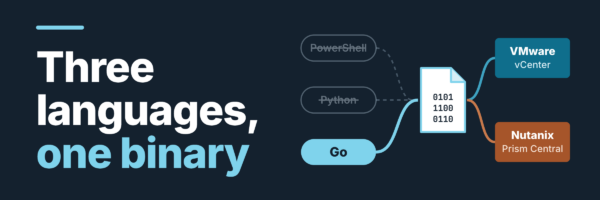
Someone asked me how many servers we run, and I couldn’t tell them. Not in 30 seconds, anyway. I had a vCenter tab, a Prism tab, two CSV exports in two different shapes, and a spreadsheet I’ve rebuilt more times than I’d like to admit. What I didn’t have was a VMware + Nutanix inventory I could export, hand to someone, and check against reality.
I look after a sandbox data center on both stacks: VMware vCenter across seven clusters, Nutanix Prism Central across three, Cisco UCS and HyperFlex underneath. Both platforms have a perfectly good UI. Neither has the faintest idea the other exists.
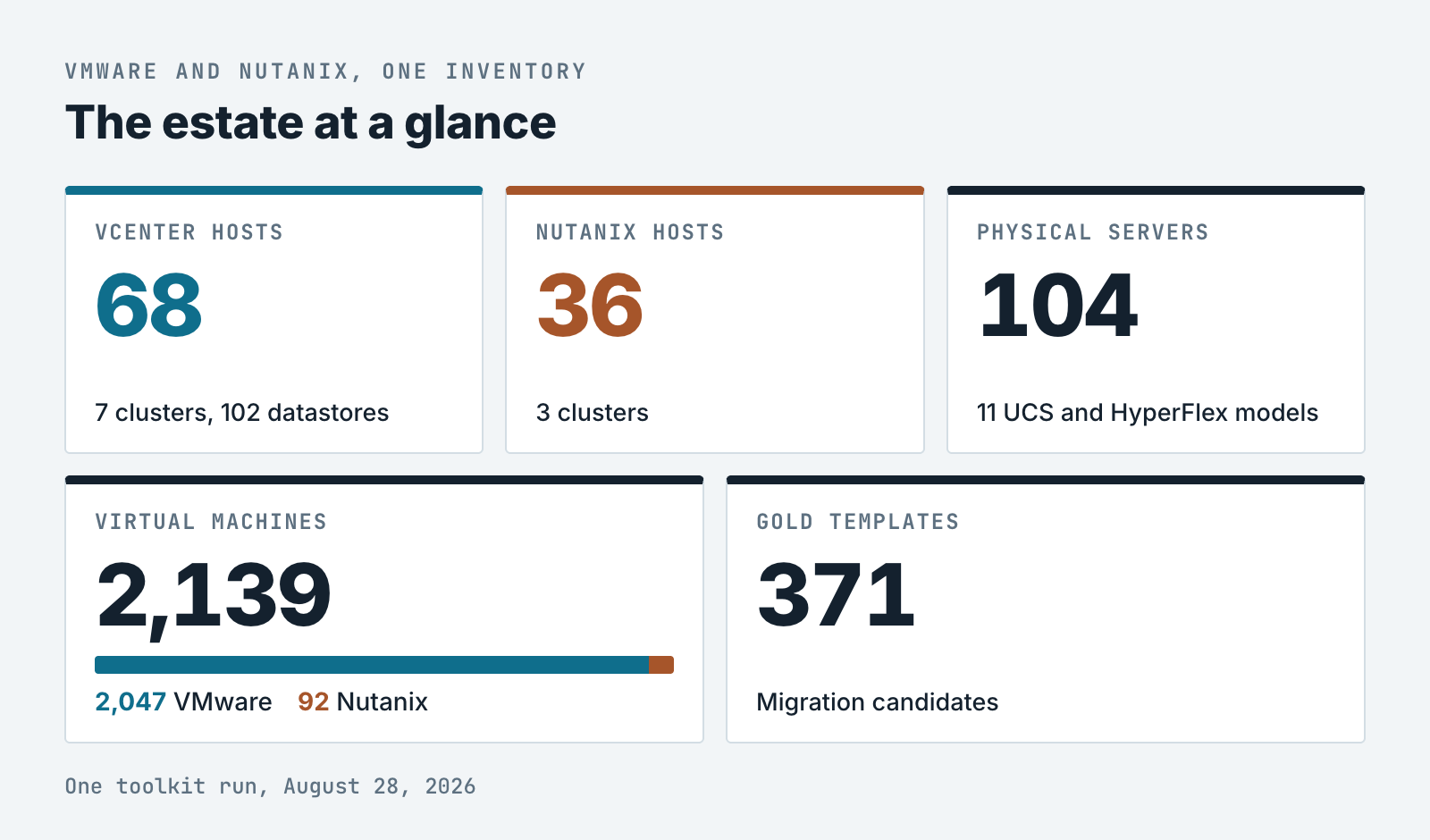
Four months later, one Go binary inventories 104 servers and 2,139 VMs across both platforms in a single run. Claude wrote a lot of it. Getting there took three languages, two throwaway versions, and three bugs that hid in plain sight for months.
The VMware Nutanix inventory nobody could give me
Even one platform’s answer was thin. The vCenter host export didn’t easily include the server model, so “what hardware are we running?” meant cross-referencing UCS Manager by hand. Once the tool reported it, the answer was 11 distinct models: 24 UCS X210C-M7 blades, 18 C225-M6S racks, 19 HyperFlex nodes across four variants, and a long tail of ones and twos.
That was annoying. What made it urgent was a migration: moving our library of golden template VMs off vCenter and into Nutanix. There are 371 of them, spread unevenly across three sandbox clusters, and nobody had a definitive list. Try planning that from two browser tabs.
My internet connection influenced the design decision
I work remotely, over a fixed-wireless WiMAX link. Every API call crosses a connection with real latency and a habit of dropping without warning. I lost more than one inventory run to a dang timeout two-thirds of the way through, with nothing written to disk for my trouble. Therefore efficiency stops being an nice to have and becomes the difference between a report that finishes or not.
So the link set the rules:
- Ask only for the data you actually read.
- Write output as you go.
- Ship something that runs from one file, with nothing to install.
I’d already automated this. Claude moved the line
I already had working PowerShell I ran remotely against vCenter, one query at a time, whenever someone asked. The real question was how far to push it before the effort stopped paying off. Claude pushed that point a long way out.
It was fast at producing something plausible, and I was the only one who could tell whether plausible was correct. Here’s how the work split:
- My calls: what the tool answers, the language (three times), the architecture, the safety model, and every check against real hardware.
- Claude’s work: boilerplate, translating between languages when I changed my mind, API mechanics I didn’t want to memorize (pagination, the shape of a SOAP property request), and first drafts I argued with or sent back.
PowerShell worked, then it multiplied
I wanted the whole object tree walked in one pass, with a structured CSV per layer: data centers, clusters, hosts, VMs, datastores. I knew exactly what that should look like. I just didn’t want to spend two weeks of evenings typing it.
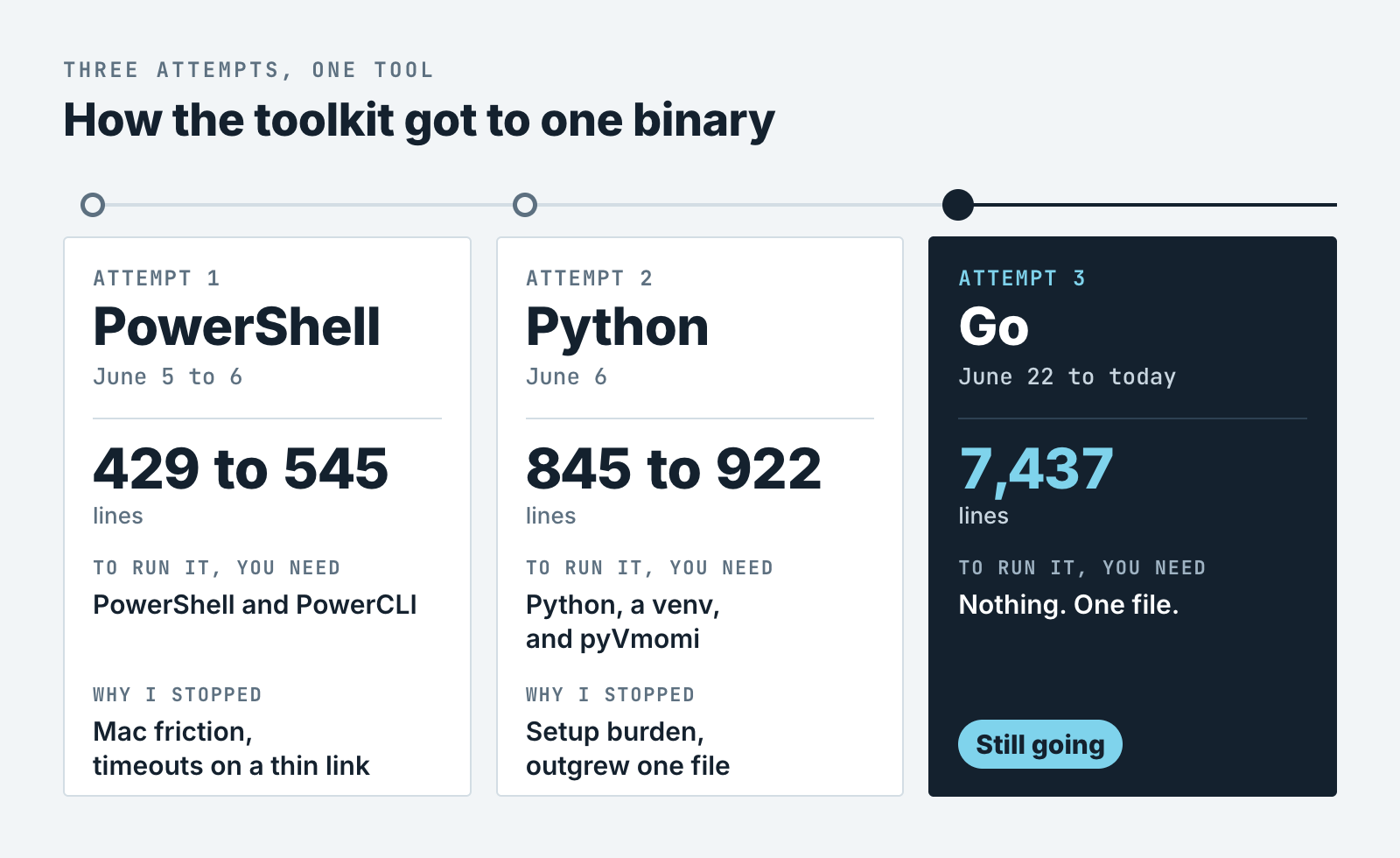
So I described the shape I was after and Claude had the breadth covered in an afternoon. Trouble was, I was still treating it as a favor to myself, not a project. This is the folder, untouched, four months on:
Get-vCenterInventory.ps1       429 lines   5 Jun 12:43
Get-vCenterInventory1.ps1      429 lines   5 Jun 14:48
Get-vCenterInventoryFinal.ps1  509 lines   5 Jun 19:00
Get-vCenterInventory3.ps1      545 lines   6 Jun 09:20
Four versions in under 24 hours. Note the order. Final landed at 7 p.m. Then 3 showed up the next morning. Every engineer reading this knows that filename personally. Heck, I’d laugh if it weren’t mine.
That’s what no version control looks like on disk, and it was entirely my doing. When a new version only cost me a few minutes, the mess never hurt enough to make me stop and fix it.
I killed it for two reasons I’d underestimated. PowerCLI on my Apple Silicon Mac was a pain in the neck: it runs under PowerShell 7, but I hit module and dependency friction every time something updated. And the long, sequential runs were exactly the kind my link loved to kill at 70%, with nothing saved.
Python gave me a faithful port, old structure and all
Same day, second try. VMware’s pyVmomi, the Python SDK for the vSphere API, gives me the same API in Python, and Python runs natively on my Mac. I asked for a wholesale port, and wholesale is exactly what I got. The header comment still reads:
#!/usr/bin/env python3
# get_vcenter_inventory.py
# Full vCenter Farm Inventory Collection Script (Python / pyVmomi)
# Exact equivalent of Get-vCenterInventory.ps1
That’s exactly what I got, including the parts I wanted to escape. It went 845 lines, then 922 lines 16 minutes later. If I’d wanted a rethink, I needed to ask for one.
Python did give me one keeper: load the entire object graph into memory first, so the inventory can’t drift if a VM migrates mid-run.
Then the wall. Every machine running it needs Python, a venv, and a pip install. When a colleague asked for the script, my honest answer was “sure, first set up a venv,” which is where most people stop asking. And it was one file nearing a thousand lines, with Nutanix still to add.
Go: one file a colleague can actually run
Go solved what I cared about most: getting the thing into someone else’s hands. It builds to a single self-contained binary: no interpreter, no runtime, nothing to install.
For VMware there’s govmomi, VMware’s open-source Go library for the vSphere API, so I wasn’t fighting the platform. For Nutanix a thin REST client of my own was used for Prism Central that paginates and smooths over the differences between API versions. More code to own, but proper support for the second platform.
It’s 7,437 lines, roughly eight times the Python, because it does far more: two platforms, a menu, VLAN and subnet queries, a MAC search across both, an orphan finder (abandoned VM folders, unattached disks, unused images), and session and audit logs.
The payoff: a VMware Nutanix inventory of 104 servers and 2,139 VMs across vCenter and Prism Central, in a single run, from a file I can hand to anyone.
It reads and reports. It doesn’t monitor, run unattended, or write Excel yet. The one write path is orphan deletion. Before a line of it existed, I decided it would ask first, confirm twice, and log every delete.
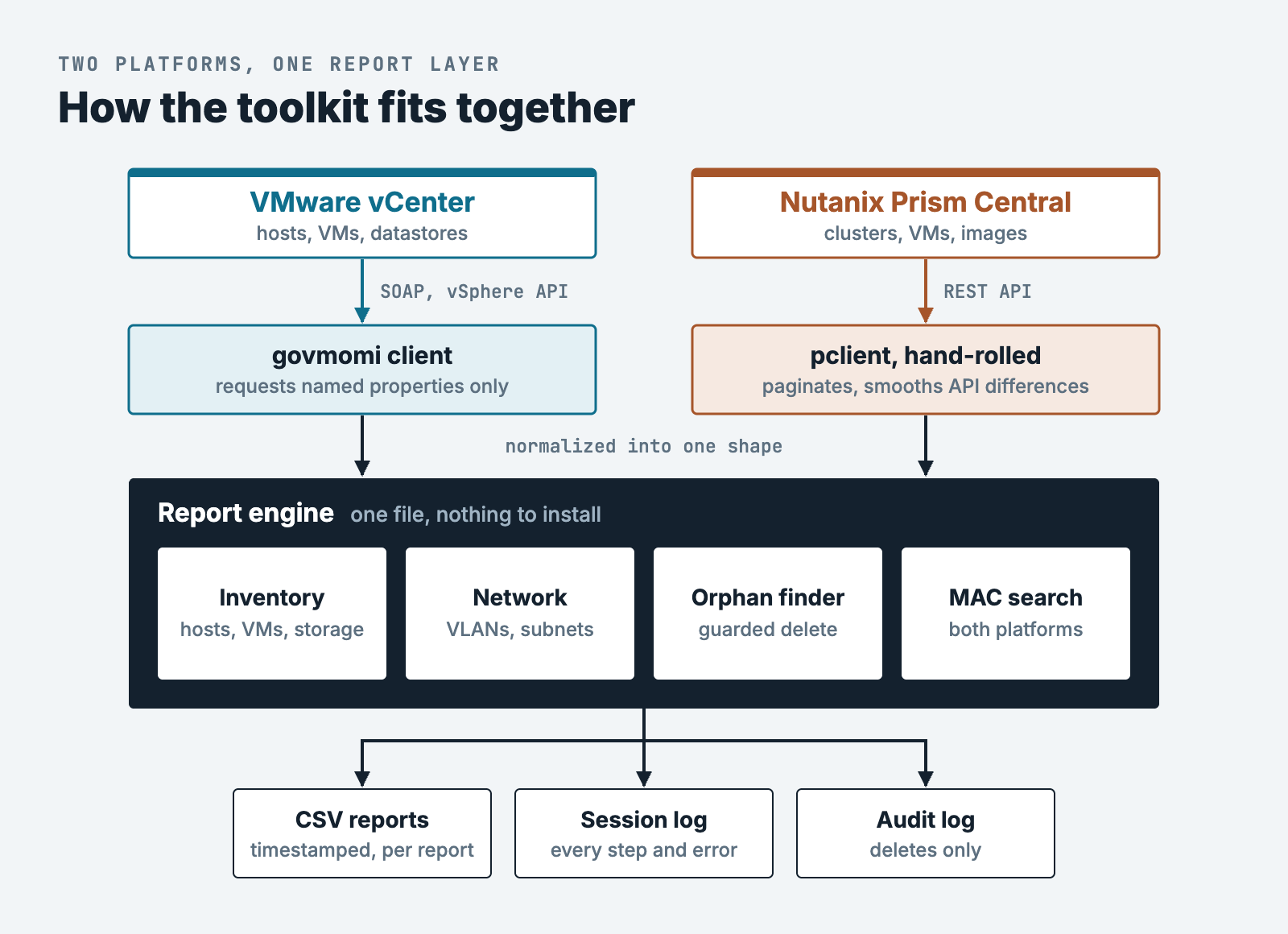
SOAP on one side, REST on the other. Everything below the adapters is shared, so a new report gets written once.
Three bugs that looked fine for months
All three sat in code that compiled and looked fine. Running it and looking hard at the output is what found them.
One property name cost nine minutes a run
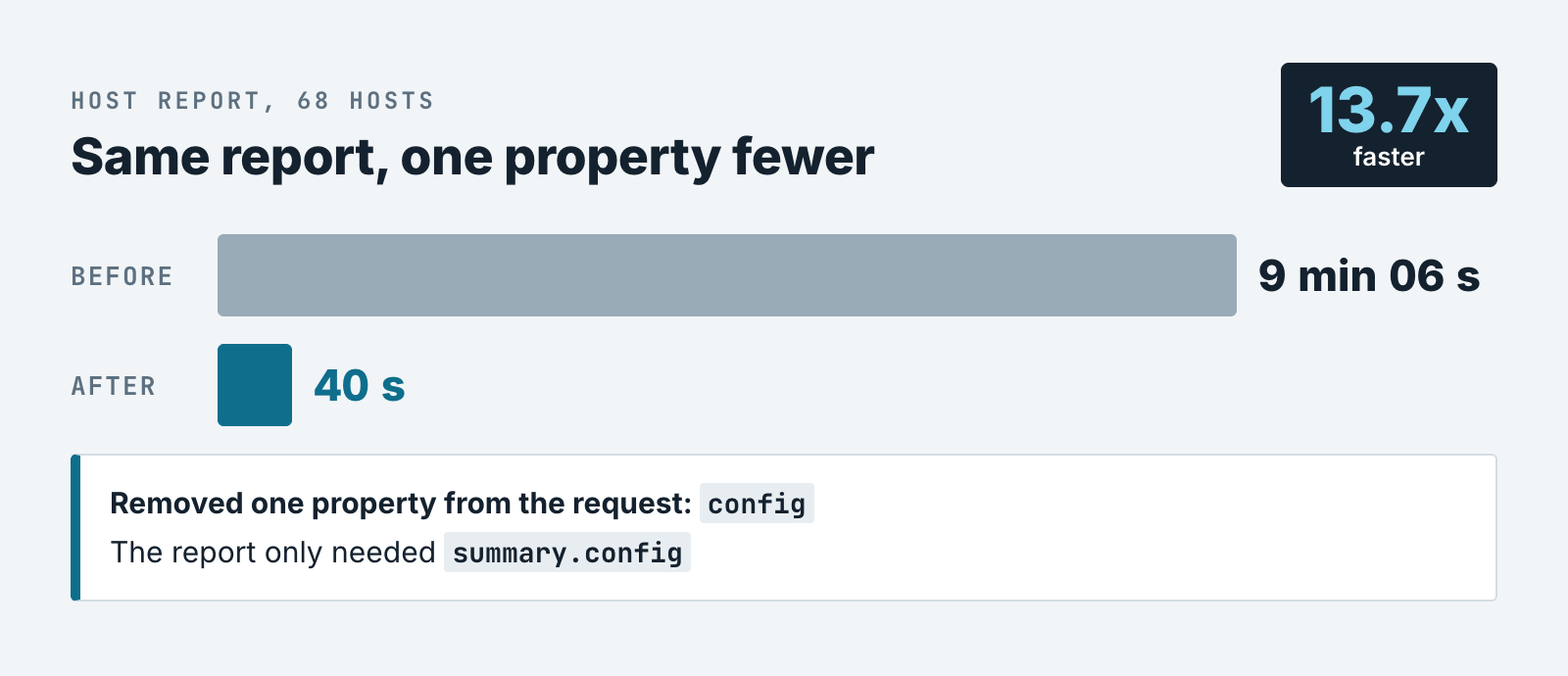
Collecting 68 hosts took 9 minutes and 6 seconds. Over my link, that’s nine minutes of hoping. Nothing in the code looked wrong, so I checked what it was asking vCenter for. It was pulling each host’s complete configuration, network, storage, and firewall rules included, and never once reading it.
The report reads the ESXi version from summary.config, which sure looks like it needs the top-level config block. It doesn’t. They’re two different objects that happen to share a word. I removed one string from the property list and the report dropped to 40 seconds, 13.7x faster. Timing the run is what caught it.
The first test I wrote found a crash
For months the repo had no tests. New features came so fast that I never stopped to write one. While adding the hardware model column, I finally wrote one: I fed the CSV export a normal host and one with an empty summary, to see what happened at the edges. The second one crashed the whole report.
vCenter can leave some summary fields empty for hosts that are disconnected or not responding, and the code read them without checking, in three places. Every host in my estate happened to be healthy, so it had never fired. The first disconnected host would’ve taken the whole report down with it.
My .gitignore was eating a whole package
This one’s all mine. My ignore file had a line reading reports/, to keep generated CSVs out of the repo. Without a leading slash, a gitignore pattern like that matches at any depth, so it was also excluding internal/prism/reports/, the entire Nutanix reporting package.
Four files, 1,311 lines, never committed. My own README described them, which is exactly why nobody noticed. A fresh clone of my own repo wouldn’t have compiled. Well, crap. The fix was one character: /reports/.
Which node count do you believe?
Two Nutanix endpoints disagree about how many nodes a cluster has. One reports 13 and 25. The other enumerates 12 and 24, each node with a model and serial number I can point at. Measured two seconds apart. Neither one errors, and both look like they know what they’re talking about.
Reading the code won’t tell you which to believe. The answer’s in the estate. What settled it is something I know and the tool doesn’t: every node we run is hyperconverged. No witness, compute-only, or storage-only nodes, so the enumerated count is the real one.
The tool now prefers the enumerated count and logs a warning when they disagree. What the other endpoint is counting is still open.
A quieter version of the same trap: three Nutanix fields came back blank or zero instead of raising an error (the server model, the cluster a host belongs to, and the node and VM counts). In a VMware Nutanix inventory someone will plan a migration from, that’s the scary kind of wrong. It looks like data.
Now, wherever a value might not arrive, the tool says so out loud instead of printing an empty column.
What I’d tell you before you start
The throwaway versions were the requirements. PowerShell taught me what the report needed. Python gave me load-everything-first. I couldn’t have specified the Go version on day one, because I didn’t know yet what I was building.
Ask for the rethink. Ask for a port and you’ll get a good port. If you want a different design, say so before it writes a line.
Ask for the boring parts up front. Structured logging, an audit trail for deletes, a double confirmation before removing anything. Writing this by hand at 11 p.m., I’d have skipped every one of them. They’re why I’m willing to point the delete path at a real datastore.
Try it on the report you rebuild by hand
Claude made it cheap to try three languages and throw two away. Generating code was never the bottleneck. Judging it was.
Mine was the VMware Nutanix inventory. Yours is whatever you rebuild by hand every month. Have Claude write the first version, then run it against live infrastructure and check one number you already know before you trust the rest.
Next: hardening the Nutanix side, settling that node count, and an unattended mode so snapshots become history. I’ve also built a companion tool that moves golden templates from vCenter into Nutanix without the image ever crossing my WiMAX link. That one’s a story for another post.