
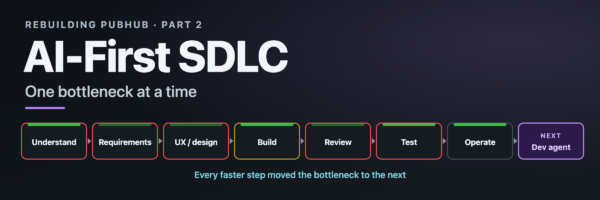
We didn’t follow an AI-first SDLC playbook. We built one by trying, failing and iterating. Here’s what each step of the software lifecycle taught us.
In Part 1, we shared how AI-assisted development helped us ship a mandatory rewrite of PubHub (DevNet’s documentation publishing platform) 3.5 months ahead of schedule. This post is the engineering side of that story: what we actually did at each step of the software development lifecycle (SDLC), and what each step taught us.
Today there’s no shortage of AI-native SDLC playbooks. When we started, there were early ideas but no playbook to follow. We arrived at our practices the hard way, and it’s been reassuring to see the newer playbooks land in many of the same places.
AI didn’t help evenly. Here’s where it gave us the most, and where it was hardest:
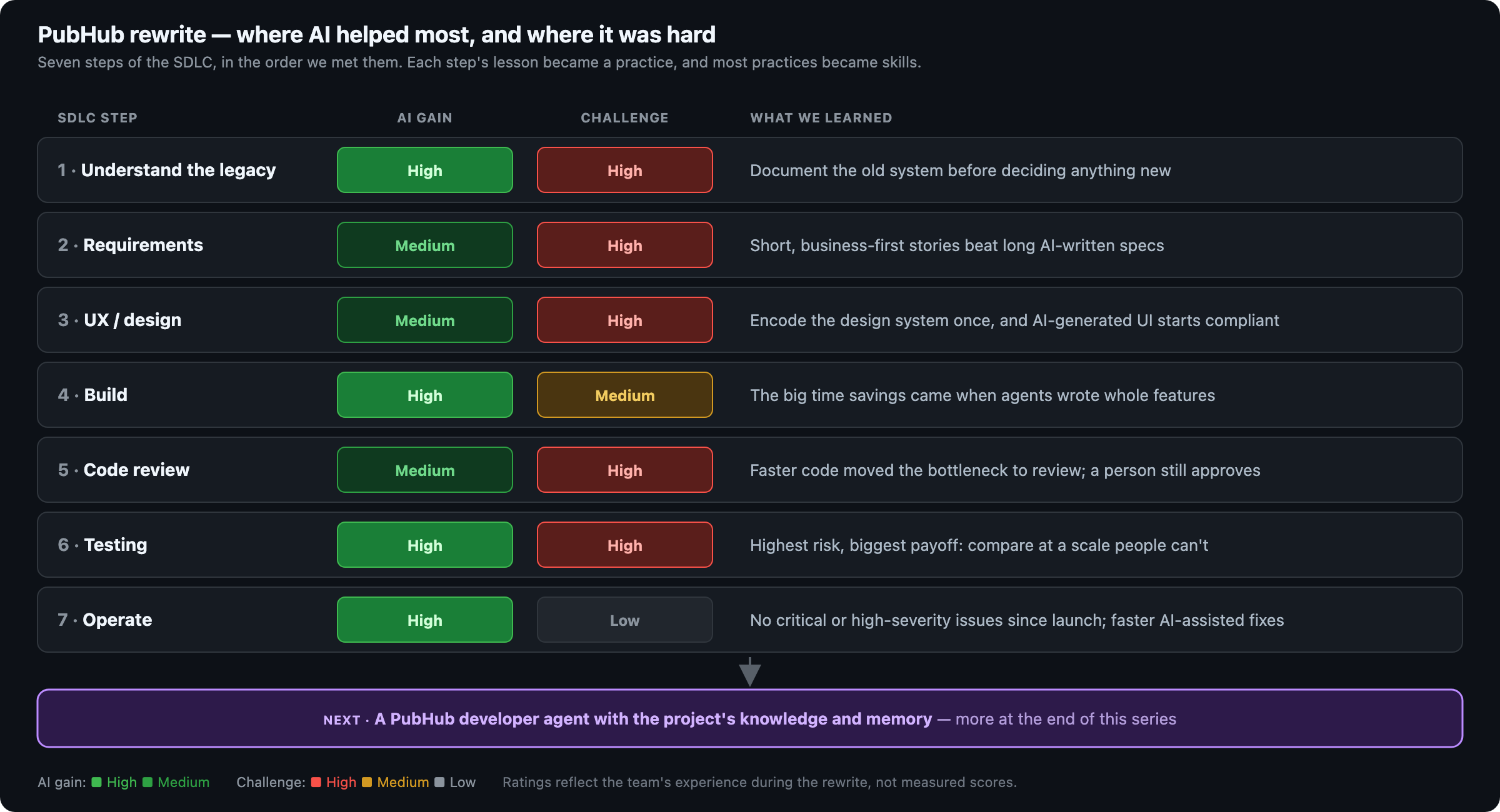
Upcoming posts in this series go deep on each step. This one is the map.
Start before the requirements
Before anyone could write a requirement, we had to understand what we had. PubHub had grown over years across more than 15 repositories (Python, Node.js, Go and React services), and the engineers who wrote most of it had moved on. The edge cases lived in the code, not in any document. An earlier attempt to migrate by hand showed how costly that is, and we gave it up.
So AI’s first job wasn’t writing code. We pointed AI at the legacy repositories and had it write what we never had: architecture, workflow and module documentation for every service. Subject matter experts reviewed it, and it became the shared reference for product, design and engineering. In a rewrite, AI’s first win is understanding, not code. How we got there deserves a post of its own later in this series.
Requirements: Less is more
With the old system documented, we wrote requirements (with AI, of course). The first drafts looked impressive. Then they kept growing. A user story would run to tens of pages and drift into design: proposed components, data flows, even the JSON structure of a schema. The business need was in there somewhere, but getting everyone to agree on it meant digging through pages of detail nobody had asked for.
We stepped back and set a simple shape: A requirement states the business need, who it’s for (the user persona) and how we’ll know it’s done (acceptance criteria). Design belongs in design docs. AI still drafts and reviews our stories, but now against that shape.
The lesson stuck: AI makes long documents cheap. What’s scarce is everyone agreeing on what matters.
A working UI before the design
Our UX team was still getting started with AI when engineering needed screens. So we flipped the usual order: For the first iteration, AI built a working pilot UI straight from the requirements.
That pilot became the UX team’s baseline. From there, they tried two approaches: classic Figma designs, and working HTML mock-ups they built themselves.
Early AI-generated UI looked right but didn’t meet Cisco’s design standards. So the UX team turned those standards into AI skills and an MCP server, and now generated UI is compliant from day one instead of needing rework. The UX team has its own story to tell, including how the two approaches compared.
From autocomplete to full features
Our engineers’ tools grew up during the project:
- At first: code completion in VS Code with GitHub Copilot and in Cursor. It helped, but early AI code generation wasn’t reliable enough to lean on.
- Once Claude Code became available to our team at Cisco: an agent writing full features, with tests, from a requirement.
Given the size of the codebase (a new Go Core, a new Go Site Engine and a new admin UI), that shift is where the biggest time savings came from. Handing over whole features, not typing faster, made the difference.
Security was the reason for the rewrite, and it stayed non-negotiable. Every new service follows current Go best practices and builds on the same secure base image we use for all our newer, secured services.
Review became the bottleneck
However good the generated code was, our review policy didn’t change: Every change needs a human review. Early on, that’s exactly where we slowed down. Code arrived faster than people could review it.
So we brought AI to the reviewer’s side too. We built review skills for Go, Python and React, plus two review agents: one that engineers run locally before opening a pull request, and one that reviews the pull request itself. They find issues and explain them. The reviewer still owns the decision and the approval.
It wasn’t the last time that speeding up one step moved the bottleneck to the next.
Testing: The scariest part
Testing kept us up at night. PubHub publishes hundreds of documentation projects written by thousands of technical writers, API architects, engineers and technical marketing engineers (TMEs). If the new platform built or rendered content even slightly differently, someone would notice it on a public page. And it’s not only the content: Authors depend on the build, review and publishing workflow every day.
AI helped us build a safety net for both:
- Content: a comparison framework that checks tens of thousands of pages built by the rewrite against the production version, so no difference reaches readers as a surprise.
- Workflows: AI agents driving a headless browser through complex UI workflows, which cut our manual testing effort many times over.
Engineers reviewed what AI generated. The frameworks did the repetitive checking, at a scale no team could manage by hand.
The payoff came after launch: No critical or high-severity issues have been reported since. When smaller ones come in, AI-assisted debugging gets us to a fix much faster. The engineers who built these frameworks will walk through them later in the series.
Our AI-first SDLC playbook
None of this started as a playbook. Each practice began as a fix for something that hurt. Put together, they look like this:
- Document the legacy first. Let AI read the old code, and have experts check what it writes.
- Keep requirements short. Business need, persona, acceptance criteria. Design goes elsewhere.
- Build a working pilot, then design. Encode the design system so AI output starts compliant.
- Hand AI whole features, not lines. Keep security standards non-negotiable.
- Give reviewers AI too. A person still approves every change.
- Test at machine scale. Compare pages by the tens of thousands, and automate the workflows.
- Expect the bottleneck to move. Re-plan when it does.
The practices that worked became reusable skills. By launch, the team had built or adopted more than 20 skills and two review agents:
| Area | Skills | What they do |
|---|---|---|
| Requirements | 2 | Draft user stories, and review them through five lenses: developer, architect, product manager, executive and end user |
| UI / UX | 7 | Create, review, debug and migrate UI that meets Cisco design standards |
| Code review | 6 + 2 agents | Language-specific reviews for Go, Python and React; local and pull request review agents |
| Testing | 5 | Turn product specs into workflow docs and end-to-end tests, keep them in sync, check links |
| SDLC guide | 3 | Point each role to the right AI tool for the step they’re on |
Two areas have no dedicated skill yet: coding itself (where engineers work with the agent directly) and operations.
What’s next
Look back at the heatmap and one pattern stands out: Every time we sped up a step, the bottleneck moved to the next one. Now that nearly every step of our AI-first SDLC is faster, the bottleneck sits in the spaces between them. Project memory files help inside a single repository, but across more than 15 repositories and years of history, the context that links a requirement to its design, code, review and tests still lives in people’s heads.
That’s the problem we’re working on next: a PubHub developer agent that knows the project the way a long-time team member does, including its architecture, its history, its rules and its open issues. It’s built to take work from issue to pull request under the same rule as the rest of us: A person approves every change. We’ll show how it works at the end of this series.
Until then, follow along as each team goes deep on its step. And tell us: Where did AI move the bottleneck in your SDLC?