Avatar

The Cisco interns are back at school now, but they shared their story with us after their experience. This post is compiled from Needhi Parekh, Tanishq Sandhu, Nabid Farvez, Shruthi Santhanam, Jamil Kassam, and Joseph Lee.  Thank you for sharing your Cisco High story with us!
CiscoHigh


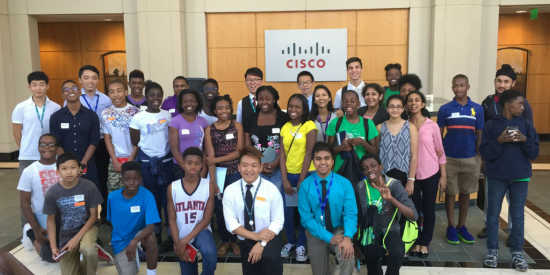
The Lawrenceville Fifteen. They were 15 upcoming junior and senior high school students from the Lawrenceville, Georgia area who came together for a STEM (Science, Technology, Engineering, Math) internship at Cisco this past summer.

Most people don’t start thinking about internships until college, and even then, finding the right intern program can be tough. These high schoolers were taking on this tough task even earlier.

After a great summer together, they wanted to share their reasons that Cisco was the right choice for them.

  1. The Culture: You’ll see Cisconians talk about #WeAreCisco a lot. The reason we proclaim it with pride is because the culture pulses through our veins! Cisco employees are proud to work with each other, and do do work that matters. We can even recognize each other through a peer recognition program. That’s neat stuff!
  1. Acceptance: At Cisco, everyone is accepted as a part of a greater team, yet encouraged to be unique. We value a diverse team because our differences drive innovation. We have big goals because we know that together we can reach them. We win together and build each other up.
  1. Leadership: The leadership at Cisco definitely has our back. As interns or employees. They want everyone to have the best experience. There are vast technology resources that allow for constant communication. Managers seem to always have an “open door.” Plus, they want us to have a little internship fun, too, and plan activities to encourage that.
  1. We’re a Team: It’s almost as close as a family. On the first day of our internship, it’s a little weird not to know anyone. But soon, we’re connected in more ways than we thought. It starts with handshakes and smiles, and becomes hugs and bonds. We helped each other up the ladders at Treetop Quest and cheered as a teammate bowled a strike. We really are the #WeAreCisco tribe.
  1. Constant Learning: You’ll never stop learning at Cisco – from just how to act in a professional work environment to how to build a personal brand to how to use all the great technology. This is stuff you won’t learn anywhere else. For example, you’ll see equipment that Material Scientists use to create solutions for Cisco products, or how Cisco is redefining “flat-screen TVs.” Plus, you’ll have mentors that will help you navigate through all of it.
  1. Feedback: When you’re just starting out, feedback can be hard. But at Cisco, you’ll learn how to accept it and grow. You’ll see how important it is to implement the advicee you’re given, and how you’ll be a better worker, and person, because of it.
  1. Unlimited Growth: You’ll be exposed to different people, different divisions and different technologies. You’ll learn what a product manager does verses a sales engineer verses a marketing person. You’ll learn from all of them. There’s never a “stupid question” because there are none. Ask as many questions as you’d like.
  1. Giving Back: Cisconians truly love giving back to our community. As an intern team, we hosted a STEM day for elementary and middle school students. We helped them learn about all the cool things we were doing at Cisco, to encourage them to look at technology as a career option. It was an amazing and something we will not soon forget. We were young minds being shaped, but we were also shaping young minds.


Our best advice after our summer? Definitely it’s to intern at Cisco. You’ll be seeing us again sooner than you think.

Want to join an awesome team? We’re hiring! Apply now.

Would you like to participate in Cisco High? Find out more information on how you can join us here!


 

Authors

Cisco Interns

Accelerate

Early-in-Career Talent

Avatar

In a long election season, one of the events that grabbed a lot of public attention were the Presidential debates between Democratic Candidate Hillary Clinton and Republican Candidate Donald Trump. As you may already know, Cisco provided the wireless network infrastructure for the first debate, held at Hofstra University in Hempstead, NY. Cisco wireless networks were also deployed at the sites of the second and third Presidential debates as well as the Vice Presidential debate too.

IMG_20161003_151145

IMG_20160929_120412

IMG_20160929_120223

IMG_20160929_120357

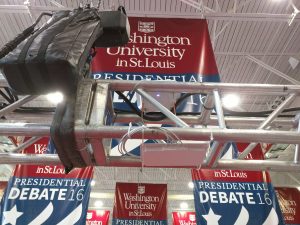
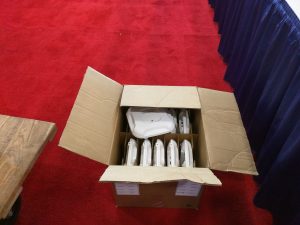
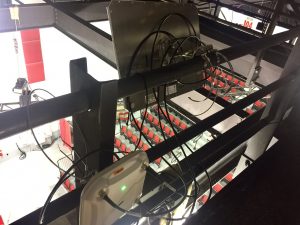
The second debate was held on Sunday, October 9 at Washington University in St. Louis, MO (WashU). An army of access points (AP) made up of the Cisco Aironet 3600 and 3700 Series APs were installed in the debate hall. Traffic rose and fell throughout the evening, but according to network data, devices during peak times the Cisco infrastructure handled 1825 unique wireless devices and 219 wired.

Cisco engineers designed the infrastructure to have four SSIDs. They also split the Wi-Fi into two distinct offerings: one for users in the actual debate hall and one for the assembled press in the media hall. The media hall had over 2,000 journalist from dozens of countries filing stories, so it was important that the bandwidth was robust and clear.

WU aggregate

debatebandwidth1

The graphs above depict the aggregate amount of internet usage during the week of the debate at WashU. You’ll notice that there is a small bump on October 9, but there was plenty of bandwidth left for more to be used. The second graph shows the aggregate bandwidth usage for the day of the debate. As expected, the bandwidth usage spiked during the debate.

Photo Oct 19, 12 05 55 PM

Photo Oct 19, 8 37 55 PM

Photo Oct 17, 4 02 05 PM

Photo Oct 05, 1 14 46 PM

The third debate was held ten days later at the University of Nevada Las Vegas’ Thomas and Mack Center on Wednesday, October 19. Over 150 Cisco Aironet 3700 Access Points were deployed to handle the 1,100 users and over 2,200 devices.

Like the previous debates, he UNLV administrators created two different networks for the event: one for the debate hall and the other for the media–in all 35 different locations were supported. The media gathered at the Cox Pavillion directly adjacent to the Thomas and Mack Center.

In addition to the media wireless network, the 10 television networks covering the debate were also given their own wireless network to connect to. This was done so that all media were able to get their stories to their viewers and readers without any issues—in fact there were over 7,200 photos uploaded over the network during the event.

Both the WashU and UNLV network designers made the decision to run their networks on the 5GHz bands instead of over both 5GHz and 2.4GHz. The reason? Hofstra ran both and observed that there was was a lot of interference on the 2.4GHz band due to a prevalence of personal hotspot devices.

With security being a high priority, the WashU and UNLV networks were armed with a variety of Cisco solutions, including: Cisco Firepower NGFW appliances and the Cisco Identity Services Engine.

The Vice Presidential debate between Tim Kaine and Mike Pence was held on Tuesday, October 4, at Longwood University in Farmville, VA.

To read more about Cisco Wireless Solutions, click here.

Authors

Byron Magrane

Product Manager, Marketing

Avatar

When you’re in charge of creating a wireless infrastructure for an event that drops 125,000 balloons at its culmination, you know that you deployed a network for a huge party.

RNC

2016-democratic-national-convention-stage-set


Since 2000, Cisco has been the Network Technological Provider for both the Republican and Democratic National Conventions. That means that Cisco provided the networking equipment, which includes the hardware, software and services to these two conventions since Al Gore and George W. Bush were pitted against one another.

This year’s Republican National Convention (RNC) ran from July 18-21 in Cleveland, OH. While the majority of the action took place at the home of the NBA Champion Cleveland Cavaliers: the Quicken Loans Arena, the event was actually spread out over four venues. One of the reasons why Cisco network architects only had 32 days to set up the infrastructure was because the Cavs played so late into the NBA season.

The Democratic National Convention (DNC) took place a week later (running form July 25-28) at the Wells Fargo Center in Philadelphia, PA. While the DNC architects had a bit longer to prepare their site, 58 days, the amount of venues doubled that of Cleveland; eight to four.

With two such enormous events, a incredible amount of gear was required. There were over 300 Cisco Aironet 3500, 3600, and 3700 Series Access Points deployed in Cleveland to handle the crush of people that attended the conferences. In Philadelphia, a similar amount of Cisco Aironet 3700 Series Access Points and Cisco 8510 Wireless LAN Controllers were used to create the network infrastructure. It was estimated that 10,000 delegates and alternate delegates along with 15,000 media representatives were at both conferences.

The amount of data that was transported via Cisco infrastructure in Cleveland during that time was 28.5TB. To put that another way, that’s the equivalent of someone constantly streaming video every day for almost ten years. In Philadelphia, even more data was used: 50.4TB. This data usage was broken up over social media apps, videos and web browsing.

Rounding out the solution was Cisco Identity Service Engine (ISE) which made sure that the network was secure.

To learn more about Cisco Wireless Network, click here.

Authors

Byron Magrane

Product Manager, Marketing

Avatar

Citrix NetScaler and Cisco ACI are jointly responding to our customer demand for delivering application centric automation of the network and application delivery controllers. In just under two years, the two companies have several customer deployment proof-points for the ACI-NetScaler joint solution and many have been shared externally as success stories. Read blog for details.

Before I deep-dive into the blog, I want to share my recent customer experiences with ACI. Customers increasingly are looking to deploy the Nexus 9k series of switches in ACI mode. Particularly, more customers are expressing interests in integrating L4-L7 network and security services with ACI. I had the privilege of understanding customers’ perspectives on how they plan on deploying the device package, which is a software package that integrates Cisco ACI with a given vendor’s L4-L7 service device. In recent months, the Insieme Business Unit at Cisco is continuing to work with its ecosystem partners to provide choice with regard to the modes customers can deploy the L4-L7 service devices with ACI.

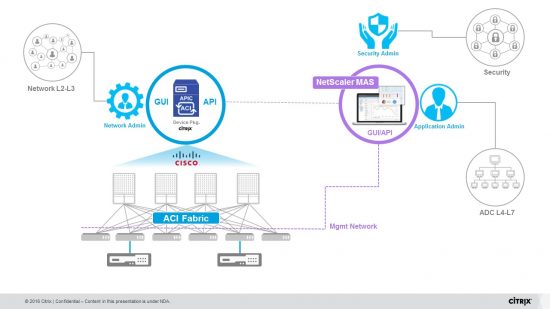
In this blog, I am going to introduce the latest integration between Cisco ACI and Citrix NetScaler utilizing Citrix Management and Analytics System (MAS). This integration is categorized as a ‘Service Manager Mode (a.k.a hybrid mode)’ of operation.

But first, a quick recap on the history of Citrix NetScaler and Cisco ACI integration modes.

3-modes

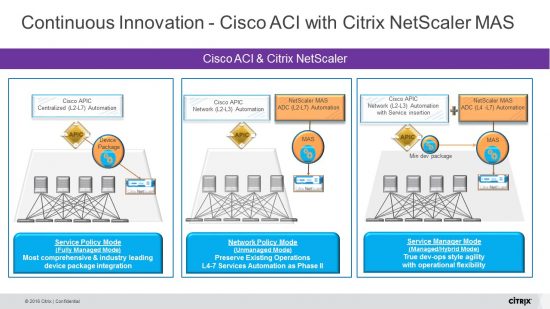
Jointly, Citrix NetScaler and Cisco ACI delivered on the first phase of innovation, also referred to as Service Policy Mode/Managed Mode. In this mode, customers provisioned the complete policy for network and application delivery controller in response to a specific application deployment through the Cisco APIC. This was achieved with a customized plugin called the Citrix NetScaler device package that was integrated into the Cisco APIC. The strategic nature of this deep integration was to enable Cisco APIC to be the central controller to provision the production ready suite of NetScaler functions including advanced ADC functions like Web Application Firewalls(WAF), and Global Server Load Balancing (GSLB), etc.

Our early success with our joint customers was endorsement to our solution; however, we also learnt that the journey to application centric networking had a sample set of customers that would prefer to get comfortable with network automation first and application delivery would follow. This led us to offering our customers the second choice which is also referred to as Network Policy Mode/Unmanaged Mode, where the automation of the network and ADC were managed separately.

Changing the Game with Service Manager Mode Integration

As we continued to learn from our customers with our solution becoming mainstream and deployments going global, we started challenging ourselves to a third offering where customers could have a flexibility of deploying new features and functions independently for the network and application deliver controller, while having the flexibility of managing the application policy provisioning through a combination of Cisco APIC and NetScaler Management and Analytics System (MAS).

In the spirit of customer success and continued innovation, we integrated NetScaler MAS with Cisco APIC using a lightweight/hybrid device package and effectively delivered, what is referred to as the Service Manager Mode/Hybrid Mode.

What is Service Manager Mode? – In very simple terms, you can perform network automation through the Application Policy Infrastructure Controller (APIC), while delegating the rich and detailed L4-L7 configuration to NetScaler MAS, which acts as a Device Manager in the APIC. Nonetheless, we still maintain full L2-7 automation to deliver true application agility and operational flexibility.

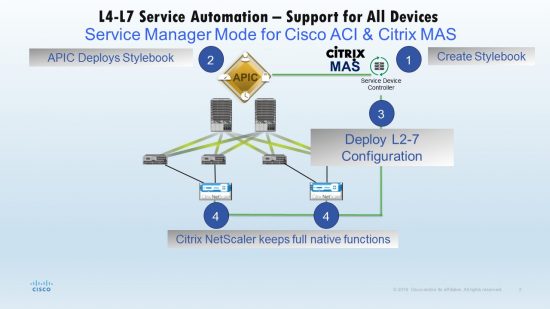
How does it work? – The solution is supported by a device package uploaded to the APIC which communicates to the NetScaler MAS. This package provides all network L2-L3 configurable entities from NetScaler. Application parity is mapped by StyleBook from NetScaler MAS to the APIC. In other words, the StyleBook acts as a programmable template between L2-L3 and L4-L7 configurations for a given application. You must provide a StyleBook name while configuring the network entities from the APIC for NetScaler.

NetScalerInHybridMode_slide-JPG

In this new mode, the NetScaler configuration is performed in the following phases:

  • L2-L3 network stitching is done from the Cisco APIC For any given application, a network administrator has to provide network specific details, such as IP addresses, port, VLAN (automated) and so on, as part of the service graph creation and deployment in the Cisco APIC. These configuration details are then pushed to NetScaler MAS, through the device package, which are processed internally to configure the NetScaler ADC as the end goal.
  • L4-7 configuration is done from the NetScaler MAS and linked via Styblebook(s) on the APIC An application administrator creates the application’s ADC related configuration by using a StyleBook in NetScaler MAS, and these configurations are then pushed from NetScaler MAS to the NetScaler ADC. The Cisco APIC and NetScaler MAS communicate with the ADC through the management network.

servicemanagermode

Why should customers care for the Service Manager Mode?

Customers’ deployments will be further simplified while retaining the native experience of using Cisco APCI for specific network automation and NetScaler MAS for specific ADC automation. With this offering, the new and innovative offerings on Cisco APIC or NetScaler MAS does not necessarily have to be in lockstep. Cisco APIC can continue to deliver newer network automation and telemetry functions that might not affect the application delivery functions and hence avoid mandatory device package upgrades. The same is true as the NetScaler MAS continues to offer more application centric functions and Enterprise Stylebook templates that does not require change to the network connectivity and policies.

“Together, Cisco and Citrix continue to provide innovative solutions that address customer needs. Now with the integration of NetScaler MAS with ACI, customers will benefit from an easier integration model with full L2-7 automation while maintaining native operational flexibility.” Ish Limkakeng, VP Product Marketing, Insieme Business Unit, Cisco.

What to expect with Cisco ACI – NetScaler MAS innovation going forward?

Cisco ACI and Citrix MAS jointly provide an app-centric fleet management and automation with industry leading telemetry and insights. The MAS framework works for a wide range of network instances like IETF complaint Service chains, NFV network function graphs. The Cisco ACI-MAS framework is a pluggable one and supports third-party technologies in any layer of the stack. We look forward to delivering continued customer success with further differentiated solutions in the near future, specifically around hybrid cloud with Cisco Cloud Center, micro-services deployments, and integration with Tetration Analytics platform.

I would like to thank Raj Gulani, Senior Director, Product Management, DNBU, Citrix Systems and Ahmed Dessouki, Product Manager, Insieme Business Unit, Cisco, for their valuable insights and additions to this blog.

Related Links:

https://www.citrix.com/content/dam/citrix/en_us/documents/products-solutions/implementing-cisco-application-centric-infrastructure-with-citrix-netscaler-application-delivery-controllers.pdf

‪Citrix NetScaler ACI Workflow – Configuring Service Manager Mode

For more info about Cisco ACI, you can visit:

cisco.com/go/aci

www.cisco.com/go/acicitrix

Authors

Ravi Balakrishnan

Senior Product Marketing Manager

Datacenter Solutions

Avatar

Schools and universities around the world are transforming their campuses using technology. Now, students can learn more and faculty can research in new ways, in new places, with new connections to resources globally.

Watch our latest video to learn how Cisco is leading the digital transformation in education with visionary solutions that enable students to learn without limits.

Authors

Alexia Crossman

Senior Cross-Portfolio Messaging Manager

Cisco Marketing

Avatar

Much has been made of the commercial potential of drones, yet actually implementing commercial drone applications seems to be mired in a complex web of unclear regulations and doubt about technical feasibility. While it may yet take a long time to work through the regulatory issues, Cisco is moving ahead with an ecosystem of partners to develop and test technical capabilities needed for various commercial applications. (We even sponsored a “DIY drone” workshop to help employees in India better understand the capabilities of drones.)

A few weeks ago, Cisco led a multi-party, multi-geography effort in Dubai to demonstrate the potential of using drones for traffic monitoring and control. We wanted to demonstrate the practical use and technical feasibility of several drone capabilities, including:

  • Safe, authorized drone flights over crowded urban areas
  • Use of various kinds of cameras and sensors to collect data and provide an accurate picture of the situation on the ground
  • Integrating drone control and sensor data into collaboration and Internet of Things (IoT) platforms
  • Use of fog computing and analytics to provide real-time insights and alerts

One of the big hurdles we needed to overcome before we could do anything else was to get approval from the Dubai Civil Aviation Authority to fly drones in the middle of Dubai over Al Jafiliya Metro Station and other urban assets. Since existing drone regulations in most countries prohibit this, obtaining this approval was a key step in proving the viability and safety of such remotely-piloted flights — and could contribute to shaping future regulations around the world.

We conducted 24 missions — over both desert and metro areas — in late September and again in October of 2016. This totaled 180 kilometers of successful remotely-piloted flights with full autonomous operational capabilities. All flights were equipped with both a high-definition video camera and a thermal camera, and we were able to share images in real time over a VPN-secured 4G network. This allowed members of the team to view a live feed over Cisco’s WebEx collaboration platform.

My colleague and Solution Architect for this effort, Angelo Fienga commented, “Embedding real time video and sensor data from drones into collaboration and IoT platforms bring traffic monitoring – and solutions, to a completely different level.”

As you might expect, the live video feed provided a great picture of overall traffic conditions on the ground. But we also had photogrammetry capabilities, combining photos with geometry to precisely measure real distances — the height of a pole, length of a car, or even the size of a pothole. This kind of real-time inspection can help identify and solve critical situations while they are happening.  And it can also improve planning for new construction or the placement of utility lines by enabling engineers to obtain precise measurements without having to physically go out into the field.


https://youtu.be/RQCSIhsbquc

A WebEx live stream enabled both remote monitoring and control.

In a real traffic monitoring application, the WebEx connection would enable traffic controllers to pinpoint a traffic issue while it’s happening, and issue an alert, or perhaps change the timing of a traffic signal to correct the bottleneck. But ultimately, our objective is to process all the data using fog analytics and be able to automatically issue alerts and recommendations through intelligent machine learning algorithms.

“Drones play a pivotal role not only in traffic management but also in public safety,” says drone specialist Nico Darrow of Cisco’s Atlanta office. “They are cheaper, faster, and more scalable than conventional methods. With predictable arrival times and historical analytics, machine learning algorithms can optimize traffic flow and alert first responders to accidents and hazards.”

I am grateful for the team of experts and partners who collaborated to bring this proof-of-concept to life. In addition to Angelo Fienga and Nico Darrow, the Cisco team also included Jawad Aboudi of Cisco Dubai, who was our local liaison. The following ecosystem partners helped deliver the complete solution:

  • Be-Link, for drone operation and logistics
  • ADPM, for providing custom-built drones
  • ISE-NET, for data processing and analytics
  • NeraTech, for offering the geo-portal function

This initiative in Dubai is just the latest demonstration of Cisco’s strategic place in the emerging drone ecosystem. Do we make drones? No. But we are creating new, secure, drone connectivity and computing platforms. And we are bringing these together with existing IoT and collaboration assets like WebEx, Spark, and Jasper to help extract IoT value from drones —value like faster, cleaner, safer traffic solutions.

Authors

Biren Gandhi

Head of Drone Business & Distinguished Strategist

Corporate Strategy Office

Avatar

While EDUCAUSE 2016 has come and gone, there were countless introductions and insights presented last week that will influence higher education until Philadelphia next year.

One of the highlights this year was the launch of the new Cisco Digital Education Platform.  This platform makes it easier for colleges and universities to offer online courses and programs by integrating Cisco WebEx and Cisco Spark into a school’s existing learning management system (LMS), which means educators can schedule highly secure online classes, connect over video, manage attendance and share recordings – all in the cloud – within their own LMS.

CvvUIoCWAAAArcI

You can check out more detail on this new educational offering within Campus Technology’s EDUCAUSE feature, “Cisco Debuts Online Learning Platform.”

In addition to the focus on digitization, we had great discussions on the need for new, online learning solutions with a range of publications, such as EdTech: Focus on Higher EdeCampus News and University BusinessEdScoop elaborated on the importance of simplicity and better integration and detailed how Cisco is working with Georgia State University to provide effective communications between students, faculty and staff – all in real-time.

Overall, one trend dominated both the presentation and discussion circuit: the critical need to secure sensitive student and research information within education. Now more than ever, colleges and universities – no matter their size or scope – feel the need invest in secure, affordable and easy-to-use technology. Cisco’s Peter Romness and Tae Hwang addressed these needs in-depth during their session on how the philosophy of “openness” on college and university campuses can safely survive (and thrive) with the integration of of the right technology tools.

As we look to EDUCAUSE 2017, it’s going to be important to focus on how colleges and universities can not only better collaborate, but also on how they can best meet their recruitment and retention goals. Be sure to check for updates on higher education news and trends on social media – we’re on Twitter at @CiscoHigherEdu and @CiscoEdu, and on Facebook at Cisco U.S. Education!

Authors

Renee Patton

No Longer at Cisco

Avatar

Before You Take Off, Get Up To Speed on These Six Precursors to Incident Response

It seems most advice on setting up a Security Operations Center (SOC), or creating a Computer Security Incident Response Team (CSIRT), focuses on people, technology or processes. Unfortunately, such advice may also include doing so at full speed, from the starting line, without taking into consideration what is needed for the long haul. The truth is that with SOC and CSIRT planning, there is a lot of behind the scenes prep that must take place before your team even starts the engine. If you don’t, your SOC/CSIRT might stall or even come to a screeching halt at the very worst moment, becoming a major distraction to your team. This can eat up limited resources and delay response. So before you go the distance, we suggest you get up to speed on the six precursors to incident response that can help drive a stronger return on your team’s investment.

Systems of Record

Systems of Record are critical to driving remediation and are a necessity for effective incident response. But if you are running it from a spreadsheet, you’re probably lagging behind. Finding a system that is impacted may seem like the last step in an investigation. But in reality, it may need to be the first, especially in a large enterprise. This might include uncovering owners, services and applications as well as identifying who can introduce changes and what impact they may have on production. Unfortunately, in organizations without good, automatically updated and accurate systems of record, remediation of an impacted system may never happen because the incident responder gives up and moves on to the next issue.

Standardization

Standardization helps you quickly identify host attributes and a host owner. By standardizing platforms, applications and security controls you can better detect aberrations that might lead to riskier situations. Even though networks and their acceptable use policies can vary dramatically from organization to organization, you can still standardize some aspects to maximize your efficiency and protection:

Host standardization

  • Using a standard host naming convention so light variations, mistakes or completely non-standard hostnames raise a red flag.
  • Standardizing on common software versions/operating systems to reduce support needs, simplify patching and allow teams deeper understanding of exposure/risk.

Network standardization

  • Using consistent network topologies and compatible systems with highly organized access control and documentation.
  • Ensure consistent software versions and feature management.
  • Use repeatable designs and architectures to simplify management.

Acceptable Use Policy

  • Enforcement of standards should be part of your AUP and audited and corrected on a regular basis

Password/Authentication policy

  • A standard for password complexity
  • Multifactor authentication
  • Unique passwords per application/server
  • Administrator accounts get special protection
  • Regular reset cadence
  • Encrypted password storage

Guidelines for datacenter minimum requirements, lab, etc.

  • Hardened host standard
  • Proper change control and change management
  • Certified compliant systems
  • Backup and Disaster Recovery mandatory

Logging

Logging enables your SOC/CSIRT to successfully investigate a security incident via simple search. But you must have current, exhaustive and relevant log delivery or availability to analysts. Log data is a machine generated timeline of activities on a host, whether nefarious or not. By the way, it’s also valuable to know if log files are unexpectedly deleted (an indicator of malicious activity).

Even if your SOC is not yet up and running, you have log data. The question is, is it usable, relevant or applicable to a security investigation. You can push things in this direction by creating an authoritative logging method that is enforceable via security policy, one that makes sure:

  • All hosts generate log data upon authentication of any user or system
  • All log files, where available, contain a timestamp (in UTC), source address, destination address, username, error-code and system hostname.
  • All internally developed applications will log to standard syslog facilities.
  • All hosts add the official IT supported syslog servers to their system logging configuration.
  • All logs use a common field naming structure.

Plus, your logs should also map the activity performed, who or what performed the activity, location or system used, time of activity, status (success/failure) and outcome. A lack of proper logging can also become a barrier to entry into any of your critical environments, such as data centers. Also, make sure your team extends the same logging standards to its cloud hosted environment, releasing all logs for regular analysis.

Network Taps

You should also have a design to tap network traffic. A physical tap can be expensive but it is worth the cost. This gives your team a full, raw flowing view of your network traffic and is a mandatory item for network troubleshooting or full scale network security monitoring. Tapped traffic can measure performance, outages or other traffic anomalies that require correction. Security teams can use the same feeds to extract binaries, match against known threats and indicators, replay attacks in labs to develop detection techniques or even use the forensic record to reconstruct an event.

Authority and Scope

Agreement on team authority and scope is critical for helping you get into gear, so a charter for the SOC/CSIRT should be initiated by all stakeholders before your team races off. It should clarify roles and responsibilities while addressing questions which might pop up later on, such as who has authority to take down a data-center host, under what conditions it can take place and procedures to mitigate service interruptions.

Communication

Communication is also key to getting started on all six cylinders. Consider worst case scenarios and which stakeholders would be most effective in engaging victims and the press both during and after an incident. Having a clear communication plan, especially in times of crisis, that covers all potential parties will help things go much more smoothly and help prevent unexpected conflict or misunderstanding that could severely damage your organization’s reputation. It will also free your SOC/CSIRT team to focus on the real problem and fix it. Again, this needs to be done before trouble strikes and usually requires representatives from Legal, PR/Corporate Communications, Frontline Services, IT Owners, Business Owners and/or Executive Leadership.

Now that you are up to speed on the six precursors to incident response, you can help make sure your SOC/CSIRT is ready for the long haul. By understanding and addressing these issues before trouble strikes, your team can deliver a more successful security response – no matter what the road ahead has in store for you.

Authors

Gavin Reid

CyberCzar/Director

Public Sector

Avatar

This blog was guest-written by Kelly Petrich, Community Relations Manager at CiscoAAEAAQAAAAAAAAfLAAAAJDZhYmY4MTNlLThkOTItNGUwZS04ZGRiLTQwMWUzODlhYzVmNg-300x300

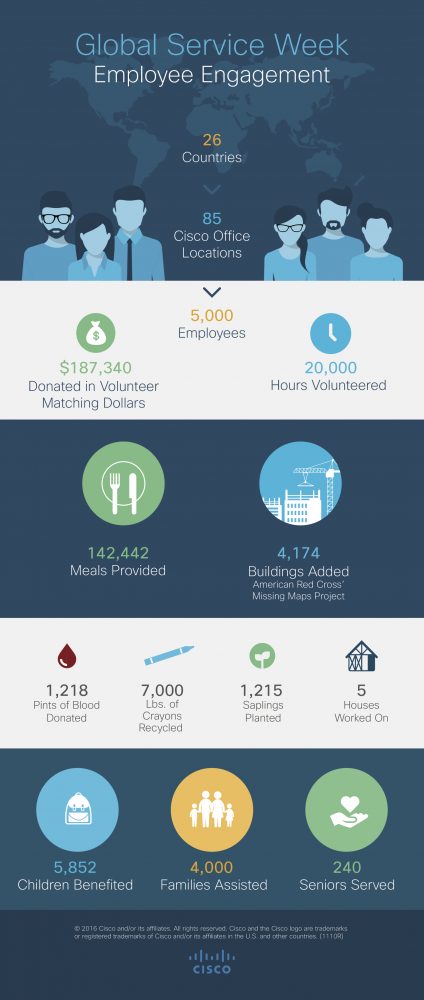
Service to our communities is part of who we are at Cisco. This core value was clearly demonstrated during our first ever Global Service Week in September. The campaign was an incredible success with nearly 5,000 employees volunteering 20,000 hours in more than 85 Cisco locations worldwide.

Employees volunteered in more than 200 activities during the campaign. Just a few examples included mapping buildings online for disaster relief in Research Triangle Park, North Carolina, playing board games with students in Krakow, Poland, planting saplings in Bangalore, India, supporting children with disabilities in Tampa, Florida and mentoring students in San Jose, California.

“Global Service Week gave us an opportunity to pause, connect with one another, and understand the larger social issues in our communities,” shared Karen Walker, Cisco SVP, and Chief Marketing Officer. “And the better we understand and serve our communities, the stronger we’ll be as a company.”

More important than the benefits we gained was our collective impact, including providing over $180,000 in volunteer matching dollars and 140,000 meals around the world. Check out the infographic below to see a few of these tallied figures:

1018614_Global_Service_Infographic_final

“I am proud of what we accomplished in our first ever Global Service Week and what it says about us as a company,” said Joe Cozzolino, SVP of Cisco Services. “From volunteering through Time2Give and generous donations through our annual giving campaign, Be the Bridge, we truly are a global collection of people who serve and care for communities.”

Thanks to the 90+ charities that partnered with us and the 5,000 employees who served during Global Service Week. Cisco looks forward to growing our service and social impact next year!

Follow Cisco CSR on Twitter  to see how’re we’re bringing passionate people, innovative ideas, and transformative technology together to accelerate global problem solving.

Authors

Austin Belisle

No Longer with Cisco